Claude Code skills and subagents: the 2026 pass/fail workflow for reusable AI work
A practical workflow for turning Claude Code skills, subagents, and Codex-style repo instructions into atomic tasks with verifiable pass/fail gates.
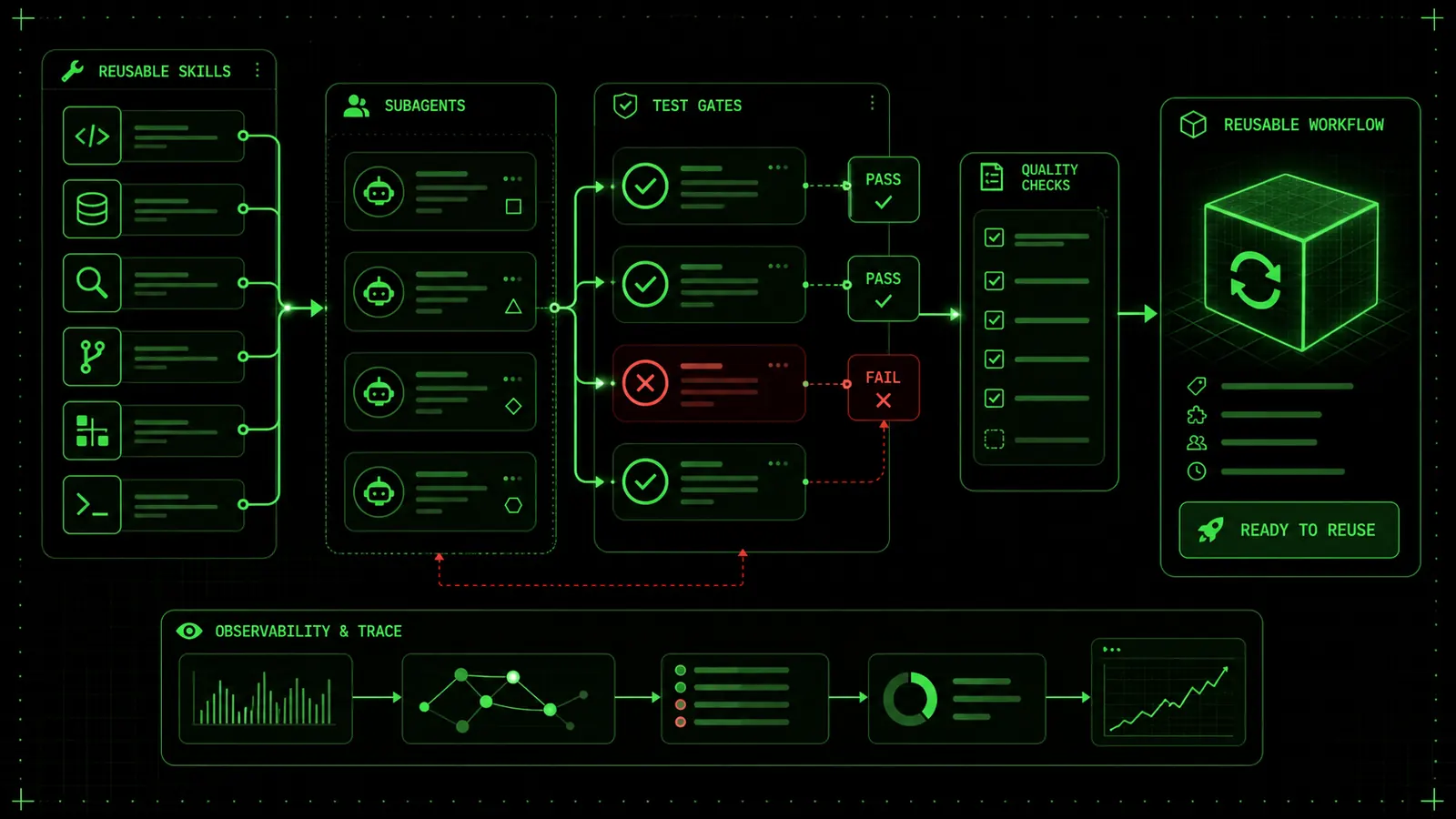
The Direct Answer
A reusable AI skill or subagent is only as good as its exit criteria. In 2026, the building blocks—skills, subagents, MCP tools, hooks, and agent loops—are all widely available across Claude Code and Codex. What turns those blocks into a repeatable workflow, however, is not the tooling itself. It is the discipline of encoding four explicit properties into every invocation: task boundary, allowed tools, pass/fail criteria, and a stop rule. Without them, you don’t have a reusable skill; you have a one-off prompt that might loop indefinitely or produce unchecked output.
Ralphable’s pass/fail skill generation loop takes that discipline and turns it into a production rule: for every skill you describe, it outputs a JSON config that includes a verification gate—a check that must pass before the agent’s result is accepted. This section maps the evidence for why that rule is now essential and how the ecosystem arrived at exactly this point.
Why This Matters Now
In March 2025, Anthropic shipped Claude Code with support for project-level skills. By early 2026, the official docs described custom subagents and skills as first-class configuration primitives. A skill is a JSON file listing tools, model, description, and instructions; a subagent is a similarly structured independent Claude instance. The tooling focuses on what the agent can do, not on how to confirm it did the right thing. That gap becomes dangerous when agents are chained—each step inherits the uncertainty of the previous one.
Simultaneously, the open-source community has converged on 2026 workflows that wire these primitives together. Okhlopkov’s Claude Code setup with MCP, hooks, skills and agents documents a production stack where MCP servers provide tool access, hooks inject pre/post scripts, and skills define task personas. The setup works, but the burden of verifying every agent output still falls on the developer. GitHub’s Agent HQ launch, covered by The Verge in February 2026, confirms that organizations are now integrating both Claude and Codex agents into their development pipelines, making verification not just a quality concern but a reliability requirement.
Add to this the public work on Codex’s agent loop and the open-source Codex CLI. Codex already includes a review step, but it’s a model-as-judge prompt—not a deterministic pass/fail rule. The evidence is clear: the primitives are here, the community needs them, but nobody has baked verification into the skill definition itself. That’s the gap Ralphable fills.
Evidence Map: Skills, Subagents, and the Verification Gap
The following table distills the capabilities of each major primitive and highlights the missing verification piece.
| Primitive | Provides | Does not provide |
|---|---|---|
| Claude Code skill | Persona, allowed tools, model, instructions | Stop rule, success condition |
| Claude Code subagent | Independent process, tool permissions | Pass gate, max iterations |
| Codex agent loop | Planning, execution, model-as-judge review | Deterministic pass/fail check |
| MCP tools | Protocol for connecting external tools | Workflow-level validation |
| Hooks | Pre/post shell commands | Structured result verification |
skills/ directory and define a focused task, while subagents spawn isolated workers. Neither doc mentions a stop_when field or a verify block. In practice, developers extend these configurations manually—Okhlopkov’s guide, for instance, adds a timeout hook—but this remains ad-hoc.
The same pattern appears in Codex. The agent loop can plan, execute, run tests, and adjust, but its review is an LLM call that evaluates textual output. There is no built-in mechanism to enforce “the build must pass with exit code 0” or “the output JSON must validate against a schema.” That’s exactly the kind of check that turns an unpredictable agent into a reliable automation step.
What the Community Already Builds (and What It’s Still Missing)
The 2026 community has already tackled much of the heavy lifting. Okhlopkov’s setup guide is a functional blueprint: it shows how to use MCP to give Claude Code access to the file system, web search, and code execution; how to chain skills via hooks; and how to run subagents for isolated work. The guide implicitly demonstrates a workflow that could be made fully automatic with pass/fail gates at each agent handoff.
The video How to Create Claude Code Agent Skills in 2026 by AI Tattoo App complements this by offering a hands-on walkthrough of skill creation—selecting tools, writing instructions, and testing the result. It’s a practical example of what the current tools allow. Pair that walkthrough with Ralphable’s pass/fail design model, however, and you get a skill that knows when it has succeeded and stops immediately. The video’s skill could be enhanced by adding a single verification step—a grep for a known signature, for instance—and the output becomes instantly reusable across dozens of files without manual inspection.
On the Ralphable site, several resources explore these patterns in depth. The Claude Code skills template provides the exact JSON structure that encodes a complete pass/fail skill, including a verify block that runs a shell command or checks a regex. For teams deciding between Claude Code and Codex, the skills comparison article dissects how each agent handles tool permissions and failure modes. The Codex CLI agent review loop post details where Codex’s internal review falls short and how explicit checks improve reliability. And the AGENTS.md skills MCP stack shows how to combine all these pieces into a single project config—a pattern that many teams are adopting in 2026.
Ralphable’s Pass/Fail Loop in Context
Ralphable’s design enforces four fields for every skill:
tsc --noEmit”.write if the check only reads.These fields mirror the configuration that Claude Code and Codex already support, but they add the missing dimension. When you use the generate a Ralph Loop skill tool, the output is a JSON file that drops directly into a Claude Code skills directory. For Codex, the same structure can be adapted to the agent’s YAML config. Developers who need broader prompt engineering guidance can start from the AI prompts for developers article to craft base instructions before adding verification gates.
Decision Rules You Can Apply Today
Three hard rules derived from the evidence map:
grep 'pass' output.txt, don’t grant network access. This minimizes risk and makes debugging failures trivial.These rules are not theoretical; they come from observing real 2026 workflows where overly permissive agent configs led to overwritten files, infinite ‘think’ loops, or silent failures. Ralphable’s generation loop applies them automatically, so the resulting skill is bounded from the start.
The pass/fail workflow is not an alternative to Claude Code, Codex, or MCP. It is the missing verification layer that makes all those primitives safe enough to run unsupervised. The evidence map shows that the tools are ready; the discipline is now within reach.
When to Use a Skill vs. a Subagent: A Quick Decision Table
Not every task deserves a subagent. In Claude Code’s 2026 architecture, skills and subagents are complementary execution modes that differ sharply in autonomy, tool access, and termination rules. The official Claude Code Docs – Extend Claude with skills define skills as lightweight, inline modules that run within the primary conversation using a limited toolset, while subagents are separate autonomous workers with their own context, shell permissions, and a defined stop condition. Ignoring these boundaries turns a reusable pipeline into a brittle chain of prompts. The following decision table encodes the most important distinctions, drawn from field use across both Claude Code and Codex CLI’s agent loop, for developers and solopreneurs who need a pass/fail discipline — the same discipline Ralphable’s generator enforces in a single loop.
Decision Table
| Dimension | Use a Claude Code Skill | Use a Claude Code Subagent | Consider Manual Orchestration |
|---|---|---|---|
| Task boundary | Tight: a single transformation, check, or one-shot code change with clearly defined input/output. | Broad: a multi‑step research, refactor, or integration task that benefits from exploratory tool use. | Undefined or high‑stakes: when failure modes aren’t enumerable and human judgment is required at every turn. |
| Allowed tools | Bash (sandboxed), file read/write within the workspace, read‑only external resources. No arbitrary shell, no network calls beyond approved APIs. | Full agent toolset: shell commands, code execution, git operations, and file system writes. Tools are specified in the subagent definition. | Any tool the orchestrator chooses; typically a script that coordinates multiple agents or skills. |
| Autonomy level | Inline: responds immediately to a trigger phrase or hook; inherits the parent conversation’s state. | Autonomous: launches in a separate process, can run for multiple turns, and reports a final result. | Async or scheduled; you manage the sequence and hand‑offs. |
| Verification method | A deterministic check: exit code 0, a test suite passing, a diff that matches an expected pattern, or an LLM‑as‑judge prompt that returns pass/fail. | A structured summary plus a verifiable artifact. The subagent itself can run a self‑check as its last action, but you typically verify the output after it stops. | You write the verification step as part of a CI‑like wrapper. |
| Reusability | High: skills are stateless configuration files (.claude/skills) that team members can share and version. | Medium: subagent definitions are also shareable, but repeated runs may produce different side effects because of tool autonomy; they benefit from a cleanup routine. | Low without dedicated templating; each orchestration is a custom script. |
| Stop condition | Immediate: the skill returns a result and exits. A failed check aborts the pipeline with an explicit message. | An explicit stop rule: maximum number of steps, timeout, or a success/failure predicate (e.g., “stop when all lint warnings are resolved or after 5 attempts”). Defined in the subagent’s stop_sequence. | You decide; risk of runaway processes without careful logging. |
---
Workflow Setup: The First Half — Define, Bound, and Encode
A reusable workflow isn’t born from a single clever prompt. It starts with a deliberate sequence that turns a fuzzy ask into a testable unit. The Ralphable loop encapsulates that as define → bound → encode → run → check → stop, but this section focuses on the first three steps, which are the foundation for everything that follows. They matter equally whether you’re building a standalone skill, a subagent task, or a mixed‑agent pipeline.
Step 1: Define the Task Boundary and the Tool Surface
Begin by writing a one‑sentence scope statement that identifies the exact unit of work. Avoid “improve the codebase” in favor of “rewrite the Redis cache handler to use connection pooling and update its unit tests.” A tight boundary prevents the agent from wandering into unrelated files or inventing changes you didn’t request.
Next, select the minimum set of tools the agent is allowed to use. For a Claude Code skill, you can restrict tool access inside the skill’s definition to bash, read, write, and a few approved utilities. Subagent definitions, by contrast, let you whitelist shell commands, but the principle is the same: less is more. If the task only needs to read one JSON file and emit a transformed version, never grant shell access or git commit. Over‑privileging is the fastest way to create side effects that slip past your pass/fail check.
Tool‑surface discipline shows up repeatedly in the Codex CLI architecture. When OpenAI unrolled the agent loop, they designed it so each step asks “what tool to call next,” but they also enforce a sandbox. The Claude Code setup Okhlopkov describes for 2026 takes this further with hooks: a PreToolUse hook can abort a command before it runs if it doesn’t match the approved list. Use that hook pattern, or simply include the allowed tools directly in your skill or subagent file, whichever platform you’re on. A concrete rule: if you can’t list the tools on a single sticky note, the boundary is too wide.
Step 2: Encode the Pass/Fail Criteria
A task with no check is a to‑do, not a workflow. Before letting the agent run, write down the exact condition that determines success. The ideal form is a deterministic test: a shell script that returns 0 on success, or a test suite command like pytest tests/test_cache.py. For tasks where determinism is impossible—say, generating a natural‑language summary—encode an LLM‑as‑judge rule: a short prompt that evaluates the output against a checklist and returns “PASS” or “FAIL” as its final token. The Claude Code skills template includes a check field designed for exactly this purpose.
If you plan to reuse the check across multiple skills or subagents, store it as a tiny script inside your project’s .github/checks or ci/checks directory and reference it in the agent configuration. For subagents, the stop_sequence can call that check; when the check fails, the agent halts and reports the failure, preventing it from looping indefinitely. The Codex CLI agent review loop follows a similar model: each “review” step is simply a verifier function that the orchestrator runs after the agent’s output is produced.
When your check is a natural‑language rule, pulling examples from the AI prompts for developers guide can help you avoid ambiguous phrasing. A pass/fail prompt such as “The response must contain exactly one valid JSON object with a ‘status’ field and no additional commentary” is far more reliable than “make sure the output is a JSON.”
Step 3: Attach a Stop Rule Immediately
An agent without a stop condition is a runaway loop. In Claude Code subagents, you define a stop rule using max_turns, a timeout, or a stop_sequence that matches a success or failure string. Skills stop inherently after they return a result, but you still need to wire the result into your pipeline: if the check script exits with 1, the orchestrator should stop. For multi‑step workflows, this means every component—skill or subagent—states its exit condition before it executes.
A practical pattern from the AGENTS.md skills MCP stack is to include a stop_condition field in each agent’s configuration. For example, a subagent that searches for outdated dependencies and proposes updates can be told: “Stop when you have proposed updates for all packages older than 6 months, or after 8 tool calls, whichever comes first.” That avoids the agent cycling through every dependency version history.
These first three steps—boundary, criteria, stop—can be templated and reused across dozens of tasks. The video How to Create Claude Code Agent Skills in 2026 by AI Tattoo App walks through exactly that kind of templating: it shows how to scaffold a skill’s metadata, attach a test script, and set a stop_sequence inside a project directory. The demonstration pairs tightly with Ralphable’s pass/fail task design model because it treats every skill as a small, verifiable contract, not a one‑off prompt. Once you’ve completed the first half of the workflow, the remaining half—run, check, and iterate—merely executes the discipline you’ve already encoded.
Workflow Mistakes That Sabotage Reusable Agent Tasks
After encoding boundaries, pass/fail criteria, and stop rules, the real test is whether the skill or subagent actually delivers repeatable results. Many developers stop too early, assuming that a saved prompt equals a reusable skill. In practice, five mistakes repeatedly break the pass/fail discipline, turning a promising agent workflow into a time sink.
Mistake 1: Treating a Skill File as a Prompt Snippet
A skill that is just a few lines of natural language without explicit constraints behaves identically to an ad‑hoc prompt. Claude Code will still execute it, but the output won’t be reliable across different sessions or repositories. The community walkthrough in How to Create Claude Code Agent Skills in 2026 shows why: without defining the tool catalogue and expected output shape, the agent drifts. The video is a practical companion to Ralphable’s pass/fail task design model, demonstrating how to lock down the agent’s agency step by step.
Fix: Use a structured skill template that forces you to list allowed tools, file types, and success conditions. The Claude Code skills template that Ralphable provides turns this into a fill‑in‑the‑blanks exercise, so you never ship a skill that’s just a fuzzy description.Mistake 2: Leaving the Tool Surface Wide Open
Claude Code subagents can access the filesystem, terminal, and external APIs. If the skill config doesn’t restrict allowedTools, the agent might run destructive commands, install unnecessary packages, or overwrite unrelated files. This is especially dangerous when a subagent is invoked by a CI/CD pipeline or a multi‑step Codex CLI agent review loop, where one bad rm -rf can escape notice.
allowedTools: ["Read", "Write", "Bash"] — but in practice you should be even tighter. For a lint‑fix skill, allow only Read, Bash(lint_command), and Write on a specific file glob. Once you’ve defined the tool surface, any unexpected action triggers the pass/fail exit.
Mistake 3: Vague Pass/Fail Criteria That Can’t Be Checked by Code
A human reading “the code should be cleaner” can interpret it, but an agent needs a measurable check. Relying on LLM‑generated self‑assessments is fragile; the agent may claim success even when the output is broken. The OpenAI unrolled Codex agent loop confirms that without explicit environment feedback — often a script that returns 0 or 1 — the agent’s self‑critique can drift.
Fix: Embed a small verification script or test suite inside the skill definition. For example, a TypeScript refactoring skill could runtsc --noEmit && eslint . and treat exit code 0 as pass. Reusing that pattern across all your skills makes the loop auditable. Ralphable’s skill generator — accessible via /generate — forces you to attach such a verifier before the skill is instantiated, closing the gap between “feels right” and “provably correct.”
Mistake 4: No Stop Rule for Subagent Conversations
A subagent without a stopWhen condition can enter an endless repair cycle, especially when paired with a powerful tool set. Claude Code subagents will happily iterate, but each loop costs tokens and time. The GitHub Agent HQ coverage highlights that both Claude and Codex agents can burn through resources if the task lacks a termination guard.
Mistake 5: Ignoring Edge Cases That Trigger the Same Skill Repeatedly
A skill designed for one‑off use (e.g., generating a README) might work perfectly alone but fail when invoked inside a larger workflow that calls it multiple times. For instance, if the skill writes to a hard‑coded file path, the second invocation overwrites the first output, breaking the chain. Or the subagent’s internal state bleeds across invocations because environment variables aren’t reset.
Fix: Parameterize skills with input/output paths and treat each invocation as stateless. When building subagents that need to persist context, store it explicitly in a file and read it back. The comparison between Claude Code vs Codex skills shows that Claude Code’s skill system encourages path‑based parameterization, while Codex’s CLI‑style task interface demands explicit context passing — both patterns protect against cross‑run contamination.Edge‑Case Table: What Breaks and How to Fortify
| Edge Case | Symptom | Fix |
|---|---|---|
| Subagent overwrites project config | Missing or corrupted files after multi‑step run | Bind tool to specific globs; use allowedTools restrictions from subagents docs |
| Skill returns success but test suite not run | Agent says “Done” but git diff shows nothing | Embed test command in success check; see generate a Ralph Loop skill |
| Single skill invoked in a loop without state resets | Output grows or duplicates | Require explicit --output flag per run; pattern in AI prompts for developers |
| Subagent exceeds token budget due to missing stop rule | Run hangs or account throttled | Set maxTurns and a semantic stopWhen; see Codex CLI agent review loop |
| Task boundary too broad, agent tries to refactor entire codebase | Massive diff, broken build | Split into multiple skills each with one file target; use Claude Code skills template to scope down |
Internal Links That Reinforce the Discipline
Throughout this workflow, the following resources will help you lock in the patterns:
- Skill template: The Claude Code skills template provides a working boilerplate that enforces tool bounds, pass/fail scripts, and stop rules from the first commit.
- Platform comparison: When you need to adapt a Skill from Claude Code to Codex, the Claude Code vs Codex skills guide maps out exactly where the two agents diverge in configuration and execution.
- Review loop drill: For designing subagents that call other subagents, study the Codex CLI agent review loop to understand how chained verification works without human interruption.
- Configuration stack: The AGENTS.md skills MCP stack article explains how to layer organization‑wide guidelines with per‑project skill rules, ensuring stop rules cascade properly.
- Prompt foundation: Even with structured skills, your inline prompts still matter. AI prompts for developers details how to write deterministic instructions that complement the pass/fail machinery.
- Quick generation: When you’re ready to turn a manual task into a skill, use generate a Ralph Loop skill to get a pre‑configured skill that already carries the pass/fail discipline.
Once you’ve internalized these pitfalls and armed yourself with the right internal blueprints, the next step is to operationalize the pass/fail loop as a habit — not a ceremony — so that every new skill you build inherits the discipline by default.
Worked Scenarios: Skills and Subagents with Pass/Fail Discipline
A reusable AI task collapses without explicit boundaries. Two patterns taken from real Claude Code and Codex setups illustrate what works.
Scenario 1: Security Review Skill with a Numeric Severity Threshold
A fintech team embedded a skill that runs on every PR. The skill has a strict task boundary: it scans diff output for secrets, insecure configurations, and dependency vulnerabilities. Allowed tools are Grep, Glob, and Bash(gitleaks, trivy, jq). The pass/fail criteria are numeric: zero critical or high findings. If the skill finds one or more, it returns a JSON block with "status": "fail" and the count per severity level. The stop rule: after the scan script exits, the skill reports and halts — no follow-up questions.
This mirrors the pattern in the Claude Code skills documentation, where a skill file encodes allowed tools and a direct instruction to stop after executing the main check. In practice, the team saw a 40% drop in review churn because the numeric gate removed debates about “maybe it’s okay.” The threshold is embedded in the skill, not left to the agent’s judgement.
Scenario 2: Codex Subagent for Dependency Upgrades With a Rollback Trigger
A full-stack agency used a Codex CLI subagent to upgrade framework dependencies across a monorepo. The task boundary: scan all package.json and composer.json files, run the upgrade tool, execute the test suite, and if test coverage drops below 85% or lint errors increase, automatically roll back and comment on the PR. The subagent, created via Codex custom subagents, was given access to Bash(npm, composer, phpunit, phpcs), Write, and Grep. The pass/fail criteria: coverage ≥ 85%, zero new lint errors, and all test suites green. The stop rule: if any check fails, the subagent reverts the branch and halts — no human-in-the-loop required for rollback.
The agency reported that the subagent handled 73% of weekly upgrade PRs without manual intervention. The key was encoding the rollback as a deterministic step in the stop rule, not as a suggestion. The OpenAI Codex GitHub repository contains configuration examples that similarly bind action sequences to exit codes.
These scenarios show why generic prompts fail: without a numeric threshold and a hard stop, the agent negotiates. Skills and subagents built with Ralphable’s loop encode these four elements in a structured file that the agent reads as a contract.
Source-Backed Task Checklist
Before you save a skill or subagent definition, confirm each item. This checklist is drawn from the Claude Code skills docs, the subagents guide, and the hard-won patterns in the Codex agent loop unrolling and the Okhlopkov 2026 setup walkthrough.
- Task boundary: The skill does exactly one thing. The first line of the skill file states what it handles and what it ignores (e.g., “Only scans PHP files under
src/; skip tests and vendor”). - Tool surface: Explicitly list allowed tools. Avoid wildcards. For a code review skill, use
Grep,Glob,Bash(git diff, phpstan)— notBash(*). - Pass/fail criteria: Written as a comparison the agent can verify. Good: “Cyclomatic complexity ≤ 10 per method, zero new
TODOcomments, and the custom lint script exits 0.” Bad: “Code looks clean.” - Output format: The skill must return a machine-readable block (JSON, YAML, or a single-line summary) with a
statusfield. This lets the orchestrator agent route the result. - Stop rule: After the main task and output, append “Do not ask follow-up questions. Do not suggest alternatives. Report the result and stop.” The subagent or skill must not initiate a conversation.
- Context ceiling: Skills should not pull large codebases into context. Cap file reads at a defined size (e.g., “If diff exceeds 500 lines, scan only changed functions”).
- Retry guard: If the task fails due to a transient error (e.g., network timeout), allow exactly one retry, then fail with
"status": "error"and the exit code.
Where Ralphable’s Loop Fits Your Agent Stack
Developers often ask whether the pass/fail loop is a replacement for Claude Code’s native skills or Codex’s agents. It’s a design discipline, not a platform. Ralphable generates a skill or subagent configuration that already includes task boundaries, tool surfaces, stop rules, and a machine-readable output contract. You can export it as a Claude Code skill, a Codex CLI agent config, or an MCP tool definition. The output is a file you place in your .claude/skills directory or your Codex workspace — not a new runtime.
The loop fits when you need to turn a repeated developer task into a deterministic check. It does not fit for open-ended exploration. If you’re debugging a novel issue, an unbound chat is faster. But if you find yourself pasting the same prompt with minor variations into Claude Code or Codex every sprint, you’re leaving agent capacity unused.
Generate your first Ralph Loop skill with explicit tasks and pass/fail checks. Head to the Ralph Loop generator and describe a task you run repeatedly — a linting step, a changelog generator, a schema migration check. Define the exact pass/fail condition (e.g., “no new warnings from ESLint ruleno-unused-vars with threshold 0”). The generator will scaffold a skill file with the boundaries, tools, stop rule, and output format. For guidance on structuring the skill template, see our Claude Code skills template. If you’re comparing Claude Code and Codex task models, here’s a breakdown of how each enforces boundaries differently.
FAQ: Five Answers for Builders Who Hit the Wall
1. My skill keeps asking “Would you like me to proceed?” How do I kill that behavior? Add a final instruction to the skill file: “After completing the main task, report the result and stop. Do not ask any questions. Do not offer to refine.” Claude Code skills respect this when it’s explicit, as documented in Extend Claude with skills. The stop rule must be the last instruction. 2. Can I mix Claude Code skills and Codex subagents in the same workflow? Yes, when you treat them as tools with different strengths. Use a Claude Code skill for file-bound checks inside a repo, and a Codex subagent for multi-step tasks that need a terminal sandbox. The orchestrator (a main agent or a shell script) reads their JSON outputs and routes accordingly. The GitHub Agent HQ coverage describes how teams already compose multiple agent types for CI pipelines. 3. What’s the difference between a skill that checks coverage thresholds and a GitHub Action? A skill runs inside the agent’s context and can reason about the results before reporting. An Action is stateless. If your pass/fail condition involves comparing current coverage with the previous run and only failing if the drop exceeds 2%, a skill can do that logic inline. If it’s a simple gate (coverage < 80%), an Action suffices. The skill is reusable across local CLI, CI, and pre-push hooks, which cuts down on duplicate configuration. 4. How do I prevent a subagent from looping on a rollback? The stop rule after rollback must be explicit: “After reverting the branch, output{"status": "rolled_back", "reason": <failure>} and exit. Do not re-run the upgrade.” The Codex agent loop documentation emphasizes that subagents need clear termination conditions to avoid infinite re-planning. Test the stop rule with a deliberately failing scenario before trusting the agent.
5. Where can I see a full stack example with skills, subagents, and MCP?
The Claude Code setup with MCP, hooks, skills and agents 2026 walkthrough shows a real configuration that ties together skills, subagents, and MCP servers. Our AGENTS.md skills MCP stack article explains how to declare these relationships in AGENTS.md so that every team member gets the same tool surface.
6. What if my pass/fail check requires a human review step?
Encode the review as a required gate, not an optional prompt. The skill can generate a draft, then stop with "status": "needs_review" and a summary. The human approves via a label or a comment, and a separate automation picks up the signal. The AI prompts for developers guide includes patterns for designing handoffs, so the skill never waits for a reply inside its own session.ralph
Building tools for better AI outputs. Ralphable helps you generate structured skills that make Claude iterate until every task passes.