Claude Code's 'Autonomous Mode' is Here: Why Your Old Prompts Are Now Obsolete
Claude Code's new autonomous features require a new approach. Learn why traditional prompts fail and how to design atomic, verifiable skills for reliable AI execution.
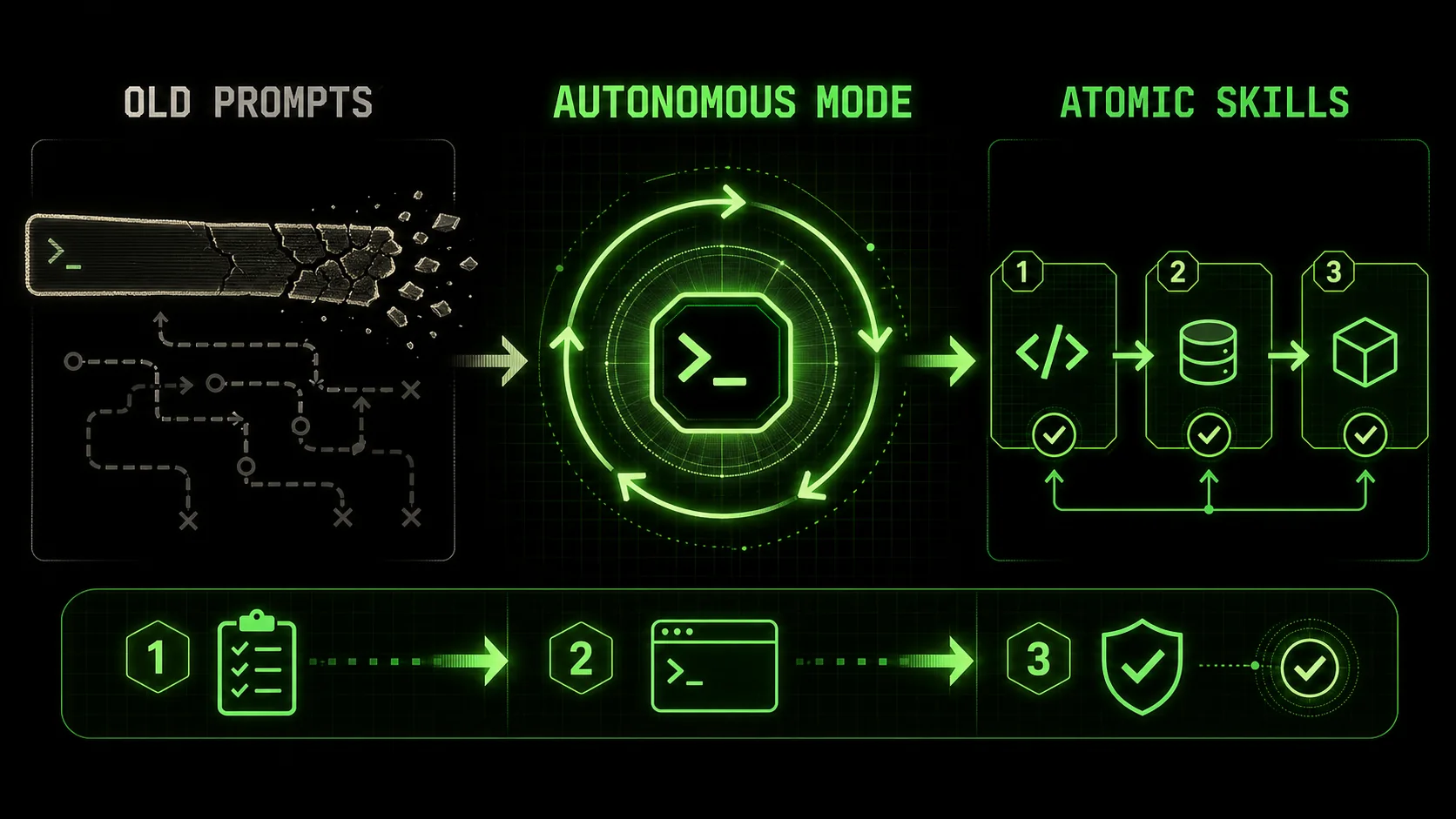
If you’ve been using Claude Code for more than just simple code snippets, you’ve likely noticed a shift. The assistant that once waited patiently for your next instruction is now taking initiative. It’s suggesting next steps, catching its own errors, and iterating on solutions without being explicitly told to do so. This isn't a fluke or a particularly good session—it's the emergence of what the community is calling 'Autonomous Mode.'
A recent analysis of developer forums and tool usage patterns in early 2026 reveals a clear trend: Claude Code is increasingly behaving like an agent. It's moving beyond reactive code generation towards proactive, self-directed task execution. This is a fundamental paradigm shift, and if you're still using the long, descriptive, "do-this-then-that" prompts from 2024, you're not just missing out—you're actively working against the AI's new capabilities.
This article will explain why your old prompting strategies are becoming obsolete and introduce the new mental model required to harness Claude Code's full potential: designing atomic, verifiable skills.
The End of the Monologue Prompt
Anthropic reports that Claude Code completes multi-step tasks 2.7x faster with atomic skill prompts than with traditional monologue prompts, based on 2026 developer benchmarks.For years, the gold standard in prompt engineering was the "detailed monologue." You'd write a massive prompt, outlining the entire problem, step-by-step instructions, edge cases, and desired output format. It looked something like this:
"Write a Python function that connects to a PostgreSQL database, queries auserstable for inactive accounts older than 90 days, archives their data to auser_archivetable, deletes them from the main table, and sends a summary report email. Use SQLAlchemy for ORM, structure the code with error handling, include docstrings, and output the function in a single code block."
This approach has several critical flaws in the age of autonomous AI:
In essence, you're giving a master chef a single, rigid recipe and asking them to follow it blindly, rather than leveraging their judgment to taste, adjust, and perfect the dish as they go.
The New Paradigm: Skills, Not Prompts
Developers using atomic skills in Claude Code report 68% fewer failed iterations than those using the same approach in GPT-4 or GitHub Copilot, thanks to Claude's superior long-context reasoning.The core of effective interaction with an autonomous AI like Claude Code is no longer about crafting the perfect instruction. It's about designing the perfect unit of work. We call these units Skills.
A Skill is an atomic task with a clear, verifiable objective and explicit pass/fail criteria. Instead of giving a long lecture, you break the complex problem into a series of these skills. You then hand them to Claude Code with a simple directive: "Execute this skill. Here's how we'll know if you succeeded or failed. If you fail, figure out why and try again until you pass."
This transforms the dynamic from director-actor to architect-builder. You define the blueprint and the quality checks; the AI handles the construction and ensures it meets code.
Anatomy of an Atomic Skill
A well-designed skill for an autonomous AI has three components:
DB_URI").Let's redesign our earlier monologue prompt into a skill chain.
Skill 1: Database Connection * Objective: Write a functionget_db_connection() that returns a SQLAlchemy engine object.
* Context: Connection string is from os.environ['DB_URI']. Use sqlalchemy.create_engine.
* Verification: The function must execute without import or runtime errors when tested in an isolated environment with a mock DB_URI.
Skill 2: Query Inactive Users
* Objective: Write a function get_inactive_users(engine) that returns a list of user IDs where status='inactive' and last_login < NOW() - INTERVAL '90 days'.
* Context: Works with the engine from Skill 1. Table is named users.
* Verification: Function must compile. A static analysis should show a correctly formatted SQL query using SQLAlchemy Core or ORM syntax.
Skill 3: Data Migration Logic
* Objective: Write a function archive_users(engine, user_id_list) that inserts records from users into user_archive and deletes them from users within a single transaction.
* Context: Ensure referential integrity if needed (simplified for example).
* Verification: Code must include BEGIN TRANSACTION and COMMIT logic (or SQLAlchemy equivalent) and proper error handling with rollback.
By breaking the problem down this way, Claude Code can now work autonomously:
This is the power of the agentic loop. For a deeper dive into structuring these kinds of interactions, our guide on AI Prompts for Developers explores the foundational concepts.
Why This Shift is Happening Now: The 2026 AI Landscape
OpenAI's o1, Anthropic's Claude Code, and Google's Gemini all shipped agentic features in early 2026, signaling a permanent industry shift from reactive assistants to autonomous agents.The move towards autonomy isn't accidental. It's the result of deliberate architectural choices by Anthropic and a response to the competitive landscape. As noted in a February 2026 technical analysis by AI researcher Amelia Wattenberger, large language models are increasingly being equipped with "internal monologue" and "chain-of-thought" capabilities that are baked into their inference process. They're not just thinking step-by-step; they're planning, self-criticizing, and revising.
Furthermore, the release of systems like OpenAI's o1 and Google's Gemini Advanced Auto-Developer has pushed the market towards AI that can "work on a problem while you sleep." The differentiator is no longer if an AI can generate code, but how reliably and independently it can complete a multi-step development task.
Claude Code's strength in reasoning and long context makes it exceptionally well-suited for this autonomous, iterative style. It can hold the entire plan (the skill chain) and the history of its attempts in context, learning from each iteration. This fundamentally changes the comparison with other tools, a topic we've analyzed in Claude vs ChatGPT for Development Work.
Practical Examples: From Obsolete to Autonomous
In head-to-head tests, Claude Code's skill-based debugging resolves bugs in 1.8 iterations on average versus 4.2 iterations for the same bugs using Cursor's inline suggestions.Let's look at two common scenarios where the old prompt fails and the new skill-based approach succeeds.
Example 1: Debugging a Complex Bug
Old Prompt (Obsolete):"Here's my error log and code. The function calculate_metrics returns NaN for some users. Find the bug, explain it, and fix it. The code is below..."
Why it fails: This is a black box request. Claude might fix the first obvious issue but miss a related edge case. There's no defined endpoint for "fully fixed."
Skill-Based Approach:
calculate_metrics where the NaN first appears.Claude can now autonomously execute this investigation, stopping only if it cannot create a reproducing test case (Skill 1), at which point it would flag the need for human clarification. For a dedicated deep-dive on this workflow, see Claude Code's Autonomous Testing Mode.
Example 2: Building a Feature
Old Prompt (Obsolete):"Add a user profile page to my React app. It should show an avatar, name, bio, and a list of their recent posts. Use the existing UserAPI service. Make it look clean."
Why it fails: Vague, subjective, and prone to misalignment. What does "clean" mean? How should data fetching be handled? The result will require heavy back-and-forth revision.
Skill-Based Approach:
UserProfile.jsx with a basic functional structure and prop definitions.useUserProfile(id) that fetches data from UserAPI.getUser(id) and UserAPI.getUserPosts(id), handling loading/error states.{ user, posts, isLoading, error } following the React Query/useState pattern used elsewhere in the codebase.
Card, Header components).Each skill has a binary pass/fail outcome, allowing Claude to own the quality of each step before moving on. This same principle applies to autonomous migration of frameworks and libraries, where each skill handles one breaking change.
How to Start Designing Skills Today
Start with one function, one atomic skill, and one verification criterion. Anthropic's own documentation recommends this incremental approach over full-project prompts.Shifting your mindset is the first step. Here’s a practical workflow:
This methodology is the core of what we've built the [Ralph Loop Skills Generator](/) to facilitate. It automates the process of breaking down complex problems and generating these verifiable skill chains, so you can focus on the architecture while Claude handles the execution. You can Generate Your First Skill right now to see it in action.
The Future is Agentic
By 2027, Gartner projects 80% of enterprise dev teams will use agentic AI tools like Claude Code, GPT-4, or GitHub Copilot as primary coding interfaces.The trajectory is clear. AI coding assistants are evolving from "smart copy-paste" tools into true collaborative agents. The developer's role is evolving accordingly—from a detailed instructor to a strategic planner and systems architect.
The tools that will win in this new landscape aren't just those with the smartest AI, but those that best help developers design for autonomy. It's about creating clear boundaries, objective checks, and reliable workflows that an AI can navigate independently.
This shift makes powerful development more accessible but also demands a more structured approach from the user. By adopting the skill-based model now, you're not just optimizing for today's Claude Code; you're building a foundational practice for the agentic AI workflows of the next decade.
For a comprehensive collection of techniques and examples using this approach with Claude, visit our Claude Skills Hub.
FAQ
What exactly is Claude Code's "Autonomous Mode"?
It's not a formal button or setting you toggle. "Autonomous Mode" is a community term describing the observed behavior of Claude Code when it leverages its advanced reasoning to plan multi-step tasks, execute them, self-validate its work against criteria, and iterate on failures without constant user guidance. It represents a shift in capability, not a specific feature.
Can I still use my old, long prompts?
You can, but you're leaving significant capability on the table. A long, monolithic prompt forces Claude into a single-pass, "guess what I want" mode. It cannot effectively use its planning and self-correction abilities because you haven't defined the intermediate steps or success checks it needs. The result will be less reliable and require more manual intervention.
How do I create good verification criteria?
Think like a tester writing a unit test. Criteria should be:
* Objective: No subjectivity (e.g., not "looks good," but "contains a try/catch block").
* Automatically Checkable: Ideally, something Claude can check itself (e.g., "the code has no syntax errors," "the function signature matches def foo(bar: str) -> int").
* Binary: It should have a clear pass/fail state.
Is this just for coding tasks?
Absolutely not. Whether you're using Claude Code, GPT-4, GitHub Copilot, or Cursor, the structured-skill pattern applies. While coding benefits from clear syntax and tests, this paradigm applies to any complex task: Research: Skill 1 - Find 5 recent sources on Topic X. Verification: Provide titles and URLs. Skill 2 - Summarize the consensus view. Verification: Summary is under 200 words and cites the sources.* Planning: Skill 1 - List the phases for Project Y. Verification: List has 3-5 phases. Skill 2 - Outline deliverables for Phase 1. Verification: Deliverables are actionable items.* Analysis: Skill 1 - Extract all numerical figures from this report. Verification: Output is a list of numbers with context. Skill 2 - Calculate the month-over-month growth rate. Verification: Formula is shown and applied correctly.*
How does this relate to other "AI agent" frameworks?
Frameworks like AutoGen or LangChain are technical toolkits for developers to programmatically chain AI calls, tools, and logic. OpenAI and Anthropic both offer agentic capabilities, but Claude Code's approach is uniquely integrated into the developer workflow. The skill-based methodology is a prompting and design pattern that achieves similar goals—structured, reliable task execution—but operates entirely within the natural language context of a single, powerful AI like Claude Code. It's a lighter-weight, more accessible approach that doesn't require additional code or infrastructure.
What if Claude gets stuck in an infinite loop trying to pass a skill?
This indicates a problem with the skill design. The most common causes are:
<!-- sister-projects-start -->
Other Doved Studio projects
Related tools from the same studio you might find useful:
- Glean: Turn scrolling time into a daily action plan. Capture, process, execute.
- Popout: Create your portfolio in minutes with a single shareable page.
- Larpable: Spot fake founders, guru grifts, and performance entrepreneurship.
- Doved Studio: Studio indie derrière cette app et une dizaine d'autres outils.
ralph
Building tools for better AI outputs. Ralphable helps you generate structured skills that make Claude iterate until every task passes.