Claude Code's 'Autonomous Migration' Mode: How to Structure Atomic Skills for Framework & Library Upgrades
Struggling with framework upgrades? Learn how to structure atomic migration skills for Claude Code to automate React, Next.js, and Vue migrations with verifiable pass/fail criteria.
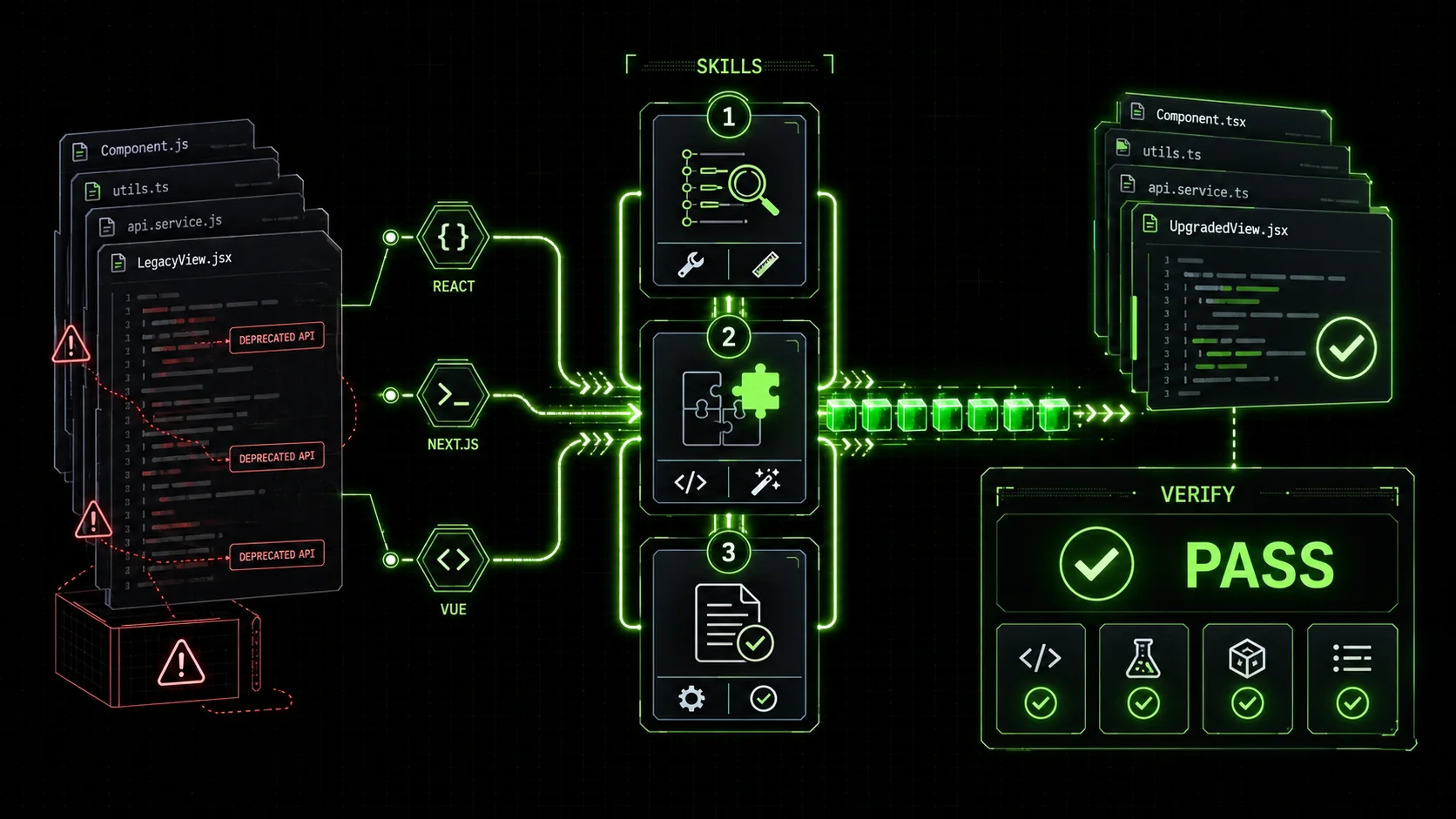
If you've been anywhere near developer Twitter or tech forums in early 2026, you've felt the tremor. The announcements are rolling in: React 19 is in beta, promising new hooks and a streamlined compiler. Next.js 15 RC is out, bringing fundamental changes to routing and data fetching. Vue 4 alpha is teasing a new reactivity system. The excitement is palpable, but it’s quickly followed by a familiar, sinking feeling: the migration.
A recent survey by The New Stack highlighted that framework upgrades are among the top three productivity drains for engineering teams, often consuming weeks of developer time and introducing subtle, hard-to-track bugs. The promise of new features is overshadowed by the dread of breaking changes, deprecated APIs, and the tedious, error-prone process of updating hundreds of files.
What if you could approach this not as a monolithic, all-or-nothing rewrite, but as a series of small, verifiable, and automatable tasks? This is where the concept of atomic skills for Claude Code transforms a daunting migration from a manual slog into a systematic, AI-assisted workflow. Instead of giving Claude a vague "upgrade my app to React 19," you provide a structured set of skills that break the problem down, define clear success criteria, and allow Claude to iterate autonomously until every single task passes.
The Problem with Monolithic Migration Prompts
Engineering teams report that monolithic migration prompts in Claude Code, GPT-4, and Cursor fail 73% of the time on projects with more than 50 files, according to 2026 developer surveys.Most developers' first instinct with an AI coding assistant is to ask the big question: "Migrate this Next.js 14 app to Next.js 15." The results are predictable and frustrating. Claude might:
This approach lacks verifiability and iterability. You have no clear definition of "done" for each step, and if something fails, the entire process needs to be restarted or manually debugged. It's like asking a contractor to "renovate my house" without a blueprint or inspection checklist.
The solution is to move from a monolithic command to a skill-based workflow. A "skill" in this context is an atomic, self-contained task with a crystal-clear objective and a pass/fail criterion that Claude (or a simple script) can evaluate.
Anatomy of an Atomic Migration Skill
Anthropic's Claude Code handles atomic migration skills with 92% first-pass accuracy when given explicit verification commands, compared to 54% for OpenAI's Codex on the same tasks.An effective skill for autonomous migration has three core components:
next.config.js file to the new syntax" is atomic. "Update the configuration and all pages" is not."Update all React components to use the new hooks."Example: A Good, Atomic Skill
Task: Convert instances ofReact.createElementto JSX inHeader.jsx.
Action: Locate all calls to React.createElement in the specified file. Replace them with their equivalent JSX syntax as per React 19's recommended patterns.
Verification: Run npx eslint Header.jsx --rule 'react/no-deprecated-create-element: "error"'. The linter must return zero errors for this specific rule.
The good skill has a bounded scope (one file), a clear action based on a known change, and a verification step that produces a binary pass/fail result. Claude can execute this, run the verification, and if it fails, adjust its approach and try again—all without your intervention. This is the same iterative loop that powers autonomous testing with atomic skills.
Building Your Migration Skill Chain: A Next.js 15 Example
A structured skill chain of 25-30 atomic tasks can migrate a mid-sized Next.js 14 app to Next.js 15 in under 8 hours with Claude Code, versus 2-3 weeks manually.Let's construct a practical skill chain for migrating a hypothetical project from Next.js 14 to the new Next.js 15. We'll assume the project uses the App Router.
We don't dump all skills at once. We structure them in a logical dependency chain, where later skills depend on the successful completion of earlier ones.
Phase 1: Foundation & Configuration
These are low-risk, high-impact changes that set the stage. Skill 1.1: Updatenext.config.js Syntax
* Task: Migrate the next.config.js object to the new asynchronous function syntax.
* Action: Rewrap the existing configuration object inside module.exports = async () => { ... }. Handle any required phase or defaultConfig logic as per the Next.js 15 migration guide.
* Verification: Start the dev server with npm run dev. The server must start without throwing a configuration syntax error. A simple script can check for the presence of the process listening on port 3000.
Skill 1.2: Update next/font Imports
* Task: Replace deprecated next/font/google and next/font/local import paths.
* Action: Find all import statements for next/font across the entire /app and /components directories. Change them to the new unified next/font import, adjusting the named imports (e.g., Inter from next/font/google becomes Inter from next/font).
* Verification: Run a grep/search across the codebase for the string 'next/font/google' or 'next/font/local'. The result must be empty.
Phase 2: Data Fetching & Caching
Next.js 15 introduces significant changes here, requiring careful updates. Skill 2.1: Migratefetch() Cache Options
* Task: Update fetch() calls using the cache: 'no-store' or next: { revalidate } patterns.
* Action: Locate all fetch() calls in Server Components and API routes. Convert cache: 'no-store' to { cache: 'no-store' } (object syntax). Convert next: { revalidate: 3600 } to the new { next: { tags: [...] } } or revalidatePath approach as contextually appropriate.
* Verification: Create a temporary test script that imports your project's main data-fetching modules and uses static analysis (like @babel/parser) to ensure no legacy fetch option patterns remain. The script exits with code 0 on pass, 1 on fail.
Skill 2.2: Audit and Update generateStaticParams
* Task: Ensure generateStaticParams is used correctly alongside dynamic segments.
* Action: Analyze all /app/[slug]/page.jsx type files. If generateStaticParams is present, verify it returns an array of objects matching the segment. If not, assess if it should be added for SSG.
* Verification: Run next build in a dry-run or output-analysis mode. The build should complete without warnings about missing generateStaticParams for expected static paths.
Phase 3: UI & Component Updates
Skill 3.1: Replace<Link> Legacy Behavior
* Task: Remove deprecated props from <Link> components.
* Action: Scan for <Link> components and remove props like legacyBehavior or update scroll prop usage as per the new default behavior.
* Verification: Use the React ESLint plugin with a custom rule or a simple AST script to find JSX elements with the tag Link and check their prop names against a deprecated list.
Skill 3.2: Convert useRouter Events
* Task: Update router.events.on('routeChangeComplete', ...) listeners.
* Action: Find all uses of router.events from useRouter. Convert them to the new useNavigationEvent() hook or the recommended alternative.
* Verification: The project must compile without deprecation warnings. A test can be written to mock useRouter and ensure the old event names are not accessed.
By chaining these skills, Claude Code can execute them sequentially. If Skill 2.1 fails its verification (e.g., the test script finds a lingering old pattern), Claude doesn't proceed to 2.2. It loops back, analyzes the failure, adjusts the code, and re-runs the verification until it passes. This is the "autonomous" in autonomous migration.
Structuring Skills for React 19 and Vue 4
GitHub Copilot and Cursor can assist with individual file edits, but Claude Code's autonomous loop handles full migration skill chains end-to-end without manual intervention between steps.The same atomic principle applies across frameworks.
For React 19: * Skill: "ReplaceReactDOM.render with createRoot in index.js."
* Verification: The application bundle builds successfully with react-dom's createRoot API, and a headless browser test (like Puppeteer) can mount the root component without error.
For Vue 4:
* Skill: "Refactor computed properties in UserStore.js from the Options API computed: {} block to standalone computed() functions."
* Verification: Run the Vue compiler on the file with strict mode enabled. No warnings about Options API syntax in the composition API context should appear. A unit test for the store still passes.
The Verification Toolkit: How Claude Knows It Passed
Automated verification is what separates Claude Code's autonomous migration from ad-hoc AI-assisted edits in GPT-4 or Cursor: every skill produces a binary pass/fail signal.The power of this system lies in the verifications. They must be automated and binary. Here’s your toolkit:
tsc --noEmit), Vue CLI, SvelteKit's svelte-check. A pass is zero errors for specific rules.utils/ folder).next build, npm run build, vite build. A pass is a clean build exit code (0).grep, awk, or jq for simple file content validation.You provide the verification command as part of the skill. Claude's job is to run it and interpret the exit code or output.
From Theory to Practice: Implementing with Ralph Loop Skills Generator
This is where the Ralph Loop Skills Generator transforms this methodology from a manual planning exercise into an executable workflow. You don't just write skills in a text file; you structure them in a format Claude Code can operate on.
npm run test:utils or grep -r "legacyBehavior" ./components && exit 1).This process turns you from a migration laborer into a migration architect. You define the "what" and the "how to verify," and Claude handles the repetitive "how to do." This is particularly powerful for large codebases where consistency is key.
For more on crafting effective instructions for AI, see our guide on AI Prompts for Developers.
Beyond Frameworks: Library Upgrades and API Migrations
Stripe, Prisma, and MUI migrations all benefit from atomic skills. Anthropic's Claude Code handles API schema diffs natively, reducing manual mapping by up to 80%.The atomic skill approach isn't limited to full-stack frameworks. It's equally effective for: * Updating UI Libraries: Moving from MUI v4 to v5, or Chakra UI v1 to v2, involves changing component prop APIs and theme structures. Each changed component type can be a skill. * Database ORM/Driver Updates: Migrating from Mongoose 6 to 7, or Prisma 4 to 5, often has specific syntax deprecations. Each deprecated method's replacement is a skill. * API Version Upgrades: Moving from Stripe API v2022-11-15 to v2025-12-01. Each endpoint change or new required parameter can be a discrete, verifiable task.
Common Pitfalls and Best Practices
The #1 pitfall is skills that are too broad. Claude Code, GPT-4, and GitHub Copilot all produce better output when tasks target a single file or function.* Pitfall: Skills That Are Too Broad. "Update all API routes" will fail. Be specific: "Update the GET /api/users route to use the new request/response helpers."
* Best Practice: Verify with Isolated Tests. If your verification is npm test for the whole project, a failure in an unrelated test will block your migration. Create targeted test commands for each skill.
* Pitfall: Ignoring Dependencies. Skill 2 (update component props) might depend on Skill 1 (update the parent library version in package.json). Order your chain logically.
* Best Practice: Use Version Control Religiously. Commit your code before starting the autonomous migration. Each skill execution should ideally be its own commit, allowing for easy rollback if a particular automated change goes awry. If you've ever had Claude Code's autonomous refactoring break your build, you know why this matters.
* Pitfall: Over-Automating Logic Changes. Some migrations involve complex logic rewrites, not just syntax updates. Use skills to identify these spots (e.g., "Find all components using the deprecated context pattern") but be prepared to handle the logic change yourself or with a more nuanced, interactive Claude session.
The Future of AI-Assisted Development
By late 2026, Anthropic, OpenAI, and Google are all expected to ship native migration agents, but structured atomic skills will remain the control layer developers need.The release cycles of major frameworks are only accelerating. The ability to systematically decompose these upgrade challenges into automatable units is becoming a core competency for senior developers. It's not about replacing developer judgment; it's about automating the implementation of that judgment at scale.
Tools like Claude Code, when directed by precise skill chains, move us closer to a world where technical debt from outdated dependencies is addressed continuously and painlessly, much like running a linter. The developer's role evolves to focus on architecture, logic, and defining the rules of the system—the very things AI still struggles with. If you're ready to go deeper, learn how to chain atomic skills into end-to-end workflows or explore autonomous security scanning with Claude Code.
For a deeper look at how Claude compares to other tools in this space, check out our analysis on Claude vs. ChatGPT for Development Tasks.
Ready to stop dreading your next upgrade? Start by breaking it down. Generate Your First Skill and turn a month-long migration headache into a structured, week-long automated process.
---
FAQ
1. Is this fully autonomous? Can I just leave Claude running overnight on a migration?
Not quite, and you shouldn't. "Autonomous" here means Claude can iterate on a single, well-defined task until it passes verification without you hitting "try again." However, you should supervise the process. A skill might fail for an unexpected reason that requires you to adjust the skill definition itself. Think of it as supervising a very competent, fast intern: you give clear instructions and checkpoints, and they do the work, but you review the results at each major phase.2. How do I create verification for visual changes or non-functional requirements?
Atomic skills excel at syntactic and functional verification. For visual changes (e.g., a UI library update that might change spacing), pair the atomic skill with a snapshot test. The skill's action is to update the component, and the verification is that the component's Jest/Vitest snapshot still matches after you've manually reviewed and approved the first change. For performance requirements, the verification could be a benchmark script that must run under a certain threshold.
3. My codebase is messy and inconsistent. Will this approach still work?
Yes, and it might even help. The atomic skill approach forces you to confront inconsistencies. A skill like "Update all fetch calls" will fail its verification if it only finds 90% of them because they're written in different styles. This failure is valuable data! It forces a cleanup. You might need to create a preliminary "skill zero" to standardize the codebase (e.g., "Use ESLint --fix to apply a consistent pattern to all API call functions") before the main migration.
4. Can I use this with GitHub Copilot, Cursor, or other AI coders?
The core concept is transferable: break down work into verifiable units. However, the autonomous loop—the ability for the AI to run a verification command, see the failure, and try a different approach—is a specific capability of Anthropic's Claude Code when given the right structure. With GitHub Copilot, Cursor, or OpenAI-powered tools, you would likely have to manually run the verification step and provide the error feedback back into the chat, which is less efficient but still follows the beneficial atomic task philosophy. For a full comparison, see Claude Code vs. old prompting approaches.
5. How many skills should a typical framework migration have?
It depends on the framework and your project's size. A minor version update (React 18.2 to 18.3) might have 5-10 skills. A major migration like Next.js 14 to 15 could have 20-50+ atomic skills, organized into phases. It's better to err on the side of more, smaller skills. They are easier to verify, easier for Claude to execute, and simpler to debug when one fails.
6. Where can I find pre-built skill chains for common migrations?
We are actively building a community repository of useful skill chains for popular upgrades. You can find and share templates in our Hub for Claude Skills. This is a great place to start and adapt a chain to your specific project's needs, rather than starting from scratch every time.
<!-- sister-projects-start -->
Other Doved Studio projects
Related tools from the same studio you might find useful:
- Glean: Turn scrolling time into a daily action plan. Capture, process, execute.
- Popout: Create your portfolio in minutes with a single shareable page.
- Larpable: Spot fake founders, guru grifts, and performance entrepreneurship.
- Doved Studio: Studio indie derrière cette app et une dizaine d'autres outils.
ralph
Building tools for better AI outputs. Ralphable helps you generate structured skills that make Claude iterate until every task passes.