The 'AI Project Handoff' Bottleneck: How to Document Your Claude Code Workflow So Anyone Can Take Over
Struggling to hand off AI-generated projects? Learn how atomic skills and clear pass/fail criteria create self-documenting workflows that any team member can understand and continue.
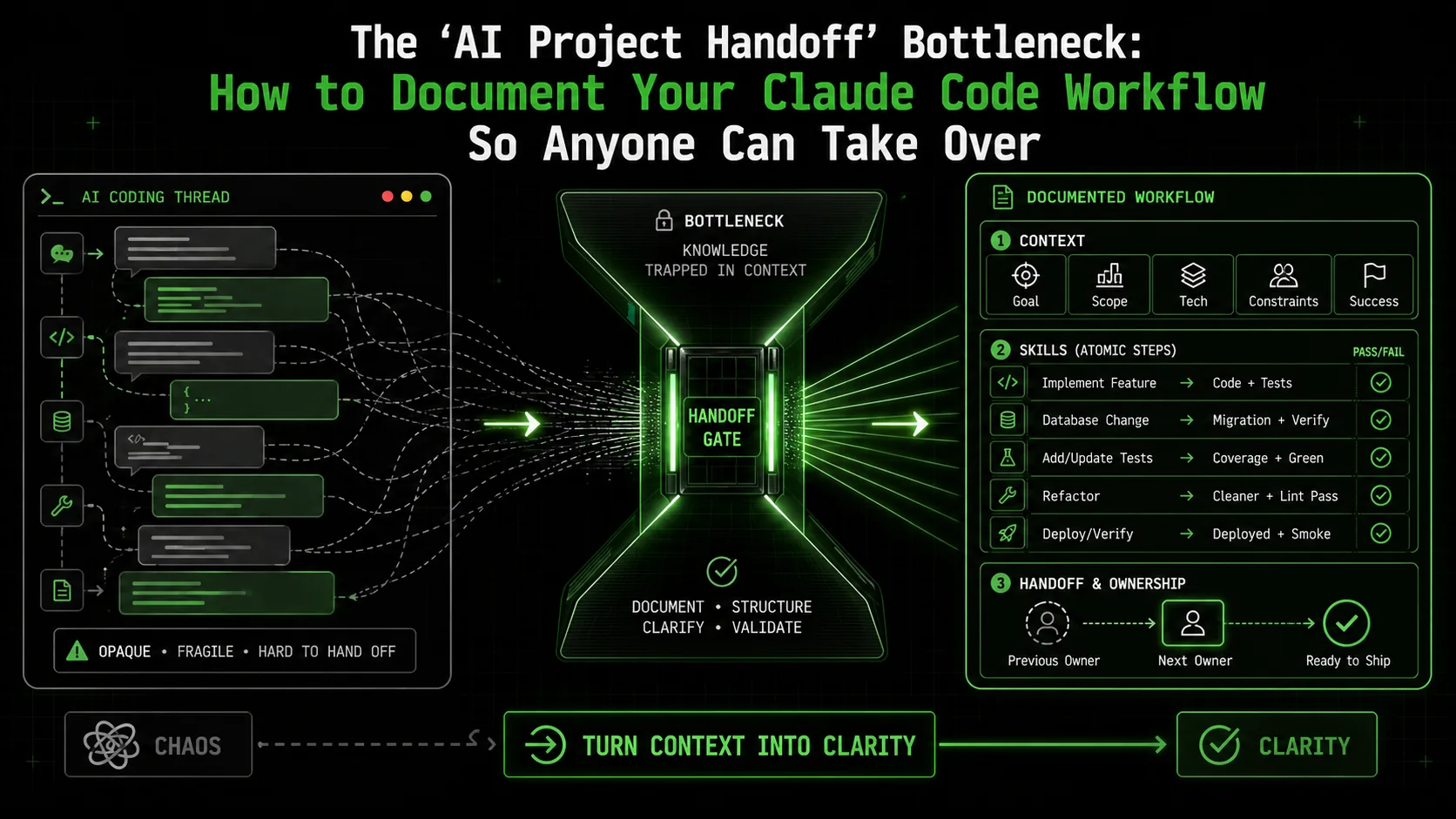
A developer on a popular tech forum recently posted a desperate plea: "My teammate, who built our entire data pipeline with Claude Code, just left the company. I have a 200-message thread of brilliant, working code... and absolutely no idea how to modify it. Help."
This isn't an isolated incident. As AI coding assistants like Claude Code evolve from solo productivity tools to core components of team-based development, a new and critical bottleneck has emerged: the AI project handoff. The very flexibility and conversational nature that makes these tools so powerful for an individual developer creates a "black box" problem for collaboration.
Recent industry discussions in early 2026, coinciding with Anthropic's push for multi-agent orchestration in team settings, highlight this growing pain. Teams are discovering that a single developer's intricate, successful Claude session is often an impenetrable artifact to anyone else. The context is lost in the conversation history, the reasoning behind specific prompts is opaque, and the path to reproduction is unclear.
This article tackles that bottleneck head-on. We'll explore why traditional documentation fails for AI-driven workflows and introduce a methodology for creating self-documenting, reproducible processes using atomic tasks and clear criteria. This approach ensures your projects survive team changes, vacations, and that most challenging collaborator: future-you.
Why Your Claude Code Session is a Terrible Handoff Document
A 2025 ACM study found that maintaining shared understanding -- not code generation -- is the top barrier to scaling Claude, GPT-4, Cursor, and GitHub Copilot adoption across teams.
Before we solve the problem, let's understand it. Your chat history with Claude Code feels like a complete record. It has the prompts, the code, the iterations. Why isn't it sufficient?
As noted in a 2025 ACM study on AI pair programming, the biggest challenge in adopting Anthropic's Claude, OpenAI's GPT-4, Cursor, and GitHub Copilot at scale is not generating code, but maintaining shared understanding and project continuity. Your chat log is a transcript, not a blueprint. For a deeper look at the related problem of context evaporating during long sessions, see our analysis of context drift as a Claude Code productivity killer.
The Atomic Skill: Your Unit of Handoff Documentation
Atomic skills -- single-objective tasks with binary pass/fail criteria and self-contained context -- replace opaque Claude and GPT-4 chat logs with standalone, reproducible units any developer can execute and verify.
The solution lies in shifting from documenting a conversation to documenting a workflow. The core unit of this workflow is the atomic skill.
An atomic skill is a single, well-defined task with three critical components:
When you structure your work as a series of these atomic skills, you are inherently creating documentation. Each skill is a standalone, understandable chunk of work that any competent developer can pick up, execute, and verify.
Example: From Chat Chaos to Clear Skill
The "Black Box" Prompt (From a Chat Log):"Hey Claude, the data export is slow. Can you optimize it? Use the users table."The Atomic Skill for Handoff:
* Objective: Reduce the runtime of the generate_user_report function for exports over 10,000 records by at least 50%.
* Pass Criteria:
* Function produces identical CSV output to the original.
* Execution time for 10,000 records is measured and is less than 2 seconds (down from 4+ seconds).
* Memory usage does not increase by more than 10%.
* Fail Criteria:
* Output mismatch occurs.
* Runtime is not improved by at least 50%.
* Memory usage spikes beyond the allowed threshold.
* Context: Function is located in /lib/data_exporter.py. Test dataset can be generated with scripts/generate_test_data.py --count 10000.
See the difference? The second version gives a new developer everything they need: the precise goal, how to test it, and where to start. They don't need to read 50 messages of you and Claude figuring out what "optimize" meant.
Building a Self-Documenting Workflow: A Step-by-Step Guide
Five steps -- decompose before prompting, define binary pass/fail criteria, execute skills sequentially with Claude or Cursor, document decisions in context, and assemble a skill log -- turn any Anthropic Claude Code project into a transferable asset.
This methodology transforms how you use Claude Code from the very beginning of a project.
Step 1: Decompose the Problem Before You Prompt
Don't start a chat with your grand vision. Start with a planning document or a whiteboard session. Break your large goal ("Build a dashboard") into a hierarchy of atomic skills.
Project: Admin Dashboard
├── Skill 1: Set up base React project with TypeScript & Tailwind
├── Skill 2: Create mock API service returning user stats JSON
├── Skill 3: Build UserCountCard component
│   ├── Sub-Skill 3.1: Fetch & display total user count
│   ├── Sub-Skill 3.2: Implement trend indicator (up/down)
│   └── Sub-Skill 3.3: Style card to match design spec
├── Skill 4: Build ActivityChart component
└── Skill 5: Implement responsive dashboard layout
This decomposition is your high-level project documentation. It's instantly understandable to any stakeholder or new team member.
Step 2: Define Unambiguous Pass/Fail Criteria for Each Skill
This is the heart of the handoff. For each atomic skill, write criteria that are:
* Objective: No room for opinion. "The button looks good" fails. "The button's background hex code is #3B82F6 and it has 8px of padding" passes.
* Automated (if possible): "The unit test in test_auth.py passes" is a perfect pass criterion.
* Contextual: Include what to check. "Verify the response matches the OpenAPI spec in /docs/api.yaml."
Step 3: Execute Skills Sequentially with Claude
Now, bring this structure into your Claude Code session. Instead of one marathon chat for the whole dashboard, you have focused sessions for each skill.
Your prompt becomes guided by your skill definition:"Claude, help me complete Skill 3.1: Fetch & display total user count. We need to create a React component that calls the/api/stats/usersendpoint from our mock service and displays the number. Pass criteria: 1) Component renders without errors. 2) It displays the number1,234when the endpoint returns{total: 1234}. 3) A loading state is shown while the API call is in flight. The mock service is already running onlocalhost:3001. Let's start by looking at the existingUserCountCard.tsxfile."
This prompt is rich with handoff-ready context. The goal, acceptance tests, and environment are all embedded.
Step 4: Document the "Why" in Skill Context
When you make a non-obvious decision during a skill's execution, add a brief note to the skill's context. This captures the reasoning for the next person.
* Context Update: "Chose react-query over useEffect for data fetching due to built-in caching and background refetch capabilities, which will be needed for Skill 5 (auto-refresh dashboard)."
Step 5: Assemble the Skill Log as Your Project Manifest
At the end of the project, you don't have a chat log; you have a Skill Log. This can be a simple markdown file, a row in a spreadsheet, or an issue in your project tracker.
| Skill ID | Objective | Status | Pass Criteria | Notes / Context | Owner |
|---|---|---|---|---|---|
| DASH-3.1 | Fetch & display total user count | ✅ PASS | 1) Renders error-free. 2) Displays formatted number from API. 3) Shows loading state. | Used react-query. Mock API at localhost:3001. | @alice |
| DASH-3.2 | Implement trend indicator | 🔄 IN PROGRESS | 1) Shows ↑ icon & green text for +% change. 2) Shows ↓ icon & red text for -% change. 3) Handles null trend data. | Waiting on design for final icons. | @bob |
Real-World Benefits: Beyond the Handoff
Structured atomic skills eliminate prompt amnesia, enable parallel teamwork across Claude and GitHub Copilot sessions, generate natural test cases, and create reusable project templates -- benefits that compound even for solo developers.
While solving the handoff bottleneck is the primary goal, this structured approach yields significant secondary benefits that improve your workflow even as a solo developer.
* Eliminates "Prompt Amnesia": You never have to re-figure out the magic words to get Claude to tweak a specific module. You just re-execute the clearly defined skill. * Enables True Parallel Work: Team members can work on independent atomic skills simultaneously without treading on each other's toes in a shared, chaotic chat context. * Facilitates Better Testing: Explicit pass/fail criteria naturally translate into test cases, improving your overall code quality. * Creates a Project "Recipe": Want to build a similar dashboard for another client? Your skill log is a near-perfect template. Reuse and adapt the atomic skills instead of starting from scratch.
This methodology aligns perfectly with the principles behind effective AI prompts for developers, which emphasize specificity and intent. It's the natural evolution of prompt craft for collaborative, production environments. Teams struggling with the related problem of accumulating undocumented prompts should also read our guide on the AI prompt debt crisis.
Getting Started: Tools and Mindset Shift
Notion, GitHub Issues, or a simple spreadsheet is enough to start -- the real shift is from "having a conversation with Claude or GPT-4" to "orchestrating verified discrete tasks toward a project goal."
You don't need a new platform to start. You can implement this today with: * A Notion/Doc page for your skill decomposition and log. * Your project's Issue Tracker (GitHub/GitLab Issues) - treat each atomic skill as an issue with the pass/fail criteria in the description. * A simple spreadsheet to track skill status.
The real change is mindset. It's the shift from thinking "I'm having a conversation with Claude to build a feature" to "I am orchestrating a series of verified, discrete tasks to reach a project goal."
For teams looking to standardize this process, tools like the Ralph Loop Skills Generator are built specifically for this paradigm. They help you systematically break down complex problems into these atomic skills with built-in pass/fail criteria, ensuring Claude iterates until each objective is definitively met. This creates a perfect, self-documenting audit trail of your project's construction. You can Generate Your First Skill to see how it structures this process from the outset.
Whether you use a dedicated tool or a simple document, the atomic skill framework is the key to unlocking collaborative, sustainable AI-assisted development. It turns the AI "black box" into a transparent, modular system.
FAQ
Answers to the six most common questions about handoff documentation for Claude Code, GPT-4, Cursor, and GitHub Copilot projects -- from solo versus team use to handling subjective UI/UX criteria.
1. Isn't this just over-engineering? For a solo developer, isn't a chat log enough?
For very small, throwaway projects, perhaps. But most code has a longer lifespan than we anticipate. The "solo developer" is often a time-traveling team: "You from 6 months ago" handing off to "You today." That future-you has forgotten the context and will thank past-you for the clear atomic skills. The small upfront investment in structure saves massive amounts of time and frustration during maintenance, debugging, and enhancement.
2. How is this different from writing traditional user stories or tasks in Jira?
It's a significant evolution of that idea, optimized for the AI development loop. Traditional tasks often have acceptance criteria like "User can log in." An atomic skill's pass/fail criteria are far more granular and technical: "The /api/login endpoint returns a 401 status code when given an incorrect password, and a 200 with a valid JWT token when credentials are correct. The token must contain the user's ID and role." It's designed not just for human verification, but to give an AI assistant the precise, unambiguous goal it needs to succeed.
3. Does this slow down the fast, exploratory nature of working with Claude?
Initially, it might feel slightly slower as you adopt the new habit. However, it dramatically speeds up the overall process, especially when you hit dead-ends or need to revisit work. The exploration happens within the execution of a skill. You can still have a free-form conversation with Claude to brainstorm solutions for "Skill 4.2: Optimize the database query." The difference is that the exploration is bounded by a clear objective and a definitive endpoint (the pass criteria), preventing endless, aimless tangents.
4. How do I handle skills that are inherently subjective, like UI/UX design?
You make the criteria as objective as possible. Instead of "The UI looks modern," your pass criteria become: * "The layout matches the Figma design spec within a 2px variance." * "All interactive elements pass WCAG 2.1 AA color contrast checks (verified with this tool)." * "Component renders correctly in the browser viewports defined in our support matrix (Chrome, Safari, mobile)." You capture the subjective "why" in the skill's context notes: "Chose this spacing to improve visual hierarchy per the UX team's guidance."
5. Can this methodology work with other AI coding assistants like GitHub Copilot or ChatGPT?
Absolutely. The core principle -- breaking work into atomic units with clear verification criteria -- is agent-agnostic. It improves clarity and reproducibility whether you use Anthropic's Claude, OpenAI's GPT-4, Cursor, or GitHub Copilot. The structure of your prompts will be similarly enhanced. For a comparison of how different assistants handle structured tasks, you can read our analysis of Claude vs. ChatGPT for development work. If you are evaluating which tool to pair with this methodology, our guide on the best AI prompt generators covers the current landscape.
6. Where should my team store and manage these atomic skills?
Start simple. A shared document or a dedicated project in your note-taking app (Notion, Coda, Confluence) is perfect. For tighter integration with development, use your Git repository's wiki or treat your README.md as a living skill log. For teams wanting to operationalize this, a centralized skills hub can become the single source of truth for reusable, vetted AI workflows across the organization, turning individual productivity into a collective capability.
<!-- sister-projects-start -->
Other Doved Studio projects
Related tools from the same studio you might find useful:
- Glean: Turn scrolling time into a daily action plan. Capture, process, execute.
- Popout: Create your portfolio in minutes with a single shareable page.
- Larpable: Spot fake founders, guru grifts, and performance entrepreneurship.
- Doved Studio: Studio indie derrière cette app et une dizaine d'autres outils.
ralph
Building tools for better AI outputs. Ralphable helps you generate structured skills that make Claude iterate until every task passes.