AI Coding Assistant Security Risks (2026): 6 Hidden Flaws and the Atomic Check Pattern That Stops Them
AI pair programmers ship subtle vulnerabilities: injection, leaked secrets, dependency rot. 6 security anti-patterns to catch in Claude Code sessions, plus the atomic pass/fail check that makes them visible.
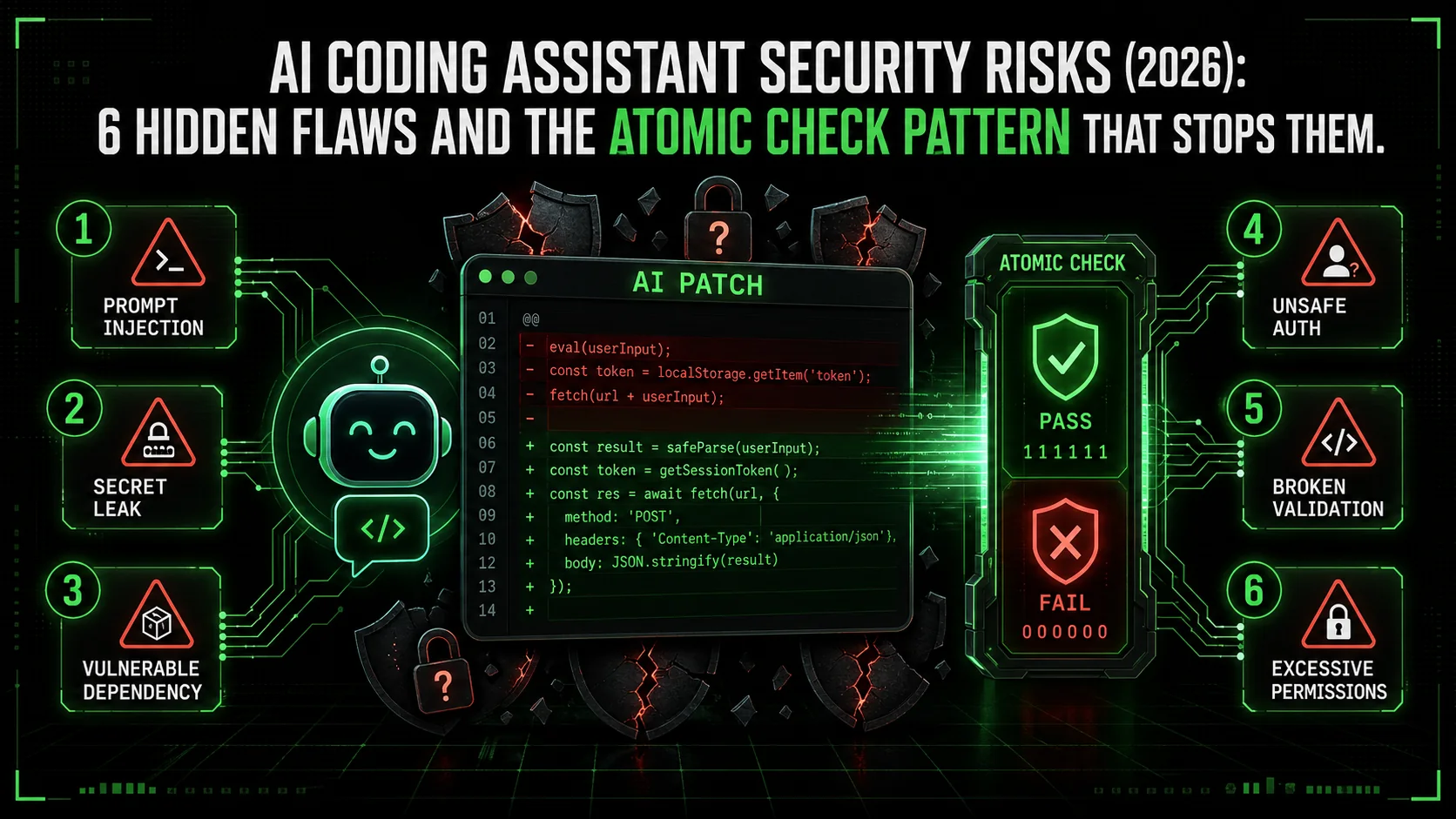
Last month, a colleague asked me to review a new API endpoint he'd built with Claude Code. The code was clean, the logic was sound, and it passed all his unit tests. But when I ran a dependency scan, it flagged a critical vulnerability in a third-party parsing library he'd let Claude add. The library had a known CVE for remote code execution, and it was three major versions behind. He hadn't asked about security, so Claude didn't check. The assistant delivered exactly what was requested: working code. It just happened to be dangerously insecure.
This isn't an isolated case. The 2026 Snyk State of Open Source Security report found a 40% increase in vulnerabilities in projects where AI-generated code made up more than 30% of the codebase. The problem isn't that AI assistants are malicious. It's that they are hyper-efficient task completers, optimized for functionality over fortification. When you ask for a login function, they give you a login function. They don't inherently ask, "Should this use parameterized queries?" or "Is this authentication library still maintained?"
Your AI coding assistant -- whether it is Anthropic's Claude Code, GitHub Copilot, OpenAI's GPT-4 inside Cursor, or another tool -- operates on a simple principle: fulfill the prompt. Without explicit, structured guardrails, this makes it a potent but blind productivity tool—one that can silently introduce what security researchers are now calling "AI-generated technical debt." This article isn't about fear-mongering. It's about recognition and remediation. We'll dissect the specific security risks AI assistants introduce, and more importantly, show you a practical framework using the Ralph Loop Skills Generator to transform your AI from a potential liability into a proactive, security-conscious partner.
Understanding the AI Security Gap
Claude, GPT-4, and GitHub Copilot optimize for "fulfil the prompt," not "secure the output" -- so outdated libraries, insecure defaults, and missing input validation silently ship unless you explicitly constrain the task.
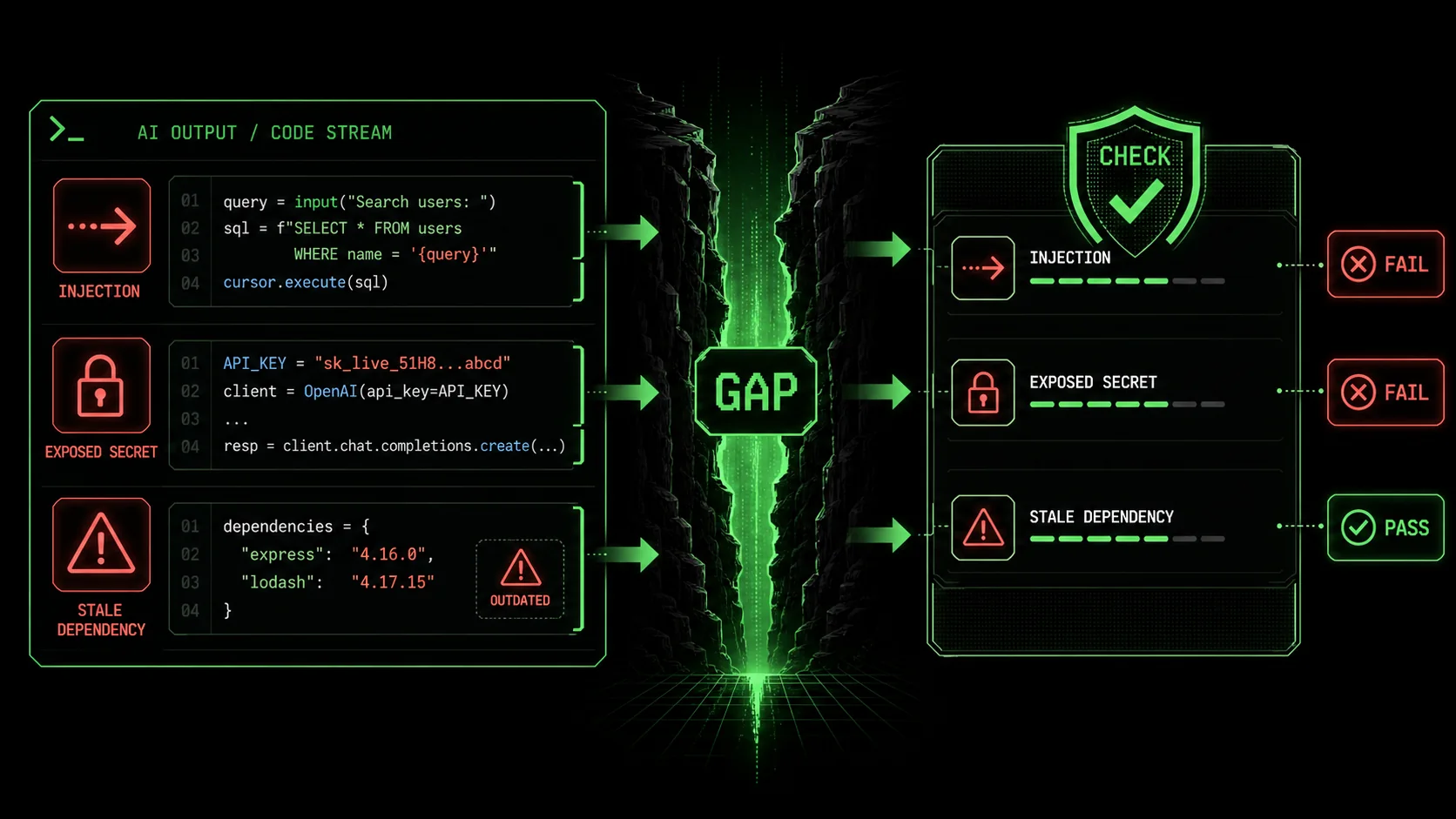 jsonwebtoken library." width="768" height="432" class="w-full rounded-lg shadow-md" loading="lazy" />
jsonwebtoken library.The "security gap" isn't a bug in the AI model. It's a fundamental mismatch between how developers think and how AI models are trained to respond. Large Language Models (LLMs) like Claude are trained on vast corpora of code from the public internet, including GitHub repositories, Stack Overflow answers, and documentation. This training data is a double-edged sword. It contains brilliant, secure patterns and also outdated, vulnerable examples. The model's primary objective is statistical: predict the most likely next token (word) given the context. Security is a secondary, implicit concern at best.
Think of it like asking a brilliant but overly literal intern to build a feature. If you say "build a user registration form," they'll build a form that accepts a username and password and stores it. They might not think to hash the password, validate email formats, add rate limiting, or check for SQL injection. They completed the task as defined. The AI assistant operates similarly. Its context window is your prompt and the existing code. If security isn't in that context, it's unlikely to materialize in the output.
This leads to several predictable failure modes:
The Outdated Library Problem: This is perhaps the most common issue. AI models are trained on data up to a certain cut-off date. When you ask for a function to "parse JWT tokens in Node.js," the model might suggest usingjsonwebtoken@8.5.1 because that was a dominant version in its training data. It has no live connection to npm to know that version 9.4.0 exists with critical security patches. The code works, but it ships with a known vulnerability.
The Insecure Default Pattern: Many frameworks and libraries have evolved their defaults to be more secure over time. An AI model trained on older code might suggest the older, less secure default. For example, it might generate a Flask route without Cross-Origin Resource Sharing (CORS) restrictions for an API, or a SQL query using simple string concatenation instead of parameterized queries or an ORM, because those patterns were prevalent in its training examples.
The "Works on My Machine" Blind Spot: AI generates code based on the abstract task. It doesn't understand your specific deployment environment, compliance requirements (like GDPR or HIPAA), or the sensitivity of the data you're handling. It might suggest storing API keys in environment variables (good) but not mention using a secret manager like AWS Secrets Manager or HashiCorp Vault for production (better).
The Complexity Obfuscation Risk: AI is excellent at generating complex code quickly. This can sometimes obscure security flaws that would be more apparent in simpler, hand-written code. A dense, AI-generated regular expression for input validation might have edge cases that allow for injection attacks, but its complexity makes manual review difficult.
Here’s a quick comparison of how a typical developer prompt differs from what a secure development process requires:
| Developer's Mental Prompt | AI Assistant's Output | The Missing Security Context |
|---|---|---|
| "Write a function to save user uploads." | function saveUpload(file) { fs.writeFileSync(./uploads/${file.name}, file.data); } | File type validation, size limits, sanitizing filenames to prevent path traversal, storing outside web root. |
| "Create a login API endpoint." | An endpoint that checks username/password against a database. | Password hashing (with bcrypt/scrypt), session management, rate limiting, logging (without sensitive data), using HTTPS. |
| "Add a search feature to the admin panel." | A SQL SELECT * FROM users WHERE name LIKE '%${query}%' query. | SQL injection protection, input sanitization, access controls to ensure only admins can search, pagination to prevent dumping the entire DB. |
Why Unchecked AI Code is a Growing Threat
Projects where AI-generated code exceeds 30% of the codebase show a 40% increase in vulnerabilities (Snyk 2026) and a 25% higher density of input-validation CWEs (OpenSSF 2025), making unchecked AI output a systemic risk.
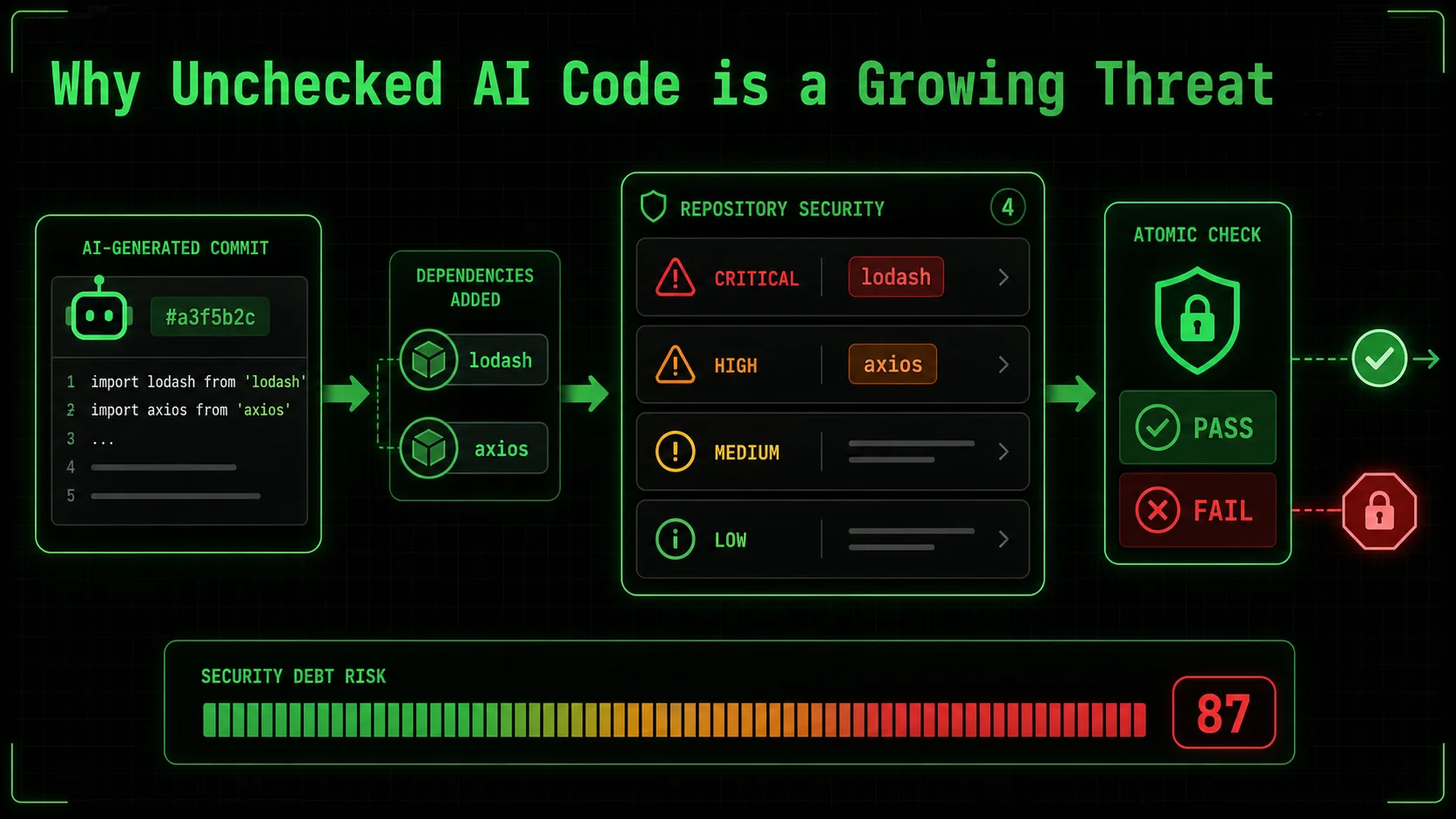 lodash and
 axios libraries, with the note "Introduced by AI-generated commit #a3f5b2c"." width="768" height="432" class="w-full rounded-lg shadow-md" loading="lazy" />lodash and axios libraries, with the note "Introduced by AI-generated commit #a3f5b2c".The convenience of AI-assisted coding is undeniable. It can turn a 30-minute boilerplate task into a 30-second prompt. This speed is seductive, and it's why adoption is skyrocketing. But this velocity has a dark side: it accelerates the introduction of vulnerabilities at the same pace it accelerates feature development. You're not just writing buggy code faster; you're potentially writing exploitable code faster.
The data is starting to paint a concerning picture. Beyond the Snyk report, a 2025 analysis by the Open Source Security Foundation (OpenSSF) found that projects with high levels of AI-generated pull requests had a 25% higher density of common weakness enumerations (CWEs) related to improper input validation and insecure dependencies. The risk isn't theoretical. In early 2026, a mid-sized SaaS company suffered a data breach traced back to an AI-suggested configuration for a caching service. The AI used an example from a tutorial that disabled authentication for the cache "for simplicity," and the developer, trusting the AI's suggestion, didn't re-enable it for production.
This matters for three concrete reasons that go beyond individual bugs:
1. The Scale of Proliferation: A single insecure pattern suggested by an AI and accepted by a developer can be replicated across dozens of files in minutes. Imagine asking Claude to "add error logging to all our API controllers." If the generated pattern inadvertently logs full request bodies containing passwords or tokens, you've just created a data leakage vulnerability in every endpoint simultaneously. Fixing it requires finding and correcting every instance, a tedious and error-prone process. This creates a form of security debt that is deeply embedded and widespread. 2. The Erosion of Security Muscle Memory: When developers outsource thinking to AI, they risk losing the critical practice of asking security questions themselves. If you never have to think about SQL injection because the AI "always" uses an ORM, what happens when you need to write a complex raw query, or when the AI gets it wrong? The foundational knowledge atrophies. Security becomes a magical property you hope the AI provides, not a discipline you engineer. This is dangerous for long-term team capability. 3. The Compliance and Liability Nightmare: For teams in regulated industries (finance, healthcare, government), using AI-generated code introduces a traceability and audit problem. Can you prove, for an audit, that the code handling patient data is secure? If your answer is "the AI wrote it," that's insufficient. You need to demonstrate due diligence, review, and validation. An unchecked AI assistant becomes a liability black box. If a vulnerability leads to a breach, arguing that "the AI did it" won't hold up in court or with regulators. The responsibility ultimately rests with the engineering team.The urgency to address this isn't about stopping AI use—that's a losing battle. It's about integrating AI safely into the development lifecycle. The goal is augmented intelligence, not replacement intelligence. This requires a shift from treating the AI as an oracle that delivers final code, to treating it as a powerful but fallible junior engineer whose work must be guided by clear, unbreakable rules and verified before integration. This is where a structured approach to defining tasks becomes non-negotiable. It's the difference between saying "build a wall" and saying "build a load-bearing wall according to building code section 7.2, using materials rated for 50 PSI, and validate it passes a stress test." The latter instruction has a verifiable, secure outcome baked in.
How to Structure AI Tasks for Inherent Security
Break every feature into atomic tasks with binary security pass/fail criteria -- dependency CVE checks, input validation rules, hashing parameters -- so Claude or Cursor cannot advance until each checkpoint clears.
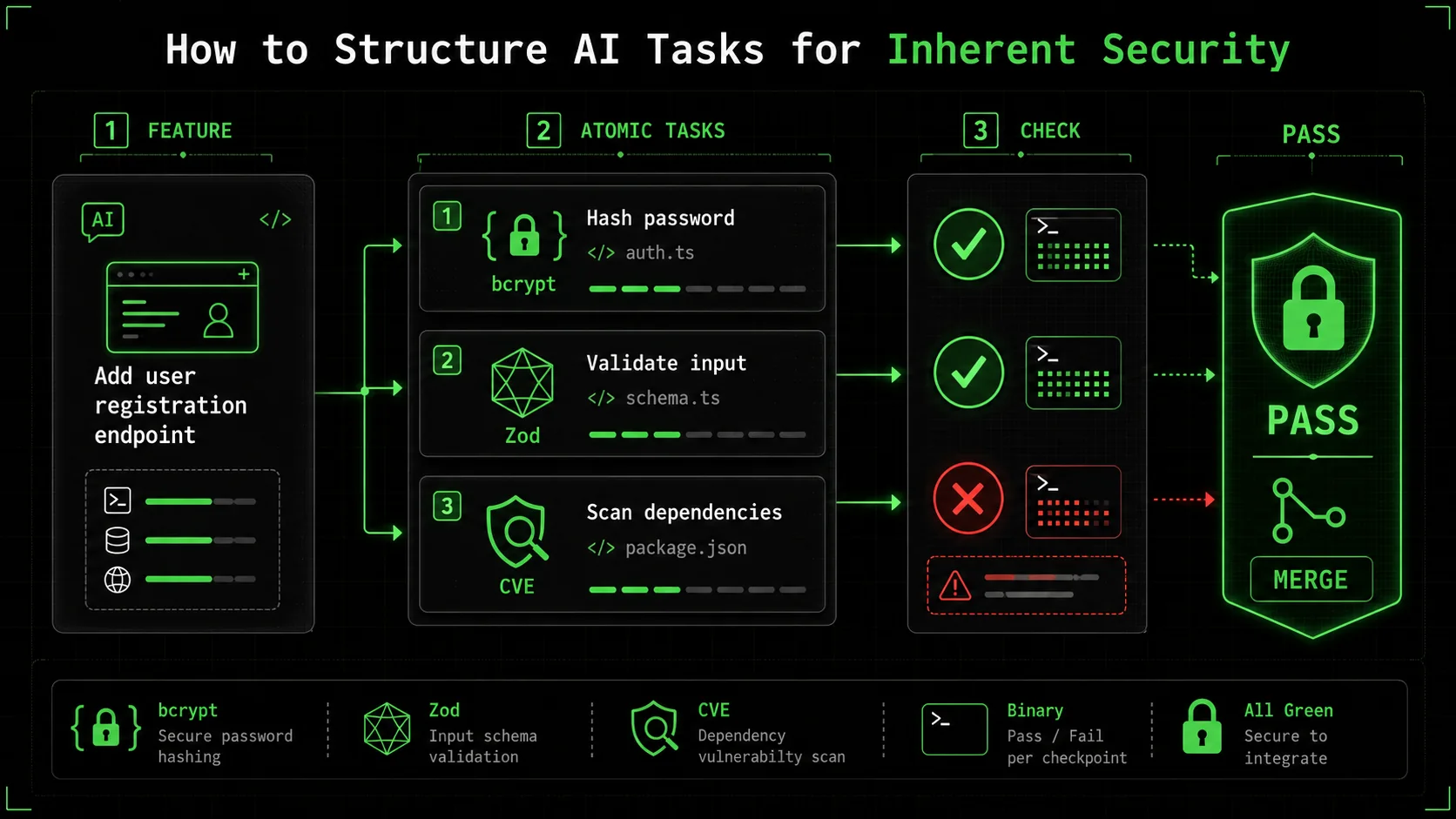 bcrypt and
 jsonwebtoken v9+," "2. Implement password hashing with salt rounds=12," "3. Add input validation using Zod schema," each with clear pass/fail criteria like "Dependency scan shows no CVEs for jsonwebtoken."" width="768" height="432" class="w-full rounded-lg shadow-md" loading="lazy" />bcrypt and jsonwebtoken v9+," "2. Implement password hashing with salt rounds=12," "3. Add input validation using Zod schema," each with clear pass/fail criteria like "Dependency scan shows no CVEs for jsonwebtoken."The solution to the AI security gap is not to ban AI, but to engineer the prompts and the process around it. This is where the concept of "atomic tasks with pass/fail criteria" from the Ralph Loop Skills Generator becomes a game-changer for security. Instead of a single, broad prompt, you break the feature down into tiny, verifiable steps, each with a security checkpoint.
This method forces both the human and the AI to think in terms of constraints and validation. It moves security from an afterthought to a prerequisite for moving to the next step. Here’s a step-by-step method to apply this to any coding task with Claude Code.
Step 1: Decompose the Feature into Security-Critical Atoms
Before you even open the chat, break the feature down. For a "user login" feature, the naive atom is "create login function." The security-aware decomposition looks different:
* Atom 1: Set up project dependencies with secure, audited libraries. * Atom 2: Create input validation schema for login payload. * Atom 3: Implement password verification against securely stored hash. * Atom 4: Generate and sign a secure session token (JWT). * Atom 5: Add rate-limiting middleware to the login route.
Each of these atoms is a single, focused task for Claude. The first atom is purely about dependencies—the most common source of AI-introduced risk.
How to prompt Claude for Atom 1: "Initialize a new Node.js project for a secure login API. Use the latest stable versions of these specific libraries:express, bcrypt (for password hashing), jsonwebtoken (version 9.0.0 or higher), zod (for validation), and express-rate-limit. First, check npm for the latest stable version of each and confirm there are no critical CVEs reported for those versions on the Snyk Vulnerability Database. Provide the package.json file."
The pass/fail criteria here are explicit: library names, version constraints, and a CVE check. Claude must verify before it can pass the task.
Step 2: Define Unambiguous Pass/Fail Criteria for Each Atom
This is the core of the security guarantee. A pass/fail criterion must be binary, automated, or trivially verifiable.
* For Atom 1 (Dependencies):
Fail:* jsonwebtoken version is below 9.0.0, or a critical CVE is listed for the chosen version on the official Snyk page.
Pass:* All libraries are at or above specified versions, and no critical CVEs are present for those exact versions.
* For Atom 2 (Input Validation):
Fail:* Validation schema allows empty strings, emails without @, or passwords under 12 characters.
Pass:* Schema rejects malformed input and provides clear error messages. A test with invalid data returns a 400 error.
* For Atom 3 (Password Verification):
Fail:* Code compares plain-text passwords or uses a weak hashing algorithm like MD5.
Pass:* Code uses bcrypt.compare() to check a hash created with a cost factor of 12 or higher.
You feed these criteria to Claude as part of the task definition in Ralph Loop. Claude's job is to iterate on its code until it meets all criteria. It can't just give you "working" code; it must give you code that passes the security sniff test.
Step 3: Integrate Security Scanning as a Task
Don't just rely on Claude's knowledge cut-off. Make live security checks part of the workflow. This can be done by including tasks that invoke security tools.
Example Task: "Run the generatedpackage.json through npm audit --audit-level=high. If any high or critical vulnerabilities are found, identify the offending dependency, find a patched version, and update package.json. Re-run the audit until it passes."
Example Task for Code: "Using the eslint plugin eslint-plugin-security, scan the generated authentication route code. Fix any issues flagged, such as potential prototype pollution, unsafe regular expressions, or security-relevant code style problems."
By making the tool run part of the task, you're using Claude as an orchestrator that acts on the tool's output. This bridges the gap between the AI's static knowledge and the current, dynamic security landscape.
Step 4: Enforce Secure Patterns with Example-Driven Prompts
AI is excellent at mimicry. Use this to your advantage by providing it with a secure pattern to follow in the context.
Instead of: "Write a function to query the user database."
Use: "Write a function to query the user database. Use the following secure pattern as a template, adapting it for the users table and a username parameter:"
// SECURE PATTERN: Use parameterized queries
async function getItemById(id) {
  const query = 'SELECT * FROM items WHERE id = $1';
  const result = await pool.query(query, [id]); // Parameter passed separately
  return result.rows[0];
}
// Your task: Adapt this for the users table.
This dramatically reduces the chance of the AI reverting to an insecure pattern from its training data. You're explicitly seeding the context with the security standard you require. For a deeper dive into how different AI models handle these structured tasks, our comparison of Claude vs ChatGPT for coding explores their respective strengths in following complex instructions. Teams using Claude Code's autonomous security mode can also leverage atomic skills for vulnerability scanning to automate these checks end-to-end.
Step 5: The "Security Review" Atomic Task
The final atom for any feature should be a dedicated security review task. This is a meta-task for Claude.
Task: "Act as a security reviewer. Analyze the complete login feature code generated in previous tasks. List any potential security weaknesses, including but not limited to: information exposure in logs, missing security headers (likeHelmet in Express), insecure cookie flags for the session, lack of CSRF protection if applicable, and any assumptions about the deployment environment. Provide a bulleted list of findings and suggestions."
This leverages the AI's analytical capabilities in a new direction. It's no longer just a code generator; it's a peer reviewer focused solely on security. The pass/fail criterion could be: "Pass: The review identifies at least one non-trivial improvement or confirms the implementation follows OWASP Top 10 guidelines for authentication."
By structuring your work this way, you build a pipeline where security is not a final, manual gate, but an integrated, automated checkpoint at every stage. The AI becomes the engine that drives through these checkpoints, failing fast and correcting itself until the output is not just functional, but fortified.
Proven Strategies to Build a Security-First AI Workflow
Reusable "secure seed" skills, a two-pass generation rule, and live vulnerability feeds turn Anthropic's Claude and OpenAI's GPT-4 from blind task completers into proactive security partners.
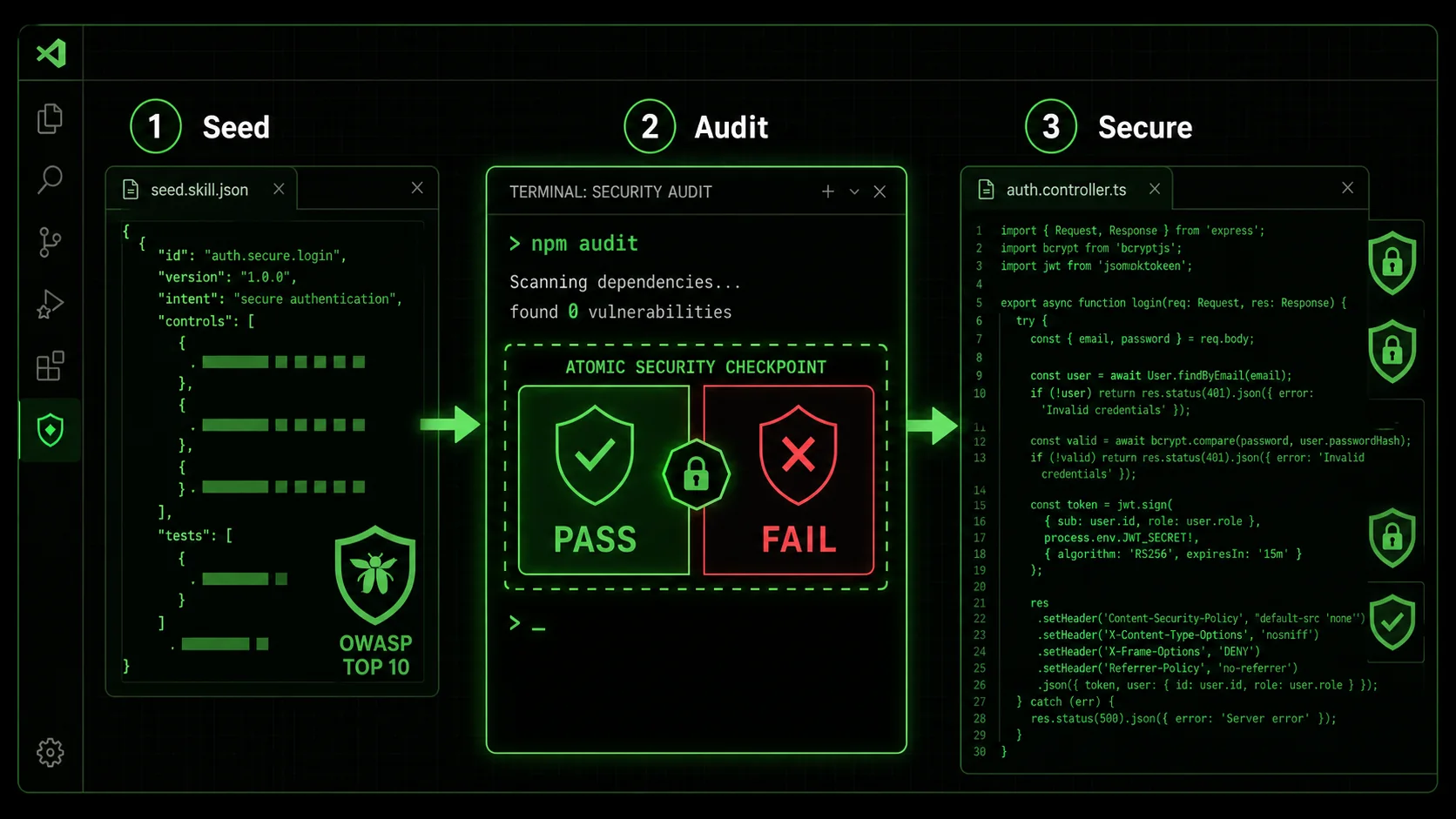 npm audit in the middle, and the generated secure authentication code on the right." width="768" height="432" class="w-full rounded-lg shadow-md" loading="lazy" />
npm audit in the middle, and the generated secure authentication code on the right.Adopting atomic tasks is the foundational shift. To make it stick and scale, you need to layer on strategies that turn this from a one-off technique into a durable part of your engineering culture. Based on implementing this with teams over the past year, here are the most effective tactics.
Strategy 1: Create a Library of "Secure Seed" Skills Don't start from scratch every time. Use Ralph Loop to create and save reusable skills for common, high-risk components. These are pre-defined, battle-tested task sequences.* Skill: Secure REST API Endpoint (Node.js/Express)
* Atoms: 1. Input validation with Zod. 2. Parameterized DB query. 3. Error handling (no stack traces in production). 4. Security headers via Helmet. 5. Logging (sanitized).
* Skill: Add OAuth 2.0 Integration
* Atoms: 1. Configure library (e.g., passport-oauth2). 2. Set secure callback URL. 3. Store tokens securely (no plaintext). 4. Implement token refresh logic.
These skills become your team's secure boilerplate. When a new developer needs to add an API, they run the "Secure REST API Endpoint" skill. This ensures consistency and embeds security knowledge into the process, even for junior developers who might not know all the pitfalls. You can build and share a collection of these in a dedicated Claude skills hub. If you are worried about the broader pattern of AI assistants secretly training on your private code while you use them, we cover that risk in Is your AI coding assistant secretly training on your private code?.
Strategy 2: Implement the "Two-Pass" Generation Rule For any non-trivial feature, mandate two distinct AI sessions. * Pass 1 (Blind Generation): Use a broad prompt to let Claude generate an initial solution. This captures its "natural" suggestion based on its training. Pass 2 (Structured Securing): Take the output from Pass 1 and use it as the context for a new Ralph Loop skill. The skill's atoms are now focused purely on analyzing and hardening* the Pass 1 code.This strategy acknowledges that the AI's first idea might be creative or efficient, but likely insecure. The second pass is a dedicated security refactoring session. It's often faster and more effective than trying to bake every concern into one mega-prompt.
Strategy 3: Connect Your Loop to Live Security Feeds This is an advanced but powerful tactic. Use Claude Code's ability to read files and execute commands to pull in live data. Example Atom: "Check thepackage.json file in the current directory. For each dependency, query the GitHub Advisory Database API to see if there are any open security advisories. Summarize the findings. If any high-severity advisories exist for direct dependencies, mark this task as FAIL and list the dependencies."
You can write a small shell script that Claude can call, or use tools like curl to fetch data from sources like the OSV (Open Source Vulnerabilities) Database. This makes your security checks truly real-time and context-aware, going far beyond the AI's training data.
What qualifies as high-risk? * Atoms dealing with cryptographic functions (key generation, signing). * Atoms defining authentication or authorization rules. * Atoms that interact with sensitive data storage or external payment APIs. * Any task where the pass/fail criteria involve legal or compliance requirements (e.g., "must be HIPAA compliant").
The strategy here is to use AI to do 95% of the work—the research, the boilerplate, the initial implementation, and the scanning—and reserve human brainpower for the 5% that carries the highest consequence of failure. This is where AI truly augments the team without overriding its judgment.
Got Questions About AI and Coding Security? We've Got Answers
Audit AI-generated code immediately with structured atomic checks, re-scan dependencies on every update, verify AI-suggested fixes against the NVD, and never assume "smart" means secure.
How often should I audit code that was initially AI-generated? Treat AI-generated code with the same suspicion as any new third-party dependency. Perform a dedicated security review immediately after generation using the structured method above. After that, it enters your normal code lifecycle. However, you should re-run dependency scans (npm audit, snyk test) with every significant dependency update, as new CVEs for those libraries can emerge at any time. The AI's initial "secure version" can become insecure weeks later through no fault of the original code.
What if my AI assistant suggests a fix for a vulnerability it introduced?
This is a common scenario and requires careful handling. First, use an external, authoritative source like the National Vulnerability Database (NVD) or the library's official security advisory to confirm the vulnerability and the recommended fix (e.g., "upgrade to version X.Y.Z"). Then, give Claude a precise task: "Upgrade the lodash dependency from version 4.17.20 to 4.17.21 as per CVE-2021-23337. Run npm test after the upgrade to ensure no breaking changes." Don't just accept the AI's summary of the fix; use it as a tool to execute the verified remediation.
Can I use this method with GitHub Copilot or other inline completions?
Yes, but the approach differs. With inline completions, you're not directing a full session. The strategy is to use "secure by design" prompts in your comments. Before writing a function, write a comment that defines the security constraints: // Validate user input: use parameterized query, hash password with bcrypt (cost=12). Copilot will often follow this guidance as it generates the code. For complex features, it's still better to switch to a chat-based assistant like Claude Code where you can implement the full atomic task workflow.
What's the biggest mistake teams make when trying to secure AI-generated code?
The biggest mistake is assuming that because the AI is "smart," its code is inherently secure. This leads to a lack of verification. Teams skip the step of defining explicit, verifiable pass/fail criteria. They accept the first working output. The second biggest mistake is treating security as a final, monolithic review stage. This creates a bottleneck and means vulnerabilities are discovered late. The correct approach is to atomize security, baking tiny, automated checks into every step of the generation process, as we've outlined here.
Ready to Code with Confidence, Not Concern?
The potential of AI coding assistants is too great to ignore, but the security risks are too real to accept. Ralph Loop Skills Generator helps you bridge this gap by providing the structure to turn vague prompts into secure, verifiable workflows. Don't just ask for code—orchestrate a process that demands security at every atomic step. Stop hoping your AI is secure, and start engineering it to be. Generate your first secure coding skill today.
<!-- sister-projects-start -->
Other Doved Studio projects
Related tools from the same studio you might find useful:
- Glean: Turn scrolling time into a daily action plan. Capture, process, execute.
- Popout: Create your portfolio in minutes with a single shareable page.
- Larpable: Spot fake founders, guru grifts, and performance entrepreneurship.
- Doved Studio: Studio indie derrière cette app et une dizaine d'autres outils.
ralph
Building tools for better AI outputs. Ralphable helps you generate structured skills that make Claude iterate until every task passes.