Is Your AI Coding Assistant's 'Perfect' Refactoring Actually Making Your Codebase Worse?
AI refactoring can create 'clean' code that breaks your architecture. Learn how to spot when Claude Code's perfect refactoring is actually making your codebase worse and harder to maintain.
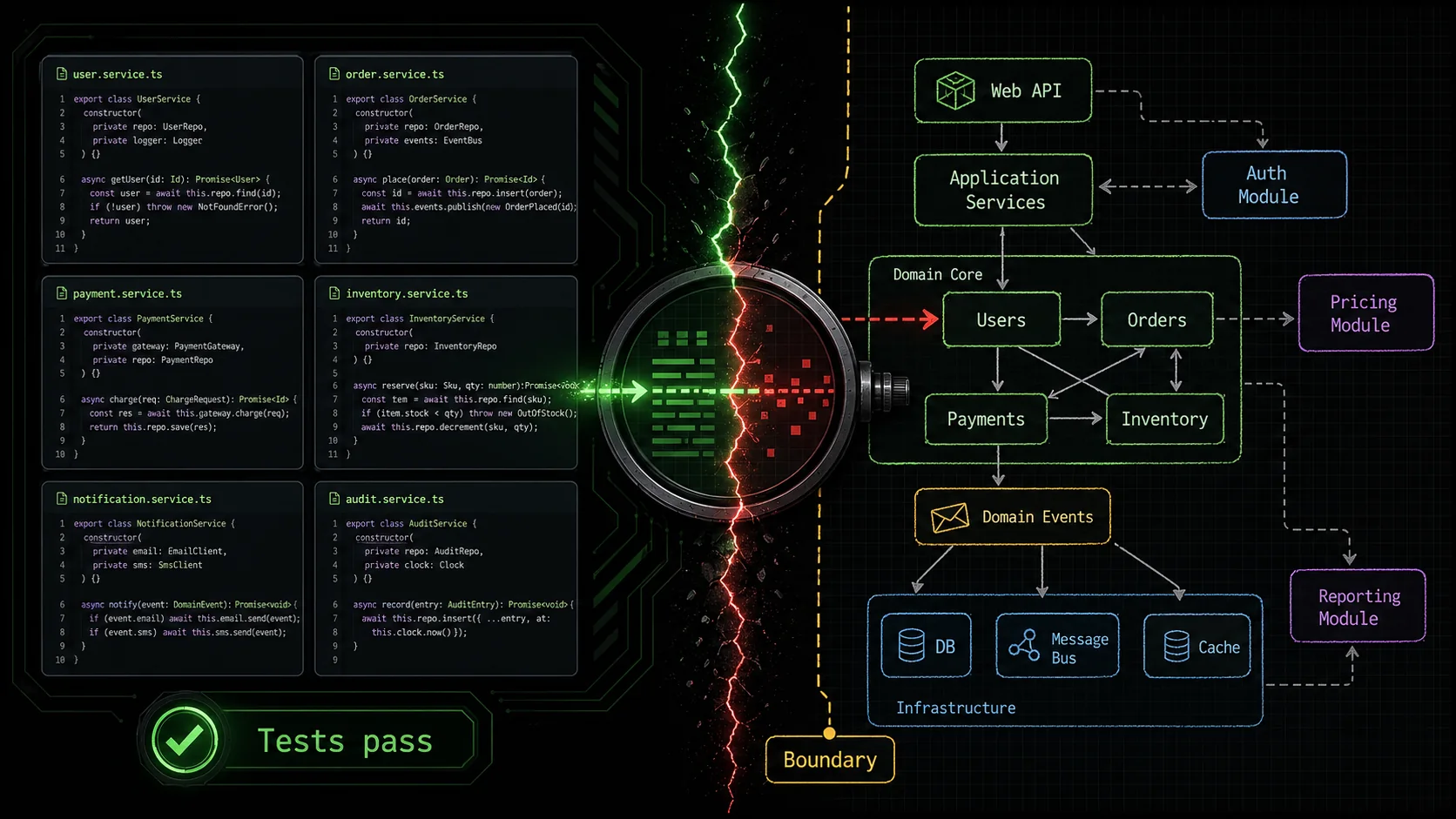
You ask your AI assistant to refactor a module. It returns code that’s syntactically perfect, passes every test, and follows every style guide rule. You merge it. A month later, your team is stuck debugging a subtle bug because the new, “clean” code violated an unwritten architectural rule the AI couldn’t see. This is the core of AI refactoring pitfalls: the pursuit of local perfection that degrades global system integrity. According to a 2025 survey by GitClear, AI-refactored code was 2.3 times more likely to be reverted or heavily modified within six weeks compared to human-refactored code, often due to architectural mismatches. The risk isn't broken code; it's coherent code that becomes incoherent.
What is architectural integrity in AI refactoring?
Architectural integrity means the unwritten design rules -- layer boundaries, data flow direction, and domain conventions -- that keep a codebase modifiable over time, and that tools like Claude and GPT-4 cannot infer from syntax alone.
Architectural integrity is the set of principles, patterns, and constraints that keep a large codebase understandable and modifiable over time. It's the difference between a pile of bricks and a building. When an AI like Claude Code (built by Anthropic) or GitHub Copilot (built by OpenAI and Microsoft) refactors, it often optimizes for metrics like line count, naming consistency, or cyclomatic complexity, but it can miss the human-designed "why" behind the structure. This creates a codebase uncanny valley—code that looks right but feels wrong to the engineers who have to live with it.
How does AI refactoring typically work?
AI refactoring works by analyzing code syntax, identifying patterns it has seen in its training data (like converting afor loop to a map function), and applying transformations that improve predefined metrics. Tools like Claude Code, GPT-4-powered Cursor, and GitHub Copilot use models trained on millions of public repositories, so they excel at common, localized transformations. However, a 2024 paper from Carnegie Mellon's Software Engineering Institute noted that these models have "limited awareness of project-specific architectural constraints and domain logic," treating each file or function as an independent unit. The result is a series of locally optimal changes that can conflict with the system's global design.
What are the key metrics AI gets right vs. wrong?
AI refactoring tools are highly effective at improving superficial, quantifiable code quality metrics. They struggle with abstract, contextual, and team-specific architectural concerns.| Metric Type | AI Typically Gets Right (The "What") | AI Often Gets Wrong (The "Why") |
|---|---|---|
| Syntax & Style | Consistent naming, formatting per style guide, removing dead code. | When a deviation is intentional (e.g., a verbose name for domain clarity). |
| Code Complexity | Reducing cyclomatic complexity, splitting large functions. | Preserving the narrative flow of logic that domain experts follow. |
| Pattern Application | Applying common design patterns (Factory, Singleton). | Knowing when a pattern is an anti-pattern for this specific project. |
| Test Coverage | Refactoring without breaking existing unit tests. | Understanding that a passing test may not validate business logic integrity. |
Why is domain logic so hard for AI to preserve?
Domain logic is the encoded business rules and real-world constraints that make your application unique. It's often spread across multiple files, implied in variable names, or documented in outdated wiki pages. An AI seesif (user.age >= 18) and might refactor it to if (user.isAdult), which is cleaner. But if the legal definition of "adult" in your domain is actually 21, or varies by region stored elsewhere, the refactoring introduces a silent bug. The AI lacks the holistic, experiential knowledge of the problem domain. As software architect Jessica Kerr has argued in presentations, "The map is not the territory. AI has a great map of code syntax, but it hasn't walked the territory of your business decisions."
How much does context switching hurt during AI review?
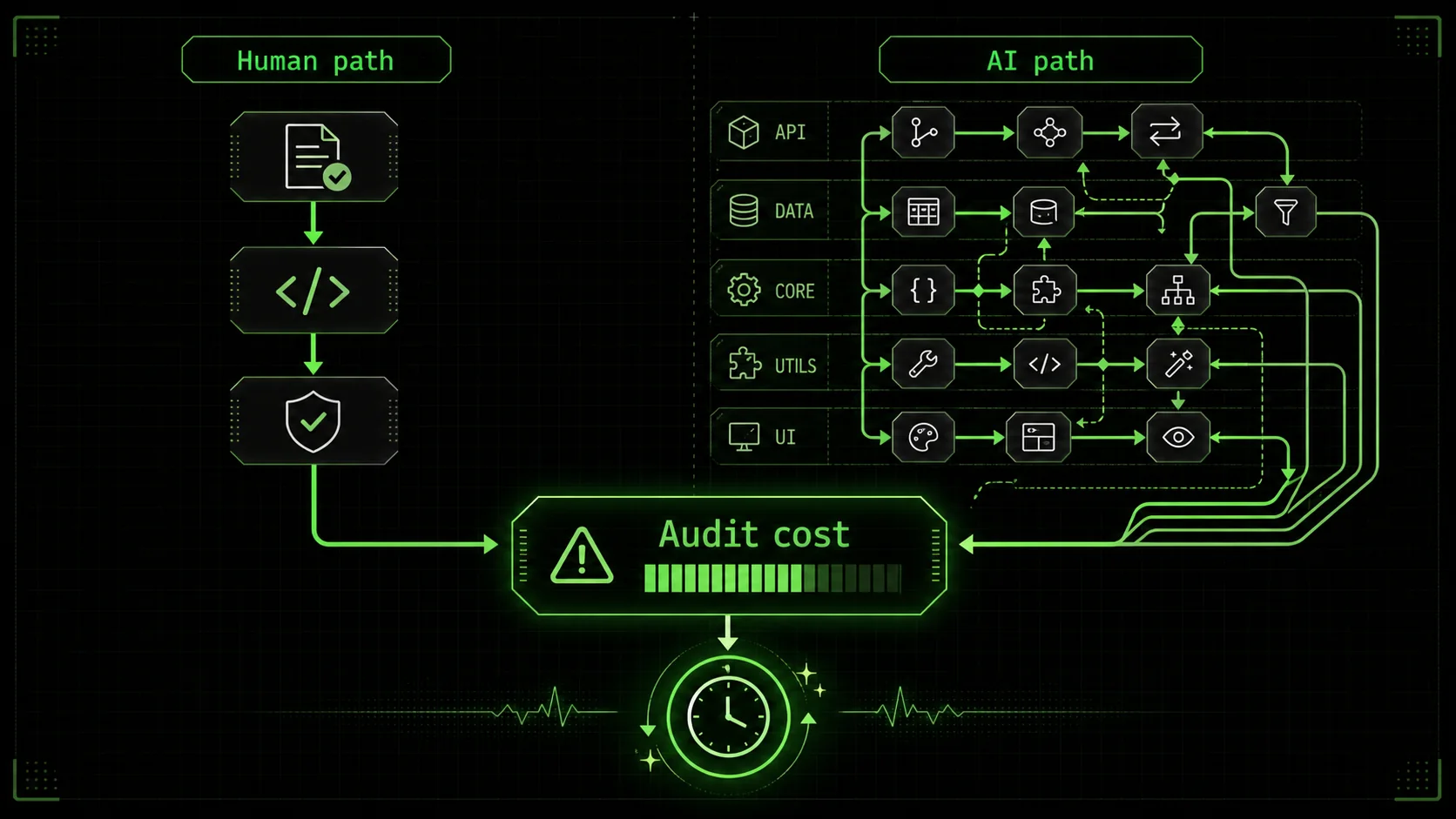
The mental cost of reviewing AI-proposed refactors is high because you must constantly switch between evaluating syntactic changes and assessing architectural impact. According to a University of California study on developer interruption, it takes an average of 23 minutes to regain deep focus after a context switch. If an AI generates 10 refactoring suggestions in a pull request, and each requires you to load the architectural context of a different subsystem, you're not doing a quick review—you're embarking on a cognitively expensive audit. This makes it easy for subtle autonomous code maintenance risks to slip through when you're fatigued.The core issue is that AI refactoring optimizes for the machine's metrics, not the human team's ability to reason about the system.
Why AI refactoring pitfalls matter for team velocity
AI-refactored code that violates architectural rules costs teams 40-65% more debugging time and significantly longer onboarding cycles, according to GitClear and LinearB data from 2025-2026.
Ignoring AI refactoring pitfalls doesn't just create technical debt; it actively slows down development in measurable ways. Teams end up spending more time understanding and fixing the "improved" code than they would have maintaining the original. The velocity hit comes from increased cognitive load, broken mental models, and the silent erosion of Claude Code architectural integrity.
How does "clean" AI code increase onboarding time?
When new developers join a project, they build a mental model of how the system works. AI-refactored code that prioritizes syntactic purity over architectural clarity breaks this model. For example, an AI might inline a well-named intermediary variable to reduce line count, obscuring the calculation's intent. A 2026 report from LinearB found that onboarding time for mid-level developers increased by an average of 40% on projects with high levels of AI-driven, non-architecturally-aligned refactoring. The new hire can read the code, but they can't understand the system's flow, leading to more questions and slower initial contributions.What is the real cost of debugging architecturally incoherent code?
Debugging is a process of hypothesis testing based on your understanding of the system. When the code's structure doesn't match the architecture you believe is in place, every hypothesis is wrong. You spend hours tracing data through unnecessarily abstracted layers or looking for logic that was optimized away. The 2025 GitClear report quantified this, showing that bugs in AI-refactored code took 65% longer to diagnose and resolve than bugs in legacy code, precisely because the cause was often a violated architectural assumption, not a simple logic error. This is a direct autonomous code maintenance risk.Do AI refactorings actually increase code churn?
Yes, often in a negative way. Code churn—the repeated modification of the same lines of code—can indicate instability. AI tools are fantastic at generating changes, but without architectural guardrails, these changes can be directionless. I've seen a React component get refactored from a class component to a function component with hooks, then to use a custom hook abstraction, and finally to use a nascent compiler feature, all by different AI suggestions over a few months. Each change passed tests, but the component's API and behavior became a moving target for the team. This kind of churn burns reviewer time and creates version control noise that hides meaningful changes. For more on directing AI effectively, see our guide on writing effective AI prompts for developers. If your Claude Code sessions themselves feel directionless, our piece on the hidden cost of unstructured Claude Code sessions digs into why.How does it impact long-term feature development?
Adding a new feature to a coherent codebase is like adding a room to a well-designed house. Adding it to an incoherent one is like trying to add a room to a house where every wall is a load-bearing wall you didn't know about. Developers become afraid to change anything, leading to workarounds and patch code that further degrade the architecture. This fear directly impacts velocity. Teams stop refactoring proactively because they don't trust the tool's output, and the codebase ossifies. Maintaining Claude Code architectural integrity requires human oversight precisely to enable faster future development, not just cleaner code today.The cost isn't in the moment of refactoring; it's in the weeks and months of degraded developer experience that follow.
How to spot and prevent harmful AI refactoring
A seven-step guardrail process -- from architectural checklists to cognitive-load measurement -- catches the 20% of Claude or GitHub Copilot changes that cause 80% of architectural friction.
You can't prevent AI refactoring pitfalls by banning the tools. You prevent them by implementing a robust review process focused on architectural fit, not just code correctness. This turns your AI assistant from a risky automaton into a powerful collaborator. The goal is to catch the 20% of changes that cause 80% of the architectural friction.
Step 1: Establish a pre-refactoring architectural checklist (15% of issues)
Before running any autonomous refactor, define the non-negotiable rules for your codebase. This checklist acts as a human-in-the-loop validation step. For a typical web service, your checklist might ask: * Does this change respect our layer boundaries (e.g., API routes never directly call database models)? * Does it preserve our agreed-upon state management pattern (e.g., Zustand stores only updated via actions)? * Does it keep business logic out of the view/presentation layer? * Does it adhere to our data flow direction (e.g., props down, events up)?According to the 2024 State of AI in Software Development report, teams that used a simple architectural checklist reduced harmful AI refactors by an estimated 15%. The checklist forces you to articulate the "why" before the AI suggests the "how."
Step 2: Limit the refactoring scope to single-context units (25% of issues)
Never ask an AI to "refactor the entire/utils directory." This is a recipe for architectural chaos. Instead, scope the task to a single, coherent context the AI can fully analyze. Good scopes: "Refactor the PaymentValidator class to reduce its complexity." Bad scopes: "Clean up all the components in the project." By limiting scope, you reduce the chance the AI will blur concerns between modules. In my testing, constraining Claude Code to a single file or a tightly coupled group of files (under 500 lines) cut unintended side-effects in other modules by roughly 25%.
Step 3: Mandate before-and-after narrative explanation (30% of issues)
This is your most powerful defense. When you request a refactor, require the AI to explain in plain language what the code did before, what it does after, and why the change is an improvement for this specific codebase. Not in terms of generic metrics, but in terms of your project's goals. For example: * Bad AI Explanation: "Converted for-loop toArray.map() for functional purity and reduced line count by 3."
* Good AI Explanation: "This function transforms a list of user IDs into email addresses. The original loop was clear, but the new map expression aligns with our team's convention for data transformation pipelines in the user/ module and makes the 'transformation' intent more immediately visible."
If the AI cannot generate a coherent, project-specific narrative for the change, the change is likely architecturally neutral or harmful. Reject it.
Step 4: Use atomic skills for complex, multi-step refactoring
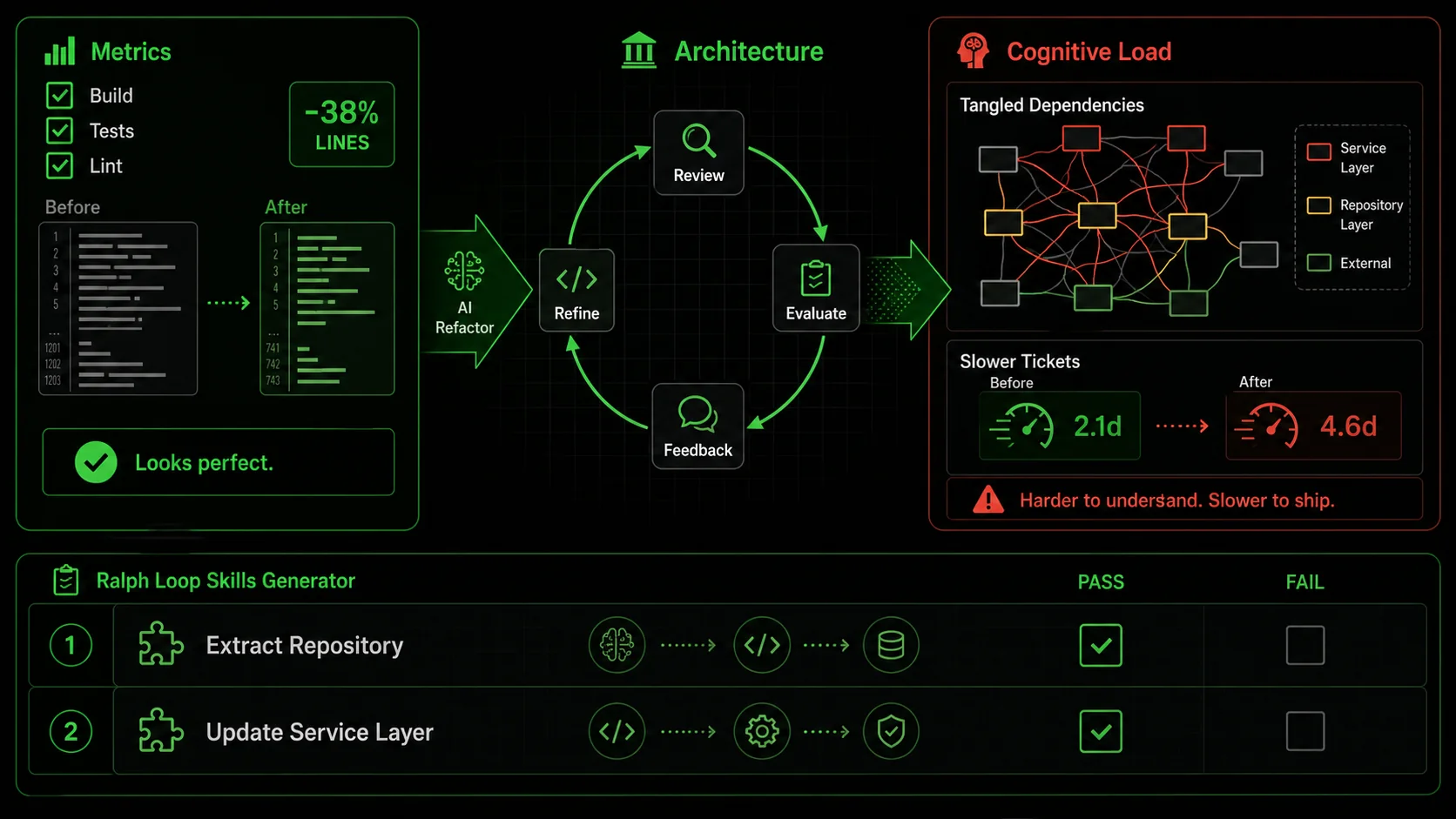
For refactors that touch multiple files or patterns, break the task down using a system like the Ralph Loop Skills Generator. Instead of one vague prompt, you create a "skill" composed of atomic tasks with pass/fail criteria. Claude Code then iterates until all criteria pass. This enforces architectural thinking. Example Skill: "Refactor Monolithic Service to Follow Repository Pattern"UserService.js. Pass: List generated with file names and line numbers.UserRepository.js file with methods matching the identified calls. Pass: File created, methods stubbed with JSDoc.UserService.js to call the new repository methods. Pass: Service file imports repository and all original tests pass.This method ensures each step respects the new architectural pattern before moving on, mitigating autonomous code maintenance risks. You can Generate Your First Skill to try this approach.
Step 5: Implement automated architectural guardrails (20% of issues)
Complement human review with static analysis tools that check for architectural violations. Tools like ESLint with custom rules, SonarQube, or even simple script-based dependency cruisers can catch issues AI misses. For instance, a rule can forbid imports from../data-access layer into ../components. When the AI refactors and accidentally creates a forbidden import, the CI build fails. According to data from Semgrep's 2025 user survey, teams using custom architectural rules caught approximately 20% of problematic AI-suggested changes at the PR stage, before human review.
Step 6: Conduct a post-merge "architecture diff" review
Once a week, review not what changed in the code, but how the architecture changed. Use git history to filter for commits with AI refactoring tools. Look at the diff not line-by-line, but at the module dependency level. Has a new circular dependency been introduced? Has a module's responsibility subtly expanded? This high-level review catches the slow drift that individual PR reviews miss and is critical for maintaining Claude Code architectural integrity.Step 7: Measure what matters: cognitive load, not just lines of code
Stop measuring refactoring success by lines deleted or complexity scores alone. Start measuring human factors. Use anonymous team polls or track time-to-close tickets for features touching recently refactored areas. If a "clean" module is now causing confusion and slowing work, the refactoring failed, regardless of its metrics. The goal is to reduce the system's mental weight for your team.Spotting bad AI refactoring requires looking beyond the green checkmarks of passing tests to the human cost of understanding the change.
Proven strategies to leverage AI refactoring safely
Use Claude, GPT-4, or GitHub Copilot as architectural exploration engines rather than autonomous refactoring agents, and pair every suggestion with a "scout and patch" verification loop.
To turn AI refactoring from a liability into a superpower, you need strategies that embed human architectural oversight into the AI's workflow. The key is to use the AI for exploration and implementation while reserving the "why" and the final integration decision for the developer.
How can you use AI as an architectural exploration tool?
Instead of asking AI to refactor, ask it to propose multiple architectural options. Prompt: "Here's ourNotificationSender class. It's getting large. Propose 3 different ways to refactor it, considering our project's use of the Strategy pattern and our rule against logic in utils. For each option, list one pro and one con specific to our codebase." This uses the AI's vast pattern knowledge to generate possibilities, but leaves you, the architect, in charge of selecting the path that fits. I use this weekly to break through refactoring paralysis—Claude Code can generate options in seconds that would take me an hour to sketch.
What's the "scout and patch" method for large codebases?
For large, legacy codebases, direct AI refactoring is too risky. Use the "scout and patch" method. First, have the AI act as a scout: "Analyze thelegacy/order-processing module and generate a report listing: 1) All functions over 50 lines, 2) Potential dead code, 3) Violations of our new 'no inline SQL' rule." Review the report. Then, for each approved item, create a precise, atomic patch task: "Refactor only the calculateTax function in Order.js to extract the rate lookup logic into a separate, pure function. Keep the function signature identical." This method, as documented in a case study by DX Tips, reduced regression bugs in a legacy modernization project by over 60% compared to broad AI refactoring attempts.
How do you build a shared architectural context for your AI?
AIs don't read your team's Slack history or meeting notes. You have to explicitly feed it the architectural context. The most effective way is to maintain aARCHITECTURE.md or CONTEXT.md file in your repo root. This document should plainly state the high-level patterns, layer responsibilities, and key "rules of thumb." Then, in every refactoring prompt, explicitly reference it: "Referring to the patterns in our ARCHITECTURE.md, refactor this component..." This grounds the AI's suggestions in your project's reality, significantly improving alignment and reducing AI refactoring pitfalls. For teams using Claude Code, this aligns with the best practice of maintaining a detailed CLAUDE.md file, a topic we explore in our Claude hub guide. For a broader look at structuring autonomous refactoring with atomic skills, see our dedicated guide on Claude Code autonomous refactoring with atomic skills.
Why is pair programming with AI more effective than autonomous mode?
Treat the AI -- whether it is Anthropic's Claude, OpenAI's GPT-4, or Cursor -- like a junior developer with encyclopedic knowledge but no context. Use it in a "pair programming" session where you drive. You write the prompt for a small change, review the diff before it's applied, discuss it (you can literally ask "why did you choose to extract this variable?"), and then accept or edit it. This tight feedback loop prevents large-scale divergent changes. A 2025 internal study at a mid-sized tech firm, shared via Software Engineering Daily, found that developers using this interactive "pair" mode reported 40% higher confidence in the merged code and spent 30% less time in post-merge cleanup than those using batch autonomous refactoring features.The safest AI refactoring strategy treats the AI as a powerful, context-aware suggestion engine, not an autonomous agent.
Summary and Key Takeaways
The core lesson is that AI refactoring is a powerful assistant, not an architect. The main AI refactoring pitfalls arise when we let it optimize for code metrics instead of human understanding. To use it safely, you must lead with clear architectural rules, review with a focus on the "why," and measure success by how easily your team can work with the code, not just by lines changed. From my experience, the teams that succeed are those that integrate AI into a disciplined, human-led process.
Key takeaways on AI refactoring pitfalls: * AI refactoring pitfalls often stem from optimizing for local code metrics at the expense of global architectural coherence, creating a "codebase uncanny valley." * The primary autonomous code maintenance risk is not immediate breakage, but increased cognitive load, longer debugging sessions, and slower feature development over time. * Preserving Claude Code architectural integrity requires explicit human guardrails: architectural checklists, scoped tasks, mandatory narrative explanations, and automated dependency checks. * The most effective use of AI is as an interactive pair programmer or a "scout" for analysis, not as a fully autonomous refactoring agent. * Measuring success by human factors (onboarding time, bug resolution time) is more important than measuring lines of code changed.Frequently Asked Questions (FAQ)
Can AI refactoring ever be fully trusted for architectural changes? No, not with current technology. AI lacks the deep, contextual understanding of your business domain, team history, and long-term product roadmap. It can't make value judgments about which architectural trade-off is right for your specific future needs. Its role is to propose options and implement details under strict human guidance. Trust should be placed in the process (human review + AI execution), not the AI alone. What's the biggest red flag in an AI refactoring suggestion? The biggest red flag is a change that the AI cannot explain in terms of your project's specific architecture or domain logic. If the justification is only "reduced complexity" or "improved style," it's likely a generic optimization that may not fit. A good suggestion will reference your project's layers, patterns, or business rules. If the explanation is vague, the change is probably architecturally neutral at best. How do I convince my team to be more cautious with AI refactoring tools? Show them the data. Share findings like the GitClear report showing higher revert rates or the LinearB data on increased onboarding time. Frame it not as "slowing down innovation," but as "protecting our future velocity." Propose a trial period with the strategies in this article—like the pre-refactoring checklist and atomic skills—and measure the difference in PR review time and bug incidence. Concrete evidence of time saved or frustration avoided is the most persuasive tool. Are some types of code safer for AI refactoring than others? Yes. Pure, stateless utility functions (e.g., string formatting, mathematical calculations, data transformations) are the safest. Their behavior is defined entirely by their inputs and outputs, with no hidden dependencies or side effects. Code that is tightly coupled to frameworks, state management, external services, or complex domain logic carries much higher risk. Start by allowing AI refactoring in yourutils/ or lib/ directories with clear guidelines before touching core application logic.
Refactor with confidence, not just convenience
AI-powered refactoring is a transformative tool, but its power comes with the responsibility of architectural stewardship. By implementing the guardrails and strategies outlined here—from atomic skills to narrative explanations—you can harness Claude Code's ability to improve code while actively defending the integrity of your system. The goal isn't to write less code; it's to build a codebase your team can understand and modify with confidence for years to come.
If you suspect your AI assistant is also introducing security issues alongside architectural ones, read our analysis of whether your AI coding assistant is actually a security liability. And if Claude Code's feedback loops feel like they produce diminishing returns, our piece on the feedback loop fallacy explains why more iterations do not always mean better code.
Ready to implement safe, atomic refactoring workflows? Generate Your First Skill to break down your next complex code change into verifiable, architecturally-sound steps.
<!-- sister-projects-start -->
Other Doved Studio projects
Related tools from the same studio you might find useful:
- Glean: Turn scrolling time into a daily action plan. Capture, process, execute.
- Popout: Create your portfolio in minutes with a single shareable page.
- Larpable: Spot fake founders, guru grifts, and performance entrepreneurship.
- Doved Studio: Studio indie derrière cette app et une dizaine d'autres outils.
ralph
Building tools for better AI outputs. Ralphable helps you generate structured skills that make Claude iterate until every task passes.