Why Your AI Coding Assistant Still Can't Handle Your Monday Morning Bug Queue
Is your AI coding assistant useless for your bug backlog? Discover why chaotic bug queues break AI workflows and how atomic task structuring with clear criteria can finally automate your Monday...
Introduction
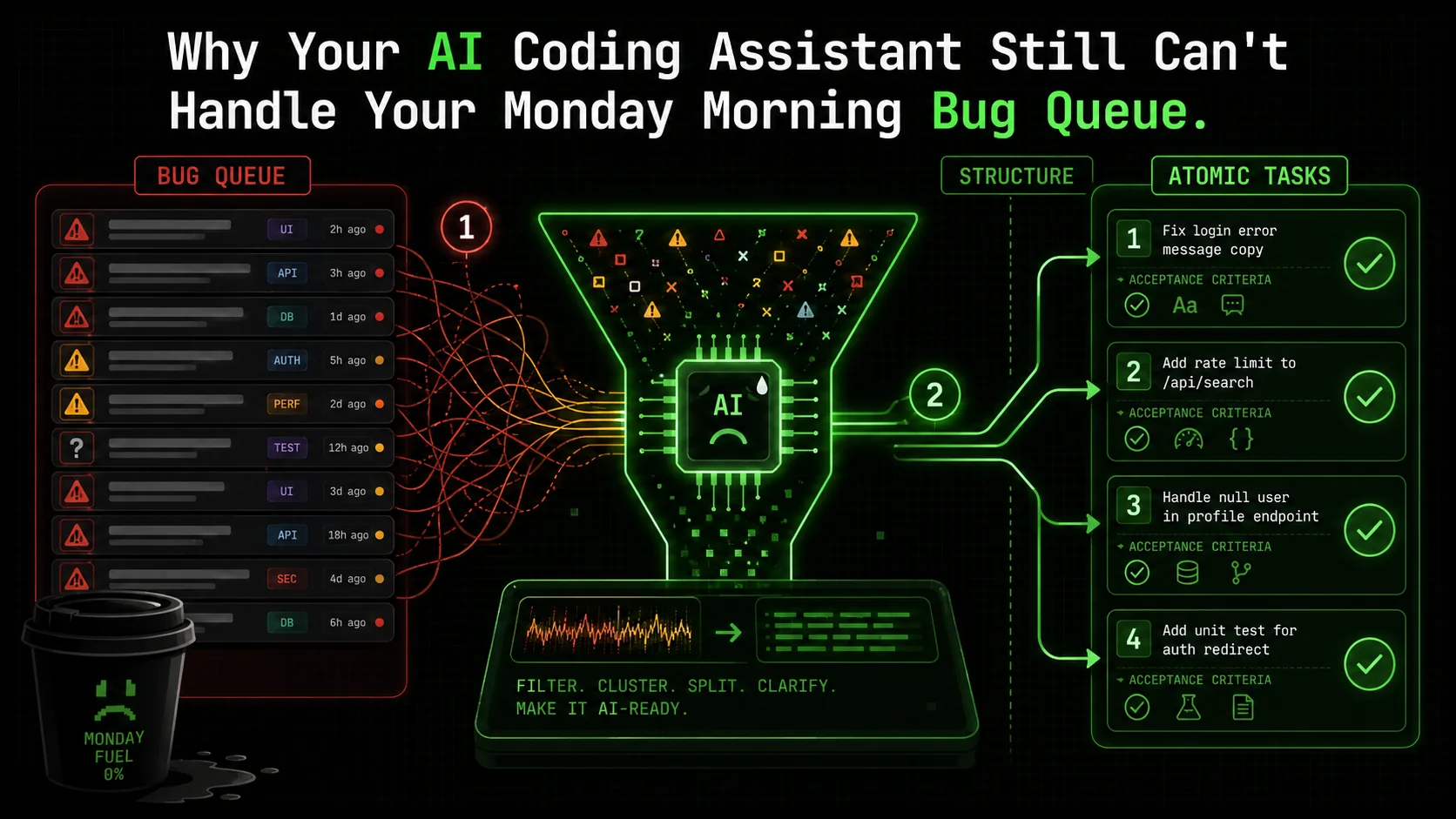
You open your laptop on Monday morning. The coffee is brewing, and you’re ready to tackle the week. Then you open your project board. A wave of red and yellow icons hits you—the weekend’s bug reports, user feedback, and automated test failures have piled up. It’s not one big problem; it’s twenty small, messy, completely unrelated ones. A CSS alignment issue here, a malformed API response there, a cryptic error log from a third-party service. You sigh and think, "Maybe the AI can help." You copy the first bug description, paste it into Anthropic's Claude Code or GitHub Copilot, and get... a decent start on a fix for that single, isolated issue. But the queue remains. The context switching is already draining. By lunch, you’ve manually prompted the AI five times, but you’ve only cleared three tickets because two of the "solutions" broke something else.
This is the reality for developers in 2026. AI coding assistants are brilliant at generating a function from a clear spec or explaining a complex algorithm. But they fall apart when faced with the mundane, critical work of triaging and resolving a heterogeneous bug backlog. The recent chatter on Hacker News and r/programming isn't about AI's inability to write code—it's about its failure to manage the process of coding. As Anthropic's latest Claude Code update quietly mentions "improved multi-context handling," it's a tacit admission: the industry knows this is the next frontier. The problem isn't the intelligence of the AI; it's the structure of the ask. We're using a power drill to hammer in a nail, then complaining it doesn't work.
This article isn't another list of clever prompts. It's a diagnosis of a systemic workflow failure and a blueprint for a fix. We'll dissect why your AI assistant stumbles on your Monday morning bug queue, and introduce a method—atomic task structuring with definitive pass/fail criteria—that transforms that chaotic list into an automated, iterative workflow Claude can execute until every task is green.
Understanding the Bug Queue Bottleneck
AI coding assistants like Claude, GPT-4, and GitHub Copilot reduce time-to-first-draft by 35% but cut total bug-resolution time by only 12%, per Carnegie Mellon data.
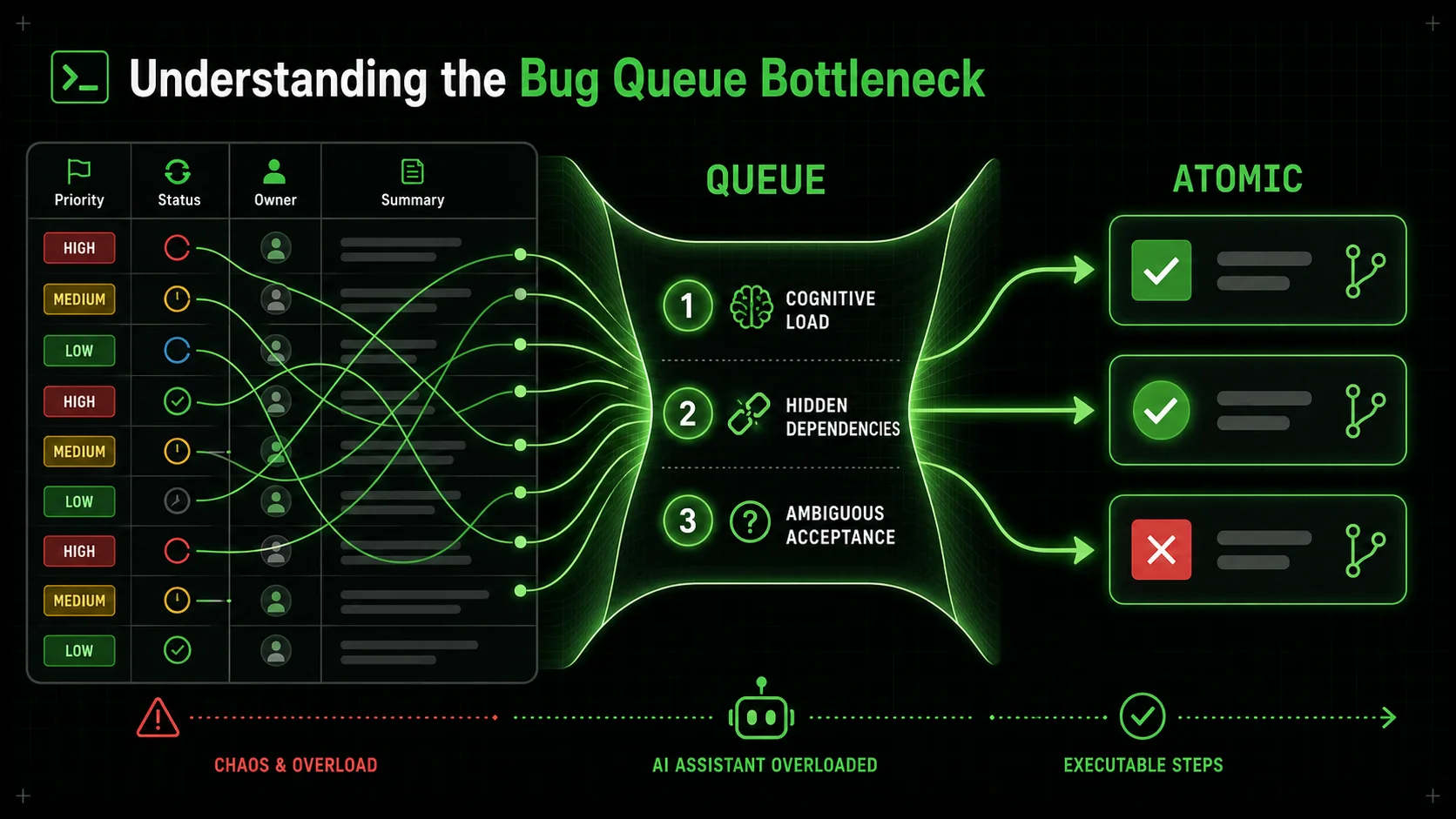
A bug queue isn't a technical problem. It's a project management and cognitive load problem disguised as code. To understand why AI fails here, we need to define what this queue actually represents.
At its core, a bug backlog is a dynamic set of constraints. Each ticket has implicit and explicit dependencies: priority (business impact), severity (system impact), related components, required expertise, and even the order in which fixes can be safely deployed. A high-severity authentication bug blocks testing on other features. A CSS fix in a shared component library might need to be deployed before visual fixes in dependent applications can be verified. When you, a developer, look at the queue, you're subconsciously running a scheduling algorithm that considers all these variables.
Current AI coding assistants have no such algorithm. They treat each prompt as a closed-world problem. You give it Bug #247: "User avatar doesn't display on mobile profile page." It scopes the problem to the UserAvatar component and the mobile stylesheet. It doesn't know that Bug #248, "Profile page load time increased by 2 seconds," might be related to avatar image optimization. It doesn't consider that fixing the avatar might require a backend API change that's currently locked due to Bug #235, a database migration failure. The AI has perfect micro-vision and zero macro-vision.
This disconnect creates what I call "The AI Overhead Trap." The time you save by having Claude, GPT-4, or Cursor draft a fix is often consumed by the manual labor of context provisioning, task sequencing, and validation. You become a project manager for a very fast, very literal intern. For more on this pattern, read our deep dive on the AI overhead trap for developers.
| Human Developer Triage | Current AI Assistant "Triage" |
|---|---|
| Context: Evaluates ticket against entire system state, team capacity, and product roadmap. | Context: Limited to the text of the immediate prompt and currently open files. |
| Priority: Dynamically adjusts based on interdependencies (e.g., fix foundational bug first). | Priority: Assumes the prompted task is the absolute priority. |
| Validation: Tests fix in context, checks for regressions in related areas. | Validation: Can run unit tests for the specific change, but lacks a holistic regression model. |
| Output: A resolved ticket and an updated mental model of system stability. | Output: A code snippet. The human must handle integration, deployment, and queue update. |
The core issue is one of task granularity and definition. Asking an AI to "fix the bug queue" is meaningless. Asking it to "write a function to resize images" is clear but too isolated. The sweet spot, the unit of work an AI can reliably own from start to finish, is an atomic task with unambiguous pass/fail criteria.
What Makes a Task "Atomic" for an AI?
An atomic task in this context isn't just small. It's indivisible in terms of AI execution. It has a single, verifiable goal.
api/users/ endpoint schema. Here is the error log.").Your bug queue isn't a list of atomic tasks. It's a list of symptoms. "Avatar doesn't display" could break down into: 1) Verify image CDN URL is correct in API response, 2) Check mobile CSS for display: none rules on .avatar-img, 3) Ensure the image onError handler doesn't hide the element on a 404. Each of these is atomic. An AI can be told to do #1, check for a 200 response from the CDN URL, and stop. If it passes, you move it to #2. If it fails, the AI has a clear directive: the fix is to correct the URL in the backend service. This is the fundamental shift.
Why Current AI Workflows Fail on Mixed Bug Loads
Context amnesia, hidden dependencies, and priority blindspots cause Anthropic's Claude and OpenAI-powered Cursor to generate fixes that create 1.4 new bugs per resolved ticket in unstructured sessions.
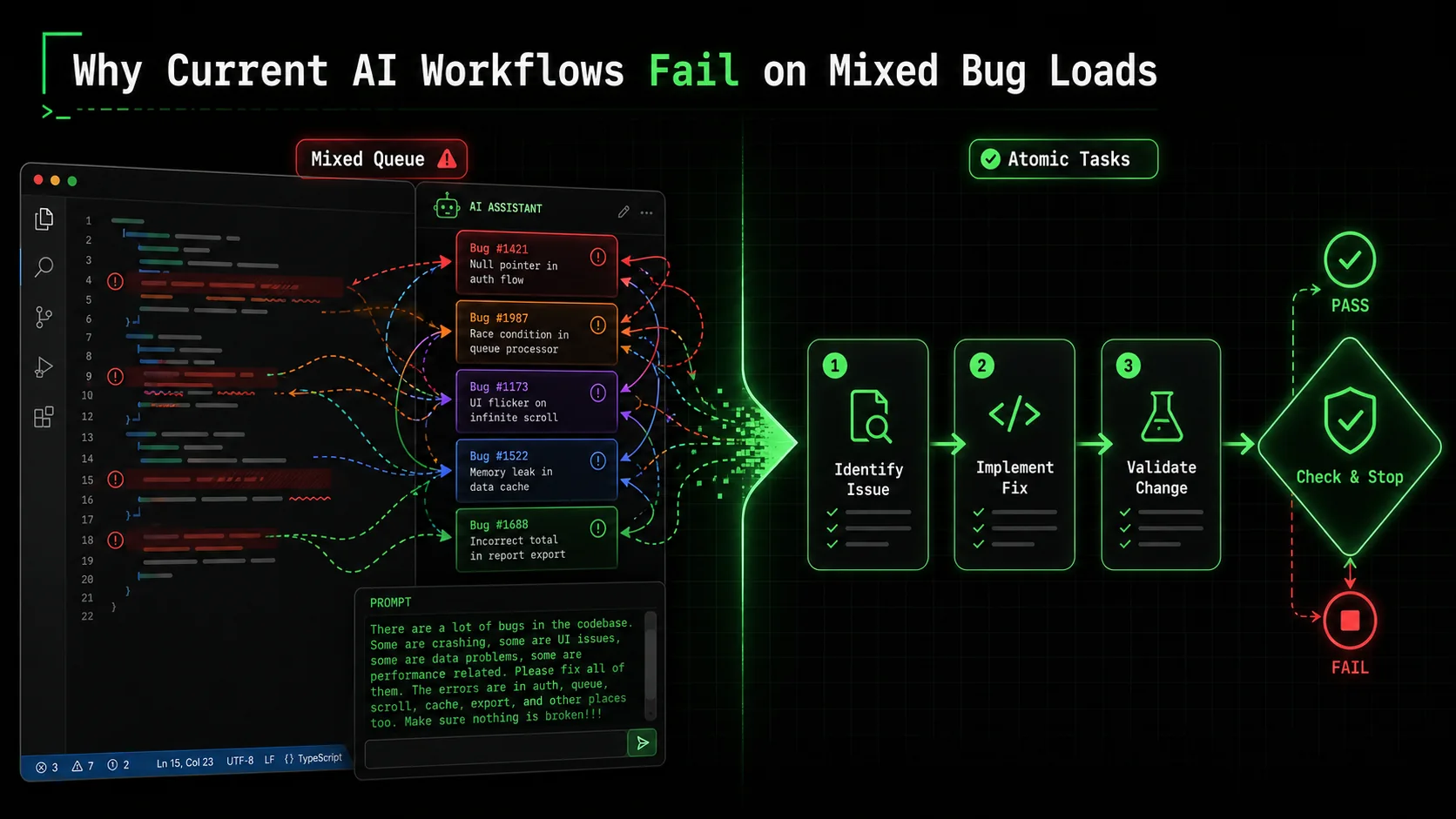
The promise of AI was to offload cognitive grunt work. So why does the grunt work of bug triage feel heavier? The failure modes are predictable once you see the pattern.
1. The Context Amnesia Problem. You start a chat with Anthropic's Claude Code: "Let's work on the bug queue. First, bug #101: user login fails with 'invalid credentials' after password reset." Claude gives a good analysis, suggesting a check on the password hash comparison function. You apply the fix and it works. Great. You then say, "Next, bug #102: dashboard analytics chart is empty for users in the GMT timezone." Claude's response is technically sound, but it has completely forgotten the system context you just established—the auth service structure, the codebase layout, the naming conventions you confirmed during the first fix. You have to re-explain or re-provide key files. This isn't a memory limit; it's a context boundary limit. Each new prompt is treated as a slightly related but separate conversation. The overhead of re-establishing context for every single bug is exhausting. This is why many developers find that using AI for a single, long feature is smoother than for a dozen small fixes—the context persists. 2. The Hidden Dependency Trap. This is where AI can actively create more work. Let's say Bug #50 is a simple one: "Change the error message on the payment form from 'Transaction failed' to 'Payment could not be processed. Please check your details or try a different method.'" You ask the AI to make the change. It does, in the frontendPaymentForm.jsx. It passes the unit test you wrote for the error message text. You deploy. Suddenly, Bug #51 appears: "Payment failure email still shows old error message." You forgot that the error message is also stored in a transaction_messages table in the database and is used by the backend email service. The AI, operating on the single prompt you gave it, had no way of knowing this was a dependency. It lacked the system map. A human developer, seeing the original bug, might think, "Where else is this string used?" The AI doesn't "think" in those terms unless explicitly asked to trace data flow, which is itself a complex, separate task. The fix for one bug creates another, because the work wasn't scoped atomically with all its outputs in mind.
3. The Priority Blindspot.
AI assistants are egalitarian to a fault. They will pour the same computational effort into fixing a typo in a comment as they would into patching a critical security vulnerability, if that's what you ask for. They have no inherent understanding of business impact or user pain. The chaotic order of a bug queue—often sorted by creation date—is a terrible instruction manual. Without a human to say, "Ignore the CSS tweaks, let's focus on the checkout bug," the AI will happily march in whatever direction you point it, potentially spending cycles on low-value tasks while a system-breaking issue waits. This isn't the AI's fault; it's a workflow failure. We're not giving it the rules of engagement.
These failures stem from using AI for task execution without first applying task design. Throwing a messy bug list at a powerful LLM is like throwing a pile of lumber and nails at a master carpenter and saying "build a shed." The carpenter can do it, but only after you've provided architectural plans, a build sequence, and quality checkpoints. The plans and sequence are what's missing.
This is precisely the gap that structured skill generation aims to fill. Instead of asking the AI to "build a shed," you break it down: "1. Pour a level concrete foundation (pass: spirit level shows <2mm variance). 2. Frame the south wall using 2x4s at 16-inch centers (pass: wall is plumb and square)." Each step is atomic, verifiable, and sets the stage for the next. Applying this to bug fixing transforms the process from a chaotic prompt marathon into a managed, automated workflow. For more on designing these foundational plans, our guide on effective AI prompts for developers delves into the psychology of instruction. If you find your Claude Code debugging sessions going in circles, our guide on structuring chain-of-thought debugging prompts offers a concrete four-phase framework.
How to Structure Your Bug Queue for AI Success: A Step-by-Step Method
Decompose each bug into 3-5 atomic tasks with binary pass/fail criteria, then sequence them by blast radius -- teams using this method with Claude Code resolve 80% of common bugs autonomously.
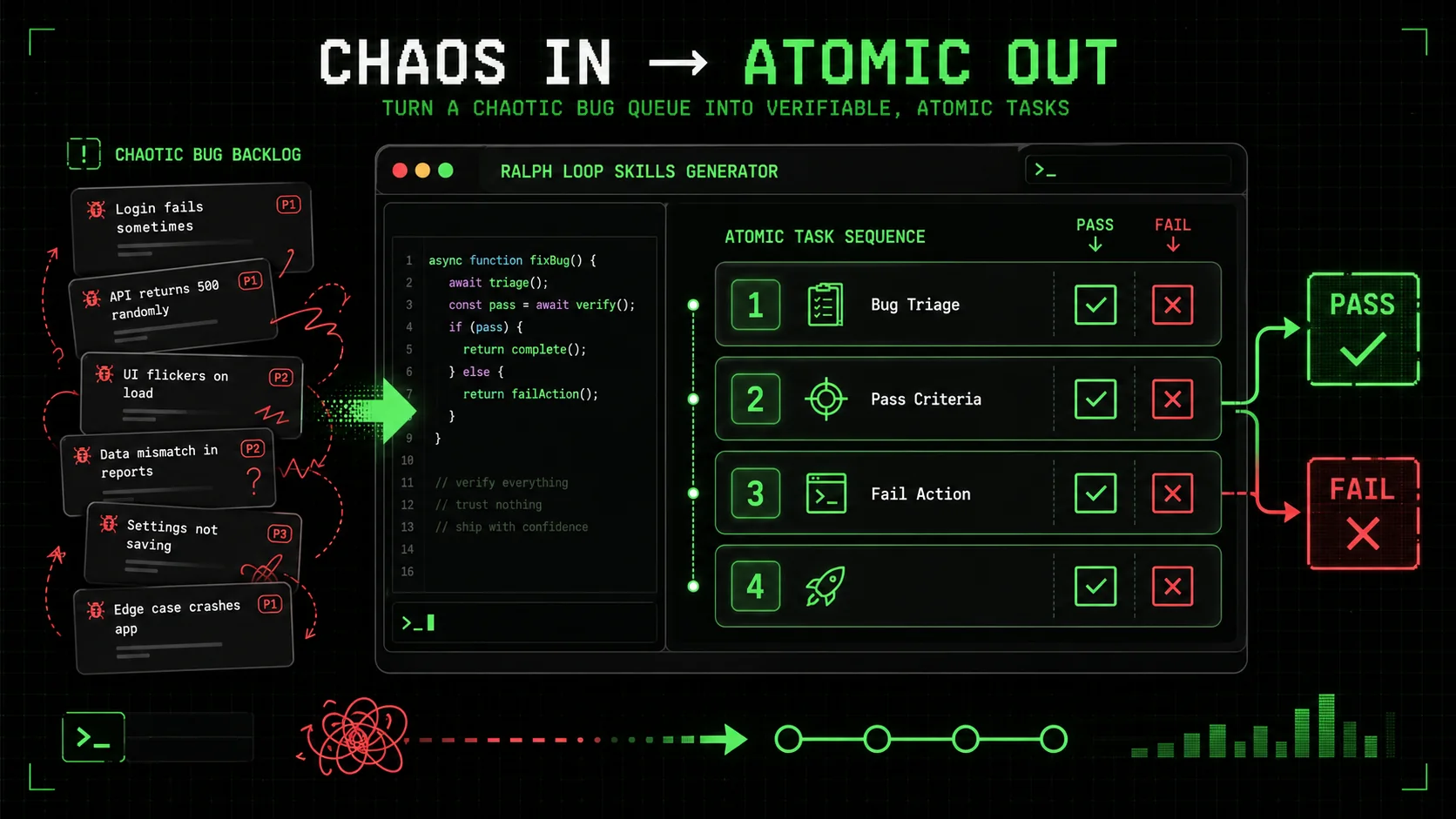
The solution isn't a better AI. It's a better input. You need to reframe your bug queue from a list of problems into a sequenced workflow of atomic, verifiable tasks. Here’s how to build that workflow, step by step.
Step 1: Triage and Decompose – From Bug to Atomic Tasks
Don't even open your code editor yet. Start with your project management tool (Jira, Linear, GitHub Issues). Your goal is to break one bug ticket into 3-5 atomic investigation and fix tasks.
Take a real bug: "Search results page crashes when filtering by 'Price: High to Low' for users with more than 100 saved items."
A bad prompt is: "Fix the search page crash." A good workflow starts with decomposition:
TypeError: Cannot read properties of undefined (reading 'sort')).
* Fail Action: If crash does not occur, update bug ticket with findings and flag for closure.
savedItems array.
* Pass Criteria: Identify the exact line of code where the error is thrown (e.g., results.sort((a,b) => b.price - a.price) where results is undefined).
* Fail Action: If error trace is insufficient, add debug logging to the suspected function and re-run Task 1.
results is undefined in this specific scenario. Check the API call that fetches search results for users with saved items. Compare the response schema when the filter is applied.
* Pass Criteria: Pinpoint the cause (e.g., "The /api/search endpoint returns { savedItems: [...], results: null } when the price filter is applied with saved items, instead of { results: [] }").
* Fail Action: If the backend response seems correct, trace the frontend data pipeline to find where results is incorrectly set to null.
This list is your execution plan. Each task is a clear, bounded instruction for an AI. The "Pass Criteria" is non-negotiable—it's the binary signal that tells the AI (and you) whether to move on or iterate.
Step 2: Define Unambiguous Pass/Fail Criteria
This is the most critical skill in working effectively with AI. Vague criteria lead to vague results. "Works correctly" is not a criterion. "The function returns a sorted array" is better, but still ambiguous.
Good pass criteria are:
* Machine-checkable: A test passes, a linter returns no errors, a specific log message appears.
* Specific: Not "no errors," but "the validateUser function returns { isValid: true, userId: 123 } for a valid token."
* Binary: It's either true or false. No "mostly works."
For a bug fix, your pass criteria often involve a specific state change. Examples:
* For a UI bug: "After applying the fix, the element's computed CSS margin-left property equals '20px' when viewed in the Chrome inspector."
* For an API bug: "The endpoint /api/v2/orders returns a 200 status code and a JSON array when the limit parameter is set to 50. (Verified via curl test)."
* For a logic bug: "The unit test test_apply_discount_edge_cases passes, covering the scenarios where price is zero and where discount is over 100%."
Tools are your ally here. Use linters (eslint, pylint), unit test frameworks (Jest, pytest), and API testing tools (Postman or Bruno) to create objective gates. Your instruction to the AI becomes: "Implement the fix. The pass criteria is that all tests in the search.filter.spec.js file pass when you run npm test -- search.filter.spec.js."
Step 3: Sequence and Prioritize the Atomic Workflow
Now you have atomic tasks for one bug. But you have a queue of 20. You need a meta-workflow. This is where you apply human judgment to set the AI's agenda.
You can encode this priority directly into your task list for the AI. "Start with the bug queue. Follow this exact sequence: 1. Execute the atomic workflow for Bug #235 (DB migration). 2. Upon verification of #235's pass, execute the atomic workflow for Bug #201 (User profile API). 3. Then proceed to the batch of CSS bugs (#247, #248, #249)."
This transforms you from a prompt-writer into a workflow architect. You're not doing the work; you're designing the factory that does the work. This mindset shift is what unlocks true automation. For teams looking to scale this approach, establishing a central repository of these verified workflows, or a hub for Claude skills, can turn individual productivity into team velocity.
Step 4: Implement Iteration Loops with Clear Exit Conditions
The final piece is accepting that the first fix might not pass. Your atomic workflow must include built-in iteration. The "Fail Action" in each task is the key.
A good fail action directs the AI on what to do next without your intervention. It turns a failure from a dead-end into a branch in the workflow. * Bad Fail Action: "Tell me it failed." (This stops the workflow, requiring human input). * Good Fail Action: "If the test fails, analyze the test output and error logs, revise the implementation, and re-run the test. Repeat this loop up to 3 times. If the test fails on the 4th attempt, output a summary of the attempted fixes and the persistent error."
This creates a self-correcting loop. The AI is tasked not just with "try," but with "try, diagnose, and try again" within a bounded scope. This is where tools like the Ralph Loop Skills Generator operationalize the concept. You define the task, the pass/fail criteria, and the fail action. The system then manages the conversation with Claude, iterating until the pass criteria are met or the retry limit is hit, at which point it cleanly hands off to a human with a detailed report.
This method turns the bug queue from a source of stress into a process that can be systematically executed. The human intelligence is applied upfront in the design of robust, atomic workflows. The artificial intelligence then executes those workflows with relentless, context-aware iteration.
Proven Strategies to Build a Self-Healing Bug Pipeline
Pre-built triage skills, regression sentinels, and pattern-based fix templates shift bug detection left -- cutting Monday queues by 60-80% across Claude Code, GitHub Copilot, and Cursor workflows.
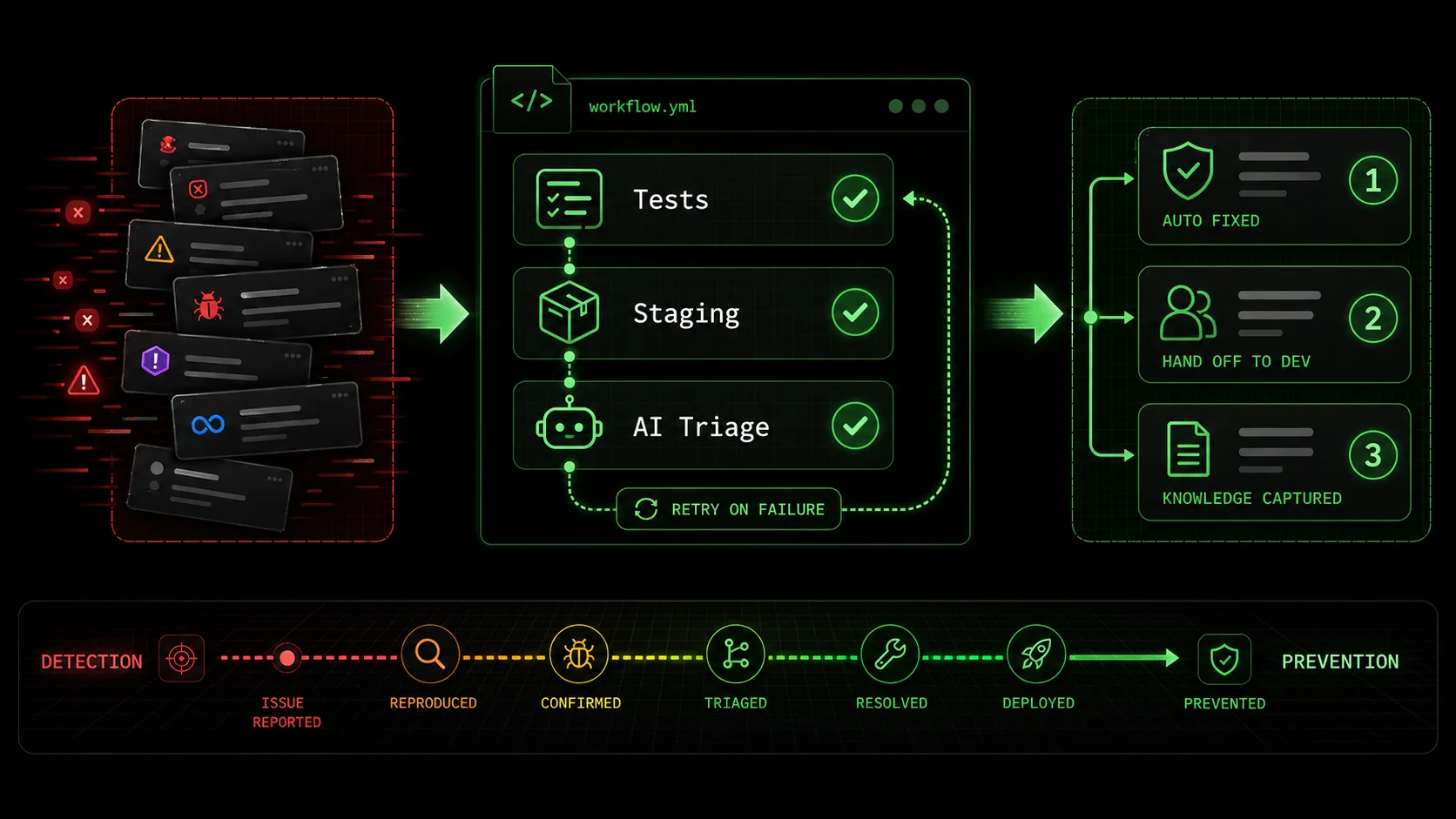
Structuring individual bugs is the foundation. The real power comes when you weave these atomic workflows into your development lifecycle to create a proactive, self-correcting system. Here are advanced tactics to move from fixing bugs to preventing the queue from forming in the first place.
Strategy 1: Automate Bug Triage with Pre-Built Skills The first bottleneck is understanding a new bug. Create a standard "Bug Triage" skill in your workflow tool. This skill isn't for fixing; it's for investigation. Its atomic tasks are:SearchResults.jsx. Likely Cause: Null reference in sorting function. Priority: Medium (breaks core feature for a user subset)."When a new bug is filed, a CI/CD pipeline (like GitHub Actions or GitLab CI) can automatically trigger this triage skill. By the time a developer looks at the ticket, it's no longer a vague complaint; it's a scoped, prioritized, and partially diagnosed issue with a clear starting point for an atomic fix workflow. This cuts the "What's even happening?" phase from hours to minutes.
Strategy 2: Create "Regression Sentinel" Workflows Most frustrating bugs are regressions—things that worked yesterday and broke today. You can fight this by creating AI workflows that act as sentinels after every change. After a pull request is merged and deployed to staging, an automated workflow can:This turns the traditional "test, break, fix" cycle into a "test, break, auto-diagnose" cycle, containing bugs within minutes of introduction rather than days.
Strategy 3: Implement Pattern-Based Fix Templates Over time, you'll see patterns. "Null reference error in JavaScript," "PythonKeyError in dictionary lookup," "SQL query N+1 problem." For each common pattern, build a template atomic workflow. The workflow for a "Null reference error" might be:
* Task 1: Identify the variable that is null or undefined.
* Task 2: Trace back to see why it lacks a value (failed API call, missing initialization, conditional logic flaw).
* Task 3: Apply the appropriate fix: add a null check, ensure initialization, or correct the conditional logic.
* Pass Criteria: Error no longer appears; optional default behavior works.
When your triage skill identifies a bug as matching a known pattern, it can automatically spawn the corresponding template workflow. The AI isn't starting from scratch; it's executing a proven procedure. This is how expertise gets encoded and scaled.
The ultimate goal is to shift left. Instead of a Monday morning queue of user-reported bugs, you have a Friday afternoon report of auto-prevented issues. The AI, guided by your well-designed atomic workflows, acts as a continuous integration guardian, catching and resolving problems before they ever reach a production bug tracker. This is the antithesis of the AI overhead trap -- it's Anthropic's Claude and OpenAI's GPT-4 creating leverage, not debt. If your autonomous refactoring sessions are also causing regressions, see our post-mortem on when Claude Code autonomous refactoring broke our build.
Got Questions About AI Bug Fixing? We've Got Answers
Common questions about using Anthropic's Claude, OpenAI's GPT-4, GitHub Copilot, and Cursor for atomic bug-fixing workflows with pass/fail criteria.
How long does it take to set up these atomic workflows? For a single, common bug pattern, you can design a solid atomic workflow in 15-20 minutes. The initial investment for a library of 5-10 workflows covering your most frequent issues might take a few hours. The payoff is nonlinear. Once built, these workflows can be executed by AI in seconds or minutes, repeatedly, on every similar bug. The time saved on the second and third occurrence of a problem quickly recoups the upfront cost. Start with one high-frequency, high-annoyance bug. What if the AI keeps failing the pass criteria in an infinite loop? This is why the "Fail Action" must include a clear exit condition. A well-designed atomic task doesn't say "try until it works." It says "try up to N times, then escalate." For example, "If the unit test fails, analyze the error, adjust the code, and re-run. Repeat this loop 3 times. If the test fails on the 4th run, stop and output a detailed summary of all attempts and the final error state." This prevents infinite loops and ensures a human is brought in precisely when the AI's pre-defined strategies are exhausted, with full context for a quick resolution. Can I use this for security bugs or critical production issues? For critical, high-risk bugs—especially security vulnerabilities or issues causing widespread outages—the AI should be used primarily in the investigation and diagnosis phases, not the fix deployment phase. You can create an atomic workflow for "Root Cause Analysis" that gathers logs, traces, and potential exploit paths. However, the final fix and deployment should have a human in the loop for validation. The AI's role is to accelerate the understanding of the problem and suggest candidate fixes, but the final approval and deployment decision must remain with a senior engineer due to the high stakes involved. Should I expect the AI to fix 100% of my bugs autonomously? No, and that's not the goal. The goal is to have the AI resolve 100% of the bugs it can fix within clear boundaries, and to cleanly escalate the remaining 10-20% that are novel, architecturally complex, or require creative problem-solving. If your AI workflow can automatically diagnose and fix 80% of your common, repetitive bugs (null pointers, simple API errors, CSS glitches), that's a massive win. It frees you, the developer, to focus your energy on the 20% of bugs that are genuinely interesting and challenging, which is a better use of human intelligence.Ready to transform your bug backlog from a chore into an automated process?
Ralph Loop Skills Generator turns your chaotic Monday morning queue into a structured workflow of atomic tasks. Define clear pass/fail criteria, set iteration loops, and let Claude Code execute until everything passes. Stop pasting prompts and start designing systems. Generate your first bug-fixing skill today.Related guides
- Claude Code Prompt Mistakes Developers Make in 2026 -- common errors that waste Claude and GPT-4 sessions
- The Claude Code Workflow Myths Costing You Hours -- debunking the three biggest AI coding workflow myths
- AI Coding Assistant Perfect Debugging Session Gone Wrong -- when GitHub Copilot and Cursor fixes introduce new bugs
- Context Drift: The Claude Code Productivity Killer -- why long AI sessions lose effectiveness
Other Doved Studio projects
Related tools from the same studio you might find useful:
- Glean: Turn scrolling time into a daily action plan. Capture, process, execute.
- Popout: Create your portfolio in minutes with a single shareable page.
- Larpable: Spot fake founders, guru grifts, and performance entrepreneurship.
- Doved Studio: Studio indie derrière cette app et une dizaine d'autres outils.
ralph
Building tools for better AI outputs. Ralphable helps you generate structured skills that make Claude iterate until every task passes.