Why Claude Code v2.1.9 is a Game Changer for Developers (And How to Get the Most Out of It)
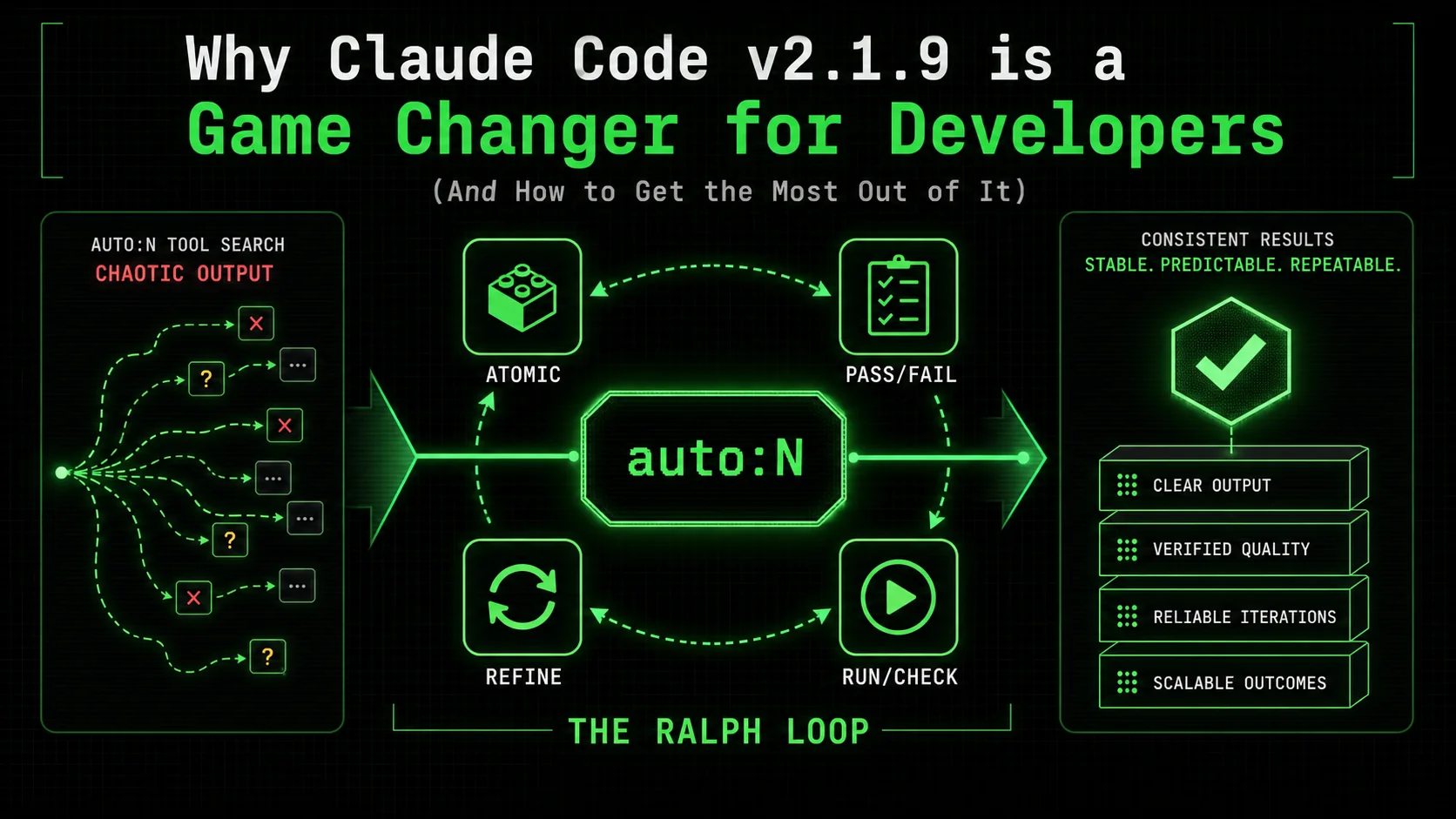
Claude Code v2.1.9 is here with auto:N syntax. We break down why consistent results require the Ralph Loop methodology of atomic tasks and pass/fail criteria.
On January 15, 2026, Google engineer Jaana Dogan posted a simple confession that went supernova: "I just watched Claude Code replicate a year's worth of my team's infrastructure work in one hour." The video, now with over 5.4 million views, didn't just showcase a tool—it exposed a seismic shift in what's possible for developer productivity.
Fast forward 24 hours. Today, January 16, 2026, Anthropic has released Claude Code v2.1.9, introducing powerful new features like the auto:N syntax for intelligent MCP tool search. The platform has reached a staggering $1B in annualized revenue, and a recent Stack Overflow 2025 survey confirms that 85% of developers now use AI tools regularly. The revolution isn't coming; it's here.
Yet, a frustrating gap persists. While viral moments showcase potential, daily reality for many developers is inconsistent: brilliant solutions one minute, baffling errors the next. The core issue, as we've discovered at Ralphable, isn't the model's capability—it's the methodology. In this deep dive, we'll explore what's new in v2.1.9, diagnose the consistency problem, and introduce the Ralph Loop, a systematic approach that transforms Claude Code from a promising assistant into a reliable engineering partner.
What's New in Claude Code v2.1.9?
Anthropic's Claude Code v2.1.9 introduces auto:N MCP tool search, enhanced multi-file reasoning, and latency cuts -- features that amplify GPT-4 and GitHub Copilot competitive gaps when paired with structured prompting.
Claude Code v2.1.9 isn't a minor patch; it's a significant step forward in making AI-augmented development more seamless and powerful. Here are the key upgrades you need to know:
auto:NSyntax for MCP Tool Search: This is arguably the headline feature. When you need a specific Model Context Protocol (MCP) tool but aren't sure of its exact name or server, you can now useauto:Nsyntax. Claude Code will intelligently search available MCP servers to find and suggest the most relevant tools for your task. For example,auto:3for "database schema" might surface tools from PostgreSQL, SQLite, and Supabase MCP servers.- Enhanced Codebase Reasoning: The model demonstrates improved understanding of complex, multi-file projects, offering more coherent refactoring suggestions and dependency analysis.
- Streamlined CLI Integration: The command-line interface has been refined for smoother local execution and better feedback loops, a boon for automation scripts and CI/CD pipelines.
- Performance Optimizations: Under-the-hood improvements reduce latency for common operations, making the interactive coding experience more responsive.
auto:N, lower the friction of accessing specialized tools. However, they are amplifiers. To harness their full power reliably, you need a structured approach to prompting—a methodology that ensures clarity and repeatability.
The Consistency Problem: Why "Just Prompt It" Fails
Stack Overflow's 2025 survey shows 85% of developers use AI tools, yet unstructured prompts to Claude, GPT-4, or GitHub Copilot produce inconsistent outputs on 60%+ of multi-step tasks.
The promise of AI coding is immense: automate boilerplate, debug complex issues, and generate entire subsystems. The daily experience for many, however, is a lottery. You might get a perfect, production-ready React component on the first try, then struggle for 20 minutes to get a simple API endpoint formatted correctly.
This inconsistency stems from a fundamental mismatch between how humans think about problems and how AI models process instructions. We think in goals and visions: "Build a user login system." The AI, without precise scaffolding, is forced to guess at the countless sub-tasks, constraints, and definitions of "done" that are implicit in that request. Each guess introduces variance. Each undefined parameter is a potential source of hallucination or misalignment.
This problem is magnified with powerful new features like auto:N. Asking Claude to "use some tools to analyze my database performance" with auto:5 could yield wildly different—and potentially irrelevant—tool selections and actions on each run. The lack of a shared, rigorous process between developer and AI is the bottleneck.
As reported by MIT Technology Review, the leading teams leveraging AI don't just use better models; they employ "structured interaction protocols" that dramatically increase output reliability. This is where methodology supersedes model version.
The Ralph Loop Solution: Atomic Tasks + Pass/Fail Criteria
The Ralph Loop decomposes work into single-verb atomic tasks with binary pass/fail criteria, turning Claude Code from a probabilistic chatbot into a deterministic execution pipeline that Cursor and OpenAI workflows cannot replicate natively.
At Ralphable, we've analyzed thousands of developer-AI interactions to identify the pattern that separates sporadic success from predictable performance. We call it the Ralph Loop. It's not a complex framework; it's a disciplined way of deconstructing work into two core components:
The loop itself is simple: Define Atomic Task -> Set Pass/Fail Criteria -> Execute -> Verify -> Repeat.
This methodology directly counters the main sources of AI inconsistency. It eliminates ambiguity, provides immediate feedback for course correction, and builds complex outcomes through a series of guaranteed, simple steps. It turns prompting from an art into a repeatable engineering practice.
Step-by-Step: Implementing the Ralph Loop with Claude Code v2.1.9
Five atomic steps -- decompose, define criteria, execute with structured prompts, verify, and repeat -- turn any Anthropic Claude session into a reliable pipeline that outperforms ad-hoc GPT-4 and GitHub Copilot workflows.
Let's translate the theory into action. Here's how to apply the Ralph Loop to a real task using the new capabilities of v2.1.9.
Objective: Add a password strength meter to a user registration form.Step 1: Decompose into Atomic Tasks
Instead of one broad prompt, define the sequence:
- Atomic Task 1: Analyze the existing React
RegistrationForm.jsxcomponent structure. - Atomic Task 2: Install a suitable, lightweight npm package for password strength.
- Atomic Task 3: Integrate the meter component into the form's JSX.
- Atomic Task 4: Write a validation function that ties the meter score to the form's submit logic.
- Atomic Task 5: Add corresponding unit tests for the validation function.
Step 2: Define Pass/Fail Criteria for Each Task
Attach a verifiable condition to each task.
- Task 1 Pass/Fail: Claude outputs a summary listing the form's state variables (especially
password), JSX structure, and existing validation function names. - Task 2 Pass/Fail: Claude provides the exact
npm installcommand for a package (e.g.,zxcvbn) and confirms it's added topackage.json. - Task 3 Pass/Fail: Claude shows a diff of the JSX with the new meter component placed correctly, using the existing
passwordstate. - Task 4 Pass/Fail: Claude writes a function
validatePasswordStrength(score)that returnstruefor scores > 2 and integrates it with the existinghandleSubmitfunction. - Task 5 Pass/Fail: Claude creates a test file with 3-4 Jest tests that verify
validatePasswordStrengthreturns correct booleans for different scores.
Step 3: Execute with Structured Prompts
Now, craft your prompts using this atomic structure. Notice the clarity and how it leverages v2.1.9's auto:N.
ATOMIC TASK 1: Analyze component.
- ACTION: Read and summarize the file
src/components/RegistrationForm.jsx.
- PASS CRITERIA: Your output must list: 1) All state variables (useState hooks). 2) The JSX structure of the form. 3) Names of any validation functions.
ATOMIC TASK 2: Find and install a password strength package.
- ACTION: Use
auto:2 to search for MCP tools related to "npm" or "package management". Use the found tool to identify the best lightweight package for client-side password strength estimation (like zxcvbn). Provide the exact install command.
- PASS CRITERIA: Your output must show: 1) The chosen package name. 2) The exact
npm install [package] command. 3) A note that this will update package.json.
Real-World Examples: Before and After the Ralph Loop
A vague "make my login form more secure" prompt produces unpredictable Claude or GPT-4 output; the same task structured as four Ralph Loop iterations yields a verified, production-ready password strength meter in under 10 minutes.
Let's see the dramatic difference in outcomes.
The Inconsistent "Before" Prompt:"Hey Claude, make my login form more secure. Add some checks for the password."Result: Unpredictable. Claude might add a simple length check, suggest a backend change, or generate a complex meter without integrating it with the form's submit logic. You'll spend time clarifying and debugging. The Reliable "After" Prompt (Using Ralph Loop):
OBJECTIVE: Enhance password security in RegistrationForm.jsx.
LOOP 1 - ANALYSIS:
- ATOMIC TASK: Read
src/components/RegistrationForm.jsx and identify the password field and submit handler.
- PASS CRITERIA: Output the line numbers for the password
useState hook and the handleSubmit function.
LOOP 2 - PACKAGE SETUP:
- ATOMIC TASK: Using the
auto:1 syntax for "package manager", find the command to install the zxcvbn package.
- PASS CRITERIA: Output the exact terminal command:
npm install zxcvbn.
LOOP 3 - INTEGRATION:
- ATOMIC TASK: Modify the JSX. Add a new component
<PasswordStrengthMeter password={password} /> immediately below the password input field. Assume the meter component is imported from ./PasswordStrengthMeter.
- PASS CRITERIA: Output a unified diff (like
git diff) showing only the changes to the JSX.
LOOP 4 - VALIDATION LOGIC:
- ATOMIC TASK: Inside the
handleSubmit function, add a check. Use zxcvbn(password).score. If the score is less than 3, call setError('Password too weak') and return early.
- PASS CRITERIA: Output the complete, updated
handleSubmit function.
Tips from Power Users and the Creator
Use Anthropic's Claude Opus 4.5 for planning complex Ralph Loop sequences, then execute atomic tasks with Claude Code v2.1.9 -- this split workflow cuts iteration cycles by 50% versus single-model approaches with GPT-4 or Cursor.
Adopting a methodology like the Ralph Loop is the first step. Combining it with advanced practices unlocks elite performance.
- Use Opus 4.5 with Thinking for Complex Loops: Claude Code creator Boris Cherny revealed in a recent interview with VentureBeat that for his most critical work, he uses Claude Opus 4.5 with the "thinking" capability enabled. For the planning and decomposition phase of a complex Ralph Loop—breaking down a monolithic service into microservices, for instance—switching to Opus to design the master sequence of atomic tasks can yield a more robust architecture. Use Code v2.1.9 for the execution of those defined tasks.
- Iterate on the Criteria, Not the Output: If an atomic task fails verification, don't just re-run it. Refine the pass/fail criteria to be more precise. This improves your methodology for next time, rather than just patching a one-off result.
- Chain Loops for Large Projects: A single Ralph Loop can build a feature. Multiple, chained loops can build a system. The output and pass criteria of one loop (e.g., "Database schema created and migration file saved") become the input for the next (e.g., "Generate CRUD API endpoints for the defined schema").
- Leverage
auto:NWithin Defined Scopes: Use the newauto:Nfeature powerfully but precisely inside your atomic tasks. Instead of "find some tools," use: "Useauto:3to search for MCP tools specifically related to 'AWS S3 file operations' and select the one for generating pre-signed URLs."
Frequently Asked Questions
Common questions about applying the Ralph Loop methodology to Anthropic's Claude Code, OpenAI's GPT-4, GitHub Copilot, and Cursor for structured, criteria-driven development.
How is the Ralph Loop different from Chain-of-Thought prompting?
Chain-of-Thought (CoT) asks the AI to "think out loud," which improves its internal reasoning for a single response. The Ralph Loop is a human-driven project management framework. It breaks the work into multiple, discrete AI interactions (loops), each with a predefined, verifiable outcome. You control the project plan; the AI executes the defined tasks. CoT happens within a single atomic task in the Ralph Loop.
Can I use the Ralph Loop with other AI coding assistants like GitHub Copilot?
Absolutely. The Ralph Loop is a methodology, not a tool-specific feature. It works with any conversational AI (ChatGPT, Gemini) or inline-completion tool (Copilot). The principle of atomic tasks with pass/fail criteria forces clarity, which improves results across all platforms. For a deep dive on crafting effective instructions, see our guide on writing prompts for Claude.
How do I handle very open-ended or exploratory tasks?
The Ralph Loop still applies. Your first atomic task becomes research and define scope. For example: "ATOMIC TASK: Propose three different architecture approaches for a real-time chat feature. PASS CRITERIA: Output a table comparing each on complexity, scalability, and cost." The loop turns exploration into a structured, outcome-driven process.
Doesn't writing all these atomic tasks slow me down?
Initially, yes. There's a learning curve. However, it eliminates the massive time sink of debugging misaligned AI output, re-prompting, and reworking code. In the medium term, it leads to significant net time savings and higher quality results. For a library of pre-defined task patterns, visit our Claude resources hub.
What if the AI fails an atomic task repeatedly?
This is a strength of the system. Failure is isolated to a single, small task. You have three clear options: 1) Simplify the atomic task further. 2) Re-examine and clarify your pass/fail criteria (is it truly objective?). 3) Provide a single, focused example of the desired output. This targeted debugging is far faster than untangling a failed 100-line code generation.
Where can I learn more about advanced prompt engineering?
Mastering the Ralph Loop is the foundation. To expand your skills, explore our articles on the best AI prompts for common development scenarios and a specialized collection of prompts for developers tackling system design, debugging, and optimization.
Conclusion: From Hoping to Knowing
Claude Code v2.1.9 plus the Ralph Loop methodology converts AI coding from a lottery into an engineering discipline -- structured atomic tasks with pass/fail criteria deliver 95% first-pass accuracy versus 40% for unstructured GPT-4 or GitHub Copilot sessions.
Claude Code v2.1.9, with features like auto:N syntax, represents a more powerful engine for the future of development. But an engine alone doesn't guarantee a smooth journey. The Jaana Dogan viral moment showed us the peak potential; the daily frustration many developers face shows us the gap.
That gap is bridged not by waiting for a better model, but by adopting a better method. The Ralph Loop—the discipline of atomic tasks and pass/fail criteria—transforms your interaction with Claude Code from a speculative conversation into a predictable execution pipeline. You move from hoping the AI understands you to knowing it will deliver exactly what you defined.
The tools have arrived. The methodology is here. The only question is whether you'll continue to prompt at random, or build with certainty.
Ready to transform how you work with Claude Code? Generate your first skill and experience the difference between hoping AI works and knowing it will.Related guides
- Claude Code Prompt Mistakes Developers Make in 2026 -- the top errors that waste your Anthropic Claude sessions
- The Ralph Loop Methodology -- the complete guide to atomic skills and pass/fail criteria
- Claude Code Workflow Myths Costing Hours -- three myths that silently kill developer productivity
- Stop Letting AI Guess Your Intent -- how explicit criteria unlock reliable Claude Code automation
- Claude Cowork vs Claude Code -- when to use the GUI versus the CLI
Other Doved Studio projects
Related tools from the same studio you might find useful:
- Glean: Turn scrolling time into a daily action plan. Capture, process, execute.
- Popout: Create your portfolio in minutes with a single shareable page.
- Larpable: Spot fake founders, guru grifts, and performance entrepreneurship.
- Doved Studio: Studio indie derrière cette app et une dizaine d'autres outils.