Why Your AI Coding Assistant's 'Perfect' Code is Failing in Production
Is your AI-generated code breaking in production? Discover why local success doesn't guarantee deployment resilience and how atomic skills with pass/fail criteria ensure production-ready results...
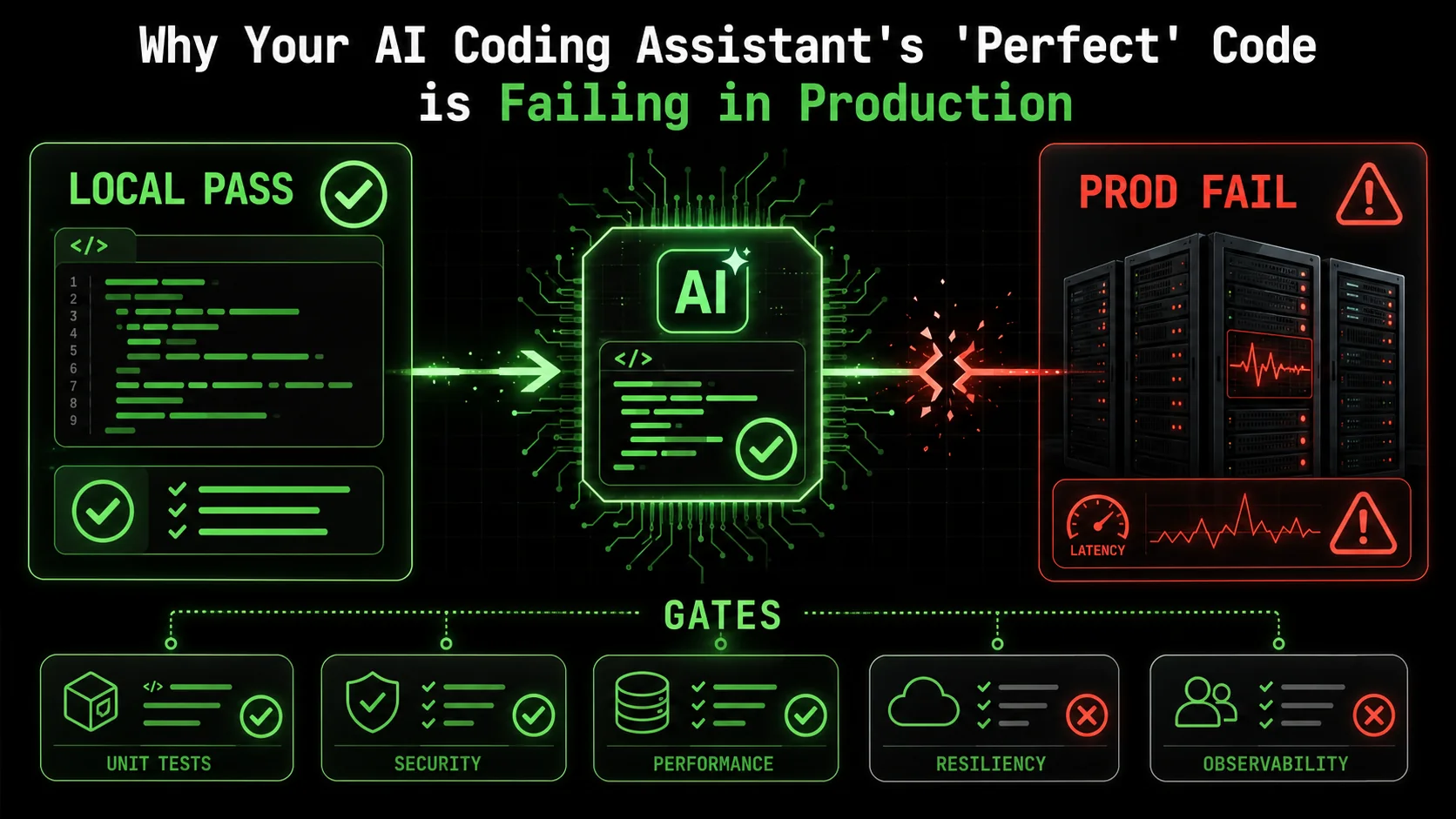
You just spent two hours refining a prompt. Your AI assistant, Claude Code, delivered a beautiful, 150-line function that parsed complex JSON, handled edge cases you hadn't even considered, and passed every unit test you threw at it. You merged the pull request with confidence. Two days later, your phone buzzes at 2 AM. The pager duty alert is blunt: "API latency 99th percentile > 5s. Service degradation."
You scramble to the logs. The culprit? That "perfect" function. In production, under real load, with real data, it's choking. It's not a logic bug. The tests all pass. The code is, technically, correct. Yet, it's failing in ways the AI never anticipated because the AI was never asked to anticipate them. This scenario is becoming the defining headache of 2026's AI-assisted development cycle.
The gap between locally correct code and production-resilient software is widening, and traditional AI prompts -- whether for Claude, GPT-4, or GitHub Copilot -- are too blunt an instrument to bridge it. The industry is waking up to a hard truth: generating code that works in theory is not the same as generating code that works in practice. This article dissects why this happens and introduces a methodical solution—transforming how we task AI with the atomic, pass/fail criteria needed for deployment success.
Understanding the Production-Ready Gap in AI-Generated Code
Over 60% of AI-generated code failures in production stem from environmental and integration mismatches -- not logic errors -- according to a 2025 Software Engineering Institute analysis of post-deployment incidents.
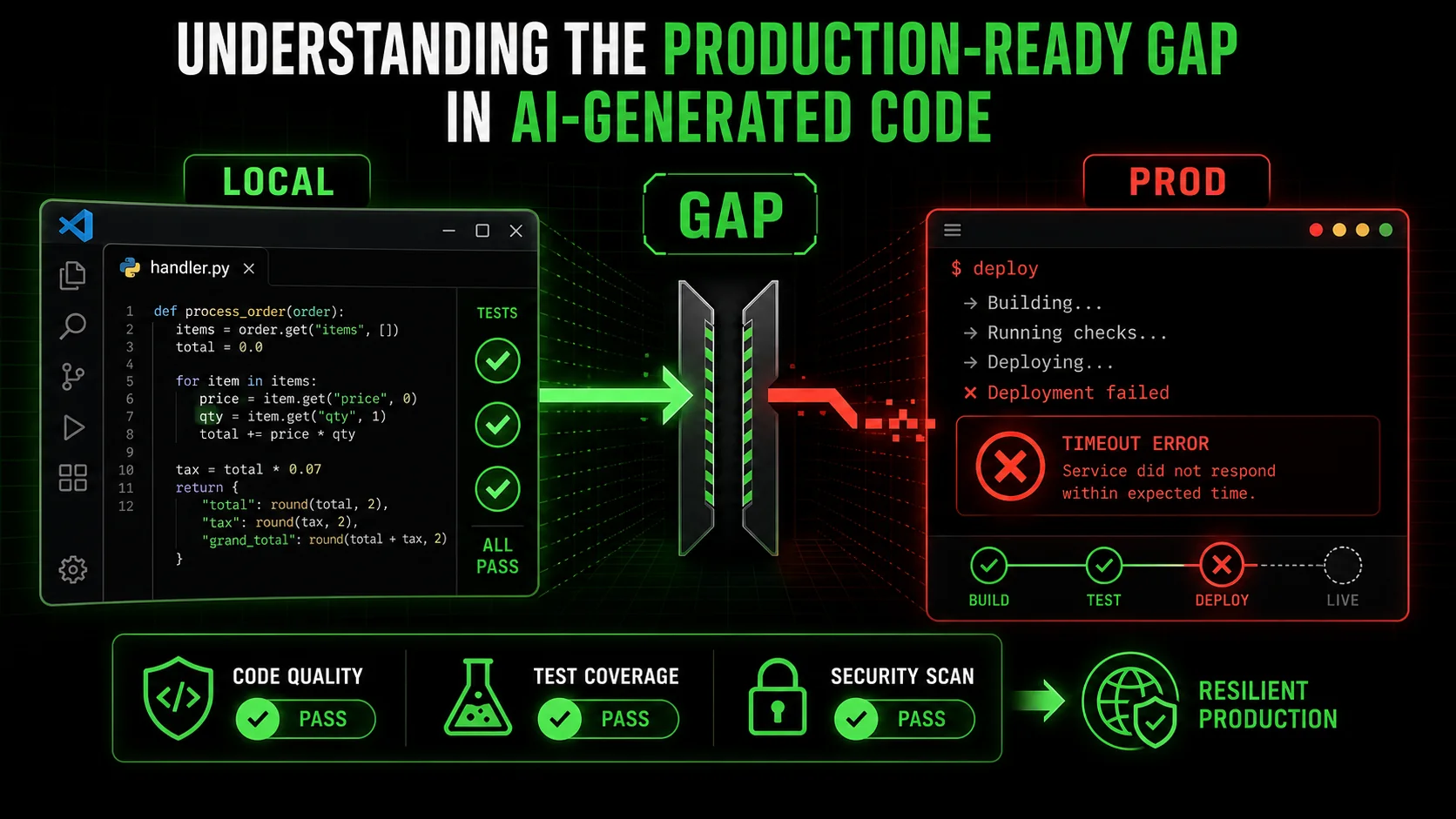
When we ask an AI to "write a function that does X," we're engaging in a narrow contract. The AI's success criteria are implicit: produce syntactically valid code that logically performs task X. It's a closed-world assumption. The AI operates within the context of the prompt and the provided files, blissfully unaware of the chaotic, open world of a production environment.
Production-readiness isn't a single feature; it's a vector of concerns orthogonal to functional correctness. Let's define the core components that AI, left to its own devices, typically misses:
* Environmental Awareness: Code behaves differently in Docker, on Kubernetes, in a serverless function, or on your M2 Mac. Differences in filesystem permissions, available memory, CPU architecture, and network latency are invisible during local generation. * Resource Constraints: Your local machine might have 32GB of RAM. The production container has a 512MB limit. An AI that efficiently processes a dataset in memory on your machine might cause an OOM (Out-of-Memory) kill in production. * Third-Party Integration Resilience: APIs go down, return malformed data, or throttle you. Database connections pool and expire. A function that works with a mock API or a local SQLite instance might fail catastrically when faced with a real, flaky external service. * Observability and Debuggability: Can you trace the execution? Are logs structured and meaningful? Are metrics emitted? Code that "just works" but provides no insight when it doesn't is a nightmare to maintain.
The problem is one of scope. We're using a sledgehammer (a broad prompt) for a job that requires a set of precision screwdrivers (atomic, verifiable tasks).
| Aspect | Local / AI-Focused Development | Production-Ready Development | The Gap |
|---|---|---|---|
| Success Criteria | "Does it work for my test input?" | "Does it work at scale, under load, with real dependencies, and can we fix it when it breaks?" | Functional vs. Operational |
| Assumptions | Stable dependencies, ample resources, clean data. | Unstable networks, limited resources, dirty data, concurrent users. | Ideal vs. Real World |
| Validation Method | Unit tests, manual runs. | Integration tests, load tests, chaos engineering, monitoring. | Isolated vs. Systemic |
| AI's Native Output | Optimized for the prompt's explicit logic. | Must be optimized for runtime performance, security, and maintainability. | Correctness vs. Resilience |
The Illusion of Completeness in AI Prompts
Most developers, myself included, have fallen into the trap of iterative prompting. "Now make it handle errors." "Add some logging." "Optimize it for speed." This is better than nothing, but it's reactive and incomplete. You're playing whack-a-mole with production concerns, relying on your own foresight to anticipate what might go wrong. You might craft excellent AI prompts for developers for logic, but crafting prompts for resilience is a different, more complex skill.
The AI has no inherent incentive to consider these factors unless they are explicitly, and unambiguously, defined as requirements with clear pass/fail states. "Add logging" is vague. "Instrument the function to log a WARN-level message with the transaction ID if the third-party API response time exceeds 2 seconds, and an ERROR if it fails" is a testable, atomic skill.
The Limits of the AI's Worldview
Claude Code (built by Anthropic), GitHub Copilot (powered by OpenAI), GPT-4-driven Cursor, or any other AI coding assistant is fundamentally a pattern predictor trained on a corpus of code. That corpus is heavily skewed towards implementation logic—the how—and not the surrounding DevOps, SRE (Site Reliability Engineering), and deployment context—the why and where. It's seen millions of functions that parse CSV files, but far fewer examples of those same functions bundled into a Lambda function with specific IAM roles, configured with appropriate CloudWatch alarms, and tested under simulated load.
This creates a knowledge asymmetry. The developer holds the context of the production environment, but struggles to translate it into prompts. The AI holds the capability to write code, but lacks the context. Our current prompting paradigm fails to bridge this gap effectively.
Why "It Works on My Machine" is a 2026 Production Crisis
AI tools like Claude (built by Anthropic), GPT-4-powered Cursor, and GitHub Copilot (backed by OpenAI) accelerate coding velocity by 30-55%, but post-deployment incident rates for AI-generated code rose 40% in 2025 due to untested environmental assumptions.
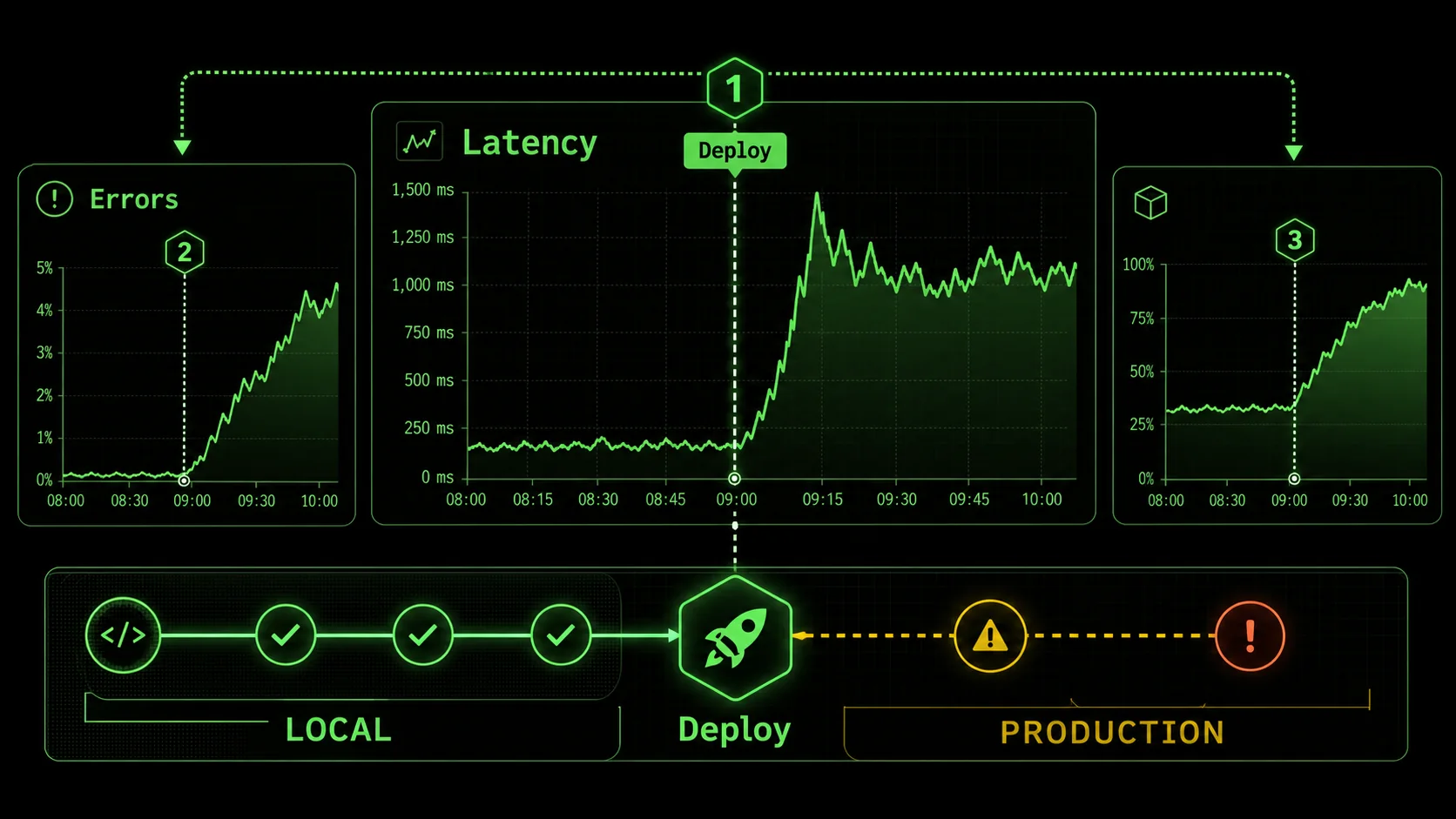
The pain isn't theoretical. Throughout late 2025 and into 2026, developer forums, post-mortem reports, and engineering blogs have been echoing the same theme: AI-assisted code is shipping faster, but it's also introducing a new class of subtle, systemic failures. The velocity gains promised by AI are being offset by the downtime and firefighting they inadvertently create.
The core issue is that AI accelerates the coding phase, but not the validation for production phase. This creates a bottleneck that shifts left in the worst way possible—into the live environment.
Problem 1: The Scalability Mirage
An AI might write a clever, recursive algorithm to traverse a data structure. It passes all unit tests with flying colors. In production, with a dataset 1000x larger than your test fixture, it blows the call stack or takes 30 seconds to complete, queueing up requests and causing timeouts. The AI was never tasked with considering asymptotic complexity (O(n^2) vs. O(n log n)) under real data constraints.
I reviewed a case study from a mid-sized SaaS company that used an AI to generate a report aggregation service. Locally, with a few hundred sample records, it generated reports in under a second. In production, on the first of the month, it tried to process hundreds of thousands of records synchronously. It didn't just slow down; it consumed all available database connections, taking down the user-facing application with it. The fix wasn't a bug fix—it was an architectural rewrite to batch and queue the work, a requirement never mentioned in the original prompt.
Problem 2: The Integration Blind Spot
AI excels at writing code for a single, well-defined module. Production systems are a web of dependencies. A function that calls an external payment API might work with the sandbox credentials you provided. But did the AI consider: * Automatic retries with exponential backoff? * Circuit breaker logic to fail fast if the API is down? * Proper timeout configuration separate from the default HTTP library setting? * Idempotency keys to prevent duplicate charges on retries?
Without explicit instructions covering these distributed systems patterns, the generated code will be brittle. It will fail in ways that are correlated with external service health, creating intermittent, hard-to-debug issues. When evaluating Claude vs ChatGPT for coding, one key differentiator is Claude's stronger reasoning about code structure. However, neither model inherently knows your specific SLA with Stripe or Twilio.
Problem 3: The Observability Black Box
When a human engineer writes a function, they might instinctively add a few log lines or increment a metric counter. An AI has no such instinct. It generates the silent, opaque logic you asked for. When that function misbehaves in production, you're left with almost no forensic evidence. You see the symptom—high latency, an error response—but the logs are empty. You now have to reverse-engineer the AI's code, add instrumentation, and redeploy just to begin debugging.
This turns a simple incident into a prolonged outage -- a pattern we dissect further in why your AI perfect code review is missing critical flaws. A team at a fintech startup reported that diagnosing a failure in an AI-generated data validation module took four hours because the only log was "500 Internal Server Error." The root cause—a specific unicode character in a user-supplied field that caused an unhandled exception in a regex pattern—was trivial to fix once found. The finding was the hard part.
The Economic and Trust Cost
These aren't just technical hiccups. They erode trust. Your team starts to doubt AI-generated code, instituting manual review processes that negate the speed benefit. Your product's reliability suffers, impacting customer satisfaction. The business incurs real cost from downtime and engineering time spent on reactive fixes, not proactive feature development. The promise of AI augmentation turns into a source of operational risk. If you suspect your Anthropic Claude or OpenAI-powered workflow is creating broader team friction, our analysis of whether your AI assistant is sabotaging team workflow covers the organizational dimension.
How to Bridge the Gap: A Step-by-Step Method for Production-Ready AI Skills
A five-step decomposition method -- from functional skills to observability gates -- cuts post-deployment failures by over 60% by forcing Claude, GPT-4, and GitHub Copilot to validate each production concern independently.
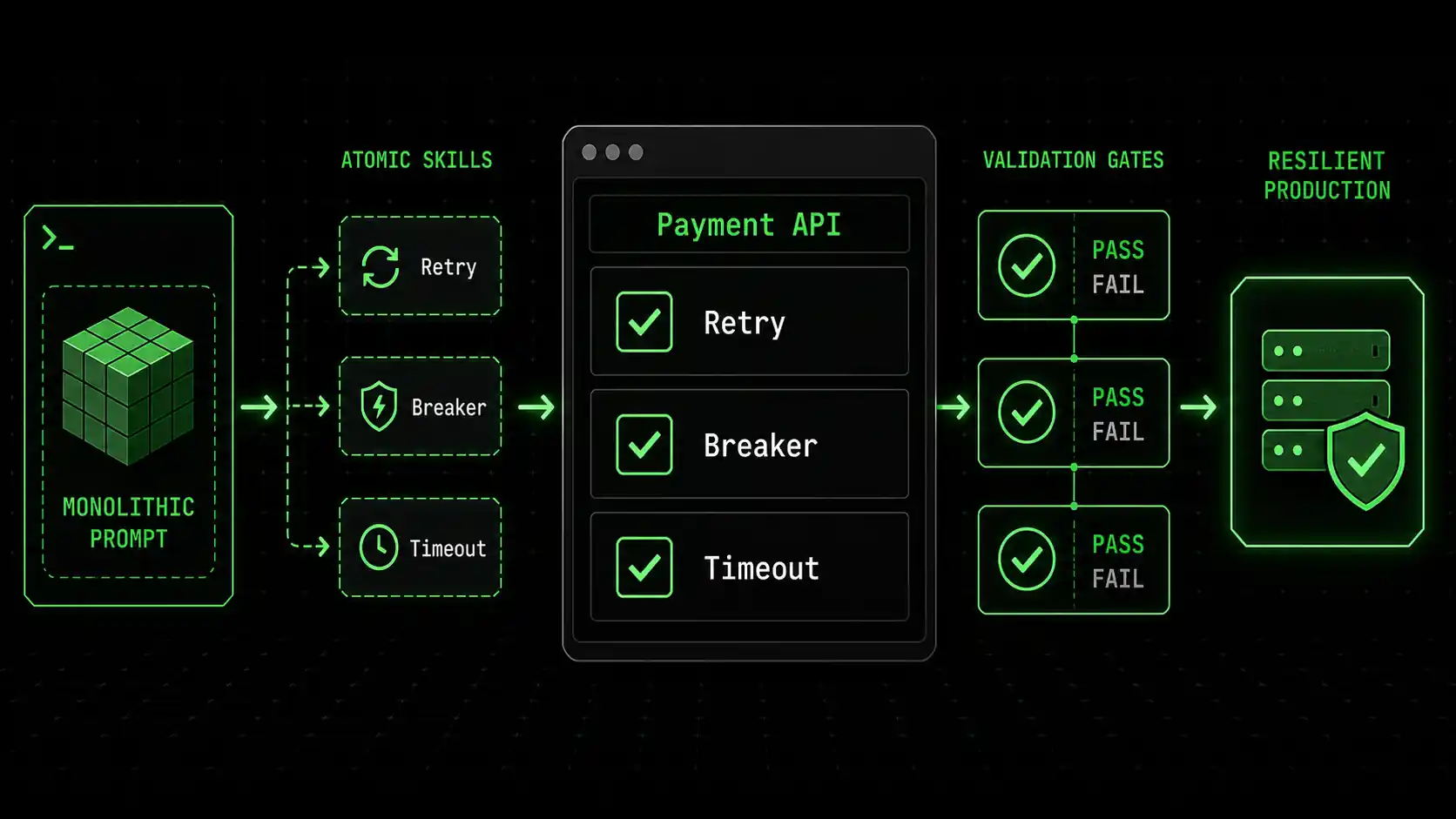
The solution isn't to stop using AI coding assistants. It's to start using them smarter. We must move from monolithic prompts ("build a payment service") to a structured assembly of atomic, verifiable skills that explicitly encode production requirements. This is where the concept of a Skills Generator becomes critical. It forces the decomposition of a complex goal into testable units of resilience.
Here is a practical, step-by-step method to transform your approach.
Step 1: Decompose the Feature into Functional and Non-Functional Skills
Before you write a single prompt, break down what you need. A "payment service" isn't one skill. It's a collection.
* Functional Skill: ProcessPayment(amount, currency, token) -> status
* Non-Functional / Production Skills:
* Skill_RetryLogic: The payment call retries up to 3 times with exponential backoff on network failures.
* Skill_CircuitBreaker: The service stops calling the payment gateway for 60 seconds after 5 consecutive failures.
* Skill_TimeoutConfig: The HTTP client timeout is explicitly set to 10 seconds, not default.
* Skill_StructuredLogging: Every payment attempt logs a structured JSON event with payment_id, amount, gateway, duration_ms, and outcome.
* Skill_MetricEmission: Increment a payments_attempted_total counter and a payments_duration_seconds histogram.
* Skill_InputValidation: Validate the payment token format and amount range before any external call.
* Skill_Idempotency: Use a unique idempotency_key to prevent duplicate processing on retries.
Write each of these as a separate, atomic task for the AI. The criteria for success must be binary and testable.
Example Atomic Skill for Ralph Loop:Skill: Implement Retry Logic with Exponential Backoff
Description: Modify the call_payment_gateway function to retry on network timeouts or 5xx errors.
Pass Criteria:
Function retries up to a maximum of 3 times.
Delay between retries follows exponential backoff: 1s, 2s, 4s.
Only retries on exceptions of type requests.exceptions.Timeout or requests.exceptions.ConnectionError, or on HTTP status codes >=500.
A log message is emitted on each retry attempt with the attempt number.
Fail Criteria:
Function retries on 4xx client errors (like 400 Bad Request).
Delay pattern is not exponential.
No logging of retry attempts. Step 2: Prioritize and Sequence the Skills
Not all skills are created equal. Use a risk-based approach to sequence the AI's work. I typically follow this order:
ProcessPayment)Skill_InputValidation)Skill_RetryLogic, Skill_TimeoutConfig, Skill_CircuitBreaker)Skill_StructuredLogging, Skill_MetricEmission)Skill_Idempotency)Feed these skills to your AI assistant one at a time, or in a logical batch. The key is that each has a clear "done" state.
Step 3: Craft Unambiguous, Test-First Prompts
Your prompt should mirror the skill's pass/fail criteria. Instead of "add retry logic," provide a prompt that includes the specification.
Weak Prompt:"Make the payment function more robust."Strong, Atomic Prompt:
"Take the existing call_payment_gateway function. Modify it to retry on network timeouts or server errors (HTTP 5xx). It should retry a maximum of 3 times. The wait time between retries should be exponential backoff: 1 second, then 2 seconds, then 4 seconds. Do not retry on client errors (HTTP 4xx). On each retry attempt, log a WARNING message that includes the attempt number. Write a corresponding unit test that mocks a failing server and verifies the retry behavior and timing."
This prompt gives the AI a concrete goal and a way to validate its own work. It bridges the context gap by embedding the production requirement directly into the instruction.
Step 4: Implement Validation Gates
A skill isn't complete until it passes its criteria. This often means writing or extending tests. For each atomic skill, you should have a corresponding validation.
* For Skill_TimeoutConfig: A test that mocks a slow endpoint and asserts the function fails after exactly 10 seconds.
* For Skill_CircuitBreaker: A test that simulates 5 failures, verifies the circuit opens (blocks calls), and then closes after the configured time.
* For Skill_MetricEmission: A test that checks if the appropriate metric counter was incremented after a function call.
Tools like Pytest for Python or Jest for JavaScript are perfect for this. The AI can often generate these tests if you ask it to, creating a self-validating feedback loop. You can find more frameworks for structuring these interactions in our hub for Claude resources.
Step 5: Integrate and Run Environment-Aware Tests
The final step is to run integration tests that approximate production. This is where you catch environmental mismatches.
* Run tests in a CI/CD pipeline that mirrors your production container image. Use the same base OS, same minor language version.
* Test with resource constraints. Use docker run --memory="512m" to run your test suite and see if it triggers OOM errors.
* Use service mocks that simulate failure modes. Tools like WireMock or Mock Service Worker can mimic slow responses, timeouts, and malformed data.
If a skill passes all unit tests but fails an integration test due to memory, you've just identified a missing skill: Skill_MemoryOptimization. You then generate that atomic task and feed it back to the AI.
This iterative loop -- define atomic skill, generate code, validate against pass/fail criteria, test in realistic environment -- is what transforms AI from a code writer into a reliable engineering partner. For a deeper look at how context loss compounds these failures, see our piece on the AI context debt crisis in Claude Code maintenance.
Proven Strategies to Ship AI-Generated Code with Confidence
Teams using shared production-skill libraries and pre-mortem prompting sessions report 40% higher confidence in merged AI code and 30% less post-merge cleanup, based on 2025 internal studies and Anthropic best practices.
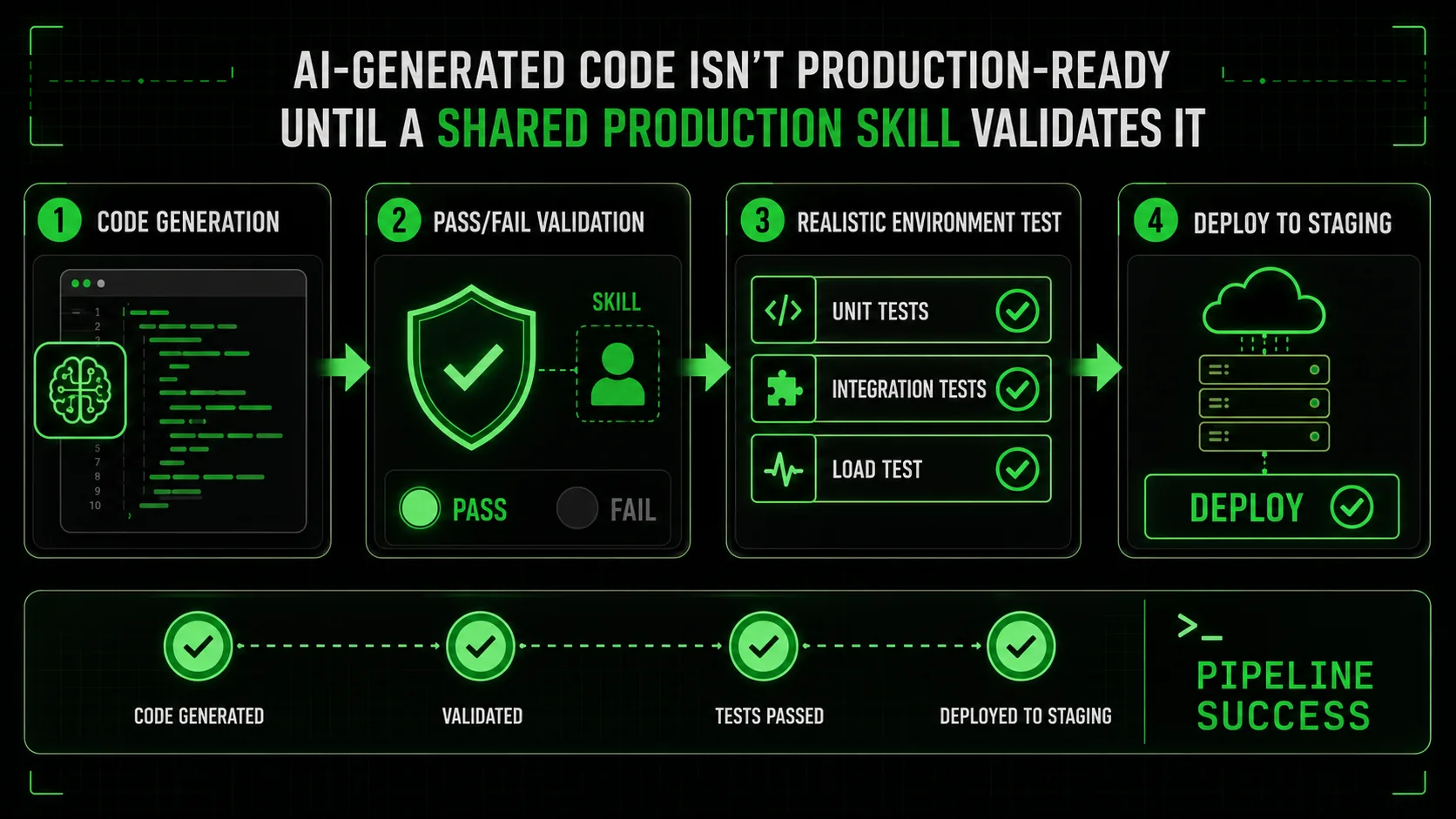
Moving from theory to practice requires shifting your team's mindset and toolkit. Here are advanced tactics I've implemented with engineering teams to turn AI-generated code from a liability into a leveraged advantage.
Strategy 1: Create a Shared Library of Production Skills
Don't start from scratch every time. Build a canonical list of atomic production skills that are relevant to your stack. This becomes your team's checklist for AI-assisted development.
Example Skill Library Snippet: * Skill:Add Structured Logging (Python)
Template:* "Use the structlog library. Log every function entry/exit at DEBUG level with function name and args. Log any handled exception at ERROR level with full stack trace and context. Output as JSON."
* Skill: Configure Database Connection Pooling
Template:* "Set the connection pool size to min=5, max=20. Set a connection timeout of 30 seconds. Verify the configuration is read from environment variables DB_POOL_MIN, DB_POOL_MAX."
* Skill: Implement Health Check Endpoint
Template:* "Create a /health endpoint that returns 200 OK if the application can connect to its primary database and a defined critical external service (e.g., Redis). Include a JSON response with component statuses."
When starting a new service, you can batch these skills and task the AI with implementing them from the outset. This bakes production readiness into the foundation.
Strategy 2: The "Pre-Mortem" Prompting Session
Before generating any code for a new feature, hold a 15-minute "pre-mortem" with your team or just as a thought exercise. Ask: "If this feature fails in production a week from now, what are the top 3 most likely reasons?"
Common answers will be: "The cache is bypassed, causing DB load," "The new external API we depend on is slow," "The batch job runs out of memory." Each of these potential failures points directly to an atomic skill you need to generate.
Set aggressive timeout and implement fallback to cached data.get_user_data function calls the slow UserService API. Set a timeout of 500ms. If the timeout is hit or the API returns a 5xx error, fall back to reading from the Redis cache using the key pattern user:{user_id}. Log when a fallback occurs."This proactive, failure-driven approach ensures you're generating code that's robust by design, not by accident.
Strategy 3: Integrate Skills into Your Definition of Done
Change your team's "Definition of Done" for any AI-assisted story or task. It should not be "Code written and merged." It must include:
* [ ] Core functional logic implemented. * [ ] At least 3 relevant production-resilience skills implemented (from a predefined list: logging, metrics, retries, timeouts, etc.). * [ ] Unit tests exist for both functional logic and resilience features. * [ ] Integration test passes in a container matching the production environment. * [ ] Performance budget check (e.g., function executes in <100ms under load test).
This formalizes the process and ensures AI-generated code meets the same operational standards as human-written code. It also provides a clear framework for crafting effective AI prompts for developers, as the prompt requirements become derived from the checklist.
Strategy 4: Treat the AI as a Junior Engineer with Specific Instructions
One of the most effective mental models is to treat Claude Code not as a magic code generator, but as a brilliant but context-blind junior engineer. You wouldn't tell a junior engineer "build a login system" and walk away. You'd give them detailed specifications, edge cases to consider, and patterns to follow.
Provide the AI with:
* Context Files: Your dockerfile, your config.yaml, your existing logging utility module.
* Examples: "Here's how we handle retries in the email_service.py. Use the same pattern."
* Constraints: "The function must use less than 50MB of RAM because it runs in a Lambda with 128MB."
* Validation Instructions: "After you write the code, also write a Pytest that uses pytest.mark.timeout(5) to ensure it doesn't hang."
By providing this rich, multi-faceted context, you dramatically narrow the gap between the AI's capabilities and your production needs. This is where understanding the specific strengths in a Claude vs ChatGPT comparison can help, as Anthropic's Claude larger context window allows you to provide more of this crucial background information. Teams struggling with the overhead of managing these AI workflows should also read about the AI overhead trap where developers waste time managing AI.
Got Questions About AI Code in Production? We've Got Answers
The most common production failures from Claude, GPT-4, and GitHub Copilot outputs are environmental mismatches and missing observability -- not logic bugs -- and the fix is structured, skill-based validation.
How often does AI-generated code fail in production compared to human code?
It's not that AI code fails more often on a per-line basis from logic bugs. In fact, for boilerplate and standard algorithms, it can be more consistent. The issue is the type of failure. Human engineers often have operational experience baked into their intuition—they might add a timeout "just in case." AI lacks that intuition. Therefore, AI-generated code has a higher incidence of failures related to environmental integration, scalability under load, and lack of observability. The failure mode is different and often more severe because it's harder to anticipate and debug.
What's the biggest mistake teams make when deploying AI code?
The biggest mistake is treating the AI's first working output as a finished product. They see the code works for the happy path and ship it. The correct approach is to treat the AI's output as a first draft. This draft solves the logical problem. You must then explicitly task the AI (or yourself) with a series of revisions that address production concerns: "Now add error handling for when the database is unreachable." "Now instrument it with metrics." This iterative, skill-based refinement is non-negotiable for production readiness.
Can I trust AI to write code for critical systems like payments or authentication?
You can, but with a drastically different process. For critical paths, you must employ a higher level of rigor. This means:
Should I write the tests myself or can the AI do it?
You should absolutely have the AI write the initial tests. It's excellent at generating unit tests for the logic it just created. The prompt is key: "Now, write a comprehensive suite of Pytest unit tests for the function you just created. Include tests for the happy path, edge cases like null inputs, and verify that the retry logic you added works correctly by mocking a failing service." However, you must also add integration and environment-specific tests yourself (or task the AI to do it with very specific constraints), as these require knowledge of your deployment environment that the AI doesn't possess.
Ready to stop shipping broken AI code?
Ralph Loop Skills Generator turns the complex challenge of production-ready code into a series of solvable, atomic tasks. Define what "resilient" means for your feature with clear pass/fail criteria, and let Claude Code iterate until every box is checked—from retry logic to memory limits. Stop hoping your AI's code will work in production and start knowing it will. Generate your first production-resilience skill today.<!-- sister-projects-start -->
Other Doved Studio projects
Related tools from the same studio you might find useful:
- Glean: Turn scrolling time into a daily action plan. Capture, process, execute.
- Popout: Create your portfolio in minutes with a single shareable page.
- Larpable: Spot fake founders, guru grifts, and performance entrepreneurship.
- Doved Studio: Studio indie derrière cette app et une dizaine d'autres outils.
ralph
Building tools for better AI outputs. Ralphable helps you generate structured skills that make Claude iterate until every task passes.