Is Your AI Assistant Secretly Sabotaging Your Team's Workflow?
Is your team's AI usage creating more chaos than clarity? Discover how standardized atomic skills in Claude Code can eliminate workflow fragmentation and align your entire team's output.
ralph
(Updated March 21, 2026)
23 min read
team collaborationworkflow managementstandardizationClaude CodeAI productivity
Is Your AI Assistant Secretly Sabotaging Your Team's Workflow?
Last week, a developer friend sent me a Slack message that perfectly captures a new kind of workplace friction. "My PR got rejected again," he wrote. "The senior dev said my AI-generated helper function uses a completely different error-handling pattern than the rest of the codebase. I just asked Claude to 'write a function to validate user input,' and it gave me something that works. But now I have to rewrite it." His AI assistant did exactly what he asked. It also inadvertently introduced a style inconsistency that broke his team's established workflow.
This isn't an isolated bug. It's a systemic symptom of what I'm calling AI workflow fragmentation. As individual team members adopt powerful tools like Claude Code, they're solving their own micro-problems with incredible speed. The unintended consequence is a creeping misalignment at the macro level. One engineer's AI writes Python with verbose logging; another's produces terse, functional-style code. A product manager's AI drafts user stories with a "jobs-to-be-done" framework, while a designer's AI generates component specs using a different atomic design vocabulary. The outputs work in isolation but clash in integration, creating hidden drag on velocity, review cycles, and product cohesion.
The promise of AI was to make us smarter and faster, not to turn our collaborative projects into a tower of Babel built by well-intentioned, isolated oracles. This article dissects the quiet sabotage of fragmented AI use and outlines a practical solution: moving from personal prompt libraries to standardized, atomic, and verifiable team skills.
Understanding AI Workflow Fragmentation
Uncoordinated use of Claude, GPT-4, Cursor, and GitHub Copilot across a team creates output, process, and verification inconsistencies -- a Carnegie Mellon study found a 40% higher defect rate in teams without standardized AI protocols.
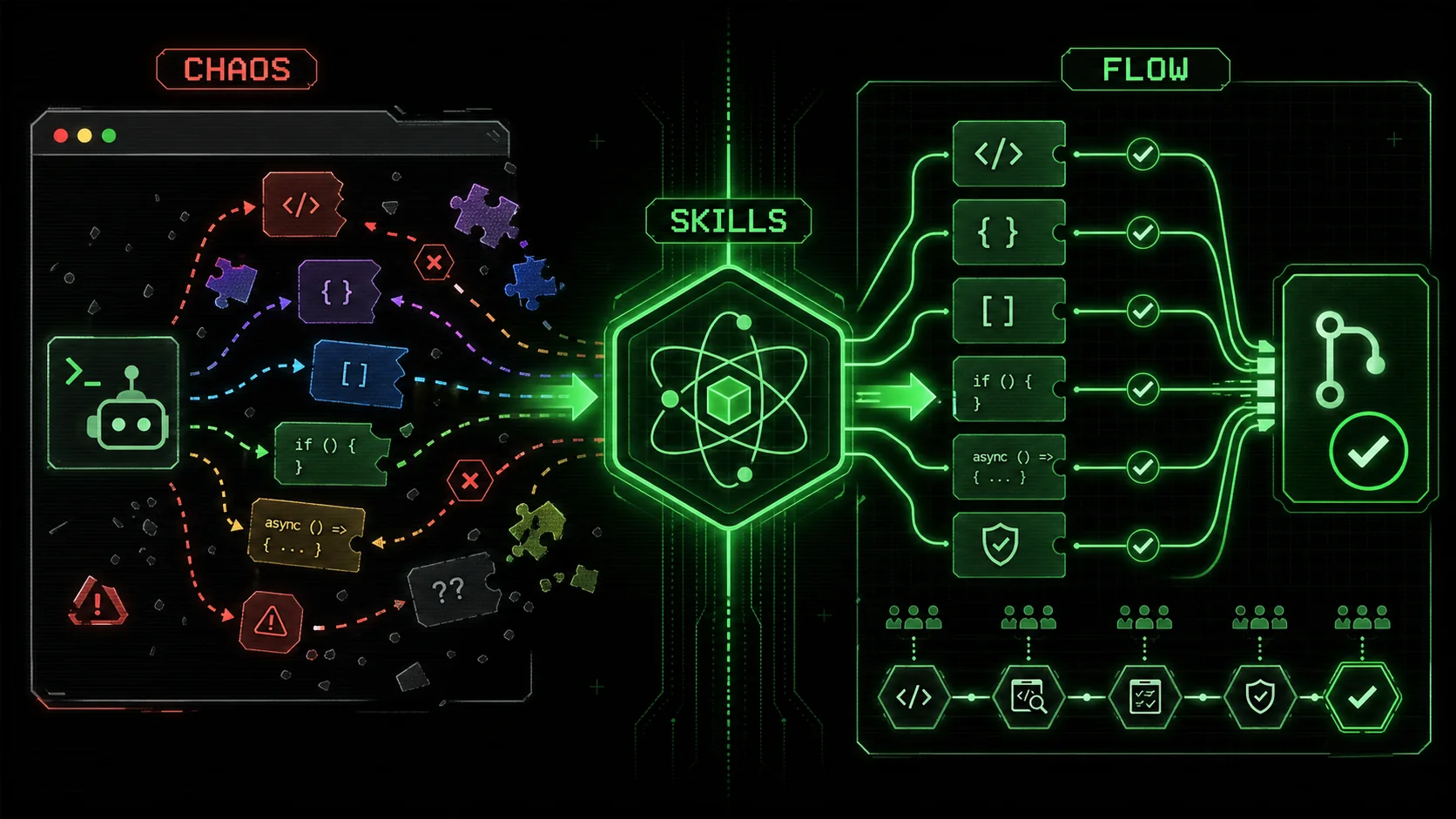
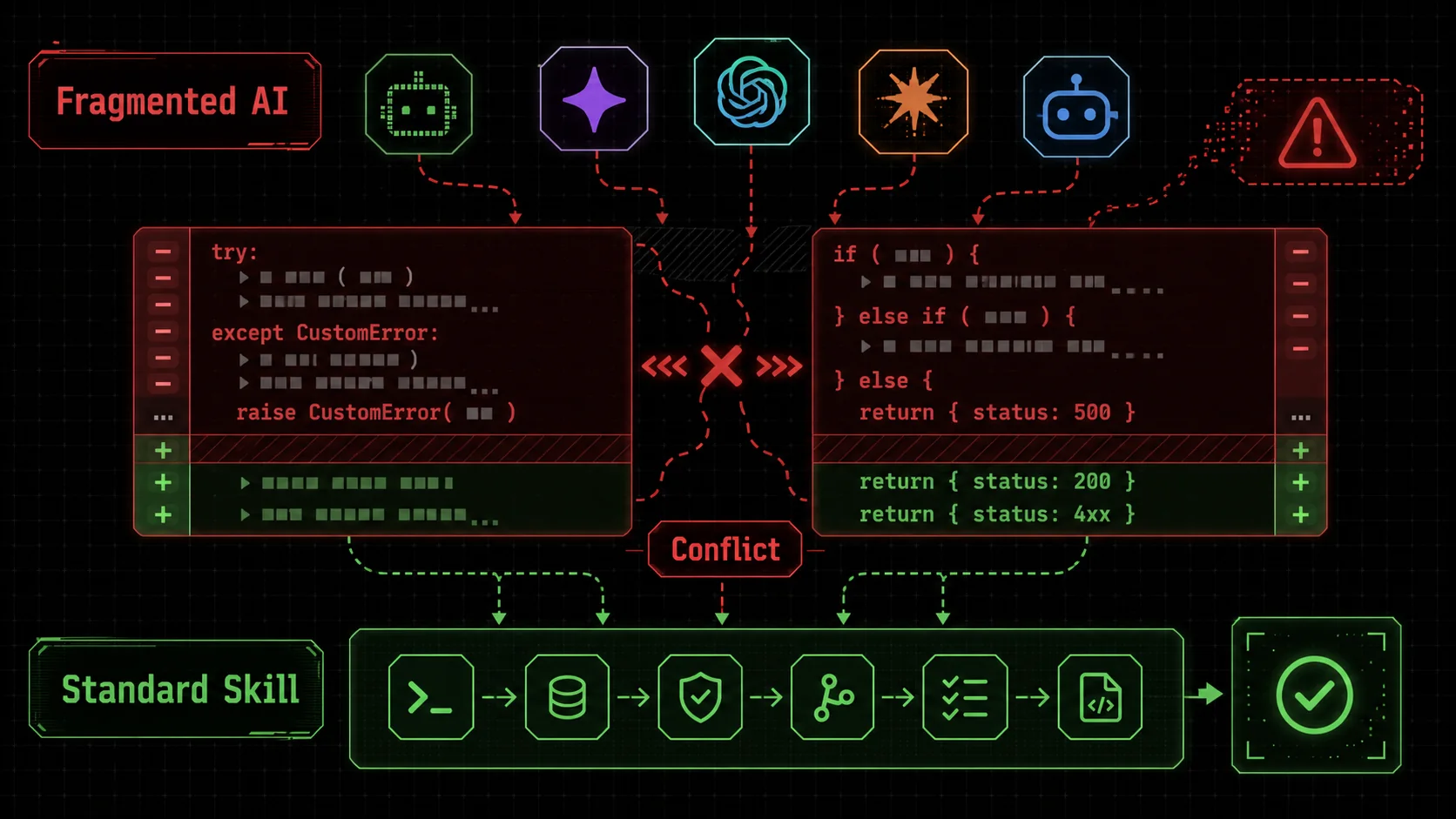
try/except with custom exception classes and another uses if/else with status code returns, highlighted in red conflict markers." width="768" height="432" class="w-full rounded-lg shadow-md" loading="lazy" />Screenshot of a GitHub pull request interface showing a code diff where one block uses try/except with custom exception classes and another uses if/else with status code returns, highlighted in red conflict markers.. The diff is highlighted in red and green, with a conflict marker visible.)
AI workflow fragmentation occurs when individual, uncoordinated use of AI assistants within a team leads to inconsistent processes, conflicting outputs, and broken integrations. It's the digital equivalent of every carpenter on a job site using a different brand of tape measure—some in inches, some in metric, some with unique markings. Each person can build their section perfectly, but when you try to assemble the house, nothing fits.
The core of the problem isn't the AI's capability; it's the lack of a shared specification. When you prompt an AI, you're essentially writing a one-time, informal contract for a task. "Write a function to validate an email" leaves a thousand details undefined: Should it return a boolean or raise an exception? Should it check for disposable email domains? What's the regex pattern? The AI makes a choice, often based on the most common pattern in its training data. Your teammate's AI, given a similar but subtly different prompt, makes a different choice.
Let's break down what this fragmentation looks like in practice:
Team Area
Symptom of Fragmentation
Consequence
Engineering
Inconsistent code patterns (error handling, logging, API design).
Longer PR reviews, hidden bugs from interface mismatches, tech debt.
Different methodologies for similar reports (metrics, filters).
Unreliable business intelligence, debates over "the truth," decision paralysis.
The Three Layers of Fragmentation
This misalignment happens across three distinct layers, each compounding the others.
1. Output Inconsistency
This is the most visible layer—the direct products don't match. For developers, it's code style. For a content team, it's an article from Writer A that sounds academic and formal next to Writer B's casual, conversational piece, both generated from a simple "write a blog post about X" prompt. The AI has no inherent sense of your team's style guide unless you painstakingly embed it into every single prompt, a tedious and error-prone process.
2. Process Inconsistency
Here, the how diverges. Two data analysts ask their respective AIs to "analyze last quarter's sales dip." Analyst One's AI is prompted to pull data from the data warehouse, clean it with Python pandas, and create a Tableau dashboard. Analyst Two's AI is instructed to use SQL queries directly in Metabase and generate summary slides in Google Slides. Both get an answer, but the steps, tools, and intermediate artifacts are completely different. This makes the work impossible to audit, hand over, or replicate. Knowledge becomes siloed inside individual, ephemeral chat histories.
3. Verification Inconsistency
This is the most insidious layer. How does each person know their AI's output is actually correct and complete? One developer might accept a function after a quick visual scan. Another might write a few manual test cases. A third might have a prompt that instructs the AI to "also write unit tests." There's no shared standard for what "done" or "correct" means. This leads to a false sense of security. The code passes the individual's loose verification but fails in integration or under edge cases the teammate's verification would have caught.
A 2025 study by the Software Engineering Institute on AI-assisted development highlighted this risk, noting that "teams without standardized verification protocols for AI-generated code exhibited a 40% higher incidence of integration defects in later development stages." The tool is powerful, but without guardrails, it accelerates us toward the wrong destination.
The common thread? Reliance on the individual's memory, skill, and diligence to craft the perfect prompt every time. It's unsustainable at scale. What you need isn't just better personal prompts, but a shared library of team skills—pre-defined, atomic operations with baked-in standards and pass/fail criteria. This is the shift from artisanal prompting to engineered workflow.
Why Unchecked AI Adoption Is Creating a Collaboration Crisis
Review bottlenecks, knowledge siloing, and meaningless velocity metrics are the three hidden costs of unchecked Claude and GPT-4 adoption -- Anthropic and OpenAI both acknowledge that unstructured AI use inflates coordination overhead.
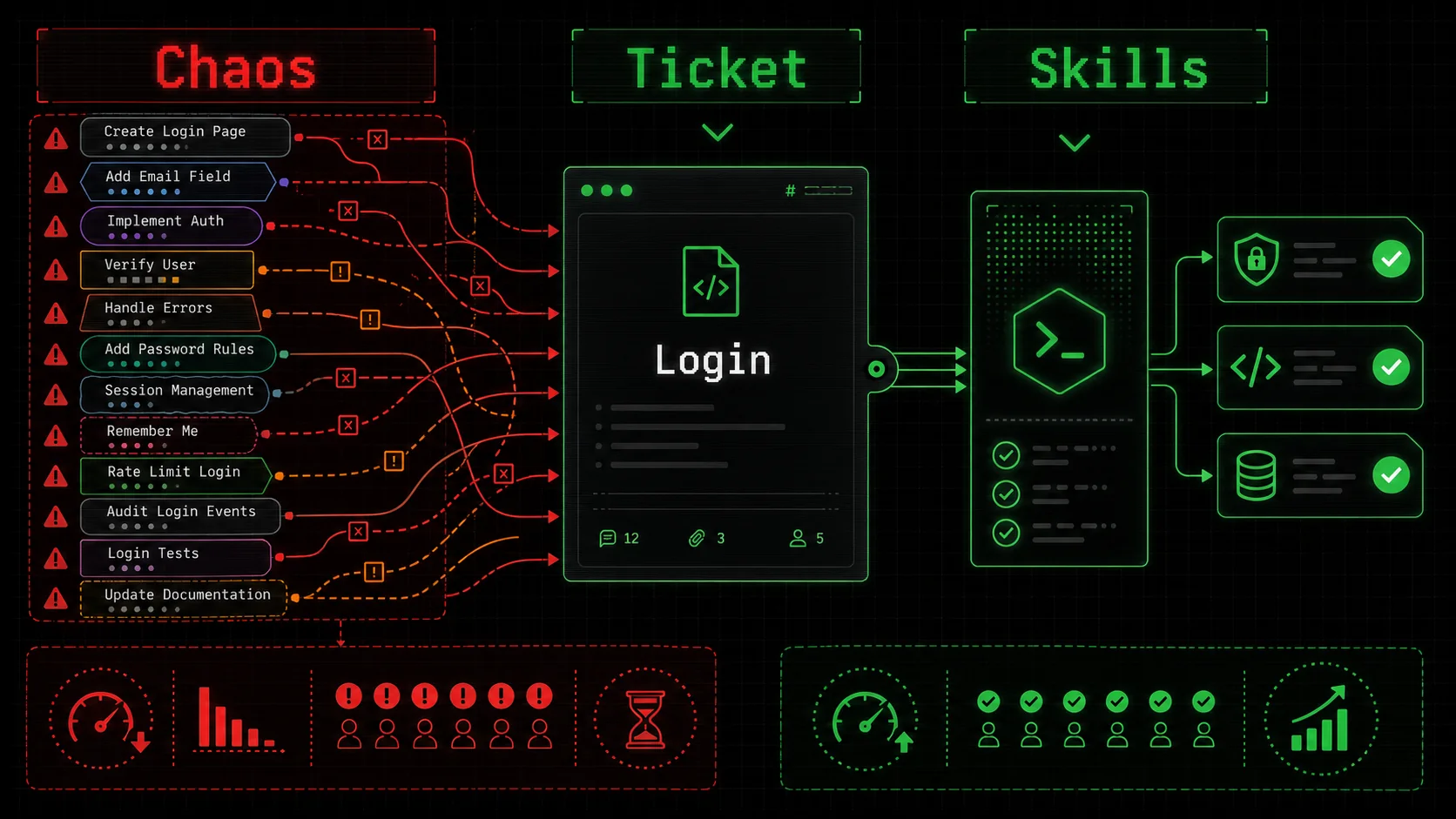
Screenshot of a Jira or Linear board showing a single ticket, "Implement User Login," with 10+ linked subtasks created by different team members' AIs, each with conflicting descriptions and acceptance criteria.
The initial thrill of AI productivity is wearing off for many teams, replaced by a nagging sense of overhead. The very tool meant to streamline work is adding new, invisible layers of coordination. The problem isn't that AI is bad. The problem is that we've handed every team member a uniquely powerful, unpredictable, and opinionated assistant without agreeing on the rules of engagement.
This creates several concrete, expensive problems.
The Review Bottleneck Explodes
In traditional development, a senior engineer might review a junior's code for logic, security, and patterns. Now, they're also reviewing the AI's architectural choices and style decisions, which can vary wildly from contributor to contributor. A pull request becomes less about "does this code work?" and more about "why did the AI do it this way, and is it our way?"
I've seen review comments that are entirely meta: "My Claude would have used a factory pattern here." "Why did you tell it to use console.log instead of our structured logger?" The cognitive load shifts from evaluating the solution to reverse-engineering the prompt and the AI's reasoning. This turns a 15-minute review into a 45-minute archaeology session. The cumulative cost mirrors what we describe in the AI prompt debt crisis -- every unstructured prompt adds to a growing maintenance burden. The bottleneck isn't human output anymore; it's the human effort required to align and correct machine output.
Knowledge Siloing Gets Worse, Not Better
A team's collective knowledge is supposed to reside in its documentation, codebase, and shared practices. Fragmented AI use pushes knowledge back into individual chat histories. The "how" of solving a problem—the specific prompt sequence, the follow-up corrections, the validation steps—exists only in one person's ChatGPT or Claude conversation, which is often private, unsearchable, and ephemeral.
When that person is on vacation or leaves the company, their highly effective, nuanced way of using AI for a specific task leaves with them. The team loses not just the person, but their personalized AI workflow toolkit. Onboarding a new member now requires teaching them both the domain and "how we get our AIs to work here," which is an undocumented, oral tradition at best.
Velocity Metrics Become Meaningless
This is the silent killer for engineering managers and product leads. You see a developer closing tickets twice as fast. Great! But you don't see the accumulating technical debt, the inconsistent patterns, and the future refactoring work their AI-assisted code is creating for others. The velocity metric on the current sprint looks fantastic, while the quality and maintainability of the codebase—critical for long-term velocity—are degrading.
You get a false positive. The team appears to be accelerating, but it's building on a foundation that's becoming more brittle and costly to modify with each AI-generated contribution. The sprint burndown chart looks healthy right up until the moment you need to make a major change and discover that integrating the disparate AI-generated components requires a complete rewrite.
Erosion of Shared Ownership and Understanding
When code or a document is generated by an AI following a private prompt, the human author's deep understanding of it can be superficial. They asked for a thing, and the AI provided it. If asked to explain a nuanced design decision within that output, they might not have an answer—because it wasn't their decision, it was the AI's extrapolation from its training.
This erodes the collective ownership and deep system understanding that high-performing teams rely on. It's a form of AI skill erosion where developers lose their ability to reason deeply about the systems they're building. The system becomes a black box to its own builders. Troubleshooting and innovation suffer because no single person fully grasps the architecture that has emerged from a thousand micro-AI-decisions. This directly contradicts the core agile principle of collective code ownership and shared understanding.
The central issue, as discussed in forums like the Anthropic Claude Community throughout early 2026, is a lack of a "source of truth" for AI-assisted work. Teams have style guides for humans, but not for their AI counterparts. The solution isn't to restrict AI use—that's throwing the baby out with the bathwater. The solution is to systematize it. To move from ad-hoc prompting to a curated library of verified, team-approved skills that ensure every AI interaction aligns with your team's standards. This transforms AI from a personal productivity booster into a true team multiplier.
How to Build Standardized AI Skills for Your Team
A five-step method -- audit friction, define atomic skills, implement in shareable format, test and version, and integrate into workflows -- aligns Claude, GPT-4, Cursor, and GitHub Copilot outputs across an entire team.
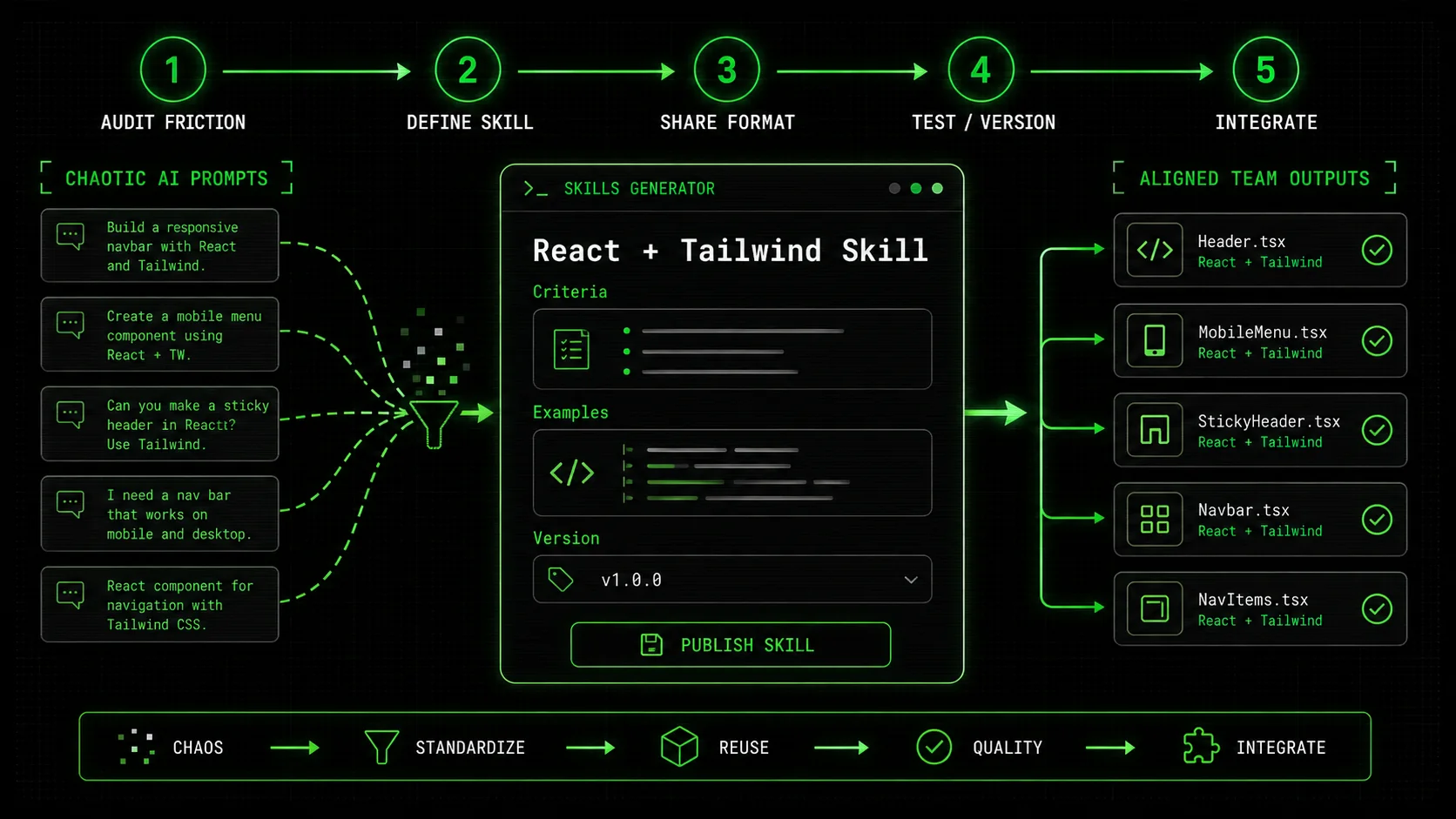
Screenshot of the Ralph Loop Skills Generator interface showing a form to create a new skill titled "Generate React Component with Tailwind," with fields for Description, Success Criteria, and example input/output.: 1. Uses useQuery from @tanstack/react-query. 2. Includes error typing with our custom ApiError. 3. Has a isLoading boolean state. 4. Returns { data, error, isLoading }.")
Fixing AI workflow fragmentation requires a shift in mindset. You're not just writing prompts; you're engineering repeatable, verifiable processes. A "skill" in this context is more than a text template. It's an atomic unit of work with a clear definition of done, baked directly into the instructions you give your AI.
Think of it like manufacturing. You wouldn't tell a robotic arm on an assembly line, "Put the thing on the other thing." You'd program it with precise coordinates, torque settings, and quality checkpoints. We need to do the same for our AI collaborators. Here’s a step-by-step method to build your team's skill library.
Step 1: Identify and Audit Friction Points
Start by looking for the pain. Don't try to boil the ocean. Where is AI causing the most rework or debate?
Gather Examples: Collect 3-5 recent instances of AI-induced friction. This could be a PR with style conflicts, two similar reports with different conclusions, or marketing copy that doesn't sound like it's from the same company.
Categorize the Problem: Is it an output issue (the final thing looks wrong), a process issue (the steps were different), or a verification issue (we aren't sure it's right)?
Find the Common Task: Drill down to the atomic task that caused the problem. It's usually something like "Generate a React form component," "Write a SQL query for monthly active users," or "Draft a customer support response to a billing question."
For example, if PR reviews are bogged down in arguments over error handling, the atomic task is "Write a function that validates input and handles errors." That's your first skill candidate.
Step 2: Define the Skill with Atomic Precision
This is the most critical step. A vague skill creates vague results. You must define the contract.
* Name: Be specific.
generate_python_data_validator is better than write_validation_code.
* Description: What is the input, and what is the expected output? "Takes a Pydantic model definition and generates a Python function that validates input data against it, returning a standardized error dictionary."
* Context & Constraints: This is your style guide and rules of engagement. Provide links to internal docs.
* "Use our custom ValidationError class from lib.errors."
* "All log messages must use the structlog logger."
* "Follow the API design patterns from our internal wiki page /engineering/rest-standards."
* Success Criteria (Pass/Fail): This is what turns a prompt into a skill. Define clear, testable conditions. The AI should use these to check its own work before delivering it. For our validator skill:
1. Function signature matches def validate(data: dict) -> tuple[bool, dict[str, list[str]]].
2. Returns (False, {"field": ["error message"]}) on failure.
3. Includes at least one unit test using pytest.
4. Code passes black and flake8 formatting.
By embedding the success criteria, you're not just asking for code; you're asking for code that passes your team's specific suite of checks. This is the same pass/fail methodology that prevents Claude Code hallucinations from shipping incorrect but plausible code. This moves the verification left, catching inconsistencies before a human even sees the output.
Step 3: Implement the Skill in a Shareable Format
A skill written in a Google Doc is a good start, but it's not operational. You need a way for the team to use it consistently. This is where a tool built for this purpose, like the Ralph Loop Skills Generator, becomes essential. It provides a structured format and a central repository.
The key is to structure the skill so it can be executed by your AI assistant. A well-structured skill for Claude Code might look like a detailed system prompt followed by a clear instruction:
text
You are an expert Python developer adhering strictly to our team standards.
TASK: Generate a data validation function.
CONTEXT:
We use Pydantic for schema definition. An example model
UserCreate will be provided.
On validation failure, return a tuple:
(False, dict) where the dict has field names as keys and lists of error strings as values.
Use
structlog.get_logger(__name__) for logging warnings.
Import statements should be grouped and ordered per our style guide.
SUCCESS CRITERIA (You must verify ALL before finalizing):
ValidationError details are transformed into our standard error dict format.
A
test_validate_user_create function exists with cases for valid and invalid data.
Code is formatted (I will run
black).
Now, generate the validation function for the provided Pydantic model.
This structured approach eliminates ambiguity. It combines the goal, the rules, and the definition of "done" into a single, executable package. For broader applications beyond code, like creating effective prompts for business analysis, a shared resource like our hub of AI prompts can provide starting templates that your team can then atomize and standardize.
Step 4: Test, Refine, and Version the Skill
A skill isn't set in stone. It's a living artifact.
Test Rigorously: Have multiple team members run the skill with different edge-case inputs. Does it consistently produce aligned outputs?
Gather Feedback: Was the output what the reviewer expected? Did it fit seamlessly into the existing codebase or document?
Iterate: Update the skill's description, constraints, or success criteria based on feedback. Maybe you forgot to specify the import path for the custom
ValidationError. Add it.
Version: Use simple versioning (e.g.,
validate_input_v1.2). This allows the team to reference which skill was used to generate a piece of work and allows for safe improvements. If a new best practice emerges, you create v1.3` and deprecate the old one.
This cycle of test-refine-version ensures your skill library improves over time, capturing your team's evolving knowledge and standards. It turns tribal knowledge into institutional knowledge.
Step 5: Integrate Skills into Team Workflows
Finally, make the skills frictionless to use. They should be the default, not an extra step.
* Repository: Store your team's skills in a central, accessible location. This could be a dedicated channel in your team's chat app, a page in your wiki, or better yet, a shared workspace within a skills management tool.
* Onboarding: New team member? Part of their onboarding is to review and use the core skill library for their role. This gets them up to speed on standards ten times faster.
* Code/Content Reviews: Make it a review checkpoint. "Which skill did you use for this?" If the answer is "none, I just typed a prompt," that's a flag. The review should focus on whether the skill's success criteria were met and if the skill itself needs updating, not on basic style nitpicks.
By following this method, you transform AI from a source of fragmentation into a force for alignment. Every team member, using the same well-defined skills, will produce work that is inherently more consistent, verifiable, and integrated. You stop reviewing the AI's choices and start reviewing the business logic, because the foundational choices are already made—and agreed upon—by the skill definition.
Proven Strategies to Operationalize AI Skills
"Skill of the Week" rollouts, role-specific bundles, lightweight governance, and consistency metrics turn a library of Anthropic Claude and OpenAI GPT-4 skills from a folder of documents into a living team practice.
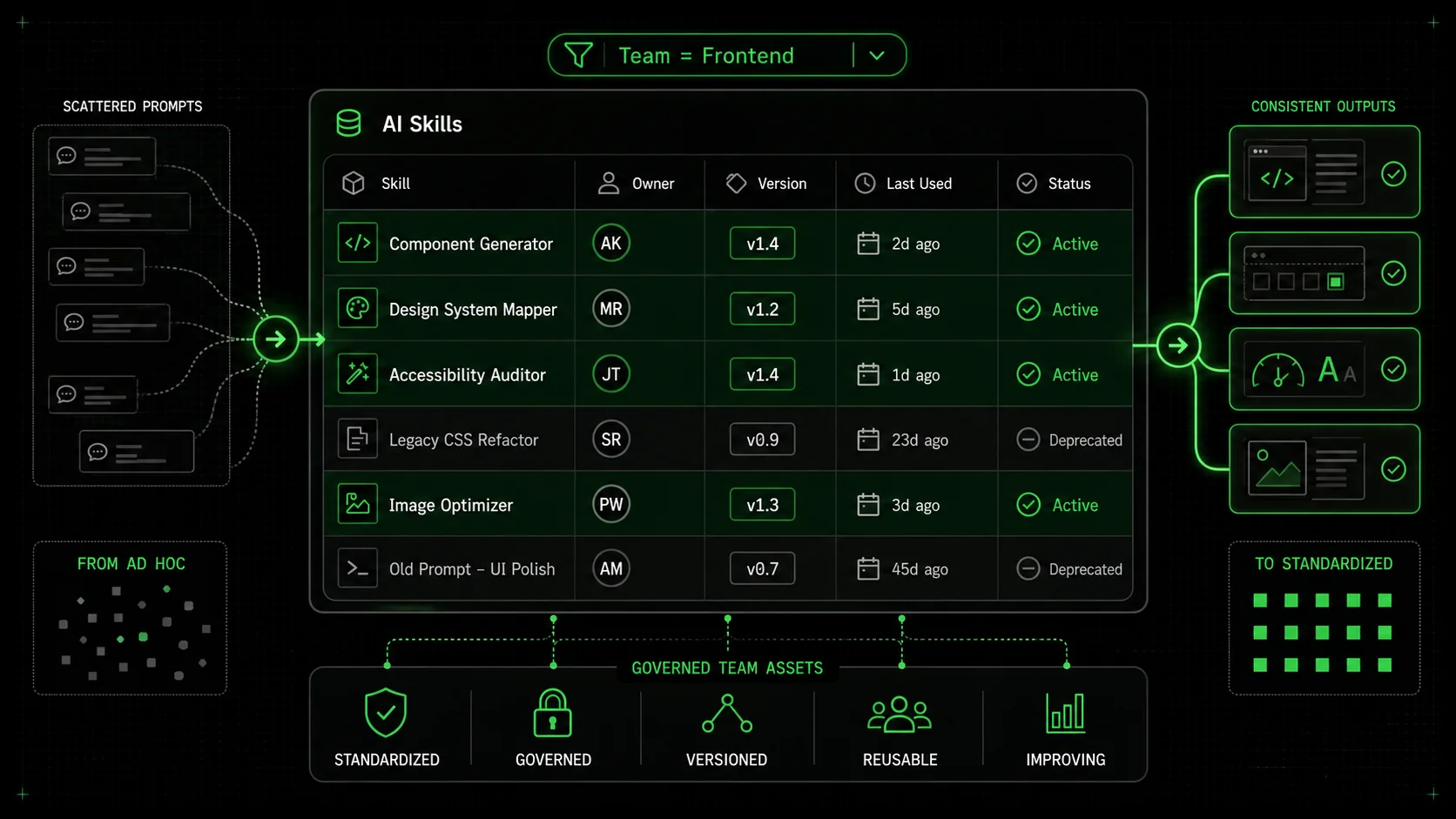
Screenshot of a Notion database table listing team AI skills, with columns for Name, Owner, Version, Last Used, and Status, filtered by team "Frontend.", Team (Frontend/Backend/Data), Status (Active/Deprecated), Version (1.4), Owner (@alex), Last Used (2 days ago). A few rows are highlighted, and there's a filter applied showing "Team = Frontend.")
Building a library of skills is the foundation. Making them stick and scale across your team is the real challenge. Based on implementing this with several development teams, here are the strategies that separate successful adoption from a folder of forgotten documents.
Strategy 1: Start Small with a "Skill of the Week"
Don't mandate that everyone convert all their work overnight. That's overwhelming and will cause rebellion. Instead, run a lightweight, positive campaign.
Pick one high-friction, atomic task—like "writing a commit message following our convention" or "generating a summary of customer feedback tickets." Formalize it as a skill. Announce it as the "Skill of the Week." Encourage everyone to try it in their next relevant task and share their experience in a dedicated Slack thread: "Worked perfectly!" or "Had an issue where it didn't handle X."
This does three things. First, it creates safe, low-stakes practice. Second, it generates social proof and peer learning. Third, the feedback you gather in that thread is pure gold for refining the skill. After a week, you'll have a battle-tested, improved skill and a group of people who are comfortable using it. Then you pick the next one. Momentum builds organically.
Strategy 2: Create Role-Specific Skill Bundles
A backend engineer, a data analyst, and a content marketer need different skills. If they all have to wade through a monolithic list of 100 skills, they'll ignore it. Organize your library by role or job-to-be-done.
* Frontend Bundle: Skills for generating React components, writing Vue composables, creating Storybook stories, crafting CSS-in-JS styles.
* Data Bundle: Skills for writing analytical SQL, building Looker explores, creating Python data cleaning scripts, drafting analysis summaries.
* DevOps Bundle: Skills for writing Terraform modules, generating Kubernetes manifests, creating CI/CD pipeline snippets.
This makes the library immediately relevant and scannable for each team member. They can focus on mastering the 10-15 skills that make up 80% of their AI-assisted work. For solopreneurs or developers wearing many hats, the approach is similar but broader, focusing on skills that span disciplines, as explored in our guide on AI prompts for solopreneurs.
Strategy 3: Implement a Lightweight Governance Model
Skills need owners and a feedback loop, not a bureaucratic committee.
* Skill Owner: The person who created or maintains a skill is its owner. Their job is to update it based on feedback and team standard changes.
* Feedback Channel: Have a simple, public way to report issues or suggest improvements for a skill (e.g., a "#ai-skills-feedback" Slack channel or a comment field in your skills repository).
* Retirement Policy: When a skill is deprecated (e.g., you move from REST to GraphQL), mark it as such in the library. Don't delete it—archive it. You might need to reference it for old work.
This model is lightweight but crucial. It prevents the library from decaying into irrelevance. It creates accountability without heavy process.
Strategy 4: Measure What Matters: Consistency, Not Just Speed
Shift your team's metrics slightly. Instead of (or in addition to) measuring story points completed, start measuring alignment.
* Skill Adoption Rate: What percentage of applicable tasks are being done with a registered team skill? (This can be self-reported via a simple emoji reaction on a ticket).
* PR Review Cycle Time: Is the time from PR open to merge decreasing for tasks where a skill was used? Less back-and-forth over style suggests better alignment.
* Rework Rate: Are there fewer bugs or revisions linked to inconsistent patterns?
These metrics tell you if your skills are working. They move the conversation from "AI makes me fast" to "AI helps us work better together." This is a more sustainable and valuable kind of productivity. It's the difference between a group of individual contributors and a cohesive, high-output team. For developers specifically, deep-diving into AI prompts for developers can provide the technical nuance needed to craft these high-impact, consistency-driving skills.
Got Questions About AI Team Workflows? We've Got Answers
Practical answers to four common questions about standardizing Claude, GPT-4, Cursor, and GitHub Copilot use across engineering, marketing, and product teams.
How do I convince my skeptical team lead that we need standardized AI skills?
Focus on the hidden costs they already feel. Frame it as risk mitigation and quality control. Ask: "How much time did we spend last sprint debating code style in PRs that was introduced by AI?" or "Are we confident that the analysis from Alice's AI and Bob's AI are comparable?" Propose a pilot. Suggest formalizing just one skill for the most common point of friction (like PR descriptions or data validation) and running it for two weeks. Measure the before-and-after review time or consistency. Data from a small pilot is far more convincing than a grand theory.
What if my team uses different AI assistants (Claude, ChatGPT, Gemini)?
This is a common challenge and actually strengthens the case for skills. The specifics of the prompt syntax will differ between models, but the core components of a skill—the atomic task definition, the context/constraints, and the pass/fail success criteria—are model-agnostic. You write the skill specification once in plain English. Then, you or different team members can translate that specification into the optimal prompt format for your chosen assistant (Claude Code, ChatGPT's custom instructions, etc.). The skill is the source of truth; the model-specific prompt is just an implementation detail. This approach ensures alignment on the what and how good, even if the exact words to the AI vary.
Can I use this for non-technical work, like marketing or project management?
Absolutely. The concept is universal. A non-technical skill might be "Draft a customer email announcement for a new feature." The description defines the brand voice and key messaging points. The constraints specify the format (subject line length, no jargon, include a CTA button). The success criteria could be: "1. Includes the three key value propositions from the product spec. 2. Subject line is under 50 characters. 3. Passes through our tone-checker tool with a 'friendly & professional' score > 80." The output is a consistent, on-brand email draft every time, whether the marketing manager or an intern uses the skill.
What's the biggest mistake teams make when trying to standardize AI use?
The biggest mistake is being too vague or too ambitious at the start. Creating a skill called "write code" is useless. Creating a skill that tries to handle "build the entire user authentication microservice" is doomed. You must start with truly atomic tasks. The second biggest mistake is not building in verification. A prompt without clear success criteria is just a suggestion. The AI will complete the task, but you have no built-in mechanism to know if it completed it to your standards. Always define what "pass" looks in concrete, checkable terms. That's what transforms a loose prompt into a reliable team skill.
Ready to Turn Your Team's AI Into an Engine of Alignment?
Ralph Loop Skills Generator helps you codify your team's best practices into atomic, verifiable skills that Claude Code can execute consistently. Stop debating style and start shipping cohesive work. Define your first shared skill today.
Generate Your First Skill
<!-- sister-projects-start -->
Other Doved Studio projects
Related tools from the same studio you might find useful:
Glean: Turn scrolling time into a daily action plan. Capture, process, execute.
Popout: Create your portfolio in minutes with a single shareable page.
Larpable: Spot fake founders, guru grifts, and performance entrepreneurship.
Doved Studio: Studio indie derrière cette app et une dizaine d'autres outils.
<!-- sister-projects-end -->
Ready to try structured prompts?
Generate a skill that makes Claude iterate until your output actually hits the bar. Free to start.
r
ralph
Building tools for better AI outputs. Ralphable helps you generate structured skills that make Claude iterate until every task passes.
 try/except with custom exception classes and another uses