Claude Code Stuck in a Loop? How to Spot, Stop, and Fix It (2026)
Claude Code looping on the same file or test? Learn the six loop signatures, exact break commands (Ctrl+C, /rewind, /clear, /compact), and how to prevent loops with CLAUDE.md hooks, Stop guards, and atomic skill decomposition. Updated for Claude Opus 4.7 / Sonnet 4.6.
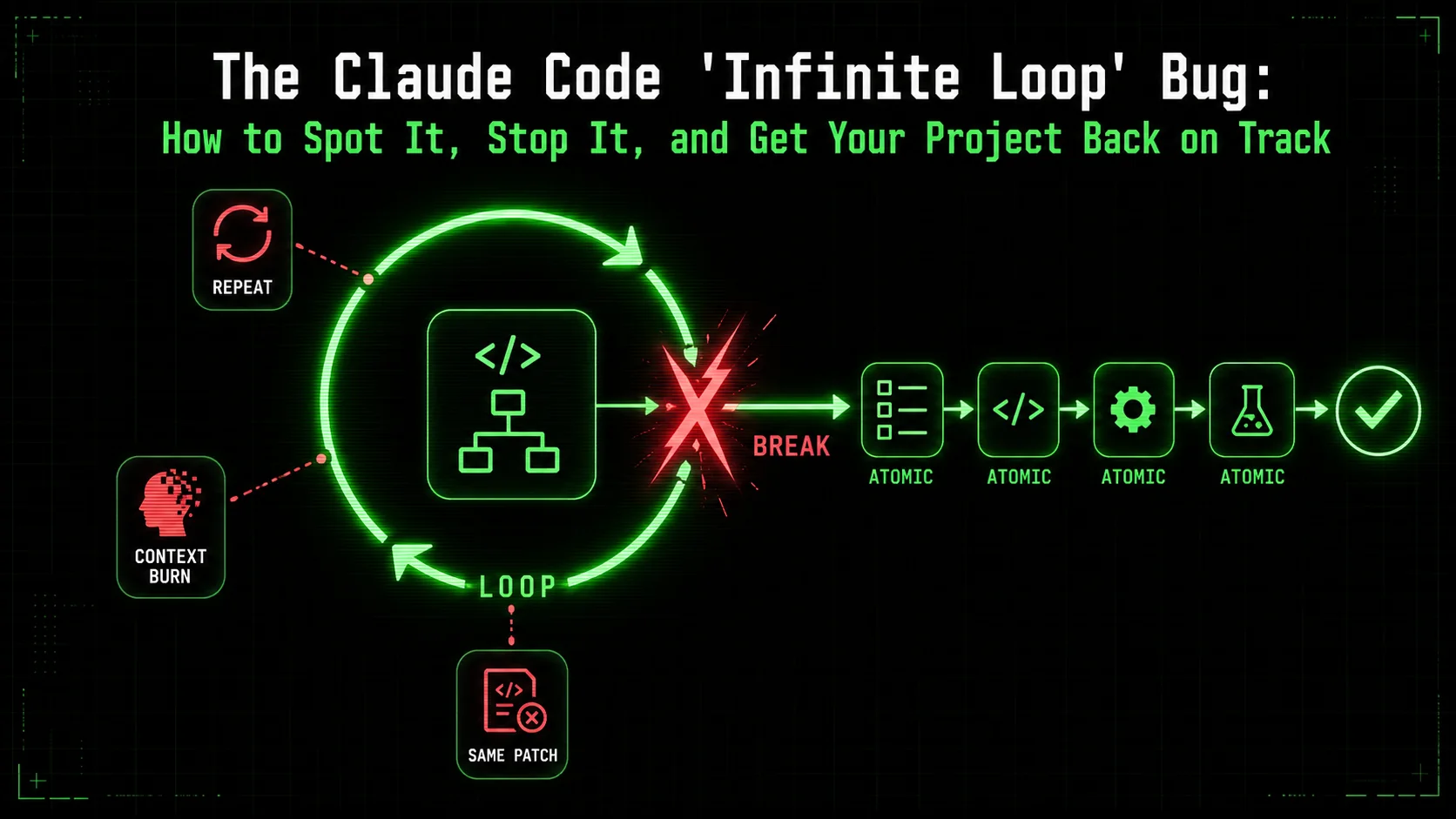
If you've spent the last 30 minutes watching Claude Code rewrite the same function for the tenth time, you're not alone. This failure mode — the agent stuck in an unproductive loop, retrying the same approach without backtracking — is one of the most-reported Claude Code issues in 2026. As of Claude Opus 4.7 and Sonnet 4.6 (June 2026), Anthropic has shipped several countermeasures: /rewind checkpointing on every prompt, /compact with focus strings, and Stop hooks for hard iteration caps. But understanding the loop signatures — the six distinct patterns that trap autonomous agents — is what turns a stuck terminal into a recoverable session in under 30 seconds.
This article is your guide to diagnosing, escaping, and preventing Claude Code loops. We break down the six signature types (edits-same-test, adds-removes-mocks, rewrites-migrations, bouncing-two-files, flaky-test-loop, re-running-failed), provide the exact constraint prompt that breaks each one, cover the three context-reset levers (/rewind, /compact, /clear), and show how to hard-cap iterations with a Stop hook so loops cannot recur. For the broader pattern of structured task decomposition that makes loops impossible, see our atomic skills guide and the Ralph Loop methodology.
What is the "Infinite Loop" Bug? (And What It Isn't)
Claude Code's infinite loop is a process failure -- not a hallucination -- where Anthropic's agent retries the same flawed approach without backtracking, burning context tokens at up to 10x the normal rate.
First, let's define the enemy. The "infinite loop" bug, as the community has dubbed it, occurs when Claude Code's autonomous problem-solving logic gets trapped. The agent fails to properly decompose a complex instruction, leading to cyclical execution without progress.
Key Symptoms: * Repetitive Output: Claude generates strikingly similar code, explanations, or plans on each iteration, with only minor, ineffective variations. Lack of Meta-Cognition: It fails to step back and question its core approach. The logs show it re-attempting "Step 3: Fix the database connection" ten times without ever questioning how* it's trying to fix it. * Ignoring Past Failures: It doesn't effectively learn from the error messages of previous attempts. ASyntaxError on loop #1 is met with the same syntactical structure on loop #5.
* Context Bloat: The conversation history balloons with failed attempts, pushing out crucial initial instructions and leading to a related issue known as context drift. This token waste compounds the AI overhead trap where developers spend more time managing Claude than coding.
What It Is NOT:
General Hallucination: This is not Claude inventing a non-existent library. That's a one-off error. The loop bug is a process* failure.
Simple Bug in Your Code: A while (true) loop in your script is your fault. This is a failure in the AI's execution strategy*.
* Lack of Capability: Claude isn't "too dumb" for the task. The issue is an unstructured approach to a complex problem.
Under the hood, this often stems from a task decomposition failure. When given a high-level goal like "build a login system with OAuth," Claude might internally create a flawed or incomplete plan. If the first sub-task ("configure OAuth provider") fails, it lacks a robust mechanism to backtrack, re-decompose the problem, and try a fundamentally different path. It simply re-executes the flawed sub-task.
Step-by-Step: Diagnosing a Stuck Claude Agent
Use the five-minute rule, log pattern analysis, goal drift check, and manual override test to confirm whether Claude, GPT-4, or Cursor is stuck in a genuine loop versus a slow but progressing task.
Before you can fix it, you need to confirm it. Follow this diagnostic checklist when Claude seems stuck.
1. The "Five-Minute Rule" Check
Set a mental timer. If Claude has been "working" on a single step or generating similar outputs for more than 5 minutes without tangible progress, you're likely in a loop. Action: Pause execution immediately.2. Analyze the Conversation Log
Scroll back. Look for patterns. * Are error messages repeating? (e.g.,ModuleNotFoundError: No module named 'xyz' appearing multiple times).
* Is the output structure identical? Compare code blocks from different turns. Minor variable name changes don't count as progress.
* Is it acknowledging past attempts? Search for phrases like "Last time I tried X, it failed because of Y, so now I'll try Z." Its absence is a red flag.
3. Check for Goal Drift
Has the original objective been lost? In long cycles, Claude can forget core requirements. Ask it directly: "What is the primary goal of this task based on our initial conversation?" A vague or incorrect answer confirms drift.4. The "Manual Override" Test
Give a direct, atomic command that should take 30 seconds. For example, if it's stuck building an entire API, command: "Create a single Python function calledconnect_to_db() that takes a connection string and returns a connection object. Nothing else."
* If it succeeds: The core capability is fine; the loop is in the planning layer.
* If it fails or loops on this: The issue might be context corruption or a deeper misunderstanding. A fresh chat may be needed.
How to Break the Loop: Immediate Actions
Six loop signatures and the one-sentence constraint prompt that breaks each one — validated against Claude Code as of July 2026.
Once diagnosed, stop the bleeding. The community has identified six distinct loop signatures, each with a specific constraint that breaks it. Match the pattern to the fix.
| Loop Type | What You See | Constraint Prompt |
|---|---|---|
| Edits same test expectation | Claude tweaks expect(...).toBe(...) repeatedly while the implementation is the problem | "Don't touch the test. The test is right — change the implementation to match." |
| Adds/removes mocks in a cycle | Claude wraps and unwraps the same dependency, bouncing between mock and real | "Keep the real implementation. Delete all mocks and run the integration test." |
| Rewrites migrations endlessly | Claude changes the schema file, then changes it back, then changes it again | "Schema is frozen. Restart the plan but only touch the UI layer." |
| Bouncing between two files | Claude edits auth.ts, breaks session.ts, edits session.ts, breaks auth.ts — ping-pong | "You may only edit src/auth/login.ts. All other files are read-only." |
| Flaky test loop | A non-deterministic test signal (time, network, random) makes Claude chase ghosts | "Stop running this test. Mock the time-dependent dependency, then move on." |
| Re-running same failed command | Claude runs the same failing build/test command without reading the error | "The last command exited non-zero. Read the error, don't re-run blindly." |
npm install yourself.
* Provide the successful output to Claude: "I've completed step X. Here's the result: [Terminal Output]. Now proceed to step Y."
* This breaks the cycle by providing the pass condition it couldn't achieve.
3. The Decomposition Command:
* Issue a strong meta-command to force a new strategy.
Prompt: "You are stuck in a loop. Stop all current work. First, list every single step you've attempted in the last 10 messages. Second, for each failed step, write one sentence on why it failed. Third, propose three fundamentally different* high-level approaches to solve the original goal: '[Restate Goal Here]'. Do not execute anything yet."
* This forces the meta-cognitive step the agent was missing.
The Root Cause & The Permanent Fix: Atomic Task Decomposition
Poor internal planning -- not capability limits -- causes loops; explicit atomic decomposition with pass/fail gates transforms Claude, GPT-4, and GitHub Copilot from flawed planners into deterministic executors.
The temporary fixes above are just that—temporary. To prevent the infinite loop bug, you must address the root cause: poor task decomposition.
Claude Code, out of the box, is a brilliant executor but a sometimes-flawed planner. When you give it a monolithic task ("Scrape this website, clean the data, analyze it, and generate a report"), its internal decomposition is a black box. If one step fails, the whole plan can derail.
The solution is to bring decomposition out of the black box and make it explicit, atomic, and testable. This is where the concept of "skills" changes the game.
What is an Atomic Skill?
An atomic skill is a single, well-defined task with three critical components:requirements.txt."pip list shows all packages from requirements.txt are present with correct versions, and python -c 'import requests, pandas' runs without error."ModuleNotFoundError occurs, check for typos in requirements.txt and attempt pip install -r requirements.txt --force-reinstall."How Atomic Skills Prevent the Loop
Let's contrast the two approaches with an example: Setting up a PostgreSQL database connection.
| Monolithic Prompt (Loop-Prone) | Atomic Skill Approach (Loop-Proof) |
|---|---|
| Prompt: "Set up a connection to my PostgreSQL database for the app." | Skill 1: Verify PostgreSQL is running. Pass: systemctl status postgresql shows active (running). Fail: If not running, attempt sudo systemctl start postgresql. |
| The Loop: Claude might conflate steps: install driver, check service status, write connection code, handle errors—all as one opaque task. Failure at any point causes a confusing retry. | Skill 2: Install psycopg2 driver. Pass: pip show psycopg2-binary returns version info. Fail: If install fails, try pip install psycopg2-binary==2.9.9. |
Skill 3: Write connection function get_db(). Pass: Function exists and, when called in a test, returns a valid connection object or a clear error. Fail: If syntax error, fix and retry. | |
| Skill 4: Test connection with sample query. Pass: SELECT 1; executes successfully. Fail: If connection fails, revert to Skill 1. |
This transforms Claude from a potentially loopy planner to a relentless, deterministic executor. You provide the battle plan (the sequence of atomic skills), and Claude marches through it, iterating only where necessary, until every skill's pass criteria are met.
Context Reset Levers: /rewind, /compact, /clear
When the trace is dominated by stale failure logs, pick the reset lever that matches how much state you want to keep. These three commands are your escalating context-repair tools, all verified against Claude Code as of July 2026:
| Command | What it does | Use when |
|---|---|---|
Double-Esc or /rewind | Opens the rewind menu. Every prompt is a checkpoint; restore conversation, code, or both. | You want to undo the loop's edits and retry from a known-good point. |
/compact [focus] | Summarizes history and replaces it, keeping the gist. Pass a focus, e.g. /compact keep only the plan and the diff. | Context is large but the goal/plan is still correct. |
/clear | Wipes conversation history entirely. Your code changes stay intact — /clear does not revert files. | The whole session is polluted and you want a blank slate. |
/rewind: double-Esc only opens the rewind menu when the prompt input is empty — if you've typed something, the first Esc clears the text and the second opens the menu. Checkpoints only track files changed by Claude's own edit tools; files modified by a Bash command (rm, mv, a script) are not captured and cannot be undone by rewind. For those, lean on Git.
Hard-Capping Iterations with a Stop Hook
A CLAUDE.md rule is advisory — Claude can talk itself out of it. For a hard stop that the model cannot override, use a Stop hook. The Stop event fires when Claude finishes responding. To halt the session at your cap, emit {"continue": false, "stopReason": "iteration cap reached"} on stdout:
{"continue": false, "stopReason": "iteration cap reached"}This is the one that halts the session. Do not use exit code 2 or {"decision": "block"} here — on a Stop hook, those force Claude to keep going, which is exactly the loop you are trying to stop. A small script that reads an iteration counter and prints {"continue": false} once the count passes your cap gives you a guardrail the model cannot override.
For Claude Code 0.100+ (Opus 4.7 / Sonnet 4.6 era), also add behavioral rules to CLAUDE.md:
## Agent behavior constraints
- Maximum 5 build/test iterations per task. If failing after 3 iterations, stop and report.
- Do not edit the same block in the same file more than 3 times.
- After 3 retries of any tool call, stop and ask.
- Read the error message before re-running a failed command.
Implementing the Fix: From Theory to Practice
Manually decompose tasks into atomic skills, define binary pass/fail criteria for each, and script Claude Code interactions one skill at a time -- no specialized tooling required to start.
You don't need complex tools to start. Begin with this manual framework, which mirrors what the Ralph Loop Skills Generator automates.
1. Decompose Your Next Project Manually: Take a task like "Add user authentication to my web app." * Break it down on paper. List every single step: (1) Install auth library, (2) Create User model, (3) Set up login route, (4) Set up register route, (5) Implement session handling, (6) Add protected route middleware. * Make each step atomic. "Set up login route" is still too big. Break it further: (3a) Create/login GET route for form, (3b) Create /login POST route to validate credentials, (3c) Set session cookie on success.
2. Define Pass/Fail for Each:
For "3b. Create /login POST route":
* Pass: A curl command curl -X POST -d "email=test@test.com&password=pass" http://localhost:3000/login returns a Set-Cookie header or a success JSON response.
* Fail: The command returns a 4xx/5xx error or no session token.
3. Script Your Interaction:
Guide Claude step-by-step using your decomposition. Present one atomic skill at a time.
HUMAN: Let's work on Skill 3b: Create the POST /login route to validate credentials.
   Objective: Create the route that accepts email/password, checks against the User model, and starts a session.
   Pass Criteria: The curl test below returns a session cookie.
   Fail Action: If it fails, analyze the error log and fix the specific issue in the route code.
   Proceed.
This structured approach is the core of effective AI prompts for developers—clarity, specificity, and verifiability. For the related problem of Claude confidently generating wrong code rather than looping on flawed code, see our guide on the Claude Code hallucination problem.
Case Study: Escaping a Real-World Loop
A React developer's 45-minute Claude Code loop on a broken import was solved in under 60 seconds by isolating the root cause -- a missing tsconfig path alias -- into three atomic skills with testable pass criteria.
Problem: A developer on Reddit reported Claude Code stuck for 45 minutes trying to "fix a broken import in a React component." The component was using a local path alias (@/components/Button) that wasn't configured in tsconfig.json.
The Loop: Claude kept trying to re-install @types/react, rewrite the import statement various ways (../Button, ./Button), and restart the dev server. It never checked the root configuration.
The Atomic Skill Fix:
tsconfig.json has "baseUrl": "." and "paths": { "@/": ["src/"] }.tsconfig.json includes these exact settings.
* Fail: If missing, add them.
@/components/Button import.
./src/components/Button.tsx.Guided through these three atomic skills, Claude solved the problem in under a minute. The loop was broken by isolating the true point of failure—the build configuration—with a clear, testable condition.
Building Loop-Proof Projects Long-Term
Atomic skill blueprints with predefined failure states eliminate loop risk across Claude Code, Cursor, and GitHub Copilot -- turning project development into a series of guaranteed, verifiable victories.
Adopting an atomic skill mindset is a paradigm shift. It turns project development into a series of guaranteed, verifiable victories. For complex projects, maintaining this decomposition manually becomes its own challenge. This is where purpose-built tooling shines, automating the creation and management of these skill workflows, ensuring Claude always has a clear, un-loopable map to follow.
Whether you start manually or with a tool, the principle is key: You are the architect. Claude is the builder. Teams scaling this across multiple developers should also address the AI prompt debt crisis to keep their skill libraries maintainable. Provide a fault-tolerant blueprint, and the infinite loop bug becomes a relic of the past.
Ready to transform how you work with Claude Code? Stop planning in prompts and start building with verifiable skills. Generate Your First Skill and experience loop-free execution.
---
FAQ: The Claude Code Infinite Loop Bug
Answers to six common questions about Claude Code's loop behavior, how it differs from hallucination, and whether GPT-4, Cursor, and GitHub Copilot face the same autonomous-agent failure mode.
Q1: Is this "infinite loop" bug an official issue with Claude Code?
Anthropic has not officially named this specific pattern as a "bug," but the behavior — autonomous agents failing to progress due to poor task decomposition — is a recognized challenge in AI agent design. Claude Code as of Opus 4.7 (June 2026) ships with built-in countermeasures: /rewind checkpointing on every prompt, /compact with focus strings for context management, and Stop hooks for hard iteration caps. The community label "infinite loop bug" accurately describes the symptomatic experience. Anthropic's documentation advises providing clearer, step-by-step instructions to improve reliability, which aligns with the atomic skill solution.
Q2: What's the difference between this and regular Claude "hallucination"?
Hallucination is about incorrect content — fabricating code, libraries, or facts. The infinite loop is about a broken process. It's the difference between Claude giving you code that uses a non-existent function (hallucination) and Claude rewriting the same faulty function 20 times without realizing its approach is flawed (the loop). The latter often involves correct code syntax that's applied to the wrong problem. For hallucination-specific patterns, see our guide on the Claude Code hallucination problem.
Q3: Can better prompting alone solve this?
Better prompting is the first line of defense and can mitigate many loops. Using structured, step-by-step prompts is essentially a manual form of task decomposition. However, for complex, multi-session projects, maintaining this structure manually is error-prone. The most robust solution is to externalize the decomposition into a formalized system of skills with baked-in pass/fail checks, which ensures consistency even over long, complex tasks. The stop-asking-AI-to-think framework provides the prompt discipline layer; the atomic skills guide provides the structural layer.
Q4: Does this happen more with specific languages or project types?
The bug is agnostic to language but is more frequently reported in complex integration or debugging tasks. Examples include: setting up database connections (any SQL/NoSQL), configuring build tools (Webpack, Vite), debugging environment variable issues, and implementing third-party API integrations. These tasks have multiple hidden dependencies and failure points, making internal AI decomposition more likely to fail. Simple, self-contained coding tasks are less susceptible. If you regularly run multi-step build/debug workflows, add the Claude Code iteration caps to your CLAUDE.md.
Q5: Should I just avoid Claude's autonomous modes?
Not necessarily. Autonomous modes are powerful for executing a well-defined plan. The key is to provide the plan externally before activating autonomy. Instead of saying "Autonomously build a dashboard," first work with Claude to define the atomic skills needed (e.g., "1. Fetch API data, 2. Process data, 3. Render chart component..."). Then, you can command it to "Execute the defined skill sequence autonomously." This gives you the power of autonomy without the risk of a black-box planning loop. For the production-grade autonomous workflow, the Ralph Loop methodology covers the full pattern.
Q6: Where can I learn more about advanced Claude Code techniques?
For a deeper dive into managing Claude's context and other advanced patterns, explore our Hub Claude resource center. It compiles best practices, case studies, and methodologies for getting the most out of AI-assisted development. For the specific techniques covered here, these deep-dives are the most directly relevant:
- How to Structure Atomic Skills for Claude Code Autonomous Refactoring — the per-procedure layer that prevents loops
- Claude Code Context Drift: The Productivity Killer Nobody Talks About — why context pollution triggers loops
- The AI Overhead Trap: Are You Spending More Time Managing Claude Than Coding? — the meta-problem of agent management overhead
- 47 AI Coding Prompts That Actually Work — copy-paste templates with built-in pass/fail criteria
Other Doved Studio projects
Related tools from the same studio you might find useful:
- Glean: Turn scrolling time into a daily action plan. Capture, process, execute.
- Popout: Create your portfolio in minutes with a single shareable page.
- Larpable: Spot fake founders, guru grifts, and performance entrepreneurship.
- Doved Studio: Studio indie derrière cette app et une dizaine d'autres outils.
ralph
Building tools for better AI outputs. Ralphable helps you generate structured skills that make Claude iterate until every task passes.