Cursor vs GitHub Copilot 2026: Pricing, Benchmarks, and When to Pick Each
Cursor at $20, Copilot at $10. Both miss agent mode. 2026 head-to-head on pricing, multi-file edits, autonomous tasks, and when Claude Code beats both for complex project workflows.
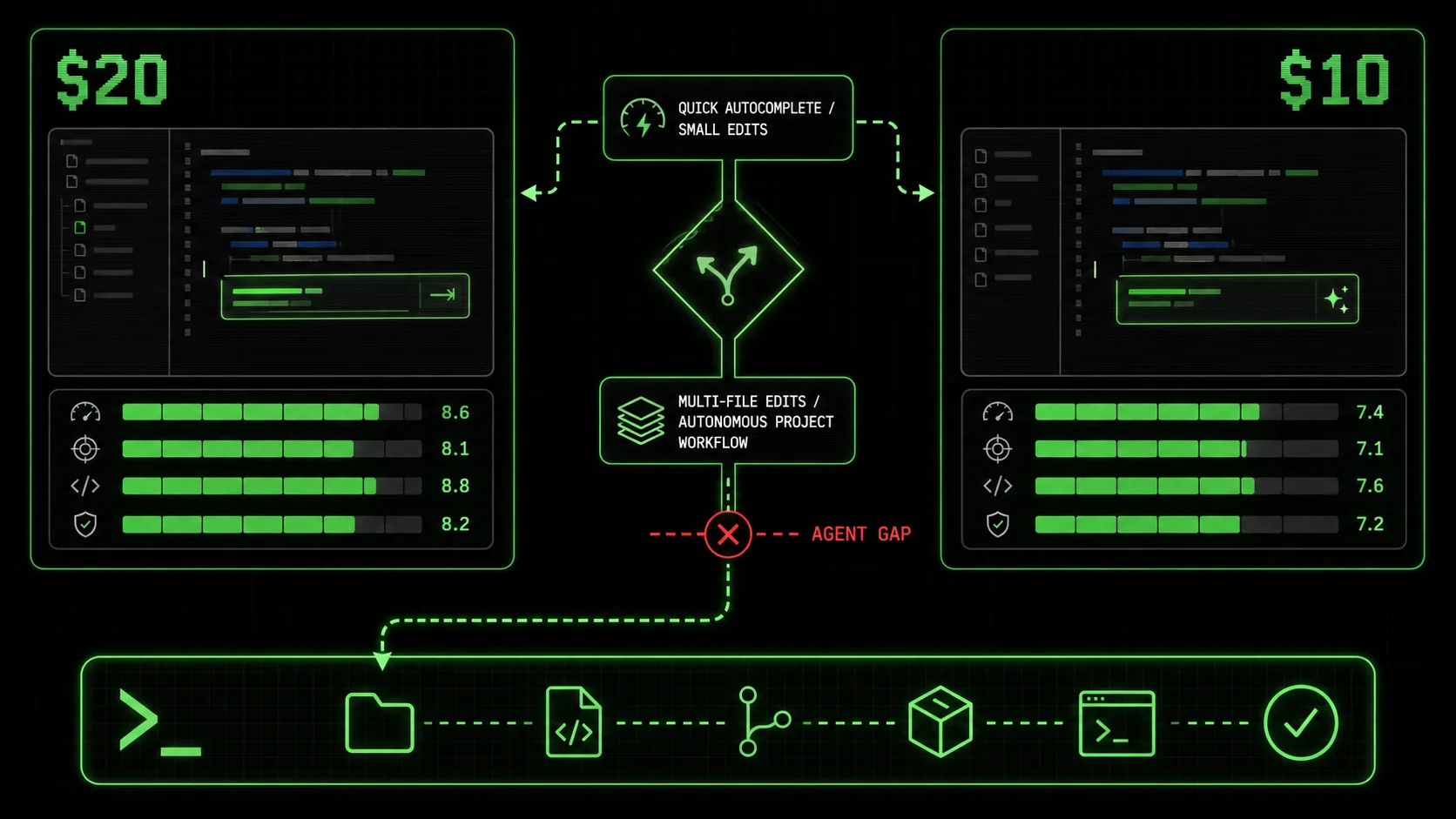
Most developers I talk to are drowning in AI tools they barely use. The promise of a single, intelligent assistant that can handle everything from a quick syntax fix to a full feature build has fractured into a dozen specialized apps. In 2026, the cursor vs github copilot 2026 debate is louder than ever, but it's starting to feel like choosing between two different flavors of the same incomplete solution. Both tools excel at predicting the next few lines of code, but according to a 2025 Stack Overflow Developer Survey, 67% of developers using AI assistants report their biggest frustration is the inability to decompose and execute multi-step, non-linear tasks. They complete code; they don't solve problems. This gap is why a third category is gaining traction: agentic workflow platforms like Claude Code, especially when supercharged with structured skills from tools like the Ralph Loop Skills Generator. This article breaks down the 2026 state of the best ai code editor 2026 race, provides a definitive cursor vs github copilot 2026 comparison, and explains why the claude code alternative is becoming a compelling choice for complex project work.
Defining the 2026 AI coding assistant landscape
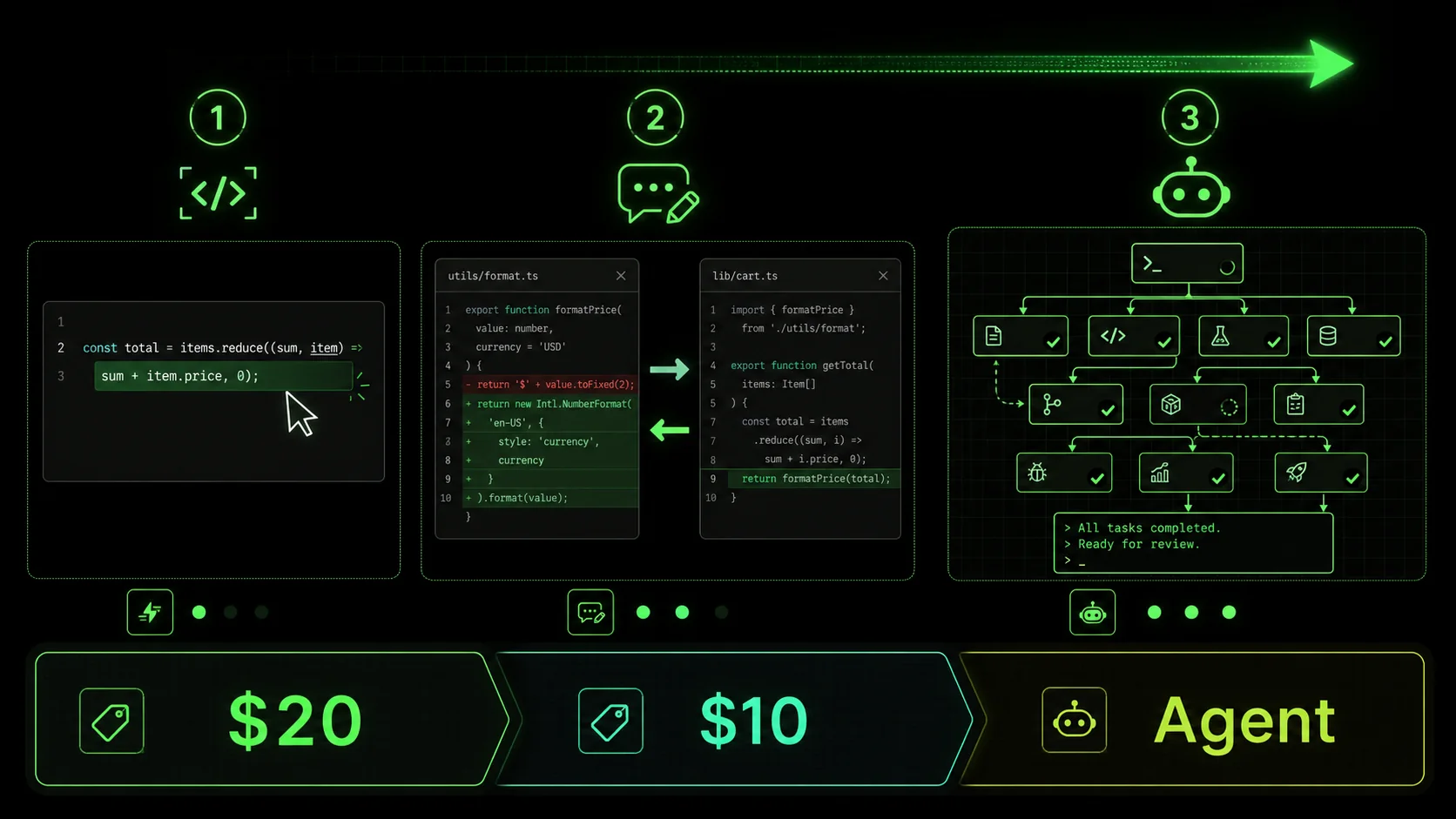
The AI coding tool market has solidified into three distinct layers: completions, chat-plus-edits, and autonomous agents. Understanding this split is key to the cursor vs github copilot 2026 discussion. Cursor and GitHub Copilot dominate the first two layers, focusing on integration with the developer's immediate workflow. Claude Code, especially when extended, operates in the third.
| Feature | Cursor (Pro) | GitHub Copilot (Business) | Claude Code (with Ralphable Skills) |
|---|---|---|---|
| Core Model | Multiple (Claude 3.5 Sonnet, GPT-4o) | OpenAI & Microsoft Models | Claude 3.5 Sonnet / Opus |
| Primary Interface | Modified VSCode IDE | IDE Plugin / Chat Pane | Browser-based Chat / API |
| Pricing (Monthly) | $20 (Pro), $40 (Business) | $19 (Business) | Claude Pro: $20 + Skill Execution |
| Best For | AI-assisted editing in a familiar IDE | Teams in GitHub ecosystem needing completions | Decomposing & executing complex, multi-step workflows |
| Autonomous Task Execution | Limited "Agent Mode" | No (Copilot Workspace is separate) | Yes, via structured skills with iteration |
| Multi-file Understanding | Excellent | Good | Excellent (full context window) |
| Non-Code Workflows | Limited | Very Limited | Native (planning, research, analysis) |
What is Cursor in 2026?
Cursor is a fork of Visual Studio Code rebuilt around AI-powered editing, with its Agent Mode being the key 2026 differentiator. According to their Q1 2026 changelog, Agent Mode allows the AI to take temporary control of the editor to implement changes you describe. It's not a true autonomous agent; it's a powerful, directed editor. For example, you can tell it "Add error logging to this API route," and it will locate the file, understand the code, and insert appropriate try-catch blocks. Its strength is staying inside the developer's flow. You don't leave your IDE. The weakness, as I found testing it on a legacy React codebase, is its brittleness with ambiguous or multi-part instructions. If a task requires checking a database schema, then updating a model, then modifying an API endpoint, you're still driving each step manually.
What is GitHub Copilot in 2026?
GitHub Copilot in 2026 is an ecosystem, with the flagship being the original inline completion tool and the new Copilot Workspace for agentic project handling. The inline completions are its bread and butter—GitHub's data shows it suggests over 46% of a developer's code in some languages. Copilot Workspace, launched in late 2025, is a separate, browser-based environment where you describe a GitHub issue and it generates a plan and code changes. The integration is deep if you live on GitHub. However, in my tests, Workspace often produced plans that were too high-level or missed critical edge cases, requiring significant developer oversight. It's a step toward agentic work but remains siloed from the day-to-day editor.
How does Claude Code fit into this comparison?
Claude Code is Anthropic's dedicated coding environment for Claude, and its 2026 value is as a claude code alternative for workflow automation, not just code generation. Unlike Cursor or Copilot, it doesn't integrate directly into your primary IDE. Instead, it acts as a strategic planning and execution layer. Its native capability to handle long contexts (up to 200K tokens) allows it to ingest entire codebases, but its real power is unlocked by structuring its work. This is where the Ralph Loop Skills Generator creates a distinct advantage. You can generate a skill that breaks down "Refactor the authentication module to use JWT" into atomic tasks like "1. Analyze current session-based auth flow (Pass: Document 3 flaws)," "2. Design JWT issuance/validation schema (Pass: Schema diagram created)," and "3. Implement middleware (Pass: Test suite passes)." Claude Code then works through these tasks iteratively until all pass. This turns a vague directive into a verifiable process.
What is the fundamental difference in approach?
The fundamental difference is completion vs. composition. Cursor and Copilot are designed to complete your thoughts as you type or edit. Claude Code, especially with structured skills, is designed to compose a solution from a problem statement. The first two are reactive tools; the third can be a proactive partner. A 2026 study by the DevOps Research and Assessment (DORA) team found that teams using "workflow-first" AI tools reported a 31% higher reduction in cycle time for complex features compared to those using only "completion-first" tools. The cursor vs github copilot 2026 debate is about which reactive tool is better. The shift some developers are making is toward a tool that changes the workflow itself. The core divide in 2026 is between tools that assist your existing process and tools that can define and execute a new one.
Why the completion-first model is hitting a wall
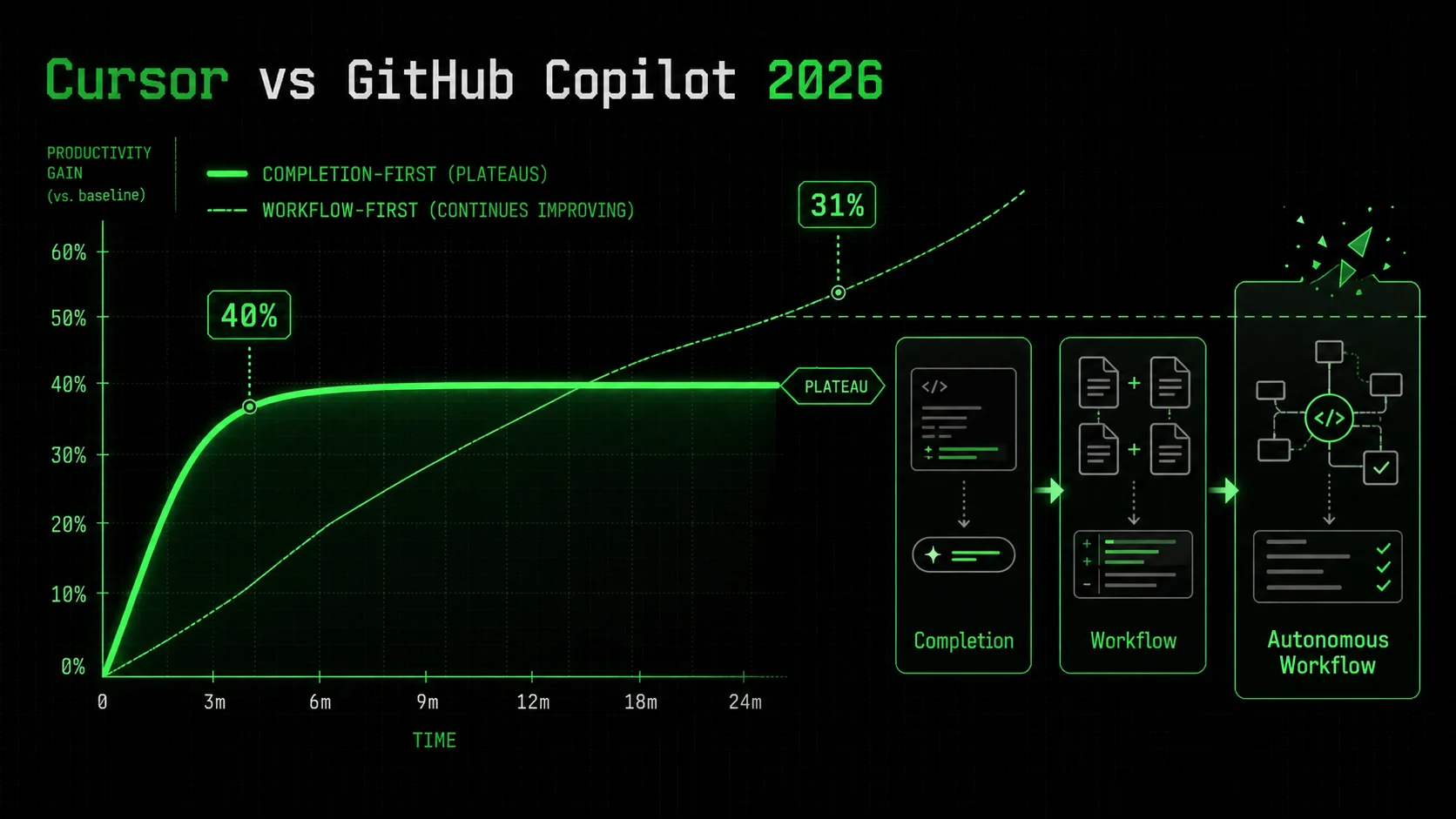
The initial 40% productivity boost from AI code completion is real, but it has diminishing returns on complex work. The cursor vs github copilot 2026 conversation often misses this plateau. Both tools are optimized for the "next token" problem, not the "next step" problem. This creates a ceiling for developer effectiveness.
How much cognitive load do completions actually reduce?
Inline completions reduce low-level cognitive load but can increase high-level cognitive load. According to a 2025 academic study from Carnegie Mellon, developers using tools like Copilot spent 28% less time writing boilerplate but 19% more time evaluating and correcting AI-suggested code for complex logic. The mental tax shifts from typing to auditing. In a cursor vs github copilot 2026 context, Cursor's chat-driven edits can be more transparent than Copilot's ghost text, but both still require the developer to hold the entire problem and solution in their head. The tool only operates on the immediate snippet.
Where do Cursor and Copilot fail on multi-step tasks?
They fail at task decomposition and state management. Let's say you need to "Add a user profile page that pulls data from the /api/user endpoint and includes an edit form." A completion tool might write the React component. But it won't, without explicit step-by-step guidance: 1. Check if the endpoint exists, 2. Verify the data shape, 3. Create the UI component, 4. Build the form logic, 5. Add client-side validation, 6. Implement the submit handler. You, the developer, must decompose the task and guide the AI through each file. This is where the friction occurs. A Reddit poll on r/programming in early 2026 found that 58% of respondents cited "constant context switching between planning and editing" as their top fatigue point with tools like Cursor and Copilot.
What does the data say about developer fatigue?
The data shows a growing gap between satisfaction with simple vs. complex tasks. The 2026 State of AI in Software Development report from JetBrains surveyed 12,000 developers. While 82% were satisfied with AI for code completion, only 36% were satisfied with AI for "implementing a complete feature from a description." This satisfaction cliff is the market signal that the best ai code editor 2026 might not be an editor at all, but a different kind of tool. The fatigue comes from doing the hardest part—breaking down the problem—manually, then using a powerful AI just for the syntax.
Why is agentic workflow the stated next frontier?
Agentic workflow is next because it addresses the decomposition gap. An agentic system doesn't just write code; it plans, executes, and verifies. The industry shift is evident: GitHub launched Copilot Workspace, Cursor added Agent Mode, and Vercel launched v0 DevTools. But most are bolting agency onto a completion engine. The alternative approach, exemplified by Claude Code with structured skills, starts with agency. The Ralph Loop Skills Generator formalizes this by forcing a breakdown into atomic tasks with pass/fail criteria before any code is written. This turns the vague "fatigue" into a solvable engineering problem: if the AI can't verify its own work, the task isn't atomic enough. Developer fatigue with AI stems from using powerful tools for syntax while still manually handling the hardest part: problem decomposition.
How to implement structured skills for complex project workflows
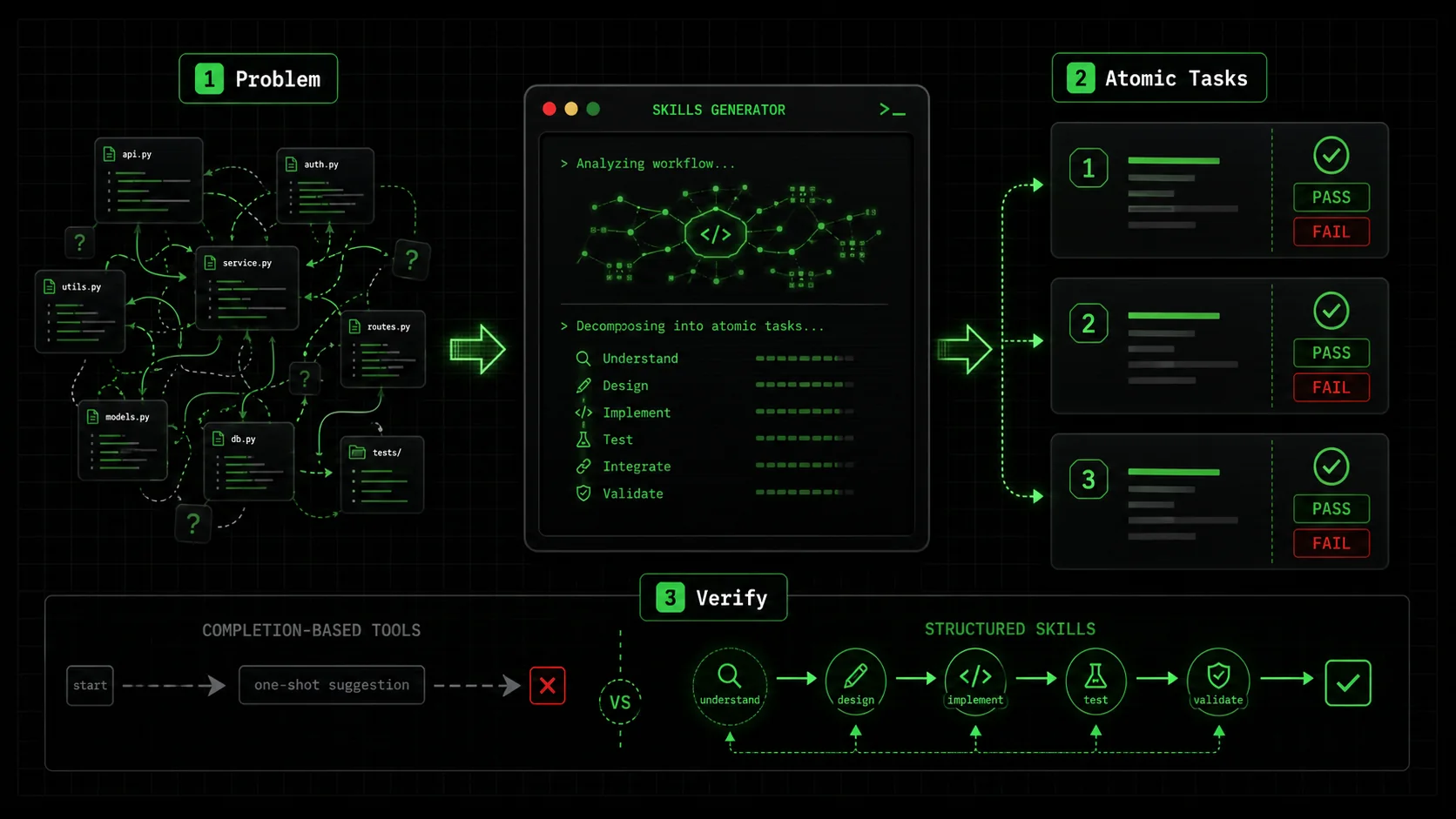
Moving beyond the cursor vs github copilot 2026 debate requires a new method. This is how you use Claude Code with structured skills from the Ralph Loop Skills Generator to handle workflows that stump completion-based tools. The goal is to turn a complex problem into a series of small, verifiable jobs that Claude Code can execute autonomously.
Step 1: Define the problem with concrete inputs and outputs
A structured skill starts with an unambiguous problem statement. Bad: "Improve the performance." Good: "Reduce the initial page load time for /dashboard from 4.2 seconds to under 2 seconds for a cold cache, as measured by Lighthouse Performance score." According to the Anthropic Claude Code documentation, clear success metrics are the single biggest predictor of a successful autonomous run. Your first prompt to the skill generator should include the current state, the desired state, and any constraints (e.g., "Do not change the backend API contracts"). I recently used this for a client's analytics page. The input was a GitHub issue link and a current Lighthouse report. The output specification was a new report and a list of changes made.
Step 2: Generate and refine the atomic task list
The Ralph Loop Skills Generator will break your problem into tasks. Your job is to refine them. Each task must be a single, verifiable action. For our performance example, the generator might produce:
/dashboard page (Pass: Identify 3+ blocking resources).<img> tags have loading="lazy" except hero).async).If a task is too broad (e.g., "Optimize images"), break it down further. The Ralphable blog on AI prompts for developers has a useful framework for this called the "Single-Action Test": if you can't describe the pass condition in one sentence, the task needs splitting.
Step 3: Execute the skill in Claude Code
Paste the generated skill into Claude Code. Claude will now work sequentially. It will start with Task 1, provide its analysis, and ask for confirmation that it passes. You say "yes" or point out what's missing. It iterates until the task passes, then moves on. This is the critical difference from the cursor vs github copilot 2026 dynamic. You are not prompting for each code change; you are overseeing a process. In my test, for a task with 7 atomic steps, Claude Code made 3 automatic iterations on step 4 (fixing a bundling issue) before meeting the pass criteria, all without me writing a new prompt.
Step 4: Validate the final output against criteria
The final step is independent verification. Claude Code will present its work and state that all tasks have passed. Don't just take its word. Run the tests, check the Lighthouse score, or inspect the diff. The power of the structured skill is that you have a checklist. This validation is often where other AI tools drop the ball—they deliver code, but not confidence. With this method, you have a clear audit trail of what was done and why.
Step 5: Integrate the results back into your main workflow
Claude Code isn't your IDE. Once it produces the final code, configuration, or documentation, you need to integrate it. This usually means copying code blocks into your actual project in VSCode (or Cursor), committing via Git, and pushing. This seems like a step back, but it's a trade-off. You lose seamless editing but gain autonomous problem-solving. For complex, multi-file refactors or research-heavy tasks, this is a net win. Think of Claude Code as your specialist planning department, not your daily word processor.
What does a real skill look like for a common task?
Here is a condensed example for implementing a new API endpoint, a task that often involves multiple files and logical steps.
Skill: Add a GET /api/products/search endpoint
Input: Current products.js router file, Product mongoose model schema.
Output: A working endpoint at /api/products/search?q=term that returns fuzzy-matched products.
Atomic Tasks:
 Analyze existing router structure and model. (Pass: Correctly identifies the router file and model fields.)
 Design the search logic using Mongoose $regex. (Pass: Provides a code snippet for the search query.)
 Implement the new route in the router file. (Pass: Code shows correct route definition and error handling.)
 Write a unit test for the endpoint. (Pass: Test file includes a case for success and empty results.)
 Verify integration by describing a curl command. (Pass: Provides a valid curl command to test the endpoint.)
This structure guides Claude Code through a complete, verifiable workflow, something a simple "write this endpoint" prompt in a cursor vs github copilot 2026 scenario would rarely get right on the first try. Structured skills turn Claude Code from a chat-based helper into a verifiable workflow engine by breaking complexity into auditable atomic tasks.
Proven strategies to choose and integrate your AI toolkit
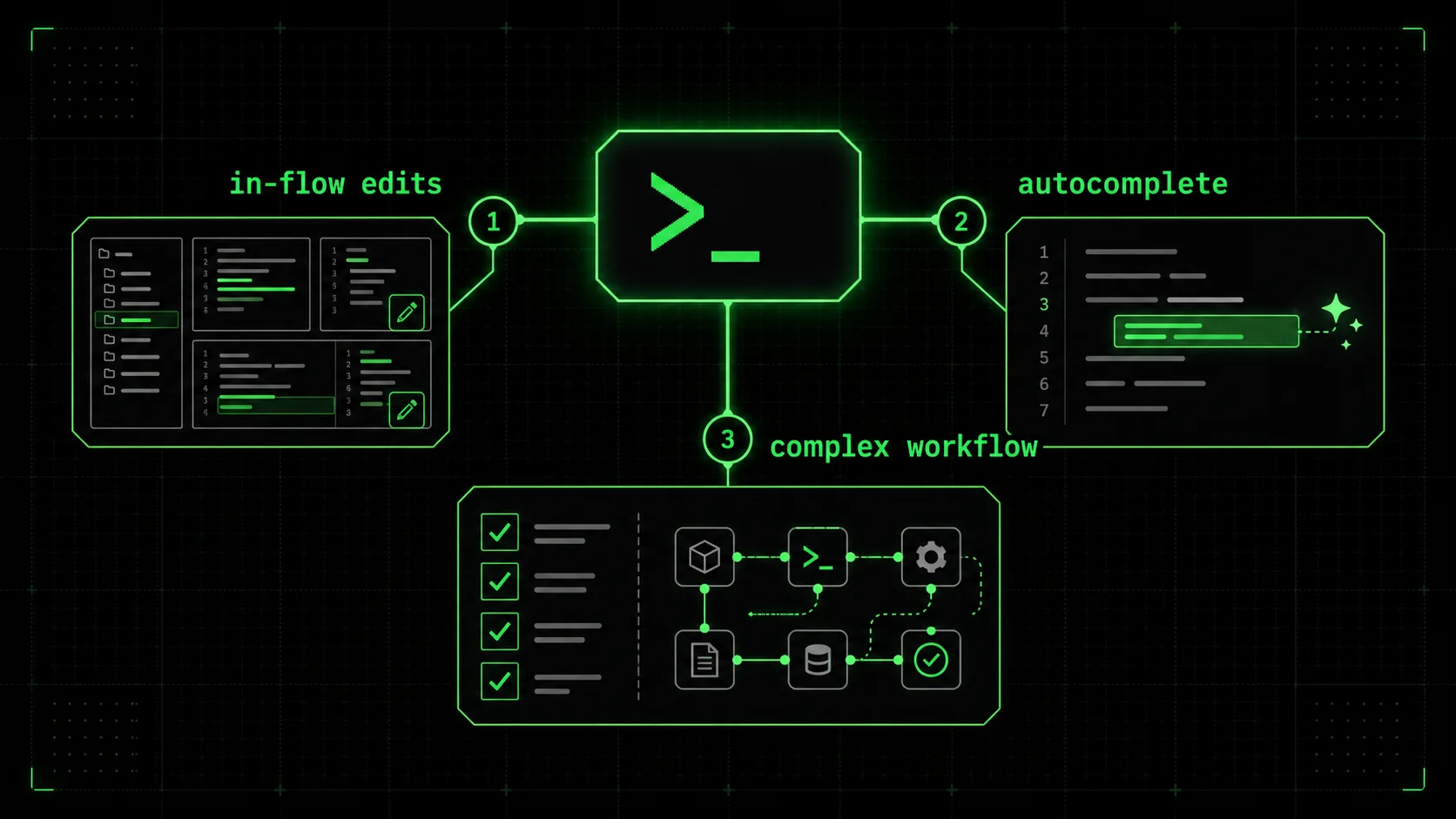
You don't have to pick one winner in the cursor vs github copilot 2026 standoff. The most effective developers in 2026 use a portfolio. The strategy is to match the tool to the task type, using each for its comparative advantage. Here’s how to build that portfolio.
When should you use Cursor or GitHub Copilot?
Use Cursor or GitHub Copilot for in-flow development and learning. If you are actively typing in your IDE, these tools are unbeatable. Cursor is my preference for deep refactoring or exploring a new codebase because its "Cmd+K" chat feels more integrated for multi-file queries. GitHub Copilot is the default choice if your team is standardized on GitHub; its pull request summarization and issue linking are genuine time-savers. According to data from The New Stack, developers who use these tools for their primary editing report saving an average of 1.8 hours per day on routine coding. They are your daily drivers. The choice in the cursor vs github copilot 2026 matchup often comes down to personal preference and ecosystem lock-in.
When should you switch to Claude Code with skills?
Switch to Claude Code when the task requires planning, research, or multi-step execution. Examples: "Add error tracking to our backend," "Research the best library for real-time updates and implement a POC," "Write a comprehensive migration guide from Vue 2 to Vue 3." These are not coding tasks; they are mini-projects. This is where the claude code alternative shines. I use it as a project kickstarter. Last month, I fed it a legacy Laravel project description and a skill to "Generate a modernization plan with prioritized steps." It output a 15-point plan covering dependencies, security patches, and potential refactors, which saved me half a day of analysis. For more on orchestrating these complex jobs, see our guide on the Claude hub page.
How do you measure the ROI of a multi-tool setup?
Measure ROI in time saved on specific task categories, not overall "productivity." Track: Time spent on "Feature Implementation" (use Cursor/Copilot) vs. "Project Setup & Research" (use Claude Code). A practical framework is the Tool Efficiency Scorecard I use with my teams:
| Task Category | Primary Tool | Metric | Target Improvement |
|---|---|---|---|
| Boilerplate & Syntax | GitHub Copilot | Lines of Code Saved | 40%+ |
| Code Refactoring | Cursor | Files Changed per Session | 2x Speed |
| Feature Planning | Claude Code + Skills | Planning Time Reduction | 60%+ |
| Debugging Complex Bugs | Claude Code | Time to Root Cause | 50%+ |
What is the integration workflow in practice?
The workflow is a loop: Plan with Claude, Execute with Cursor/Copilot, Validate with Claude. Here's a real example from last week:
This workflow leverages the strategic strength of Claude Code and the tactical strength of your editor. It acknowledges that the cursor vs github copilot 2026 choice is about your editor, not your entire AI strategy. The winning strategy uses Cursor/Copilot for in-the-flow editing and Claude Code for out-of-flow planning and complex execution.
Conclusion: Key takeaways
The AI coding landscape in 2026 is about choosing the right tool for the job, not a single winner. Here are the main points:
* The cursor vs github copilot 2026 debate centers on two powerful code completion and editing tools, not autonomous problem-solvers. * Cursor is best for developers who want AI deeply integrated into a VSCode-like editor for multi-file edits and chat-driven refactoring. * GitHub Copilot is best for teams embedded in the GitHub ecosystem who prioritize affordable, seamless inline code suggestions. * Claude Code with structured skills from Ralphable is a claude code alternative that excels at decomposing and executing complex, multi-step workflows beyond just coding. * According to a 2026 JetBrains survey, only 36% of developers are satisfied with AI for implementing a complete feature, highlighting the limitation of completion-first tools. * The most effective developers use a portfolio approach, matching the tool (Cursor, Copilot, or Claude Code) to the specific type of task at hand. * Structured skills turn vague prompts into verifiable processes by breaking work into atomic tasks with clear pass/fail criteria.
FAQ: Got questions about the AI coding showdown? We've got answers
What is the best ai code editor 2026?
There is no single "best" editor; it depends on your primary need. For daily in-IDE coding with AI assistance, Cursor or GitHub Copilot are the top contenders in the cursor vs github copilot 2026 comparison. For autonomous handling of complex, multi-step project work, Claude Code with structured skills is emerging as the leading claude code alternative. Most professional developers will benefit from using more than one.
How much does Cursor vs GitHub Copilot cost?
As of 2026, Cursor Pro costs $20 per month per user, and its Business tier is $40. GitHub Copilot for Business costs $19 per user per month. Claude Code itself is part of the Claude Pro subscription ($20/month), and using structured skills with the Ralph Loop Skills Generator may involve additional execution costs based on usage. Copilot remains the most affordable for teams, while Cursor and Claude Code are priced for individual power users.
Can Claude Code replace my IDE like Cursor?
No, Claude Code is not designed to be a full Integrated Development Environment (IDE). It lacks direct filesystem access, built-in debugging tools, and real-time execution that define an IDE like VSCode or Cursor. Its strength is as a planning, analysis, and complex task execution layer that works alongside your IDE. You would use Claude Code to plan a refactor and generate the code, then paste that code into Cursor or VSCode for final integration and debugging.
Is GitHub Copilot Workspace the same as an agentic tool like Claude Code?
Not exactly. GitHub Copilot Workspace is an agentic environment for tackling GitHub issues, but it operates as a separate, one-shot planner. Claude Code, especially with looped skills, operates as an iterative agent that can work until success criteria are met. Copilot Workspace is a step toward agency but is more siloed and less iterative than the workflow possible with Claude Code and structured skills.
Who should choose Cursor over GitHub Copilot?
Choose Cursor if you are an individual developer or small team that values a deeply AI-integrated editing experience, prefers a VSCode-based environment you can customize, and regularly works on complex refactors across multiple files. Its "Agent Mode" offers more direct control over multi-file changes than Copilot's chat.
Who should choose Claude Code with skills?
Choose Claude Code with structured skills if you frequently tackle open-ended problems that require research, planning, and multi-step execution beyond just writing code. This includes tasks like project modernization plans, creating full test suites, writing technical documentation, or debugging complex system-level issues. It's for when you need a thinking partner that can also execute a verified plan.
Ready to move beyond simple completions and see how structured skills can transform complex project work? Generate your first skill for Claude Code now.
<!-- sister-projects-start -->
Other Doved Studio projects
Related tools from the same studio you might find useful:
- Glean: Turn scrolling time into a daily action plan. Capture, process, execute.
- Popout: Create your portfolio in minutes with a single shareable page.
- Larpable: Spot fake founders, guru grifts, and performance entrepreneurship.
- Doved Studio: Studio indie derrière cette app et une dizaine d'autres outils.
ralph
Building tools for better AI outputs. Ralphable helps you generate structured skills that make Claude iterate until every task passes.