Claude Code Context Management: How to Navigate 100K+ Line Codebases Without Losing Your Mind
Large codebases break most AI coding tools. Here's a battle-tested system for using Claude Code effectively on real-world projects with 100K+ lines — from context priming to surgical edits.
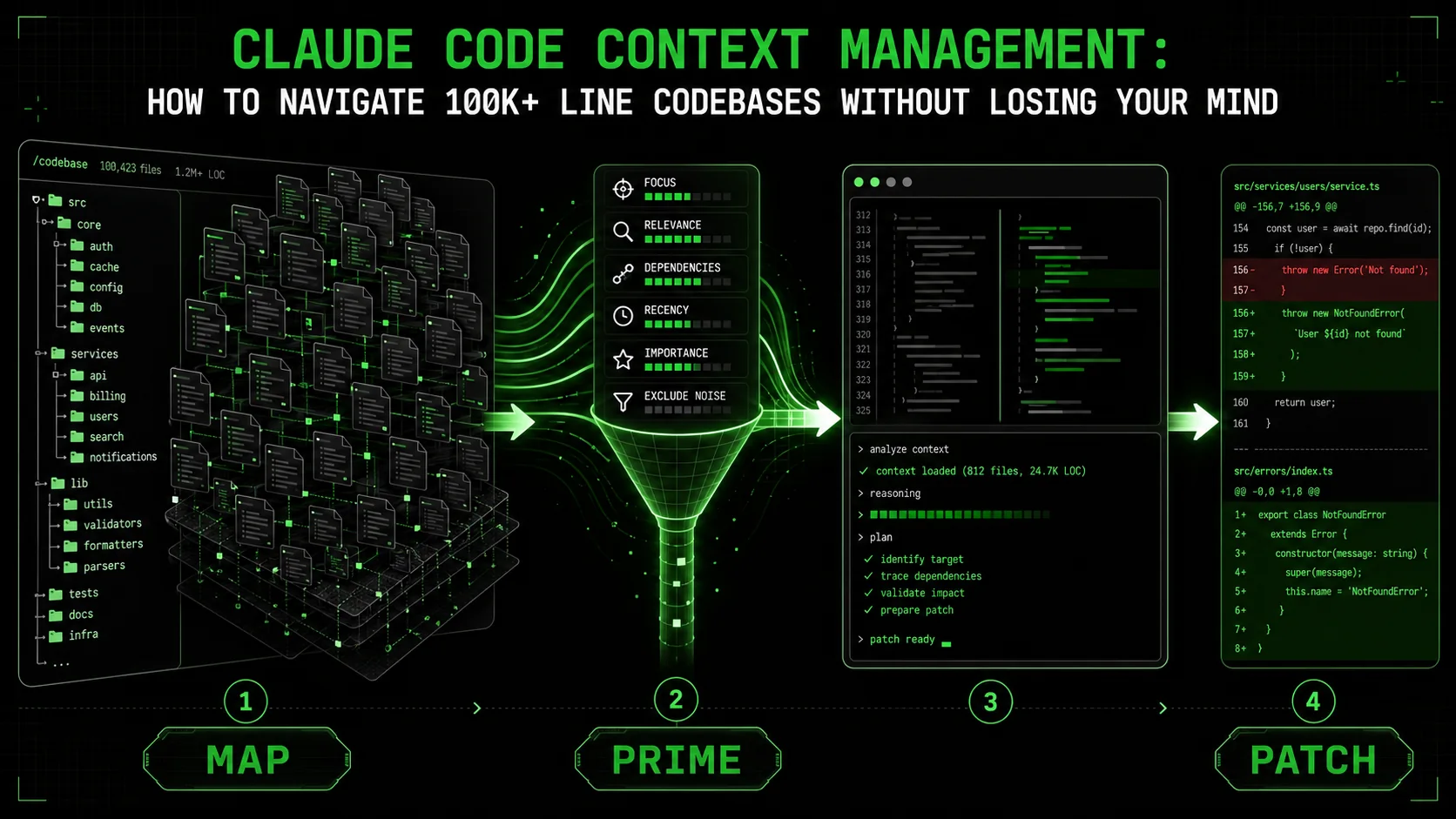
Here's the reality that AI coding tool marketing doesn't mention: the moment your codebase exceeds about 50,000 lines, every AI assistant starts making the same mistakes. It hallucinates file paths that don't exist. It suggests imports from packages you removed six months ago. It confidently refactors a function without knowing about the fourteen other files that call it. It burns through context window reading files it didn't need and then forgets the one file it did.
Claude Code is the best tool available for large codebase work in March 2026. That's not hype — it's measurable. The extended context window, the file system access, the agentic tool use, the ability to run commands and inspect output. But "best available" doesn't mean "works perfectly out of the box." On a 100K+ line codebase, Claude Code without a strategy is still Claude Code making expensive mistakes.
This article is a practitioner's guide. Everything here comes from daily use across multiple production codebases ranging from 80K to 400K lines — monorepos, polyglot stacks, legacy systems with zero documentation. The goal isn't theory. It's a repeatable system that makes Claude Code reliable on projects where most AI tools fall apart.
The Context Window Problem: Why AI Tools Choke on Big Repos
Before solving the problem, let's name it precisely. Claude Code's context window — even the extended 200K token version available in early 2026 — cannot hold an entire large codebase at once. A 100K-line TypeScript monorepo, accounting for typical line lengths and token density, represents roughly 1.5-3 million tokens. That's 10-15x the context window.
This creates three specific failure modes:
Failure mode 1: The blind edit. Claude modifies a file without seeing its callers, its tests, or its related types. The edit is locally correct but globally broken. You won't catch it until CI fails or, worse, production breaks. This happens most often with shared utilities, type definitions, and API contracts. Failure mode 2: Context thrashing. Claude reads ten files to understand a problem, consuming 60% of the context window on exploration. By the time it starts writing code, it's already forgetting the details of the first files it read. The solution it produces blends accurate details from recent files with hallucinated details from earlier files that have faded from working memory. Failure mode 3: The over-read. You ask Claude to fix a bug in a specific module, and it preemptively reads the entire directory tree, all related tests, the package.json, the README, and three config files "for context." None of this was necessary. But now 80% of the context window is occupied by irrelevant information, leaving minimal room for the actual reasoning and code generation.The solution to all three failure modes is the same principle: you control what Claude sees, when it sees it, and how much of it enters the context window. Claude Code is not a search engine. It's a reasoning engine. Your job is to feed it exactly the right information at exactly the right time.
The CLAUDE.md File Strategy
The single most impactful thing you can do for large codebase work is maintain a CLAUDE.md file at the root of your project. This is Claude Code's equivalent of onboarding documentation — the file it reads first, before touching anything else.
A well-structured CLAUDE.md transforms Claude from a tourist into a local. Here's what belongs in it and, just as importantly, what doesn't.
Architecture overview in five to ten lines. Not a comprehensive design document. A concise map: "This is a Next.js 15 app. The API layer is in /src/api/. Business logic lives in /src/services/. Database models are in /src/db/models/. Tests mirror the source structure under /tests/." This gives Claude an instant spatial model of the codebase.
Key conventions that aren't obvious from the code alone. "We use barrel exports in feature directories. Error handling uses a Result pattern — never throw exceptions in service functions. All API responses conform to the shape defined in /src/types/api-response.ts." These are the rules that Claude can't infer from reading a single file.
Common gotchas that have burned you before. "The user table uses uuid not serial for primary keys. The auth middleware in /src/middleware/auth.ts mutates the request object — always access the user from req.auth, not from req.user. The legacy payment module in /src/payments/ is being deprecated — do not add new functionality there."
Build, test, and lint commands. "Run tests: npm run test. Run a single test file: npm run test -- path/to/file.test.ts. Lint: npm run lint. Build: npm run build. Type check: npx tsc --noEmit." Claude needs to know how to verify its own work.
Anything longer than 100 lines. If your CLAUDE.md is a novel, Claude spends too many tokens reading it and you've defeated the purpose. Be ruthless about brevity.
Implementation details that change frequently. CLAUDE.md should be relatively stable. If you're updating it every day, the information probably belongs in code comments or a more targeted instruction file.
General documentation. CLAUDE.md is not a README. It's an instruction set for an AI agent. Write it the way you'd brief a new senior developer on their first day — assume competence, provide orientation, skip the basics.
Project-specific CLAUDE.md files. For monorepos, place a root-level CLAUDE.md with the global architecture, and subdirectory-level CLAUDE.md files for each package or service. Claude reads the nearest CLAUDE.md to its working context, so a file at/packages/auth/CLAUDE.md will be read when Claude is working in the auth package. This prevents the auth-specific conventions from polluting the context window when Claude is working on the billing package.
Surgical Context: Teach Claude to Explore, Not Dump
The biggest mistake developers make with Claude Code on large codebases is front-loading context. They paste entire files into the conversation, or they ask Claude to "read the whole module first." This feels thorough. It's actually destructive.
The correct approach is surgical context loading: give Claude the minimum viable context for each step of the task, and let it request more as needed.
In practice, this means:Start with the specific file you want modified. Not the whole module. Not the related tests. The one file. Let Claude read it, understand it, and propose changes.
When Claude needs to understand a dependency, let it explore one file at a time. "What does UserService.getById return?" is a question Claude can answer by reading one file. You don't need to pre-load the entire UserService module.
Use grep and glob strategically. Instead of reading entire files, have Claude search for specific patterns. "Find all files that import from @/lib/auth" gives Claude a focused map of the blast radius for a change, without consuming context on the contents of those files.
Provide type definitions separately from implementations. If Claude needs to understand the shape of data flowing through a function, the type file is usually 20 lines. The implementation file might be 500 lines. Feed it the types first. Often, that's enough.
The "context budget" mental model: Think of the context window as a budget. Every file Claude reads is a withdrawal. Every line of reasoning it performs is a withdrawal. Every line of code it generates is a withdrawal. Your job is to ensure that the withdrawals are high-value — directly relevant to the task — and that the balance never runs low before the task is complete.A useful heuristic: if Claude is reading a file and you can't articulate why that file is necessary for the current task, it shouldn't be reading it.
The "Zoom In, Zoom Out" Workflow
This is the core workflow pattern for large codebase work with Claude Code. It alternates between two modes: zoomed-out orientation and zoomed-in execution.
Zoomed-out mode (orientation):In this mode, Claude is mapping the territory. It's reading file trees, grepping for patterns, checking type definitions, and understanding relationships. The goal is to build a mental model of the relevant portion of the codebase, not to write any code.
Example prompt in zoomed-out mode: "I need to add a new notification channel (Slack) to our notification system. Before writing any code, explore the existing notification module at /src/notifications/. Show me the file structure, the base interface that channels implement, and how existing channels (email, SMS) are registered."
Claude will read three to five files, summarize the architecture, and identify the patterns. It hasn't written a single line of code, but it now understands the contract it needs to fulfill.
Zoomed-in mode (execution):Now Claude writes code, with full awareness of the patterns it discovered. The zoom-in is surgical: one file at a time, one change at a time, verified against the patterns established in the zoom-out phase.
Example prompt in zoomed-in mode: "Now implement the Slack notification channel. Follow the exact same pattern as EmailChannel in /src/notifications/channels/email.ts. Create the new file at /src/notifications/channels/slack.ts. Use the SlackWebhookClient from /src/lib/slack.ts for delivery."
The zoom-in prompt is specific, referenced, and bounded. Claude knows exactly what file to create, what pattern to follow, and what dependency to use. The probability of a correct implementation on the first attempt goes from roughly 40% (cold start) to roughly 85% (after zoom-out orientation).
The oscillation: Complex tasks require multiple zoom-in/zoom-out cycles. Implement the channel (zoom in). Run the tests and review failures (zoom out). Fix the specific test failures (zoom in). Check integration with the notification router (zoom out). Wire up the new channel in the router (zoom in). This oscillation is not inefficiency — it's the rhythm of reliable AI-assisted development on large codebases.Working With Monorepos
Monorepos amplify every context management challenge by an order of magnitude. A monorepo with five packages isn't five times harder than a single package — it's twenty times harder, because of cross-package dependencies, shared types, workspace-level configuration, and the sheer volume of potentially relevant code.
The package isolation principle: When working in a monorepo, treat each package as an independent codebase. Start Claude's context from the package root, not the monorepo root. Read the package's own CLAUDE.md (if it has one), its own types, and its own tests. Only reach out to other packages when a cross-package dependency is directly relevant. Practical monorepo workflow:packages/api. The relevant entry point is packages/api/src/index.ts."User type is defined in packages/shared/src/types/user.ts — read that file for the type definition but don't explore the rest of the shared package."npm run test --workspace=packages/api to run only the API package tests" keeps Claude's verification scope narrow and its feedback loop tight.packages/api depends on packages/shared and packages/db. packages/web depends on packages/shared and packages/ui. No other cross-package dependencies exist." This three-line map prevents Claude from exploring packages it doesn't need.
File-Level vs. Project-Level Instructions
Claude Code supports instructions at multiple levels of granularity. Understanding when to use each level is critical for large codebases.
Project-level instructions (CLAUDE.md) are for conventions, architecture, and patterns that apply everywhere. "We use camelCase for variables. All API endpoints returnApiResponse<T>. The database layer uses Drizzle ORM."
Directory-level instructions (CLAUDE.md in subdirectories) are for module-specific conventions. The auth module's CLAUDE.md might say: "All auth functions must validate the session token before performing any operation. Never return raw database records — always map to the AuthUser DTO. Rate limiting is handled at the middleware level, not in individual functions."
Inline code comments are for local context that Claude needs when editing a specific file. A comment like // IMPORTANT: This function is called by the webhook handler and MUST complete within 500ms gives Claude performance constraints it can't infer from reading the function signature.
When to use which:
If the instruction applies to more than one directory, it goes in the root CLAUDE.md. If it applies to exactly one module, it goes in that module's CLAUDE.md. If it applies to one function or one block of code, it's an inline comment.
The common mistake is putting everything in the root CLAUDE.md. This creates a massive instruction file that Claude reads in full every session, wasting context on instructions that are only relevant 10% of the time. Distribute the knowledge close to where it's used.
Managing Context Across Long Sessions
Long sessions — the kind where you're building a feature over thirty or more turns — are where context management either saves you or destroys you. Claude Code in March 2026 handles long sessions better than any previous version, but the context window is still finite, and information decay is still real.
The checkpoint pattern. Every ten to fifteen turns, ask Claude to summarize the current state: "Summarize what we've done so far, what's working, and what's remaining." This forces Claude to consolidate its understanding and gives you a chance to correct any drift before it compounds. The summary becomes a compressed representation of the session state that's far more efficient than the raw conversation history. The fresh-start pivot. Sometimes the most efficient move is to start a new conversation with a targeted brief. If a session has gone thirty turns deep into a debugging rabbit hole and Claude is clearly thrashing, a new conversation with "Here's the bug: [description]. Here's the file: [path]. Here's what we've tried that didn't work: [list]. Find the root cause." will often solve in three turns what the previous session couldn't solve in twenty.Don't treat this as a failure. It's a strategic reset. The new conversation has a clean context window, fresh attention, and the benefit of everything you learned from the failed attempt — compressed into a concise brief.
The conversation split pattern for complex features. If you're building a feature that touches multiple modules, split it into multiple conversations: one for the data layer, one for the API endpoints, one for the frontend components. Each conversation has a narrow focus and a manageable context budget. Stitch the results together with a final integration conversation that reads only the new or modified files. Explicit state management. At key milestones, write the current state to a file that Claude can reference later. A scratchpad file at/tmp/feature-progress.md with bullet points like "Database migration: done. API endpoint: done, needs tests. Frontend component: not started. Blocking issue: the UserPreference type needs a new notificationChannel field" gives Claude a reliable external memory that doesn't decay with conversation length.
The Subagent Pattern for Parallel Exploration
One of Claude Code's most powerful and underused capabilities is its ability to dispatch subagents — spawning parallel exploration tasks that don't consume the main conversation's context window.
When to use subagents:When you need to understand multiple disconnected parts of the codebase simultaneously. "I need to know how authentication works in the API, how the frontend handles auth state, and what the database schema for sessions looks like." Instead of reading all three sequentially in the main context, you can dispatch three focused explorations.
When you need to search broadly before acting narrowly. "Find all the places in the codebase where we handle date formatting." A subagent can grep, compile results, and return a summary — consuming the context cost in its own window, not yours.
When you need to validate a change across multiple consumers. After modifying a shared function, a subagent can check each consumer to verify compatibility, returning only the files that need updates rather than dumping every consumer into the main context.
The subagent workflow:/src/services/auth.ts and summarize: what methods does it export, what are their signatures, and what does the session validation logic do?"This pattern is particularly effective for impact analysis before large refactors. "Before I rename getUserById to findUser, show me every file that calls it and how it's used." The subagent returns a focused list. The main conversation handles the refactor armed with that list but without having read every file.
Real Examples: Before and After
Example 1: Bug fix without context strategy (before)Developer: "There's a bug where users get logged out randomly. Fix it."
Claude reads the auth middleware (400 lines). Reads the session model (200 lines). Reads the token utility (150 lines). Reads the user model (300 lines). Reads the login controller (250 lines). Reads the logout controller (100 lines). Now at 1,400 lines of context consumed. Proposes a fix to the token expiry logic. The fix is wrong — the bug is actually in the session refresh middleware, which Claude never read because it ran out of context budget for exploration.
Example 1: Bug fix with context strategy (after)Developer: "There's a bug where users get logged out randomly. Before making any changes, search for all files related to session management — grep for 'session' in filenames and in code that handles token refresh or session expiry."
Claude greps, returns a list of eight relevant files. Developer: "Read just the session refresh middleware at /src/middleware/session-refresh.ts — that's the most likely location."
Claude reads the single file (80 lines), identifies the bug immediately: the refresh check uses < instead of <= for the expiry comparison, causing sessions to expire one second early under race conditions. Fix applied in one turn, verified with a test.
Developer: "Add Stripe webhook handling for subscription events."
Claude reads the Stripe SDK docs it was trained on (potentially outdated). Creates a new webhook handler from scratch. Misses the existing webhook infrastructure in /src/webhooks/ that has a registration pattern, signature verification, and retry logic. The new handler works but doesn't follow any existing patterns, lacks signature verification, and introduces a parallel infrastructure that the team now has to maintain separately.
Developer: "I need to add Stripe webhook handling for subscription events. First, explore our existing webhook infrastructure — check /src/webhooks/ for the existing pattern, and look at how other webhook handlers (like the one for GitHub) are structured."
Claude reads the webhook base class (40 lines), the registration utility (30 lines), and the GitHub webhook handler as a reference implementation (60 lines). Now it knows the pattern: extend WebhookHandler, implement validateSignature and handleEvent, register in webhook-registry.ts.
Developer: "Now implement the Stripe subscription webhook handler following that exact pattern."
The result follows every existing convention, includes proper signature verification, uses the established registration system, and integrates cleanly on the first attempt.
Common Mistakes and How to Fix Them
Mistake: Pasting entire files into the prompt. You copy-paste 500 lines of code into the conversation, thinking you're being helpful. You've just consumed a quarter of Claude's context window with raw text that it also has to parse. Instead: reference files by path and let Claude read them with its tools. It reads files more efficiently than parsing pasted text, and it can re-read specific sections later if needed. Mistake: Asking Claude to "understand the whole codebase first." This is the fastest way to burn through the context window with zero useful output. Claude cannot hold a whole codebase in context. Stop trying. Instead: give Claude the map (CLAUDE.md) and let it explore specific rooms as needed. Mistake: Never verifying Claude's understanding. After Claude reads several files, you assume it understood everything correctly and jump straight to asking for code. Instead: ask Claude to briefly state what it understood before writing code. "Before you implement this, tell me: what's the existing pattern for error handling in this module?" A 30-second verification saves a 30-minute debugging session. Mistake: Using Claude for search when grep would do. "Find all the TODO comments in the codebase" is not a Claude Code task. It's a grep command. Wasting Claude's reasoning capacity on text search is like using a sports car to deliver mail. Use Claude for reasoning, analysis, and generation. Use grep, glob, and find for search. The combination is more powerful than either alone. Mistake: Fighting the context window instead of working with it. Some developers try to cram maximum context into every turn, writing enormous prompts that try to anticipate every question Claude might have. This is like packing for every possible weather scenario — you end up with a suitcase too heavy to carry. Keep prompts lean. Provide context incrementally. Let Claude ask for what it needs. The most productive sessions are conversations, not monologues. Mistake: Not using the tools to verify changes. Claude wrote the code. You reviewed it visually. It looks right. Ship it. Then the build breaks because of a type error Claude didn't catch. Instead: after every meaningful code change, ask Claude to run the type checker and the relevant tests.npx tsc --noEmit and npm test -- --testPathPattern=relevant-file take seconds and catch errors that visual review misses. Make Claude prove its own work, as we discussed in our article on atomic skills and pass/fail criteria.
The System in Summary
Large codebase work with Claude Code is not about the model's capability — it's about your ability to manage what the model sees. The entire system reduces to five principles:
1. Orient before acting. CLAUDE.md files, zoom-out exploration, and dependency mapping happen before a single line of code is written. 2. Minimize context, maximize relevance. Every file Claude reads should be directly necessary for the current task. Err on the side of less context, not more. 3. Verify continuously. After exploration, verify understanding. After code generation, verify with tests and type checks. After integration, verify with the build. 4. Split big tasks into small conversations. Long sessions decay. Fresh conversations with targeted briefs are more efficient than marathon sessions. 5. Use the right tool for each step. Grep for search. Subagents for parallel exploration. The main conversation for reasoning and generation. Tests for verification.This isn't a framework you memorize. It's a set of habits you build. After a few weeks of deliberate practice — catching yourself before front-loading context, remembering to zoom out before zooming in, resisting the urge to paste 500 lines — the system becomes instinctive.
And when it does, the 100K-line codebase stops being an obstacle. It becomes exactly what a codebase should be: a project you ship, with Claude Code as a reliable partner that knows how to navigate it — because you taught it how.
<!-- sister-projects-start -->
Other Doved Studio projects
Related tools from the same studio you might find useful:
- Glean: Turn scrolling time into a daily action plan. Capture, process, execute.
- Popout: Create your portfolio in minutes with a single shareable page.
- Larpable: Spot fake founders, guru grifts, and performance entrepreneurship.
- Doved Studio: Studio indie derrière cette app et une dizaine d'autres outils.