How to Create Iterative Prompts That Improve Themselves
Learn iterative prompting for better AI outputs. Step-by-step guide to creating prompts that self-improve through structured feedback loops.
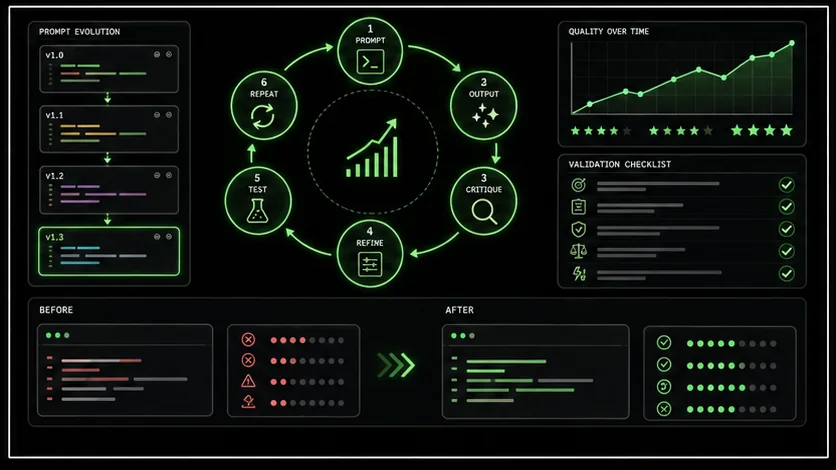
Standard prompting is a gamble. You submit a prompt, hope it works, and start over if it does not. Sometimes you get lucky. Often you do not.
Iterative prompting changes the equation.Instead of hoping for good results, you build prompts that improve themselves through structured feedback loops. The AI generates output, evaluates it against criteria, identifies weaknesses, and produces better versions—all within a single interaction.
This technique consistently produces better results than one-shot prompts. It is how professional prompt engineers work and why tools like [Ralphable](/) are built around iterative methodology.
This guide teaches you exactly how to create iterative prompts from scratch.
---
What Is Iterative Prompting?
Iterative prompting replaces one-shot guessing with structured feedback loops -- Claude, GPT-4, and GitHub Copilot produce measurably better output when given built-in evaluation and refinement steps.
Iterative prompting structures AI interactions as improvement cycles rather than single attempts.
The One-Shot Problem
Traditional prompting:
This process is inefficient because:
- Each attempt is independent
- The AI does not learn from previous attempts
- You do all the evaluation work
- Quality depends on prompt luck
The Iterative Solution
Iterative prompting:
This process works because:
- AI leverages its own capabilities for improvement
- Each iteration builds on previous work
- Criteria define "done" objectively
- Quality becomes predictable
The Core Structure of Iterative Prompts
Every iterative prompt needs four components: task definition, quality criteria, evaluation instructions, and an improvement loop -- this structure works identically in Anthropic's Claude, OpenAI's GPT-4, and Cursor.
Every iterative prompt contains four essential components:
1. The Task Definition
Clear specification of what you want:
Generate a LinkedIn post about remote work productivity
for an audience of tech managers.
2. Quality Criteria
Measurable standards the output must meet:
Quality criteria for evaluation:
- Hook: First sentence stops scrolling (creates curiosity or emotion)
- Length: 150-200 words (optimal for LinkedIn engagement)
- Specificity: Contains at least one concrete example or data point
- CTA: Ends with a clear engagement prompt
- Tone: Professional but conversational
3. Evaluation Instructions
How the AI should assess its own output:
After generating your initial version, evaluate it:
Score each criterion 1-5
Identify the weakest criterion
Explain specifically what is wrong
Describe how to improve it
4. Improvement Loop
Instructions for generating better versions:
Based on your evaluation:
Create an improved version addressing the weakest area
Re-evaluate the new version
Repeat until all criteria score 4 or higher
Present the final version with your evaluation
---
Building Your First Iterative Prompt
A five-step process -- from clear task definition to combined prompt -- turns any Claude Code, GPT-4, or GitHub Copilot session into a self-improving workflow with binary pass/fail gates.
Let us build an iterative prompt step by step.
Step 1: Define the Task Clearly
Start with what you want to accomplish:
Vague: "Write marketing copy" Clear: "Write a hero section headline and subhead for a SaaS landing page. The product is an AI-powered email assistant for sales teams."The clearer your task, the better the AI can evaluate and improve.
Step 2: Establish Quality Criteria
List specific, measurable criteria:
Poor criteria:- Be engaging
- Sound professional
- Be effective
- Headline under 10 words
- Headline contains a specific benefit
- Subhead explains what the product does
- No jargon or buzzwords
- Creates urgency or curiosity
- Would make target audience want to learn more
Step 3: Create the Evaluation Framework
Tell the AI how to assess its output:
Evaluate your copy against each criterion:
- Met: The criterion is clearly satisfied
- Partial: The criterion is somewhat satisfied
- Not Met: The criterion is not satisfied
For any "Partial" or "Not Met" ratings, explain specifically
what is missing and how to fix it.Step 4: Build the Improvement Loop
Structure the iteration process:
Improvement process:
Generate initial headline and subhead
Evaluate against all criteria
If any criterion is "Partial" or "Not Met":
   a. Identify the most impactful improvement
   b. Generate a new version with that improvement
   c. Re-evaluate the new version
Repeat step 3 until all criteria are "Met"
Present final version with evaluation summary
Step 5: Combine Everything
Here is the complete iterative prompt:
Task: Write a hero section headline and subhead for a SaaS landing
page. The product is an AI-powered email assistant for sales teams.
Target audience: Sales managers at B2B companies, 50-200 employees
Quality criteria:
Headline under 10 words
Headline contains a specific, measurable benefit
Subhead explains what the product does in one sentence
No jargon, buzzwords, or vague claims
Creates curiosity or urgency
Would make target audience want to learn more
Evaluation framework:
For each criterion, rate:
- Met: Criterion is clearly satisfied
- Partial: Criterion is somewhat satisfied
- Not Met: Criterion is not satisfied
For any Partial or Not Met, explain what is missing and how to fix it.
Improvement process:
Generate initial headline and subhead
Evaluate against all criteria
If any criterion is Partial or Not Met:
a. Identify the most impactful improvement to make
b. Generate improved version
c. Re-evaluate
Repeat until all criteria are Met (max 3 iterations)
Present final version with complete evaluation
Begin.
---
Advanced Iterative Techniques
Multi-perspective evaluation, staged iteration, and quality-threshold escalation push Claude and GPT-4 outputs from "good enough" to production-ready in 3-5 iterations.
Once you master basic iterative prompts, these advanced techniques produce even better results.
Technique 1: Multiple Evaluation Perspectives
Have the AI evaluate from different viewpoints:
Evaluate from three perspectives:
Perspective 1 - Target Customer:
Would this resonate with a sales manager? Score 1-5.
What would they think/feel reading this?
Perspective 2 - Copywriting Expert:
Is this technically well-written? Score 1-5.
What copywriting principles are used or missing?
Perspective 3 - Competitor Analysis:
Does this differentiate from typical SaaS copy? Score 1-5.
What makes it stand out or blend in?
Average score must reach 4+ across all perspectives.
Technique 2: Explicit Improvement Strategies
Provide specific improvement strategies the AI can apply:
Available improvement strategies (use as needed):
SPECIFICITY: Replace vague claims with specific numbers or examples
EMOTION: Add emotional triggers relevant to the audience
SIMPLIFY: Remove unnecessary words or complexity
REFRAME: Change the angle or perspective of the message
STRUCTURE: Reorganize for better flow or impact
PROOF: Add credibility elements
In each iteration, identify which strategy would help most
and apply it explicitly.
Technique 3: Comparative Evaluation
Have the AI compare multiple versions:
Generate three different approaches:
- Version A: Focus on pain point (before state)
- Version B: Focus on benefit (after state)
- Version C: Focus on differentiation (versus alternatives)
Evaluate all three against criteria.
Select the strongest version.
Improve the selected version through iteration.
Present the strongest final version with reasoning.Technique 4: Staged Iteration
Break improvement into focused stages:
Stage 1 - Core Message:
Generate the core message. Iterate until the message is clear and accurate.
Stage 2 - Emotional Impact:
With the core message set, iterate to maximize emotional resonance.
Stage 3 - Polish:
With message and emotion set, iterate for word choice and flow.
Each stage has separate criteria. Move to next stage only when
current stage criteria are fully met.
Technique 5: Quality Threshold Escalation
Increase standards as iterations progress:
Iteration 1: Target 3/5 on all criteria (good enough draft)
Iteration 2: Target 4/5 on all criteria (solid output)
Iteration 3: Target 4.5/5 on all criteria (excellent output)
If any criterion falls below target, iterate on that specific area.
Move to next iteration level only when current threshold is met.
---
Iterative Prompt Templates
Five ready-to-use templates for content, code, analysis, email, and product descriptions -- each with scoring rubrics that work in Claude, GPT-4, Cursor, and GitHub Copilot.
These templates work across common use cases.
Template 1: Content Writing
Task: Write [content type] about [topic] for [audience].
Length: [word count]
Tone: [description]
Goal: [what the content should accomplish]
Quality criteria:
Opening hook captures attention (score 1-5)
Content delivers promised value (score 1-5)
Structure flows logically (score 1-5)
Tone matches audience expectations (score 1-5)
Conclusion drives desired action (score 1-5)
Evaluation process:
After generating, score each criterion 1-5 with explanation.
Identify lowest-scoring area.
Generate improved version focusing on that area.
Re-score. Repeat until all scores reach 4+.
Present:
- Final content
- Final scores with brief justification
- Summary of improvements made
Template 2: Code Generation
Task: Write [programming language] code that [functionality].
Requirements:
[List specific requirements]
Quality criteria:
Code executes without errors
All requirements are implemented
Code follows [language] best practices
Edge cases are handled
Code is readable and well-commented
Evaluation process:
Generate initial code.
Walk through execution mentally, checking for:
- Syntax errors
- Logic errors
- Missing requirements
- Unhandled edge cases
For each issue found:
- Describe the issue
- Explain the fix
- Generate corrected version
Repeat until no issues remain.
Present:
- Final code
- Explanation of key decisions
- Any limitations or assumptions
Template 3: Strategic Analysis
Task: Analyze [topic/situation] and provide strategic recommendations.
Context:
[Relevant background information]
Analysis criteria:
All relevant factors considered (score 1-5)
Assumptions clearly stated (score 1-5)
Multiple perspectives examined (score 1-5)
Recommendations are actionable (score 1-5)
Risks and limitations acknowledged (score 1-5)
Evaluation process:
Generate initial analysis.
Evaluate against criteria.
For any score below 4:
- Identify what is missing
- Expand or revise that section
- Re-evaluate
Repeat until all criteria score 4+.
Present:
- Complete analysis
- Key recommendation (prioritized)
- Confidence level and limitations
Template 4: Email Writing
Task: Write an email for [purpose] to [recipient].
Context:
[Background and goal]
Quality criteria:
Subject line would get opened (score 1-5)
Opening establishes relevance (score 1-5)
Request/message is clear (score 1-5)
Appropriate length (score 1-5)
CTA is specific and easy to act on (score 1-5)
Tone matches relationship and context (score 1-5)
Evaluation process:
Generate initial email.
Score each criterion.
Identify weakest area.
Rewrite focusing on improvement.
Re-score. Continue until minimum 4 on all criteria.
Present:
- Final email ready to send
- Brief note on key choices made
Template 5: Product Description
Task: Write product description for [product] targeting [audience].
Product details:
[Features and specifications]
Quality criteria:
Opens with benefit, not feature (score 1-5)
Answers "what is it" within first sentence (score 1-5)
Answers "why should I care" clearly (score 1-5)
Features translate to benefits (score 1-5)
Differentiators are highlighted (score 1-5)
Drives toward purchase decision (score 1-5)
Evaluation process:
Generate description.
Evaluate each criterion with specific feedback.
Improve lowest-scoring area.
Re-evaluate. Repeat until all scores reach 4+.
Present:
- Final description
- Evaluation summary
Common Mistakes and How to Avoid Them
Vague criteria, unlimited iterations, and missing evidence are the three errors that cause Claude, GPT-4, and GitHub Copilot to loop without converging on a usable output.
Mistake 1: Vague Criteria
Problem: Criteria like "be engaging" or "sound good" cannot be evaluated objectively. Solution: Make criteria specific and measurable:- ❌ "Engaging headline"
- ✅ "Headline under 8 words that includes a number or specific claim"
Mistake 2: Too Many Criteria
Problem: 15 criteria overwhelms the evaluation process and leads to scattered improvements. Solution: Limit to 5-7 criteria. Focus on what matters most for your specific output.Mistake 3: No Improvement Guidance
Problem: Telling the AI to "improve" without direction produces random changes. Solution: Include specific improvement strategies or frameworks the AI can apply.Mistake 4: Unlimited Iterations
Problem: Without a cap, iteration can continue indefinitely with diminishing returns. Solution: Set a maximum iteration count (usually 3-5) or time limit.Mistake 5: Missing Evaluation Evidence
Problem: AI claims criteria are met without demonstrating why. Solution: Require specific evidence or quotes that prove each criterion is satisfied.---
When to Use Iterative Prompts
Use iteration for final deliverables and multi-requirement tasks in Claude Code or Cursor; skip it for brainstorming and simple lookups where GPT-4 or GitHub Copilot one-shots suffice.
Iterative prompting is not always necessary. Use it when:
Best Uses
Quality matters more than speed:- Final deliverables
- Client-facing content
- Important communications
- Repeated tasks with quality standards
- Brand voice maintenance
- Technical documentation
- Copy with specific requirements
- Code with defined behavior
- Analysis with coverage requirements
- Complex creative tasks
- Multi-requirement outputs
- Tasks you typically revise heavily
Skip Iteration When
Speed matters more than perfection:- Brainstorming
- Initial drafts
- Exploration
- Pure creative expression
- Opinion pieces
- Personal preference
- Quick questions
- Simple lookups
- Straightforward instructions
Integrating Iteration into Your Workflow
Start with manual iteration to learn the method, then build a reusable template library -- Anthropic's Claude Code and OpenAI's GPT-4 both support structured iteration natively.
Option 1: Manual Iteration
Build iterative prompts yourself using the templates and techniques in this guide. Good for:
- Learning the methodology
- Custom one-off tasks
- Full control over criteria
Option 2: Saved Iterative Prompts
Create a personal library of iterative prompt templates for recurring tasks. Good for:
- Frequent tasks with consistent requirements
- Team standardization
- Building institutional knowledge
Option 3: Tools Built on Iteration
[Ralphable](/) provides prompts designed with iterative methodology built in. Good for:
- Immediate productivity gains
- Community-validated criteria
- Best practices without building from scratch
Recommended Approach
---
Measuring Iterative Prompt Success
Track initial-vs-final scores, iteration count, and time-to-result across Claude, GPT-4, and Cursor sessions to quantify the ROI of structured iteration over one-shot prompting.
Quality Metrics
Track across iterations:
- Initial vs. final scores
- Number of iterations needed
- Which criteria most often need improvement
Efficiency Metrics
Compare to one-shot prompting:
- Total attempts to acceptable output
- Time to final result
- Consistency of results
Learning Metrics
Improve over time:
- Which criteria definitions work best
- Common improvement patterns
- Template effectiveness by use case
Frequently Asked Questions
Do iterative prompts work with all AI models?
Yes, but some models handle iteration better than others. Anthropic's Claude excels at following complex iterative instructions consistently. OpenAI's GPT-4 and ChatGPT work well but may need more explicit structure. GitHub Copilot and Cursor support iteration within IDE contexts. Less capable models may struggle with multi-step iteration.
How many iterations should I allow?
3-5 iterations typically suffice. Beyond that, diminishing returns set in. If outputs are not meeting criteria after 5 iterations, the criteria january be unrealistic or the task january need restructuring.
Does iteration increase token usage significantly?
Yes, iterative prompts use more tokens than one-shot prompts. For Claude and ChatGPT, this increases cost. However, the efficiency gain (fewer total attempts) often offsets the per-prompt increase.
Can I iterate on the AI's evaluation?
Yes. If the AI's self-evaluation seems off, add instructions like: "Your evaluation should cite specific evidence from the output. Do not claim criteria are met without demonstrating why."
How do I know if my criteria are good?
Good criteria are:
- Specific enough to evaluate objectively
- Important enough to iterate on
- Achievable within the task's scope
- Comprehensive for the output type
Should criteria change between iterations?
Generally no. Stable criteria provide consistent targets. However, you might add refinement criteria in later iterations (e.g., polish criteria after core requirements are met).
---
Conclusion: From Hoping to Knowing
One-shot prompting hopes for good results. Iterative prompting engineers them.
The methodology is straightforward:
This approach produces consistently excellent results because quality is not left to chance.
Getting started:Stop hoping for good AI outputs. Start engineering them.
Related guides
- How to Write Prompts for Claude -- master the fundamentals of Anthropic's Claude prompt engineering
- AI Prompts for Developers -- 40+ battle-tested prompts for Claude Code, GPT-4, and GitHub Copilot coding workflows
- Stop Letting AI Guess Your Intent: Explicit Pass/Fail Criteria -- turn vague prompts into deterministic automation
- The AI Prompt Debt Crisis -- how your growing prompt library becomes unmanageable without atomic structure
- Claude Code Prompt Mistakes Developers Make in 2026 -- the top errors that waste your Claude and Cursor sessions
<!-- sister-projects-start -->
Other Doved Studio projects
Related tools from the same studio you might find useful:
- Glean: Turn scrolling time into a daily action plan. Capture, process, execute.
- Popout: Create your portfolio in minutes with a single shareable page.
- Larpable: Spot fake founders, guru grifts, and performance entrepreneurship.
- Doved Studio: Studio indie derrière cette app et une dizaine d'autres outils.