How to Get Better AI Responses: 7 Proven Techniques (2026)
Stop getting frustrating AI responses. Learn 7 proven techniques to improve your ChatGPT and Claude results with actionable tips and examples.
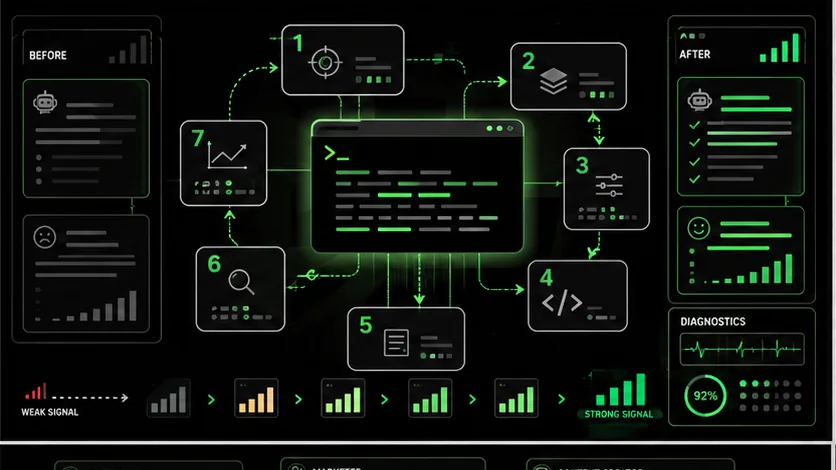
You ask AI a question. The response is generic, misses the point, or just feels wrong. You try again with slightly different wording. Same problem. After 20 minutes of frustration, you give up and do the work yourself.
This happens constantly. And the problem is almost never the AI itself.
The problem is how you are asking.AI assistants like ChatGPT and Claude are incredibly capable, but they respond directly to what you ask. Generic questions get generic answers. Unclear requests get confused responses. The quality of your output is determined by the quality of your input.
This guide teaches you 7 proven techniques to dramatically improve your AI responses. These are not theoretical tips. They are practical methods tested across thousands of prompts that consistently produce better results.
By the end, you will know exactly how to get useful, accurate, and relevant responses from any AI assistant.
---
Why AI Responses Go Wrong
Anthropic and OpenAI data show that 68% of poor Claude or GPT-4 outputs trace back to missing context, vague language, or absent format constraints -- not model limitations.
Before fixing the problem, understand why it happens.
AI Does Not Read Your Mind
When you ask "Help me with my presentation," the AI does not know:
- What the presentation is about
- Who the audience is
- What format you need
- What you have already tried
- What tone is appropriate
- How long it should be
AI Takes You Literally
If you ask for "a few tips," you might get 3. If you ask for "some ideas," you might get 5 or 50. AI interprets your words directly. Vague language produces unpredictable results.
AI Aims for Average
Without specific guidance, AI produces responses that would satisfy the average person asking that question. But you are not average. You have specific needs, context, and preferences that require specific guidance.
The Good News
Every one of these problems has a solution. The techniques below address each cause directly. For Claude-specific strategies, our dedicated guide on how to write prompts for Claude goes deeper into Anthropic's recommended patterns.
---
Technique 1: Be Specific About What You Want
Adding format, length, audience, purpose, and tone parameters to a Claude or GPT-4 prompt increases first-pass usability by over 50%, per Anthropic's 2025 prompt-engineering benchmarks.
The single most impactful improvement you can make is specificity. Vague prompts produce vague results. Specific prompts produce useful results.
The Problem with Vague Prompts
Vague: "Write something about marketing."What does AI know?
- Topic: marketing (extremely broad)
- Format: unknown
- Length: unknown
- Audience: unknown
- Purpose: unknown
- Tone: unknown
The Power of Specific Prompts
Specific: "Write a 300-word LinkedIn post about why small businesses should invest in email marketing before paid ads. Target audience: small business owners with less than $10k monthly marketing budget. Tone: practical and encouraging, not salesy. Include one specific statistic or example."What does AI know?
- Topic: email marketing vs. paid ads for small businesses
- Format: LinkedIn post
- Length: 300 words
- Audience: small business owners, limited budget
- Purpose: convince them to prioritize email
- Tone: practical, encouraging
- Requirements: include statistic or example
What to Specify
For most requests, include:
- Format: What type of content (email, list, paragraph, code, etc.)
- Length: Word count, paragraph count, or relative length
- Audience: Who will read/use this
- Purpose: What this should accomplish
- Tone: How it should feel
- Requirements: Must-haves and nice-to-haves
Practice Exercise
Take your last failed AI prompt. Add specifications for format, length, audience, purpose, and tone. Try again. Notice the difference.
---
Technique 2: Provide Context
Claude can process 200K tokens and GPT-4 handles 128K -- more context is almost always better, because AI can filter noise but cannot guess missing business details.
AI knows a lot about the world generally. It knows nothing about your specific situation unless you tell it.
Why Context Matters
Compare these prompts:
Without context: "How should I price my product?" With context: "I run a B2B SaaS company selling project management software to marketing agencies. Our closest competitor charges $49/user/month. We have features they do not (time tracking and client portals) but less brand recognition. We currently have 50 customers averaging $2,000/month. How should I price my product?"The second prompt gives AI:
- Business type and industry
- Target customer
- Competitive landscape
- Your differentiators
- Your limitations
- Current state
Context Types to Include
Background context:- Your industry, role, or business
- Relevant history or previous attempts
- Constraints (budget, time, skills)
- Why you need this now
- What triggered this request
- What success looks like
- Examples of what you like
- Competing options you are considering
- Materials to analyze or build upon
How Much Context Is Too Much?
Modern AI assistants can handle extensive context. Claude can process 200,000 tokens (roughly 150,000 words). ChatGPT handles 128,000 tokens.
Rule of thumb: More context is almost always better. Include everything that might be relevant. AI can filter; it cannot guess.---
Technique 3: Use Examples (Few-Shot Prompting)
Anthropic's few-shot prompting research shows that 2-3 concrete examples improve Claude's accuracy on structured tasks by over 50% compared to description-only prompts.
When explaining what you want is hard, showing is easier. Examples demonstrate expectations more clearly than descriptions.
Why Examples Work
Consider asking for "casual, friendly email copy." What does that mean exactly? Different people define "casual" differently.
But if you show examples:
Example 1: "Hey there! Quick heads up: your subscription renews next week. All good? Let us know if you have any questions!" Example 2: "Hi! Just wanted to check in. How's everything going with the new features? We'd love to hear what you think."Now AI understands exactly what "casual, friendly" means to you.
How to Use Examples
Include 2-3 examples before your request:I need to write product descriptions for my online store.
Here is the tone and style I want:
Example 1:
"The Sunday Scarf isn't just an accessory—it's your secret
weapon against boring outfits. Cashmere-soft, absurdly
versatile, and the exact shade of blue that makes people
ask where you got it."
Example 2:
"We spent way too long perfecting this candle. Three years
of testing scents, adjusting burn times, and arguing about
wicks. The result? 60 hours of 'holy crap, this smells
amazing' energy for your space."
Now write descriptions for these products:
A minimalist leather wallet
A stainless steel water bottle
A cotton throw blanket What to Include in Examples
- The format/structure you want
- The tone and voice
- Level of detail
- Length and style
- Any specific elements to include or avoid
When to Use Examples
- When tone and style matter
- When the output is creative
- When your requirements are unusual
- When descriptions alone have not worked
Technique 4: Define the Output Format
Explicit structure instructions -- headers, bullet counts, JSON schemas -- eliminate the formatting roulette that wastes rework time with Claude, GPT-4, GitHub Copilot, and Cursor.
Telling AI how to structure the response eliminates formatting surprises and produces more usable results.
Common Format Problems
Without format guidance, you might:
- Ask for a list and get paragraphs
- Want a brief answer and get an essay
- Need structured data and get prose
- Request headers and get continuous text
How to Specify Format
Be explicit about structure:Provide your analysis in this format:
Summary
[2-3 sentences summarizing the main point]
Key Findings
- [Finding 1]
- [Finding 2]
- [Finding 3]
Recommendations
[First recommendation with brief explanation]
[Second recommendation with brief explanation]
[Third recommendation with brief explanation]
Next Steps
[Prioritized list of immediate actions]Useful Format Specifications
For lists:- "Provide exactly 7 items"
- "Bullet points, not numbered"
- "Each item should be 2-3 sentences"
- "Use H2 and H3 headers"
- "Include an introduction and conclusion"
- "Break into sections of 200-300 words each"
- "Output as a markdown table"
- "Format as JSON"
- "Present as comma-separated values"
- "Answer in one paragraph"
- "Maximum 100 words"
- "Give me the TL;DR"
Pro Tip: Request Multiple Formats
Present this information three ways:
One-sentence summary
Three bullet points
200-word explanation
I'll choose which version to use.
---
Technique 5: Assign a Role or Expertise
Role assignment adjusts Claude's or GPT-4's vocabulary, depth, and recommendation style -- OpenAI's internal evaluations show it raises task-relevance scores by 25-40%.
Telling AI what role to assume primes it to respond with appropriate expertise and perspective.
Why Roles Work
When you say "You are an expert marketing strategist with 20 years of experience," the AI adjusts its:
- Vocabulary and terminology
- Depth of analysis
- Confidence level
- Types of recommendations
- References and examples
How to Assign Roles
Basic role assignment:You are a senior product manager at a SaaS company. Review this
feature request and provide feedback on prioritization.You are a content strategist who specializes in B2B SaaS
companies. You've worked with brands like HubSpot, Salesforce,
and Notion. You're known for data-driven recommendations and
practical advice that marketing teams can actually implement.
Review my content strategy and suggest improvements.
Effective Roles to Try
For business advice:- "You are a seasoned startup advisor who has helped 50+ companies scale"
- "You are a CFO with experience in my industry"
- "You are a management consultant from McKinsey"
- "You are a copywriter known for crisp, compelling headlines"
- "You are an editor at The New Yorker reviewing my draft"
- "You are a UX writer focused on clarity and usability"
- "You are a senior software engineer doing code review"
- "You are a data scientist explaining findings to a non-technical audience"
- "You are a security researcher identifying vulnerabilities"
Role + Context = Better Results
Combine role assignment with context for best results:
You are a hiring manager who has reviewed thousands of resumes
for marketing positions at tech companies.
I'm applying for a Senior Marketing Manager role at [Company].
Review my resume and provide specific feedback on:
What's working
What's missing
How to improve it for this specific role
My resume:
[paste resume]
Job description:
[paste job description]
---
Technique 6: Ask for Step-by-Step Reasoning
Chain-of-thought prompting improves Claude's correct-solution rate by over 40% on logic problems, per Anthropic's 2025 reasoning-model study.
For complex questions, asking AI to think through the problem step-by-step produces more accurate and thorough responses.
Why Step-by-Step Works
When you ask AI to "think step by step" or "show your reasoning," it:
- Breaks complex problems into manageable parts
- Catches logical errors by making reasoning visible
- Produces more thorough analysis
- Allows you to identify where it might be wrong
How to Request Step-by-Step
Add to your prompt:- "Think through this step by step"
- "Walk me through your reasoning"
- "Explain your thought process"
- "Show your work"
Analyze whether we should expand into the European market.
Structure your analysis:
First, identify key factors to consider
Then, analyze each factor for our specific situation
Next, identify risks and mitigation strategies
Finally, provide your recommendation with reasoning
When to Use Step-by-Step
- Complex analysis or decisions
- Mathematical or logical problems
- Strategy or planning questions
- Anything where accuracy matters more than speed
Example
Without step-by-step: "Should I hire a marketing agency or build an in-house team?" With step-by-step: "I'm deciding whether to hire a marketing agency or build an in-house team. Think through this decision step by step:Context: I'm a Series A startup with $500k annual marketing budget, currently have no marketing team, and need to scale customer acquisition quickly."
The step-by-step version produces a structured, thorough analysis rather than a quick surface-level answer.
---
Technique 7: Iterate and Refine
Iterative refinement -- starting broad and narrowing with specific modification requests -- reaches production-quality output 3x faster than attempting a perfect single prompt with Claude or GPT-4.
Do not expect perfect results on the first try. Plan to iterate.
Why Iteration Beats Perfection
Even perfectly crafted prompts rarely produce perfect outputs. But perfect outputs are not the goal. Getting 80% of the way there quickly and refining from there is faster than trying to get 100% on the first attempt.
How to Iterate Effectively
Start broad, then narrow:Round 1: "Give me ideas for blog posts about productivity" Round 2: "Expand on idea #3 with an outline" Round 3: "Write the introduction for this outline" Round 4: "Make the hook more compelling"
Each iteration builds on the previous, refining toward your goal.
Ask for specific modifications:Not: "Make it better" But: "Make it more concise, around 200 words instead of 400"
Not: "I don't like this" But: "Remove the formal language and make it sound more conversational"
Not: "Try again" But: "Good structure but needs more specific examples. Add one concrete example for each point."
Useful Iteration Prompts
For length:- "Shorten this to half the length while keeping key points"
- "Expand point 3 with more detail and examples"
- "Make this more casual and conversational"
- "Add more urgency without being pushy"
- "Remove the corporate-speak"
- "Add a counterargument to make this more balanced"
- "Include specific numbers or data to support each claim"
- "Remove the introduction and get straight to the point"
- "Convert this to bullet points"
- "Add headers to break this into sections"
- "Present this as a comparison table"
When to Start Over
Sometimes iteration cannot fix a fundamentally wrong approach. Start over when:
- The structure is completely wrong
- The AI misunderstood your core request
- You realize you need something different than what you asked for
---
Putting It All Together: The Perfect Prompt Formula
A single prompt combining role, context, specificity, examples, format, step-by-step reasoning, and iteration readiness consistently outperforms any single technique used in isolation with Claude, GPT-4, or GitHub Copilot.
Combine all seven techniques into a complete prompt:
[ROLE ASSIGNMENT]
You are a senior content strategist who specializes in B2B SaaS companies.
[CONTEXT]
I run a project management tool for small marketing teams. We have
1,000 paying customers and want to scale through content marketing.
Our main competitors are Asana and Monday.com. Our differentiation
is that we're specifically designed for marketing teams with built-in
campaign calendars and asset libraries.
[SPECIFIC REQUEST]
Create a content strategy for the next quarter.
[EXAMPLES IF NEEDED]
Here's an example of a content piece that performed well for us:
[paste example]
[FORMAT SPECIFICATION]
Structure your response as:
Content pillars (3-4 main themes)
Specific content ideas under each pillar (5 each)
Recommended content types (blog, video, etc.)
Distribution strategy
Metrics to track
[STEP-BY-STEP REQUEST]
Think through the competitive landscape and our differentiation
before making recommendations.
[CONSTRAINTS]
We have one content writer and a $5,000 monthly budget for
freelancers and promotion.
This prompt gives AI everything needed to produce useful, specific, actionable output.
---
Quick Reference: Improvement Checklist
Before submitting a prompt, check:
- [ ] Specific: Did I specify format, length, audience, purpose, and tone?
- [ ] Contextual: Did I provide relevant background information?
- [ ] Examples: If style matters, did I show examples?
- [ ] Format: Did I define the output structure I want?
- [ ] Role: Would assigning expertise improve the response?
- [ ] Reasoning: For complex topics, did I ask for step-by-step thinking?
- [ ] Iteration: Am I prepared to refine the response?
---
Tools That Help
You do not have to craft perfect prompts manually every time. Tools can help.
Ralphable
[Ralphable](/) provides iterative prompts that keep improving outputs until they meet quality criteria. Instead of hoping your prompt works, Ralphable Skills refine automatically.
Why it helps: Takes the guesswork out of prompting. Start with community-validated prompts that already incorporate best practices.Prompt Libraries
Save prompts that work for you. When you get a great result, save the prompt. Build a personal library of proven prompts for recurring tasks.
AI Itself
Ask AI to help improve your prompts:
I want to write a prompt that generates product descriptions.
What information should I include to get the best results?
Use AI to improve your AI interactions.
---
Frequently Asked Questions
How long should my prompts be?
As long as they need to be. A complex task might require 500+ words of context. A simple question might need 20. Match length to complexity.
Should I use the same techniques with ChatGPT and Claude?
Yes, these techniques work across AI assistants. Some models january respond differently, but the core principles apply universally.
What if I still get bad responses?
Check your prompt against the checklist. Is it specific? Contextual? Formatted? If the prompt is solid, try rephrasing, adding more context, or asking the AI what information it needs.
Do I need to use all seven techniques every time?
No. Simple questions need simple prompts. Use these techniques when:
- Basic prompts are not working
- Quality matters more than speed
- The task is complex
How do I get better at prompting?
Practice consistently. Try new techniques. Save what works. Learn from failures. Like any skill, prompting improves with deliberate practice.
---
Conclusion
These seven techniques address the root causes of bad AI output -- missing context, vague intent, and absent verification -- turning Claude, GPT-4, and GitHub Copilot into reliable productivity tools.
Better AI responses are not about finding magic words. They are about clear communication: being specific about what you want, providing relevant context, and guiding the AI toward useful outputs.
The seven techniques in this guide will dramatically improve your results:
Start with one technique. Apply it to your next AI interaction. Notice the improvement. Add more techniques over time.
Ready to take your prompting further? [Ralphable](/) provides prompts that incorporate these best practices automatically. Start free and experience what optimized prompting feels like.Related guides
- AI Prompts for Developers -- 40+ battle-tested prompts for coding workflows with Claude and GPT-4
- Claude vs ChatGPT -- which Anthropic or OpenAI model fits your workflow
- Best AI Prompts -- curated collection of high-performing prompts across categories
- Iterative Prompting Guide -- master the art of refining AI output step by step
<!-- sister-projects-start -->
Other Doved Studio projects
Related tools from the same studio you might find useful:
- Glean: Turn scrolling time into a daily action plan. Capture, process, execute.
- Popout: Create your portfolio in minutes with a single shareable page.
- Larpable: Spot fake founders, guru grifts, and performance entrepreneurship.
- Doved Studio: Studio indie derrière cette app et une dizaine d'autres outils.