Claude Code Tutorial: From Zero to Autonomous Coding in 30 Minutes
Complete Claude Code tutorial: installation, first commands, CLAUDE.md setup, autonomous workflows, and the Ralph Loop for production-quality results. With real examples.
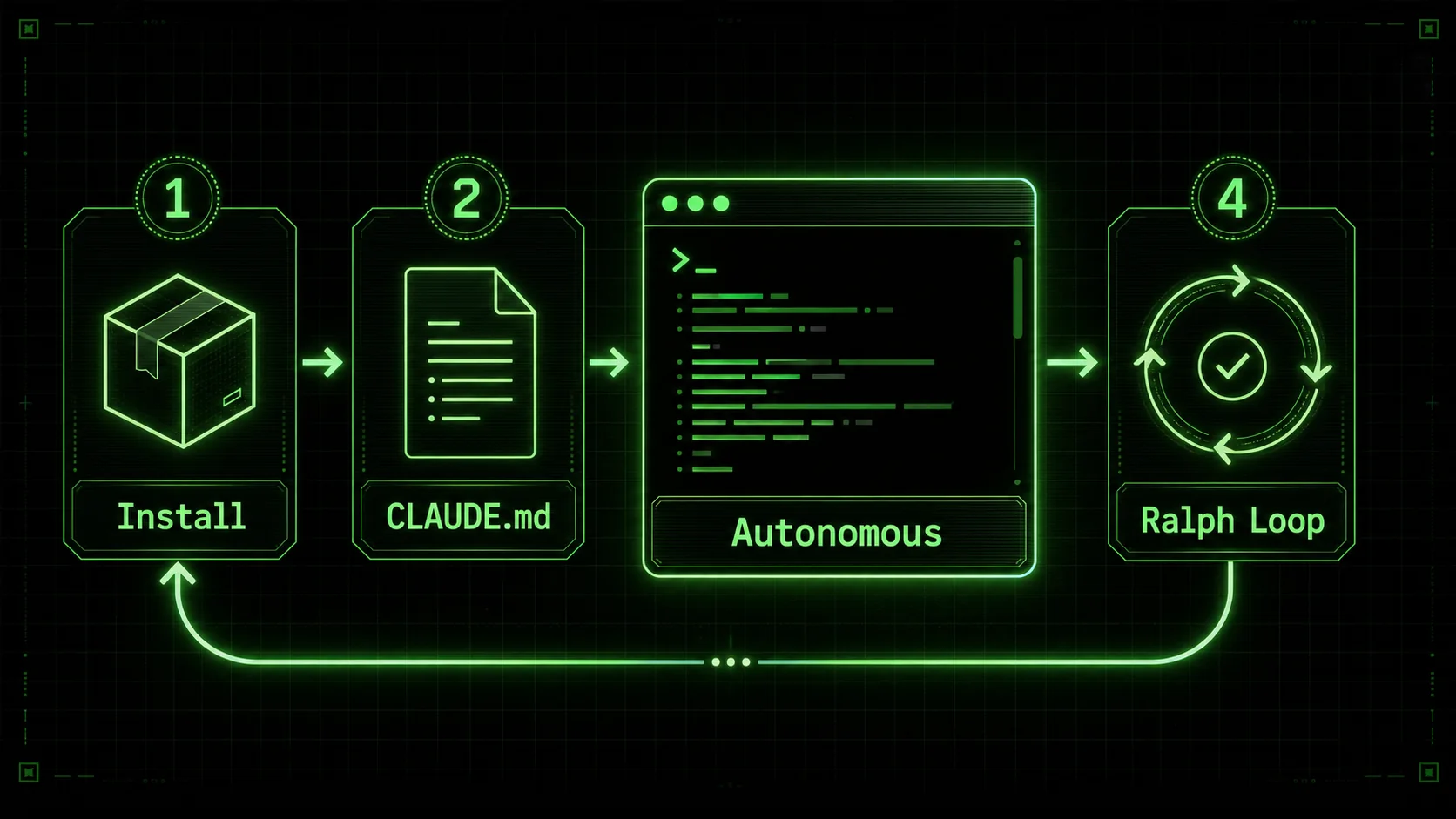
Claude Code is Anthropic's terminal-based coding agent. Unlike IDE extensions that autocomplete your current line or chat sidebars that answer questions about highlighted code, Claude Code operates in your terminal, reads your entire project, and executes multi-step tasks autonomously. It greps your codebase, edits files across directories, runs your test suite, reads the failures, fixes them, and re-runs — all from a single prompt.
This tutorial takes you from installation to your first autonomous workflow in 30 minutes. Every example here comes from real projects, not contrived demos. By the end, you'll have Claude Code installed, configured with a project-specific CLAUDE.md, and you'll have used the Ralph Loop pattern to complete a task that would normally take five prompts in a single shot.
Step 1: Installation (3 Minutes)
Claude Code runs as a global npm package. You need Node.js 18 or later installed.
npm install -g @anthropic-ai/claude-codeThat's it for the binary. Now you need an API key. Go to console.anthropic.com, create an account if you don't have one, navigate to API Keys, and generate a new key. Set it as an environment variable:
export ANTHROPIC_API_KEY=sk-ant-...your-key-hereAdd that line to your .zshrc or .bashrc so it persists across terminal sessions. If you're on a team, each developer uses their own key — there's no shared account model.
Now navigate to any project directory and run:
claudeClaude Code starts an interactive session. On first launch, it scans your project structure — reading package.json, tsconfig.json, Cargo.toml, pyproject.toml, or whatever configuration files exist — and builds a mental model of your tech stack, directory structure, and coding patterns. This isn't cached between sessions; Claude reads your project fresh each time, which means it always reflects your current code.
You'll see a prompt where you can type natural language instructions. But before you start prompting, there's a configuration step that dramatically improves the quality of every response.
Step 2: Your First Commands (5 Minutes)
Start with simple tasks to see how Claude Code operates. These examples assume a Next.js project, but the patterns apply to any language or framework.
Ask Claude to explain a file:explain src/app/layout.tsxClaude reads the file, identifies the framework conventions (App Router layout, metadata export, font loading), and explains what each section does, including how it interacts with other files in your project. This isn't a generic explanation of Next.js layouts — Claude references your actual component tree and provider setup.
Ask Claude to find and fix a bug:there's a hydration error on the blog page — the date renders differently on server and client. find and fix it.Watch what happens. Claude doesn't just read the blog page. It greps for date formatting functions across your codebase, identifies that you're using new Date().toLocaleDateString() without a consistent locale parameter, finds every instance, and applies a fix that uses a shared utility function with an explicit locale and timezone. It then runs your dev server or test suite to verify the fix.
add a dark mode toggle to the header. use next-themes, persist preference in localStorage, default to system preference.Claude installs next-themes via your package manager, wraps your layout in the ThemeProvider, creates a toggle component with the correct client directive, adds it to your header, and handles the flash-of-unstyled-content issue that catches most developers the first time. Multiple files touched, all from one prompt.
The key insight from these first commands: Claude Code doesn't just generate code. It reads existing code to understand your patterns, navigates your file structure to find the right locations for changes, executes shell commands to install dependencies and run tests, and edits multiple files in a coordinated way. It's closer to pair programming with a senior developer who can type faster than you can think than it is to an autocomplete engine.
Step 3: Setting Up CLAUDE.md (5 Minutes)
CLAUDE.md is the single most impactful thing you can do to improve Claude Code's output quality. It's a Markdown file that Claude reads at the start of every session, containing project-specific instructions that shape how it writes code.
Create a file called CLAUDE.md in your project root. Here's a template for a Next.js TypeScript project:
# Project: My SaaS App
Tech Stack
- Next.js 15 (App Router)
- TypeScript (strict mode)
- Tailwind CSS v4
- shadcn/ui components
- Supabase (Postgres + Auth + RLS)
- Stripe for billing
Directory Structure
- src/app/ — App Router pages and layouts
- src/components/ — shared UI components (shadcn/ui based)
- src/lib/ — utilities, Supabase client, Stripe helpers
- src/features/ — feature modules (auth/, billing/, dashboard/)
- Each feature: components/, hooks/, actions/, types.ts
Coding Standards
- Server Components by default, "use client" only when needed
- Use Server Actions for mutations, not API routes
- Error handling: Result pattern (never throw from server actions)
- All database queries go through src/lib/db/ — never call Supabase directly from components
- Use next/dynamic for heavy components (charts, editors)
- Import directly, avoid barrel files
Patterns
- Forms: react-hook-form + zod validation
- Auth: Supabase SSR client in middleware, server client in server components
- Data fetching: React cache() for dedup, Promise.all() for parallel fetches
- Testing: Vitest for unit tests, Playwright for E2E
Build & Lint
npm run build must pass before committing- Only fix lint ERRORS, ignore warnings
- Conventional commits: feat:, fix:, chore:
Don't
- Never use any-typed variables
- Never create API routes for things Server Actions can handle
- Never put business logic in components — extract to lib/ or features/
# Project: Data Pipeline
Stack
- Python 3.12, Poetry for dependencies
- FastAPI for HTTP endpoints
- SQLAlchemy 2.0 (async) + Alembic migrations
- PostgreSQL 16
Structure
- src/pipeline/ — ETL stages (extract/, transform/, load/)
- src/api/ — FastAPI routes and dependencies
- src/models/ — SQLAlchemy models
- src/schemas/ — Pydantic schemas
- tests/ — pytest, fixtures in conftest.py
Conventions
- Type hints on every function signature
- Async by default, sync only when forced by library
- Use Result type from returns library for error handling
- Logging via structlog, never print()
- Tests: pytest-asyncio, factory_boy for fixtures
Build
poetry run pytest must pass before commitpoetry run ruff check . for linting (errors only)
~/.claude/CLAUDE.md for preferences that apply to all projects — your preferred commit message style, your device targets, your coding philosophy. The project-level file overrides the global one when they conflict.
The difference is immediately noticeable. Without CLAUDE.md, Claude makes reasonable guesses about your preferences. With it, Claude writes code that looks like your code, follows your patterns, and uses your project's established conventions. The five minutes you spend writing CLAUDE.md pays for itself on the first task.
Step 4: Multi-File Operations (7 Minutes)
This is where Claude Code separates itself from chat-based coding assistants and autocomplete tools. Multi-file operations — refactoring, migrations, feature additions that touch 5-15 files — are Claude Code's natural advantage because it can hold your entire codebase in context and execute coordinated changes.
Try a real refactoring task:
refactor the auth module from using Supabase client-side auth to server-side auth with middleware.
update all components that check auth state to use the server-side session instead.
Watch Claude's execution. It starts by reading your current auth implementation — scanning for Supabase client instantiation, useEffect hooks that check session state, client components that conditionally render based on auth. Then it plans the changes: a new middleware file for session validation, a server-side utility to get the current user, updates to every component that currently uses client-side auth checks.
The execution unfolds over several minutes. Claude creates src/middleware.ts with the Supabase auth helper. It modifies src/lib/supabase/server.ts to export a getUser() function that reads from cookies. It finds every component that imports from @supabase/auth-helpers-react, replaces the client-side hooks with server-side getUser() calls, and converts client components to server components where the auth check was the only reason for the "use client" directive. It updates your auth callback route, adjusts the sign-in and sign-out flows, and modifies your layout to pass the user through the component tree via props instead of context.
Throughout this process, you see every file Claude reads, every command it runs, and every edit it proposes. You can approve or reject individual changes. After all edits are applied, Claude runs your build and test suite to verify nothing broke.
The context window is the enabling technology here. Claude's 200k token window — roughly 150,000 words or 500-800 files of typical source code — means it can hold your entire project in working memory. It doesn't lose track of how file A relates to file Z. When it changes an interface in your types file, it finds and updates every consumer. When it renames a function, it catches the import in the test file that other refactoring tools miss.
For projects larger than the context window, Claude handles it by reading strategically — scanning directory structures, reading the files most relevant to the task, and using grep to find references that need updating. You don't need to tell it which files to read; it figures that out from the task description and your project structure.
Step 5: The Ralph Loop — Autonomous Quality (10 Minutes)
The Ralph Loop is the pattern that transforms Claude Code from a useful assistant into an autonomous coding agent that ships production-quality output. The name comes from this site — it's the workflow pattern we've refined over months of daily Claude Code usage and documented extensively on Ralphable.
The core idea is simple: instead of giving Claude an open-ended instruction and hoping for the best, you provide explicit pass/fail criteria and instruct Claude to iterate until all criteria are met.
Here's a basic example. Without the Ralph Loop:
write unit tests for src/lib/auth.tsClaude writes some tests. Maybe they pass, maybe they don't. Maybe they cover the happy path but miss edge cases. You review, ask for changes, Claude revises, you review again. Three to five round trips to get tests you'd actually merge.
With the Ralph Loop:
Write unit tests for src/lib/auth.ts.
Pass criteria:
100% branch coverage (verify with vitest --coverage)
All tests pass (verify with npm test)
No mocks of external services — use dependency injection
Test file follows existing test patterns in tests/unit/
Each test has a descriptive name that explains the scenario
Iterate until ALL criteria pass. After each iteration, run the tests and coverage check.
If any criterion fails, fix the issue and re-run. Do not stop until all five criteria are green.
What happens next is remarkable. Claude writes the initial test file. It runs npm test and sees two failures — an edge case where the token is expired but the refresh succeeds, and another where the user object is malformed. It reads the error output, fixes the assertions, and re-runs. Tests pass. It runs coverage and sees 87% branch coverage — the error handling paths for network failures aren't covered. It adds tests for those paths, re-runs, and sees 96% coverage. The uncovered branch is a logging statement in a catch block. Claude adds a test that verifies the log call with a spy, re-runs, and hits 100%. All five criteria pass, and Claude reports completion with a summary.
One prompt. Zero manual intervention. Production-quality tests.
The Ralph Loop works because it gives Claude something it's exceptionally good at: a clear objective with measurable checkpoints and the tools to verify its own progress. Without the loop, Claude optimizes for plausible-looking output. With the loop, it optimizes for passing real, executable criteria.
Here's a more advanced example from a real project:
Migrate the user settings page from Pages Router to App Router.
Pass criteria:
The page renders identically to the current version (screenshot comparison)
All form submissions work (test manually by running dev server)
Server Components used where possible, "use client" only for interactive form elements
No runtime errors in console
The old pages/settings.tsx is deleted
Build passes: npm run build
E2E tests pass: npm run test:e2e -- --grep settings
Iterate until all criteria pass.
Claude handles the entire migration — reading the existing page, creating the new App Router version, converting data fetching from getServerSideProps to server-side fetch, splitting the page into server and client components, migrating the form handling, deleting the old file, and running the build and E2E tests to verify. When the E2E test fails because a button selector changed, Claude reads the test, updates the selector, and re-runs.
For more Ralph Loop templates and advanced patterns, see our Ralph Loop deep dive and autonomous coding patterns.
5 Real Workflows You Can Start Using Today
These are workflows we use daily. Each one is a prompt you can adapt to your project.
1. Bug Fix Workflow
Paste the error directly into Claude:
I'm getting this error in production:
TypeError: Cannot read properties of undefined (reading 'email')
    at getUserProfile (src/features/profile/actions.ts:23:18)
    at ProfilePage (src/app/profile/page.tsx:11:24)
The user is authenticated — I can see their session in the middleware logs.
Fix this and add a guard so it can't happen again.
Claude reads the stack trace, opens both files, traces the data flow from middleware to page component, identifies that the Supabase getUser() call returns the auth user but the profile query can return null for new users who haven't completed onboarding, adds a null check with a redirect to the onboarding flow, and writes a test that covers the null-profile scenario.
2. PR Review Workflow
Review the changes in this diff for bugs, security issues, performance problems,
and code style violations. Be specific — cite line numbers and explain why each issue matters.
[paste your git diff, or just say: review the staged changes]
Claude reads the diff, cross-references the changed code against the rest of your codebase, and produces a structured review. It catches things like: SQL injection risks in dynamic queries, missing await on async calls that silently drop errors, N+1 queries hidden in loops, and components that import heavy libraries without dynamic loading. Each finding includes the file, line number, severity, and a concrete fix.
3. Test Generation with Ralph Loop
Generate tests for every exported function in src/lib/billing/.
Pass criteria:
Every exported function has at least 3 test cases (happy path, edge case, error case)
All tests pass
Coverage above 90% for src/lib/billing/
Use existing test patterns from tests/unit/
Mock Stripe API calls using the existing test helpers in tests/helpers/stripe-mock.ts
Iterate until all criteria pass.
This generates a comprehensive test suite for your billing module in a single prompt. Claude reads the existing test patterns, uses your established mocking approach, and iterates until the coverage threshold is met.
4. Documentation Generation
Generate JSDoc comments for all exported functions in src/lib/.
Include @param, @returns, @throws, and @example for each function.
Skip functions that already have complete JSDoc.
Run the TypeScript compiler after to verify no type errors were introduced.
Claude walks through every file in src/lib/, reads each exported function, infers parameter and return types from the TypeScript signatures, writes documentation that matches the actual behavior (not just the type signature), and includes usage examples pulled from how the function is actually called elsewhere in your codebase.
5. Migration Workflow
Migrate this codebase from Express to Hono.
Step 1: Replace express imports with hono equivalents
Step 2: Convert middleware signatures (req, res, next) to Hono's (c, next)
Step 3: Convert route handlers to use c.json(), c.text(), c.redirect()
Step 4: Update error handling middleware
Step 5: Update tests to use Hono's test client instead of supertest
Step 6: Verify: npm run build && npm test
Do all steps sequentially. If any step breaks the build or tests, fix before proceeding.
This is a multi-hour manual task that Claude completes in 10-20 minutes. The step-by-step structure prevents Claude from making too many changes at once, and the build verification after each step catches issues before they compound.
Common Mistakes to Avoid
These are the mistakes we made during our first month with Claude Code, and the corrections that improved our results.
Being too vague. "Make the dashboard faster" gives Claude no actionable target. "Reduce the dashboard's initial load time by lazy-loading the chart components and deferring the analytics widget until after the main data table renders" gives Claude a specific, executable plan. The more precise your prompt, the fewer iterations you need. Not setting up CLAUDE.md. Without project-specific instructions, Claude makes educated guesses about your coding style, testing framework, directory structure, and error handling patterns. Those guesses are often reasonable but never exactly right. The ten minutes you spend on CLAUDE.md saves hours of "no, we do it this way" corrections. Approving changes without reviewing. Claude Code shows you every file it wants to modify and asks for confirmation. Read the changes. Claude is remarkably accurate, but it's not infallible. It occasionally makes assumptions about your business logic that are technically valid but functionally wrong. The review step exists for a reason — use it. The goal is to ship faster, not to ship blindly. Using Claude for trivial tasks. If you need to rename a variable, add a single import, or fix a typo, your editor's native features are faster. Claude Code shines on tasks that involve understanding context across files, making coordinated changes, or iterating through test/fix cycles. Using it for one-line changes adds overhead without saving time. Not using the Ralph Loop. Open-ended prompts produce open-ended results. Claude is significantly better when it has clear criteria to verify against and the instruction to iterate until those criteria pass. Adding pass criteria and "iterate until all pass" to your prompts is the single highest-leverage habit change for Claude Code users.Claude Code vs Doing It Yourself
Claude Code doesn't replace developer judgment. It replaces developer keystrokes. Knowing when to use it and when to do the work yourself is a skill that develops with practice.
When Claude Code saves significant time:- Multi-file refactoring where the pattern is clear but the scope is large
- Test generation, especially for existing untested code
- Migrating between frameworks or library versions
- Writing boilerplate (forms, CRUD endpoints, database schemas)
- Investigating bugs in unfamiliar parts of the codebase
- Adding consistent changes across many files (logging, error handling, documentation)
- One-line changes that are faster to type than to describe
- High-level architecture decisions that require business context Claude doesn't have
- Security-critical code that needs human verification regardless of who wrote it
- Exploratory prototyping where you're discovering what you want through the act of building
- Code where the learning process is the point — if you're studying a new language or pattern, writing it yourself builds understanding that delegating to Claude doesn't
FAQ
Is Claude Code free?Claude Code itself is free to install. You pay for API usage based on the tokens consumed. A typical coding session uses $0.50-$3.00 in API credits depending on codebase size and task complexity. Anthropic offers usage-based pricing with no monthly minimum. For heavy users, the Claude Pro subscription ($20/month) includes a generous Claude Code allowance. Check anthropic.com/pricing for current rates.
Does Claude Code work with any programming language?Yes. Claude Code supports any language that exists in text files — TypeScript, Python, Rust, Go, Java, Swift, Ruby, C++, PHP, and everything else. It's strongest in languages with large training data representation (TypeScript, Python, Rust, Go) and slightly less precise in niche languages, but it can read, understand, and edit code in any language. It also handles configuration files, Dockerfiles, CI/CD pipelines, and infrastructure-as-code (Terraform, Pulumi).
Can Claude Code access the internet?Not directly. Claude Code reads your local files and executes local commands. It doesn't browse the web, fetch documentation pages, or download packages on its own (though it can run npm install or pip install commands that do). Its knowledge comes from its training data and your project's code. For up-to-date documentation, paste relevant sections into the chat or include them in your CLAUDE.md.
Different tools for different workflows. Cursor is a VS Code fork with AI deeply integrated into the editor — inline completions, chat in the sidebar, AI-powered search. It's excellent for developers who want AI assistance while staying in their IDE. Claude Code is terminal-first and autonomous — it's better for multi-file tasks, migrations, and workflows where you want to describe an outcome and let the AI execute. Many developers use both: Cursor for in-editor assistance during active coding, Claude Code for larger operations and autonomous workflows. See our full comparison.
What's the maximum project size Claude Code can handle?Claude's context window is 200k tokens, roughly equivalent to 500-800 files of typical source code. For projects within that size, Claude holds everything in context. For larger projects — and many production codebases exceed this — Claude reads strategically, scanning directory structures and using grep to find relevant files rather than loading everything. We regularly use Claude Code on projects with 2,000+ files and it handles them well by being selective about what it reads. The limiting factor is usually task complexity, not project size.
Can I use Claude Code in a team?Yes. Each team member installs Claude Code with their own API key. The shared element is CLAUDE.md — commit it to your repository so every team member gets the same project instructions. Some teams also maintain a shared .claude/ directory with common prompts and workflow templates. There's no shared session or collaborative mode; each developer runs their own instance.
---
This tutorial covers the fundamentals. For advanced patterns — custom tool configurations, CI/CD integration, and multi-agent workflows — see our advanced Claude Code guide. Related reading:- Claude Code vs Cursor vs GitHub Copilot: 2026 Comparison
- The Ralph Loop: Autonomous Quality Patterns
- 10 Claude Code Prompts That Ship Production Code
- CLAUDE.md Templates for Every Stack
- Why Terminal-First AI Coding Wins
- Anthropic Claude Code Documentation
- Claude Code on GitHub
Other Doved Studio projects
Related tools from the same studio you might find useful:
- Glean: Turn scrolling time into a daily action plan. Capture, process, execute.
- Popout: Create your portfolio in minutes with a single shareable page.
- Larpable: Spot fake founders, guru grifts, and performance entrepreneurship.
- Doved Studio: Studio indie derrière cette app et une dizaine d'autres outils.
ralphable
Building tools for better AI outputs. Ralphable helps you generate structured skills that make Claude iterate until every task passes.