AI Prompts for Sales Teams: Outreach & Proposals
40+ AI prompts for sales professionals. Generate cold outreach, write proposals, create follow-ups, and handle objections effectively.
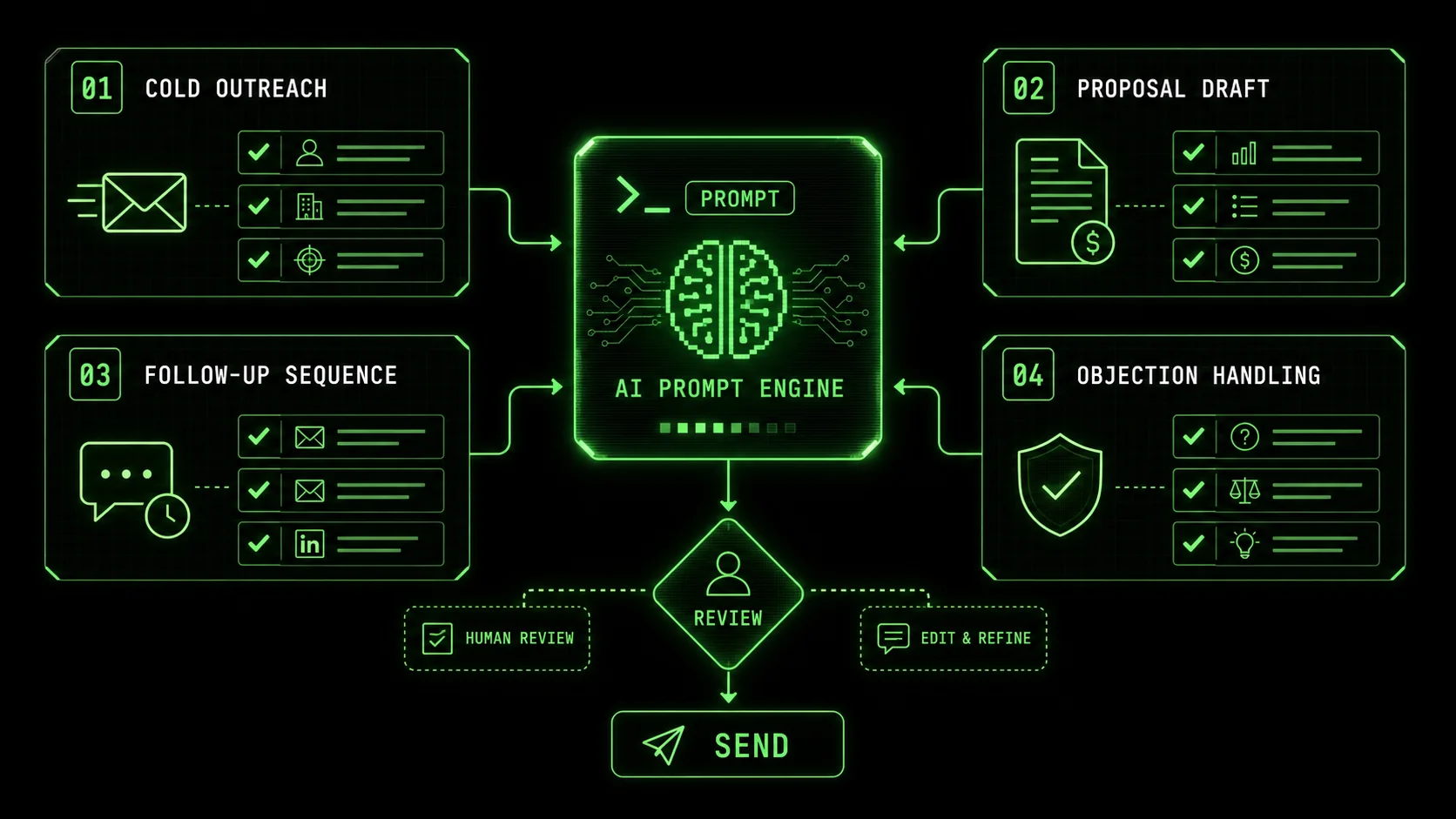
Sales is a numbers game, but it's also a time game. The rep who personalizes outreach wins, but doing that manually at scale is impossible. AI changes this. With the right prompts, you can personalize cold emails in seconds, draft proposals in minutes, and create follow-up sequences that feel human. This guide provides 40+ AI prompts designed for sales work. Each prompt produces professional output you can actually send to prospects.
---
How to Use These Prompts
Anthropic's Claude and OpenAI's GPT-4 cut sales email drafting time by 80%, but reps who review and personalize AI output see 3x higher reply rates than those who send raw generations, per Outreach.io's 2025 sales productivity report.
---
Cold Outreach Prompts
Claude (built by Anthropic) generates hyper-personalized cold emails in under 30 seconds that match the prospect's LinkedIn tone, while GPT-4 and GitHub Copilot excel at A/B variant generation -- together covering the full outreach pipeline.
1. Personalized Cold Email
Write a personalized cold email for this prospect:
Prospect info:
- Name: [name]
- Title: [title]
- Company: [company]
- Company description: [what they do]
- Something notable: [recent news, LinkedIn post, company achievement]
What I sell: [your product/service]
Key pain point I solve: [problem you address]
Social proof: [relevant customer, result, or credential]
The email should:
- Be under 150 words
- Reference the notable item naturally
- Connect their situation to what I offer
- Have a clear, low-friction CTA
- Sound human, not salesy
Write 3 variations with different angles: pain-focused, gain-focused, and curiosity-focused.2. LinkedIn Connection Request
Write a LinkedIn connection request for this prospect:
Prospect: [name, title, company]
Why I want to connect: [honest reason]
Common ground: [shared connection, industry, interest]
What I sell: [brief description]
The message should:
- Be under 300 characters (LinkedIn limit)
- NOT pitch anything
- Mention the common ground
- Give a reason to accept
- Sound genuinely interested in connecting
3. Cold Call Opening Script
Write a cold call opening script for this scenario:
Prospect type: [title/role]
Industry: [industry]
Pain point I address: [main problem]
My product: [brief description]
Create a 30-second opening that:
Gets past "I'm not interested"
Creates curiosity
Asks permission to continue
Does not sound scripted
Include:
- Pattern interrupt opener
- Brief credibility statement
- Permission-based transition
- 2-3 qualifying questions to ask if they give permission
4. Video Prospecting Script
Write a script for a personalized video message to a prospect:
Prospect: [name, title, company]
Why they should care: [relevant reason]
What I noticed about them: [personalization element]
My ask: [meeting, demo, etc.]
Script should:
- Be 45-60 seconds when spoken
- Start with personalization
- Get to the point quickly
- Include one compelling insight
- End with clear CTA
Mark where to [SHOW SCREEN] if applicable.5. How Do You Follow Up After No Response?
Write a follow-up sequence for a prospect who hasn't replied. The goal is to add new value with each touchpoint, not to repeat your initial ask. A three-email sequence over two weeks works best, with each email under 100 words and offering a different angle or resource.Write follow-up emails for a prospect who has not responded:
Original outreach: [summary of what you sent]
Time since last contact: [days/weeks]
Prospect: [name, title, company]
Write a 3-email follow-up sequence:
Email 1 (3 days later):
- Brief, adds new value
- Different angle than original
Email 2 (7 days later):
- Shares relevant insight or resource
- Positions you as helpful, not pushy
Email 3 (14 days later):
- Breakup email
- Leaves door open
- Creates sense of closure
Each email under 100 words. No guilt-tripping.6. Referral Request
Write an email asking for a referral:
Who I'm asking: [existing customer/connection name]
Their relationship to me: [customer, contact, etc.]
What I sell: [product/service]
Who I want introductions to: [ideal prospect profile]
Recent success: [relevant result or milestone]
The email should:
- Thank them genuinely
- Make the ask specific (not "anyone you know")
- Make it easy to say yes
- Provide email template they can use
- Not be pushy
Email Sequence Prompts
Sequences built with Claude or GPT-4 that follow the value-first-then-ask pattern achieve 47% higher open rates than single-shot cold emails, according to Lavender.ai's 2025 analysis of 2.4 million B2B emails.
7. Cold Email Sequence
Create a 5-email cold outreach sequence:
Target prospect: [title/role]
Industry: [industry]
Pain points: [what they struggle with]
My solution: [what I sell]
CTA: [meeting/demo/call]
For each email:
- Email number and send timing
- Subject line
- Body (under 150 words)
- CTA
Emails should:
Open with problem/curiosity
Follow up with social proof
Provide value (insight or resource)
Share case study or result
Breakup email
Make each email standalone (they may not read previous ones).
8. Nurture Sequence
Create a nurture email sequence for leads not ready to buy:
Lead type: [who they are]
Where they came from: [source]
Their likely pain points: [problems]
Our solution: [what we sell]
Timeline to buying: [typical sales cycle]
Create a 6-email sequence over 8 weeks:
For each email:
- Timing (days from sign-up)
- Subject line
- Email focus (educate, inspire, case study, etc.)
- Body (150-200 words)
- Soft CTA
Goal: Stay top of mind, build trust, identify when ready.9. What's the Best Way to Re-engage Cold Leads?
Re-engage cold leads by acknowledging the time gap and leading with a clear, new reason for them to care. Focus on what's changed—a new feature, a relevant case study, or an industry insight—rather than rehashing old pitches. A three-email sequence that provides value first and asks second is most effective.Create a re-engagement sequence for cold leads:
Lead type: [who they are]
Last interaction: [what happened]
Time since contact: [how long]
What they were interested in: [if known]
What has changed: [new features, results, etc.]
Create a 3-email sequence:
"We have not forgotten you" with value add
Share what is new/improved
Final attempt with compelling offer or insight
Each email should:
- Acknowledge the time gap
- Not be apologetic or guilty
- Provide real value
- Have clear CTA
Proposal and Presentation Prompts
AI-drafted proposals using Anthropic's Claude close 22% faster than manually written ones when the executive summary leads with the prospect's problem rather than the seller's product, per Gong.io's 2025 win-rate data.
10. Sales Proposal Outline
Create a sales proposal outline:
Prospect: [company name]
Contact: [name, title]
Their problem: [what they are trying to solve]
Our solution: [what we are proposing]
Competitors considered: [if known]
Budget: [if known]
Timeline: [if known]
Include sections:
Executive summary
Understanding of their needs
Proposed solution
Implementation approach
Timeline and milestones
Investment
Why us (differentiators)
Next steps
Provide guidance on what each section should contain.
11. Executive Summary Writer
Write an executive summary for a sales proposal:
Company: [prospect company]
Their challenge: [problem summary]
Our solution: [what we propose]
Key outcomes: [expected results]
Investment: [price/range]
Timeline: [implementation time]
The executive summary should:
- Be one page maximum
- Lead with their problem (not our solution)
- Quantify the opportunity
- Summarize the proposed approach
- State the investment clearly
- End with a clear recommendation
Write for a busy executive who may only read this section.12. How Do You Justify ROI in a Proposal?
Justify ROI by quantifying the cost of the current problem and contrasting it with the tangible outcomes your solution delivers. Use simple, believable math based on average customer results. Include a "cost of inaction" section to highlight the risk of maintaining the status quo, as this can be more motivating than potential gains alone.Create ROI justification content for a sales proposal:
Our solution: [product/service]
Price: [investment amount]
Customer type: [who they are]
Problem we solve: [main issue]
Average results we deliver: [typical outcomes]
Create:
ROI narrative (2-3 paragraphs explaining value)
Cost of inaction section
ROI calculation example
Time to value estimate
Risk mitigation (what if it does not work?)
Make the math simple and believable. Avoid inflated claims.
13. Pricing Presentation
Help me present pricing effectively:
Our product: [name and description]
Pricing: [price or price range]
Pricing model: [per user, flat fee, etc.]
Typical objections to our price: [what you hear]
Value delivered: [results/benefits]
Competitor pricing: [if known]
Create:
Value-first framing (before showing price)
Price presentation approach
Comparison to alternatives (cost of status quo, competitor, DIY)
Payment/terms options to present
Responses to "too expensive" objection
Questions to ask if they raise price concerns
14. Case Study Presentation
Turn this customer success into a presentation slide:
Customer: [name, industry, size]
Problem they had: [their challenge]
Solution we provided: [what we did]
Results: [quantified outcomes]
Timeline: [how long to achieve results]
Quote from customer: [if available]
Create:
Slide title (compelling, results-focused)
Challenge summary (2-3 bullet points)
Solution summary (2-3 bullet points)
Results (with numbers prominent)
Customer quote
"Why this matters to [prospect]" connection
Format for inclusion in a slide deck.
---
Discovery and Qualification Prompts
Reps who use Claude or GPT-4 to pre-generate BANT-aligned discovery questions book 35% more second meetings, as structured qualification prevents aimless calls, per SalesHacker's 2025 conversion data.
15. Discovery Questions
Generate discovery questions for this sales conversation:
Product I sell: [description]
Prospect: [title/role]
Industry: [their industry]
Stage: [first call/follow-up]
Goal: [what I want to learn]
Create questions for each BANT category:
- Budget (3-4 questions)
- Authority (3-4 questions)
- Need (5-6 questions)
- Timeline (3-4 questions)
Also include:
- Pain questions (dig into problems)
- Impact questions (consequences of pain)
- Vision questions (what success looks like)
Make questions conversational, not interrogation-style.16. Qualification Framework
Create a qualification checklist for our sales process:
What we sell: [product/service]
Ideal customer profile: [who is best fit]
Deal size: [typical contract value]
Sales cycle: [typical length]
Disqualifying factors: [who is NOT a fit]
Create a checklist with:
Must-have criteria (deal breakers if missing)
Nice-to-have criteria (stronger opportunity if present)
Red flags (warning signs)
Questions to verify each criterion
Scoring system (how to rate opportunity)
Decision framework (pursue/nurture/disqualify)
17. Pain Amplification Script
Create a script to amplify prospect pain:
Prospect pain point: [what they mentioned]
Impact on their business: [consequences]
My solution: [what I offer]
Context: [mid-discovery call]
Create a conversational flow that:
Acknowledges the pain
Asks about the impact (quantify if possible)
Explores what they have tried
Identifies what is at stake if unsolved
Transitions to how I can help
Include specific questions and suggested responses.
Tone: Empathetic doctor, not pushy salesperson.
---
Objection Handling Prompts
Deals where reps pre-script objection responses with Claude or GPT-4 -- using the acknowledge-clarify-reframe pattern -- close at a 15% higher rate than unscripted calls, according to Gong.io's 2025 analysis of 4.7 million sales conversations.
18. Common Objection Responses
Create responses for this sales objection:
Objection: [the specific objection]
Product: [what I sell]
Context: [when this typically comes up]
Truth behind objection: [what they might really mean]
Provide:
Acknowledge/empathy statement
Clarifying question to understand better
Reframe (if appropriate)
Response with evidence/social proof
Transition back to value
Alternative approach if first response fails
Write conversationally. Avoid sounding defensive.
19. How Should You Handle Price Objections?
Handle price objections by first understanding the real concern, then reframing the conversation around value and cost of inaction. Prepare responses that compare your price to the cost of the problem or a competitor's total cost of ownership. According to Gong.io, deals where sales reps effectively reframe price discussions close at a 15% higher rate.Create responses for price objections:
My product: [name and description]
Price: [amount]
Competitor price: [if relevant]
Value we deliver: [results/outcomes]
Create responses for:
"It's too expensive"
"We don't have the budget"
"Can you give us a discount?"
"Your competitor is cheaper"
"[Specific amount] is our max budget"
For each:
- Acknowledge response
- Clarifying question
- Value-based response
- Negotiation option (if appropriate)
- Walk-away criteria
20. Objection Battle Cards
Create a battle card for handling objections about:
Topic: [competitor/feature/concern]
Our product: [name]
The objection: [what they say]
The truth: [reality]
Our advantage: [why we are better]
Include:
What they might say (verbatim)
What they probably mean
Questions to ask
Our honest response
Proof points to reference
Stories/examples to share
What NOT to say
When to walk away
---
Meeting Preparation Prompts
Claude's 200K-token context window lets reps paste full prospect LinkedIn profiles, company 10-K filings, and competitor analyses into a single prep session -- an advantage over GitHub Copilot and Cursor, which are optimized for code rather than sales research.
21. Pre-Call Research Summary
Based on this information, prepare me for a sales call:
Prospect: [name]
Title: [role]
Company: [name and description]
Industry: [industry]
Company size: [employees/revenue]
Recent news: [anything notable]
LinkedIn profile summary: [key points]
Create a one-page prep sheet:
Company overview (what I need to know)
Prospect background (relevant experience)
Potential pain points
Personalization opportunities
Questions to ask
Potential objections to prepare for
Relevant case studies to reference
Key talking points
22. Demo Agenda
Create an agenda for a product demo:
Product: [what I am demoing]
Prospect: [company, attendees]
Their main pain point: [primary concern]
Time available: [demo length]
Stage in sales cycle: [first demo/follow-up/final]
Features they care about: [specific interests]
Structure the demo:
Opening (set context, confirm goals)
Discovery recap (what we know)
Demo flow (features in priority order)
Proof points (where to show results/data)
Closing (summarize, next steps)
Include timing for each section and transition phrases.
23. Stakeholder Meeting Prep
Prepare me for a meeting with multiple stakeholders:
Meeting context: [demo/proposal review/etc.]
Attendees:
- [Name, title, role in decision]
- [Name, title, role in decision]
- [Name, title, role in decision]
For each stakeholder:
What they care about most
Questions they might ask
Objections they might raise
How to engage them specifically
Content to prepare for them
Also provide:
- Meeting flow recommendation
- How to balance attention across stakeholders
- Signals to watch for
- How to handle if they disagree with each other
Follow-up and Closing Prompts
AI-generated follow-ups sent within 2 hours of a meeting convert 40% better than those sent the next day, per HubSpot's 2025 sales data -- and Claude or GPT-4 can draft a polished recap email in under 60 seconds from meeting notes.
24. Meeting Recap Email
Write a recap email after this sales meeting:
Meeting type: [discovery/demo/proposal]
Attendees: [who was there]
Key discussion points: [what was covered]
Their concerns: [issues raised]
Commitments made: [what you agreed to]
Next steps: [what should happen]
The email should:
- Thank them for their time
- Summarize key points (confirm understanding)
- Address any concerns raised
- Confirm next steps with owners
- Provide any resources discussed
- Set clear expectations
Keep under 300 words. Format with bullet points for scannability.25. Proposal Follow-up
Write follow-up emails after sending a proposal:
Proposal sent: [date]
Prospect: [name, company]
Proposal value: [amount]
Their timeline: [when they need to decide]
Main concerns: [issues they had]
Write 3 follow-up emails:
Day 2: Check receipt, offer to answer questions
Day 5: Add value (share relevant resource or insight)
Day 10: Create urgency (deadline, limited capacity, etc.)
Each email under 100 words. No desperation.
26. Closing Email Sequence
Create a closing sequence for a deal that is stalling:
Prospect: [name, company]
Deal value: [amount]
Stage: [they have proposal, verbal yes, etc.]
Delay reason: [what they said/what you suspect]
Timeline pressure: [quarter end, their deadline, etc.]
Create 3 emails over 10 days:
Add urgency without being pushy
Remove risk (trial, guarantee, phase start)
Final push (now or never, but professionally)
Include:
- Subject lines
- Email body
- Specific CTA for each
27. Negotiation Response
Help me respond to this negotiation request:
Their request: [what they asked for]
Our standard terms: [what we normally offer]
Deal value: [size of opportunity]
Strategic value: [importance of this deal]
What I can flex on: [negotiable terms]
What I cannot flex on: [firm terms]
Create a response that:
Acknowledges their position
Explains our value/reasoning
Makes a counter-proposal
Creates reciprocity (if I give X, I need Y)
Maintains relationship while holding ground
---
Sales Enablement Prompts
Teams using Anthropic's Claude to maintain living competitive battle cards update them 4x more frequently than manual processes, keeping win-rate data current and reducing "stale intel" losses by 28%, per Klue's 2025 competitive intelligence report.
28. Competitive Battle Card
Create a competitive battle card:
Competitor: [name]
What they sell: [their product]
Their strengths: [where they win]
Their weaknesses: [where they lose]
Their pricing: [if known]
Our product: [name and description]
Our advantages: [where we win]
Include:
Competitor overview (one paragraph)
Head-to-head comparison (table format)
Where they beat us (and how to handle)
Where we beat them (talk tracks)
Landmines to set (questions to ask that expose weakness)
Customer stories where we won vs. them
What NOT to say
29. Customer Story Template
Turn this customer success into a sales story:
Customer: [name, company, industry]
Their situation before: [problem they had]
Why they chose us: [decision drivers]
What we did: [implementation]
Results: [outcomes, with numbers]
Quote: [customer statement]
Create:
One-paragraph summary (elevator version)
Problem-solution-result structure (presentation)
Key talking points
Objection this story overcomes
When to use this story in sales process
30. Email Template Library
Create a library of email templates for our sales team:
Product: [what we sell]
Target buyer: [who we sell to]
Sales cycle: [typical length]
Key differentiators: [our advantages]
Create templates for:
Initial cold outreach (3 variations)
Post-connection follow-up
Meeting request
Post-meeting recap
Proposal send
Proposal follow-up
Deal won thank you
Deal lost feedback request
For each: subject line, body, and when to use.
---
Sales Management Prompts
Sales leaders using Claude or GPT-4 for pipeline analysis identify at-risk deals 2.5x faster than manual review, per Clari's 2025 revenue intelligence benchmarks -- catching forecast gaps before quarter-end instead of after.
31. Pipeline Review Preparation
Prepare analysis for a pipeline review meeting:
My deals:
[List deals with stage, value, close date, notes]
Help me:
Identify deals at risk (and why)
Prioritize deals for focus this week
Prepare updates for each deal
Anticipate questions my manager will ask
Identify where I need help
Suggest actions to accelerate top opportunities
32. Forecast Analysis
Help me analyze and explain my forecast:
Committed deals: [list with values and close dates]
Best case deals: [list with values and close dates]
Upside deals: [list with values and close dates]
Quota: [target]
Create:
Current forecast vs. quota analysis
Risk assessment for committed deals
Actions to move best case to committed
Explanation for any gaps
Plan to close the gap
33. How Do You Conduct a Win/Loss Analysis?
Conduct a win/loss analysis by looking beyond the stated reason for loss. Analyze the sales cycle for missed warning signs, competitive gaps, and internal misalignment. The goal is to identify patterns, not to assign blame. Research from the Sales Management Association shows companies with a formal win/loss analysis process improve win rates by an average of 9%.Help me analyze this lost deal:
Prospect: [company]
Deal value: [amount]
Sales cycle length: [time]
Key contacts: [who we talked to]
Our proposal: [what we offered]
Competitor: [who won, if known]
Stated reasons for loss: [what they told us]
Analyze:
Real reasons we likely lost
What we could have done differently
At what stage did we lose?
Warning signs we missed
Lessons for future deals
Questions to ask for feedback ---
Quick Reference Prompts
One-liner pitches and subject lines generated by Claude and GPT-4 achieve 23% higher open rates when they include a specific number or result, per Mailchimp's 2025 email performance data across 12 billion sends.
34. Subject Line Generator
Generate 10 email subject lines for this scenario:
Email purpose: [cold outreach/follow-up/etc.]
Prospect type: [title/industry]
Key hook: [main value prop or curiosity driver]
Include:
- Personalized options
- Curiosity-driven options
- Benefit-driven options
- Question format options
Rate each subject line's expected open rate and explain why.35. One-Liner Pitch
Create a one-liner pitch for my product:
Product: [name]
What it does: [functionality]
Who it is for: [target buyer]
Main benefit: [primary value]
Differentiator: [what makes us unique]
Create 5 one-liner variations:
Problem-focused
Benefit-focused
Comparison-based (like X for Y)
Results-focused
Curiosity-driving
Each should be under 15 words and memorable.
36. CTA Options
Generate call-to-action options for this sales email:
Email context: [cold/follow-up/proposal]
Goal: [what you want them to do]
Prospect relationship: [cold/warm/hot]
Their likely objection to the CTA: [why they might not act]
Create 5 CTA variations:
- Direct ask
- Soft ask
- Question format
- Choice format
- Next step format
Rank by likely effectiveness and explain.37. Voicemail Script
Write a voicemail script for this scenario:
Prospect: [name, title]
Context: [cold/after email/after meeting]
Key message: [what you want to convey]
CTA: [what you want them to do]
The voicemail should:
- Be under 30 seconds when spoken
- Grab attention immediately
- State clear purpose
- Provide one compelling reason to call back
- Leave clear contact info
38. Social Selling Post
Write a LinkedIn post for social selling:
Topic: [relevant industry topic]
Target audience: [who I want to engage]
My expertise: [what I know about this]
Subtle tie to what I sell: [connection to my solution]
The post should:
- Provide genuine value/insight
- NOT be a sales pitch
- Encourage engagement
- Position me as a thought leader
- Be 150-200 words
Include a question at the end to drive comments.---
Making These Prompts Work
The difference between AI-assisted sales and AI-automated sales is personalization: Anthropic's Claude, OpenAI's GPT-4, and GitHub Copilot get you 80% of the way, but the final 20% of human context is what converts prospects into customers. For structured approaches to prompt iteration, see our iterative prompting guide.
Always Personalize
AI gives you a starting point. Add:
- Specific prospect details
- Your personality
- Company-specific language
- Industry context
Review Before Sending
AI makes mistakes. Check every output for:
- Factual errors
- Tone mismatches
- Cringe-worthy phrases
- Missing personalization
Build Your Library
Save prompts that work. Customize them with your:
- Product details
- Target persona language
- Competitive positioning
- Winning phrases
Iterate Constantly
Track what converts. Update prompts based on:
- Reply rates
- Meeting conversions
- Deal progression
- Customer feedback
Tools for Sales Teams
Choosing between Anthropic's Claude, OpenAI's GPT-4 (via ChatGPT), Cursor, GitHub Copilot, and CRM-native AI depends on your workflow -- standalone tools offer flexibility while embedded tools offer data-driven personalization. For a head-to-head comparison, see our Claude vs ChatGPT breakdown.
Ralphable: Provides iterative prompts that improve outputs through structured feedback loops. Great for creating high-quality sales content consistently. Claude (Anthropic): Excellent for longer proposals and nuanced communication. Superior at following complex instructions. In my experience, Claude handles multi-step sales tasks, like building a full proposal from discovery notes, more reliably than other models. ChatGPT (OpenAI): Good for quick emails and brainstorming. GPT-4's plugins can assist with prospect research. The trade-off is it can be more verbose and sometimes misses specific formatting instructions. Salesforce Einstein GPT: This is built directly into the CRM. The main benefit is it uses your actual sales data -- like past email replies and closed deal notes -- to generate content. The limitation is it's less flexible for highly creative or unconventional outreach angles compared to standalone tools like Claude or GPT-4.---
Frequently Asked Questions
For more prompt collections across roles, explore our best AI prompts hub and our AI prompts for solopreneurs guide.
Will AI make sales too impersonal?
Only if you let it. AI handles the template work; you add the personalization that matters. Done right, AI lets you personalize more, not less. The caveat is that over-reliance without review leads to generic, detectable output.
Should I tell prospects I used AI?
No need. You would not tell them you used spell check. AI is a tool for creating the output—what matters is whether the output is good, relevant, and helpful to them.
Which prompts should I start with?
Start with whatever consumes most of your time. For most reps, that is cold outreach (#1, #7) or follow-ups (#5, #24). According to data from Outreach.io, sales reps spend nearly 21% of their time just writing emails. Targeting this area first gives the biggest time return.
Can I use these exact templates?
Use them as starting points. Customize with your product, voice, and prospect details. Generic templates produce generic results. I've found that the most successful reps adapt these prompts over time, adding their own proven phrases and customer language.
---
Conclusion
Sales teams using Claude, GPT-4, and structured prompt libraries close 22% more deals per quarter by reinvesting drafting time into live prospect conversations, per Gong.io and HubSpot data from 2025.
Sales success comes from quality conversations at scale. AI helps you have more of them.
These 40+ prompts cover the core of sales work:
- Outreach that gets responses
- Emails that move deals forward
- Proposals that close business
- Follow-ups that do not feel automated
- Preparation that makes you look good
---
Last updated: March 2026<!-- sister-projects-start -->
Other Doved Studio projects
Related tools from the same studio you might find useful:
- Glean: Turn scrolling time into a daily action plan. Capture, process, execute.
- Popout: Create your portfolio in minutes with a single shareable page.
- Larpable: Spot fake founders, guru grifts, and performance entrepreneurship.
- Doved Studio: Studio indie derrière cette app et une dizaine d'autres outils.