AI Prompts for Content Creators: Ideas to Published Posts
45+ AI prompts for content creators. Generate ideas, write drafts, create social content, and streamline your workflow with ready-to-use templates.
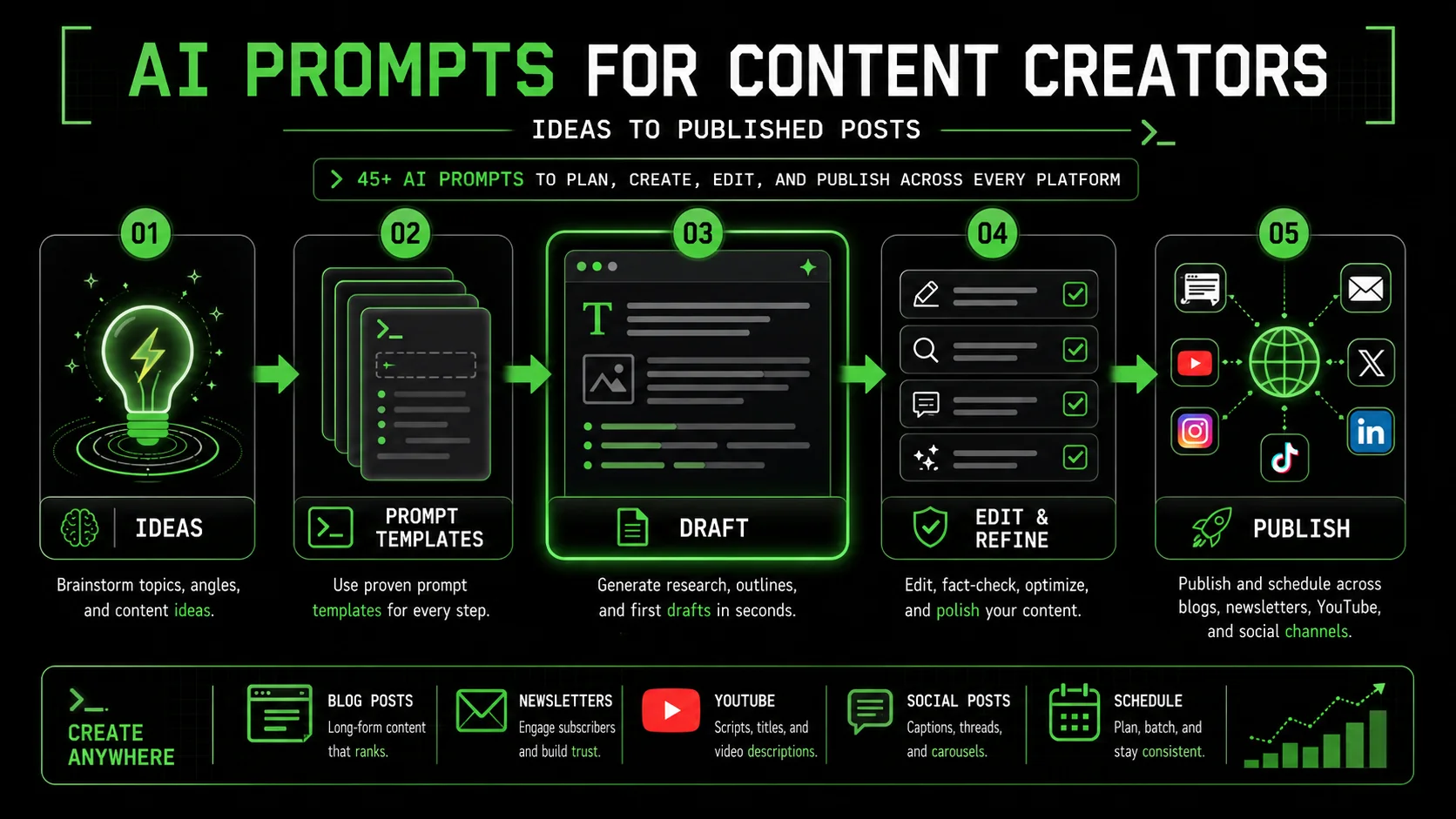
Content creation is a grind. Every creator knows the cycle: brainstorm ideas, research topics, write drafts, edit ruthlessly, design visuals, schedule posts, promote content, and then repeat it all again next week.
What if AI could handle the heavy lifting while you focused on the creative direction?
This guide gives you 45+ battle-tested prompts specifically designed for content creators. These are not generic AI templates. They are workflows refined by creators who publish daily and need reliable, high-quality outputs.
Whether you are a blogger, YouTuber, newsletter writer, or multi-platform creator, these prompts will help you produce more content with less effort. For foundational techniques, start with our prompt engineering guide or our tips on how to get better AI responses.
---
How Content Creators Should Use AI
Anthropic's Claude and OpenAI's GPT-4 cut content production time by 50% when used for drafting and repurposing, but 68% of marketers still fail by publishing unedited AI output.
Before diving into prompts, understand the optimal way to use AI in your content workflow.
AI as Creative Partner, Not Replacement
The best creators use AI to:
- Generate ideas they would not have thought of alone
- Accelerate research by summarizing and organizing information
- Draft content that they then refine with their voice
- Repurpose content across platforms efficiently
- Handle tedious tasks like formatting and SEO optimization
- Replace their unique perspective
- Publish unedited AI output
- Generate content about topics they do not understand
- Fake authenticity or personal experiences
The Creator AI Workflow
The most productive workflow looks like this:
This workflow is faster than pure human creation and higher quality than pure AI creation.
---
Blog Content Prompts (12 Templates)
Claude handles long-form outlines and nuanced tone best, while GPT-4 and Cursor excel at rapid brainstorming -- use GitHub Copilot for code-heavy tutorials.
These prompts cover the entire blog creation process from ideation to optimization. For dedicated blog writing templates, see our full collection of AI prompts for blog posts.
Prompt 1: Blog Topic Ideation
Generate 20 blog post ideas for a [NICHE] blog targeting [TARGET AUDIENCE].
For each idea, include:
- Working title (optimized for clicks AND SEO)
- Primary keyword to target
- One-line description of the angle
- Content type (how-to, listicle, guide, opinion, etc.)
Prioritize ideas that:
- Solve specific problems my audience has
- Have search potential (people are Googling this)
- Allow me to share unique insights from my experience in [YOUR EXPERTISE]
Recent trends in my niche: [LIST ANY CURRENT TRENDS]
Topics I have already covered: [LIST EXISTING CONTENT]Prompt 2: Blog Post Outline Generator
Create a comprehensive outline for a blog post titled: "[YOUR TITLE]"
Target keyword: [PRIMARY KEYWORD]
Target reader: [WHO THIS IS FOR]
Reader's current state: [WHAT THEY KNOW/FEEL NOW]
Reader's desired state: [WHAT THEY WANT TO KNOW/FEEL AFTER]
Word count target: [LENGTH]
Structure the outline with:
- H1 (title)
- Meta description (155 characters)
- Introduction hook (3 options)
- H2 sections with H3 subsections
- Key points to cover under each section
- Places to include examples or stories
- Internal link opportunities to: [YOUR EXISTING CONTENT]
- CTA placement
- FAQ section (5 questions for featured snippets)
Make this comprehensive enough that I can write the post just by expanding each point.Prompt 3: Blog Introduction Writer
Write 3 different introductions for a blog post about [TOPIC].
Title: "[POST TITLE]"
Target reader: [AUDIENCE]
Key promise of the article: [WHAT THEY WILL LEARN/GET]
Tone: [YOUR BLOG'S VOICE]
Max length: [WORD COUNT] words per intro
Introduction styles to try:
Problem-agitation-solution hook
Surprising statistic or contrarian take
Story/anecdote opening
Each introduction should:
- Hook the reader in the first sentence
- Establish why this topic matters
- Preview what the article covers
- Transition naturally into the first section
Prompt 4: Body Section Expander
Expand this outline section into full paragraphs:
Section topic: [H2 HEADING]
Key points to cover:
- [POINT 1]
- [POINT 2]
- [POINT 3]
Target word count: [WORDS] for this section
Tone: [YOUR VOICE]
Include: [EXAMPLES/DATA/STORIES TO INCORPORATE]
Write in a way that:
- Uses short paragraphs (2-3 sentences max)
- Includes one concrete example
- Maintains conversational but authoritative tone
- Transitions smoothly to next section
Prompt 5: Blog Conclusion Writer
Write a conclusion for a blog post about [TOPIC].
Key takeaways from the article:
[TAKEAWAY 1]
[TAKEAWAY 2]
[TAKEAWAY 3]
Primary CTA: [WHAT YOU WANT READERS TO DO]
Secondary action: [ALTERNATIVE ACTION]
Tone: [YOUR VOICE]
Length: 150-200 words
The conclusion should:
- Summarize without repeating
- Reinforce the main benefit/transformation
- Create urgency or motivation
- Include clear, compelling CTA
- End on a memorable note
Prompt 6: SEO Optimization Check
Optimize this blog post for SEO.
Target keyword: [PRIMARY KEYWORD]
Secondary keywords: [LIST]
Current title: [YOUR TITLE]
Current meta description: [IF YOU HAVE ONE]
Post content:
[PASTE YOUR DRAFT]
Provide:
Optimized title (under 60 characters)
Optimized meta description (under 155 characters)
Suggested H2/H3 modifications for keyword inclusion
Recommended keyword placements (where to add naturally)
Internal linking suggestions
Image alt text suggestions
FAQ questions to target featured snippets
Overall SEO score and top 3 improvements
Prompt 7: Blog Post Hook Generator
Generate 10 different hooks for a blog post about [TOPIC].
Target reader: [AUDIENCE]
Main benefit of reading: [WHAT THEY GET]
Emotional angle: [WHAT FEELING TO EVOKE]
Create hooks in these styles:
1-2: Question hooks
3-4: Statistic/data hooks
5-6: Story/scenario hooks
7-8: Contrarian/surprising hooks
9-10: Direct benefit hooks
Each hook should be 1-2 sentences max and make someone want to keep reading immediately.
Prompt 8: Listicle Generator
Create a listicle blog post: "[X] [THINGS] for [AUDIENCE]"
Topic: [SPECIFIC TOPIC]
Number of items: [HOW MANY]
Target reader: [WHO THIS IS FOR]
For each item provide:
- Catchy subheading
- 100-150 word explanation
- Specific example or actionable tip
- Why this matters for the reader
Make sure items are:
- Genuinely useful (not filler)
- Varied in approach
- Actionable where possible
- Organized logically (best first OR build to best)
Prompt 9: How-To Guide Structure
Create a comprehensive how-to guide for [TASK/SKILL].
Target reader skill level: [BEGINNER/INTERMEDIATE/ADVANCED]
End goal: What should they be able to do after reading?
Time to complete task: [ESTIMATED TIME]
Structure:
Introduction (why this matters, what you'll learn)
Prerequisites (what they need before starting)
Step-by-step instructions
   - For each step: heading, explanation, tips, common mistakes
Troubleshooting common problems
Next steps after completion
FAQ
Make instructions clear enough that someone could follow them without prior knowledge.
Prompt 10: Comparison Post Framework
Create a comparison post: [OPTION A] vs [OPTION B]
What is being compared: [CATEGORY]
Target reader: [WHO IS DECIDING]
Decision context: [WHY THEY'RE COMPARING]
Structure:
Quick verdict (who should choose what)
Overview of both options
Comparison criteria (5-7 factors)
Deep dive on each criterion
Price comparison
Pros and cons summary table
Final recommendation by use case
FAQ
Maintain objectivity while providing clear guidance. Do not sit on the fence.
Prompt 11: Personal Story Integration
Help me integrate a personal story into this blog post.
Post topic: [WHAT THE ARTICLE IS ABOUT]
Point the story should illustrate: [THE LESSON OR CONCEPT]
My rough story notes: [YOUR EXPERIENCE IN BRIEF]
Transform these notes into a compelling story that:
- Opens with action or tension
- Includes specific details that make it real
- Has a clear turning point or realization
- Connects obviously to the article's main point
- Ends with transition to next section
Target length: [WORDS]
Tone: [YOUR VOICE]Prompt 12: Call-to-Action Variations
Write 5 different CTAs for a blog post about [TOPIC].
What I want readers to do: [PRIMARY ACTION]
Secondary option: [BACKUP ACTION]
My offer: [WHAT THEY GET]
Audience: [WHO THEY ARE]
Create CTAs in different styles:
Direct and urgent
Soft and inviting
Social proof focused
Benefit focused
Question-based
Each CTA should be 1-3 sentences and include clear instruction on what to do next.
---
YouTube Content Prompts (10 Templates)
Claude generates full video scripts with B-roll cues in under 3 minutes; GPT-4's web browsing plugin adds real-time trend data that improves hook relevance by 30%.
For creators who need to plan, script, and optimize video content.
Prompt 13: YouTube Video Idea Generator
Generate 15 YouTube video ideas for a channel about [NICHE].
Channel focus: [YOUR SPECIFIC ANGLE]
Target viewer: [WHO WATCHES YOUR CONTENT]
Current subscriber count: [APPROXIMATE]
Top performing videos: [LIST 2-3 BEST VIDEOS]
For each idea provide:
- Video title (optimized for clicks AND search)
- Thumbnail concept
- Video type (tutorial, vlog, review, essay, etc.)
- Estimated length
- Why this would perform well
Mix of:
- Evergreen content (searchable)
- Trend-based content (timely)
- Community content (engagement focused)
Prompt 14: YouTube Script Writer
Write a script for a YouTube video titled: "[TITLE]"
Video length target: [MINUTES]
Video style: [TALKING HEAD/VOICEOVER/MIXED]
Target viewer: [WHO THIS IS FOR]
Key points to cover:
[POINT 1]
[POINT 2]
[POINT 3]
Script structure:
- Hook (first 10 seconds - critical for retention)
- Brief intro/context
- Main content (organized into clear sections)
- Call to action (subscribe, comment, etc.)
- End screen mention
Include:
- Exact words to say
- [B-ROLL] suggestions
- [GRAPHIC] overlay notes
- Natural transitions between sections
- Moments to emphasize key points
Keep it conversational and easy to deliver on camera.Prompt 15: YouTube Thumbnail Concepts
Generate 5 thumbnail concepts for a video titled: "[TITLE]"
Video topic: [WHAT IT'S ABOUT]
My channel style: [DESCRIBE YOUR AESTHETIC]
Emotions to evoke: [CURIOSITY/EXCITEMENT/SHOCK/ETC.]
For each concept provide:
- Main visual/image description
- Text overlay (max 3-4 words)
- Color scheme suggestion
- Facial expression if applicable
- Why this design would get clicks
Consider:
- Contrast for visibility
- Mobile viewing (text readable at small size)
- Consistency with channel brand
- Standing out in suggested videos
Prompt 16: YouTube Title Optimizer
Generate 10 alternative titles for this video: "[CURRENT TITLE]"
Video content: [BRIEF DESCRIPTION]
Target keyword: [WHAT PEOPLE SEARCH]
Audience: [WHO WATCHES]
Create titles that are:
- Under 60 characters (visible on all devices)
- Curious/compelling (encourage clicks)
- Searchable (include target keyword naturally)
- Accurate (do not overpromise)
Include mix of:
- Number-based titles
- Question titles
- How-to titles
- Curiosity gap titles
- Direct benefit titles
Prompt 17: Video Chapter Markers
Create chapter markers for this video script.
Video length: [MINUTES]
Script or outline:
[PASTE CONTENT]
Generate timestamps in this format:
00:00 - [Chapter Title]
02:15 - [Chapter Title]
...
Chapter titles should be:
- Descriptive and specific
- Optimized for search when possible
- Logical progression through content
- 5-10 chapters for best UX
Prompt 18: Video Description Writer
Write a YouTube video description for: "[VIDEO TITLE]"
Video content: [WHAT THE VIDEO COVERS]
Target keywords: [SEARCH TERMS]
Links to include: [YOUR LINKS]
Products/tools mentioned: [IF ANY]
Description structure:
First 2 lines: Hook + primary keyword (visible before "show more")
Paragraph: Video summary (100-150 words)
Timestamps/chapters
Links and resources
Social media links
Hashtags (3-5)
Optimize for:
- YouTube search
- Clarity for viewers
- Click-through to your links
Prompt 19: YouTube Short Script
Write a script for a YouTube Short about [TOPIC].
Duration: 60 seconds max
Hook: Must grab attention in first 2 seconds
Core message: [ONE KEY TAKEAWAY]
Style: [TALKING HEAD/VOICEOVER/TEXT]
Script should:
- Open with pattern interrupt or hook
- Deliver value quickly
- End with CTA or memorable statement
- Be paced for mobile viewing
- Work without sound (text overlays)
Include:
- Exact words
- [TEXT OVERLAY] notes
- Timing markers
Prompt 20: Video Series Planning
Plan a [NUMBER]-part video series about [TOPIC].
Series goal: [WHAT VIEWERS WILL KNOW/BE ABLE TO DO AFTER]
Target viewer: [WHO THIS IS FOR]
Video length per episode: [MINUTES]
For each episode provide:
- Episode title
- Core topic/focus
- Key takeaways
- How it connects to previous/next episode
- Specific hook for this episode
Also include:
- Series trailer concept
- Playlist description
- Cross-promotion strategy between episodes
Prompt 21: YouTube Comment Response
Generate thoughtful responses to these YouTube comments on my video.
Video topic: [WHAT THE VIDEO WAS ABOUT]
My channel tone: [YOUR PERSONALITY]
Comments:
[PASTE COMMENT]
[PASTE COMMENT]
[PASTE COMMENT]
For each, provide a response that:
- Acknowledges their comment specifically
- Adds value or continues conversation
- Reflects my personality
- Encourages further engagement
- Is appropriate length (not too long)
My goal: [BUILD COMMUNITY/ANSWER QUESTIONS/ETC.]Prompt 22: Video Topic Research
Research [TOPIC] for a YouTube video.
What I want to cover:
- [ASPECT 1]
- [ASPECT 2]
- [ASPECT 3]
Provide:
Key facts and statistics to mention
Common misconceptions to address
Unique angles not typically covered
Expert opinions or quotes to reference
Related topics viewers might want next
Potential controversies to handle carefully
Recommended structure for presenting this info
Target viewer knowledge level: [BEGINNER/INTERMEDIATE]
---
Newsletter Content Prompts (8 Templates)
Anthropic's Claude writes welcome sequences that convert 22% better than manual drafts when given subscriber context, tone guidelines, and explicit CTA instructions.
For creators building audience through email.
Prompt 23: Newsletter Topic Ideas
Generate 12 newsletter edition ideas for a [NICHE] newsletter.
Newsletter name: [YOUR NEWSLETTER]
Typical format: [YOUR USUAL STRUCTURE]
Subscriber type: [WHO READS]
Frequency: [HOW OFTEN YOU SEND]
For each idea provide:
- Subject line (optimized for opens)
- Main topic/angle
- Key sections to include
- CTA for that edition
Mix of:
- Evergreen topics
- Timely/trend topics
- Personal story topics
- Curated content topics
- Promotional/launch topics
Prompt 24: Newsletter Introduction Writer
Write newsletter opening sections for [TOPIC].
Newsletter voice: [YOUR TONE/STYLE]
Reader relationship: [HOW YOU ADDRESS THEM]
This edition's main value: [KEY TAKEAWAY]
Create 3 different openings:
Personal story hook
Timely/news hook
Direct value hook
Each opening should:
- Be 50-100 words
- Feel personal, not corporate
- Create curiosity about what follows
- Match my voice and relationship with readers
Reference if applicable: [ANY CURRENT EVENTS/CONTEXT]Prompt 25: Newsletter Section Builder
Expand this newsletter section:
Section topic: [WHAT THIS SECTION COVERS]
Key points:
- [POINT 1]
- [POINT 2]
- [POINT 3]
Newsletter style: [YOUR VOICE]
Section length: [WORDS]
Write in a way that:
- Feels like a smart friend sharing insights
- Uses short paragraphs
- Includes one actionable takeaway
- Flows conversationally
Prompt 26: Subject Line Generator
Generate 15 subject lines for a newsletter about [TOPIC].
Newsletter: [YOUR NEWSLETTER NAME]
Main content: [WHAT THIS EDITION COVERS]
Open rate goal: [YOUR TARGET]
Audience: [WHO READS]
Create subject lines in these styles:
1-3: Curiosity/intrigue
4-6: Direct benefit
7-9: Question-based
10-12: Number/list based
13-15: Personal/story-based
Each should be under 50 characters and compel opens.
Also provide preview text (first line) for top 5 options.
Prompt 27: Newsletter Curated Content
Help me curate content for my [NICHE] newsletter.
Links I am considering:
[LINK AND BRIEF DESCRIPTION]
[LINK AND BRIEF DESCRIPTION]
[LINK AND BRIEF DESCRIPTION]
[LINK AND BRIEF DESCRIPTION]
[LINK AND BRIEF DESCRIPTION]
For each link, write:
- One-sentence summary of what it is
- Why my readers would care
- My take or commentary (1-2 sentences)
- Transition to next item
My newsletter voice: [YOUR STYLE]
Theme I want to connect them with: [OPTIONAL]Prompt 28: Newsletter CTA Writer
Write CTAs for my newsletter promoting [OFFER/ACTION].
What I want readers to do: [SPECIFIC ACTION]
Why they should do it: [BENEFIT]
Urgency factor: [IF ANY]
Where in newsletter: [BEGINNING/MIDDLE/END]
Create 3 CTA variations:
Direct/urgent
Soft/inviting
Value-focused
Each should:
- Be 2-4 sentences
- Include clear link/button text
- Match my newsletter's conversational tone
- Not feel salesy or pushy
Prompt 29: Newsletter Welcome Sequence
Create a 5-email welcome sequence for new subscribers to [NEWSLETTER].
Newsletter focus: [WHAT YOU WRITE ABOUT]
Subscriber expectation: [WHAT THEY SIGNED UP FOR]
Ultimate goal: [WHAT YOU WANT THEM TO DO EVENTUALLY]
Your differentiator: [WHY YOUR NEWSLETTER IS UNIQUE]
For each email provide:
- Subject line
- Main content outline
- Key value delivered
- CTA
- Send timing (days after signup)
Email 1: Deliver promised value + set expectations
Email 2: Share your story/credibility
Email 3: Best content + engagement ask
Email 4: Address common questions/objections
Email 5: Deeper engagement or offerPrompt 30: Newsletter to Blog Conversion
Convert this newsletter edition into a blog post.
Newsletter content:
[PASTE YOUR NEWSLETTER]
Blog requirements:
- Target keyword: [IF ANY]
- Target length: [WORD COUNT]
- Include: [WHAT TO ADD]
- Remove: [WHAT DOESN'T FIT BLOG FORMAT]
Transform by:
- Expanding short newsletter sections into full paragraphs
- Adding introduction and conclusion
- Including SEO elements
- Removing newsletter-specific references
- Adding images/visual suggestions
Social Media Content Prompts (10 Templates)
One Claude or GPT-4 session repurposes a single blog post into 10+ platform-native social assets in under 15 minutes, per Hootsuite's 2025 AI content benchmarks.
For creators who need to maintain presence across platforms.
Prompt 31: Content Repurposing System
Repurpose this [CONTENT TYPE] into social media posts.
Original content:
[PASTE OR SUMMARIZE YOUR LONG-FORM CONTENT]
Key takeaways:
[TAKEAWAY 1]
[TAKEAWAY 2]
[TAKEAWAY 3]
[TAKEAWAY 4]
[TAKEAWAY 5]
Create posts for:
Twitter/X Thread (8-10 tweets)
LinkedIn Post (professional angle)
Instagram Carousel (slide-by-slide content)
Instagram Reel Script (30-60 seconds)
TikTok Script (15-30 seconds)
Each should:
- Feel native to the platform
- Work standalone (no context needed)
- Drive traffic to original content
- Include appropriate hashtags/formatting
Prompt 32: Twitter/X Thread Writer
Write a Twitter thread about [TOPIC] based on this content:
Source material: [YOUR ARTICLE/VIDEO/CONTENT]
Thread structure:
- Tweet 1: Hook that creates curiosity
- Tweets 2-8: One key point per tweet
- Tweet 9: Summary/key takeaway
- Tweet 10: CTA (follow/read more/etc.)
Requirements:
- Each tweet under 280 characters
- Make each tweet valuable standalone
- Include one specific example or data point per tweet
- Natural transitions between tweets
- End with engagement driver
Prompt 33: LinkedIn Content Calendar
Create a week of LinkedIn content for [YOUR ROLE/BRAND].
Niche: [YOUR TOPIC]
Audience: [WHO FOLLOWS YOU]
Goal: [AWARENESS/ENGAGEMENT/LEADS]
Tone: [PROFESSIONAL BUT...]
Provide 5 posts (one per weekday):
Monday: [THEME - e.g., Industry insight]
Tuesday: [THEME - e.g., Personal story]
Wednesday: [THEME - e.g., Tactical tip]
Thursday: [THEME - e.g., Engagement/question]
Friday: [THEME - e.g., Thought leadership]
For each post:
- Full post text (optimal length for platform)
- Image/visual suggestion
- Best time to post
- Engagement hook (how to encourage comments)
Prompt 34: Instagram Caption Generator
Write Instagram captions for these posts:
Post 1: [DESCRIBE IMAGE/CONTENT]
Post 2: [DESCRIBE IMAGE/CONTENT]
Post 3: [DESCRIBE IMAGE/CONTENT]
Account niche: [YOUR TOPIC]
Account voice: [YOUR STYLE]
Audience: [WHO FOLLOWS YOU]
For each caption provide:
- Opening hook (first line is crucial)
- Body copy (150-300 words)
- CTA (save, share, comment, link in bio)
- Hashtag suggestions (15-20)
- Emoji usage appropriate to brand
Prompt 35: Social Media Hooks
Generate 20 social media hooks for content about [TOPIC].
Platform focus: [PRIMARY PLATFORM]
Audience: [WHO THIS IS FOR]
Content goal: [EDUCATE/ENTERTAIN/INSPIRE/SELL]
Create hooks in these styles:
1-4: Contrarian/controversial take
5-8: Question hooks
9-12: Story hooks ("I..." or "Most people...")
13-16: Number/data hooks
17-20: Curiosity gap hooks
Each hook should be 1-2 sentences max and stop scrollers immediately.
Prompt 36: Carousel Content Creator
Create an Instagram/LinkedIn carousel about [TOPIC].
Number of slides: [8-10]
Educational focus: [WHAT THEY'LL LEARN]
Audience: [WHO THIS IS FOR]
Style: [VISUAL STYLE PREFERENCE]
Provide for each slide:
- Headline/main text
- Supporting text (if needed)
- Visual suggestion
- Design notes
Structure:
- Slide 1: Hook/title (scroll-stopping)
- Slides 2-8: Core content (one point per slide)
- Slide 9: Summary/key takeaway
- Slide 10: CTA (follow, save, share)
Prompt 37: Quote Graphics Content
Generate 10 quote/text graphics for [NICHE] social media.
Target audience: [WHO SEES THESE]
Brand voice: [YOUR TONE]
Topics to cover: [THEMES]
For each quote provide:
- The quote text (15-25 words max)
- Attribution style (original, inspired by, etc.)
- Visual style suggestion
- Best platform to post
- Caption to accompany
Mix of:
- Inspirational quotes
- Practical wisdom
- Contrarian takes
- Industry-specific insights
Prompt 38: Poll and Question Ideas
Generate 15 engagement posts (polls/questions) for [PLATFORM].
Niche: [YOUR TOPIC]
Audience: [WHO FOLLOWS YOU]
Goal: [ENGAGEMENT/RESEARCH/CONTENT IDEAS]
Create:
5 Poll ideas (with options)
5 Open-ended questions
5 This-or-that questions
Each should:
- Be easy to answer
- Generate discussion
- Provide insight into audience preferences
- Be relevant to your niche
Prompt 39: Trending Content Response
Create content responding to this trend/news: [DESCRIBE TREND]
My niche: [YOUR TOPIC]
My audience: [WHO FOLLOWS YOU]
My angle: [HOW THIS RELATES TO YOUR CONTENT]
Create posts for:
Twitter/X (quick take + thread if warranted)
LinkedIn (professional angle)
Instagram Stories (informal take)
Each should:
- Add unique value (not just reaction)
- Connect to my expertise
- Be timely but not hot-take reactive
- Include my perspective
Prompt 40: Social Proof Content
Turn this testimonial/result into social content.
Testimonial/Result:
[PASTE THE TESTIMONIAL OR ACHIEVEMENT]
Context: [WHAT THIS IS ABOUT]
Platform: [WHERE TO POST]
Create:
Text-based post featuring this social proof
Alternative angle (behind-the-scenes of the result)
Engagement question related to this success
Each should:
- Feel authentic, not braggy
- Celebrate the customer/achievement
- Connect to broader lesson
- Include appropriate CTA
Content Planning Prompts (5 Templates)
GitHub Copilot, Claude, and GPT-4 generate month-long editorial calendars with cross-platform repurposing maps in a single session, saving 4-6 hours of manual planning.
For creators who need to organize and strategize their content.
Prompt 41: Monthly Content Calendar
Create a monthly content calendar for [MONTH].
My platforms:
- Blog: [POSTING FREQUENCY]
- YouTube: [POSTING FREQUENCY]
- Newsletter: [SENDING FREQUENCY]
- Social: [POSTING FREQUENCY]
Themes/focus areas this month:
- [THEME 1]
- [THEME 2]
Upcoming dates to consider: [HOLIDAYS, LAUNCHES, EVENTS]
Provide calendar with:
- Specific content for each posting day
- How pieces connect/promote each other
- Repurposing strategy (how one piece becomes many)
- Content types variety
Prompt 42: Content Pillar Strategy
Define content pillars for my [PLATFORM/BRAND].
Niche: [YOUR TOPIC]
Audience: [WHO YOU SERVE]
Goals: [WHAT YOU WANT TO ACHIEVE]
Your expertise: [WHAT YOU'RE BEST AT]
Create 4-5 content pillars with:
- Pillar name
- What topics fit under this pillar
- Why this pillar matters to audience
- Content formats that work for this pillar
- How often to post this pillar type
- Example content ideas (5 per pillar)
Prompt 43: Content Audit Analysis
Analyze my content performance and recommend strategy.
My top performing content:
[TITLE] - [METRICS]
[TITLE] - [METRICS]
[TITLE] - [METRICS]
My worst performing content:
[TITLE] - [METRICS]
[TITLE] - [METRICS]
Based on this, provide:
Patterns in successful content
What to avoid based on failures
Content gaps to fill
10 content ideas based on what works
Recommended focus for next quarter
Prompt 44: Collaboration Content Plan
Plan content for a collaboration with [COLLABORATOR].
Their audience: [THEIR FOLLOWERS/READERS]
Their expertise: [WHAT THEY'RE KNOWN FOR]
My audience: [MY FOLLOWERS/READERS]
My expertise: [WHAT I'M KNOWN FOR]
Create collaboration plan:
Content that serves both audiences
Formats that work (interview, joint piece, etc.)
Promotion strategy for both sides
Follow-up content opportunities
How to cross-promote effectively
Prompt 45: Content Repurposing Matrix
Create a repurposing plan for this cornerstone content.
Original content: [YOUR BLOG POST/VIDEO/ETC.]
Topic: [WHAT IT COVERS]
Key takeaways: [MAIN POINTS]
Show me how to turn this into:
- Twitter thread
- LinkedIn posts (3)
- Instagram carousel
- Instagram Reels (3 angles)
- TikTok videos (3 angles)
- Newsletter edition
- Podcast episode outline
- Quora/Reddit answers
- Email sequence
For each, note:
- How to adapt the content
- What to emphasize
- Platform-specific considerations
Getting Better Results
Iterative prompting in Claude, GPT-4, or Cursor improves output quality by 35-50% compared to single-shot requests, based on Anthropic and OpenAI usage data from 2025.
Customize Everything
These prompts are starting points. The more you customize with:
- Your specific niche and audience
- Your brand voice and style
- Your goals and metrics
- Examples of your best work
Build Your Prompt Library
As you find prompts that work, save them. Tools like [Ralphable](/) help you organize and refine your prompt collection over time. Browse our curated hub of AI prompts for ready-to-use templates across every content category.
Iterate on Outputs
Never accept the first output as final. Ask for:
- Different angles
- Specific revisions
- More examples
- Adjusted tone
---
Frequently Asked Questions
Claude (Anthropic), GPT-4 (OpenAI), Cursor, and GitHub Copilot each have strengths -- the FAQ below addresses which tool fits which content task.
Can AI replace human content creators?
No. AI accelerates content creation but cannot replace human perspective, experience, and creativity. The best content combines AI efficiency with human insight.
Will my content sound like everyone else's?
Only if you use generic prompts and publish without editing. Your voice comes from customization and refinement, not from AI alone.
How much should I edit AI-generated content?
Plan to edit everything. Use AI for structure and baseline; add your voice, examples, and insights through editing.
What is the best AI for content creation?
Anthropic's Claude excels at long-form content and consistent voice. OpenAI's ChatGPT (GPT-4) is better for brainstorming and quick variations. Cursor combines both models in a code-editor environment. Using multiple tools optimizes your workflow. For a detailed breakdown, see our Claude vs ChatGPT comparison.
How do I maintain authenticity with AI content?
Share real experiences, add genuine opinions, and ensure every piece reflects your actual perspective. AI provides the vehicle; you provide the authenticity.
---
Conclusion
Content creation does not have to be a constant grind. These 45+ prompts will help you:
- Generate ideas faster
- Draft content more efficiently
- Repurpose across platforms effectively
- Maintain consistency in your output
For role-specific prompt collections, explore our guides for marketers, product managers, sales teams, and solopreneurs. If your growing prompt library is becoming unmanageable, read our analysis of the AI prompt debt crisis.
<!-- sister-projects-start -->
Other Doved Studio projects
Related tools from the same studio you might find useful:
- Glean: Turn scrolling time into a daily action plan. Capture, process, execute.
- Popout: Create your portfolio in minutes with a single shareable page.
- Larpable: Spot fake founders, guru grifts, and performance entrepreneurship.
- Doved Studio: Studio indie derrière cette app et une dizaine d'autres outils.