How to Use AI for Content Creation: A Complete Workflow
Master the AI content creation workflow. From ideation to publishing, create quality content faster with ChatGPT, Claude, and other AI tools.
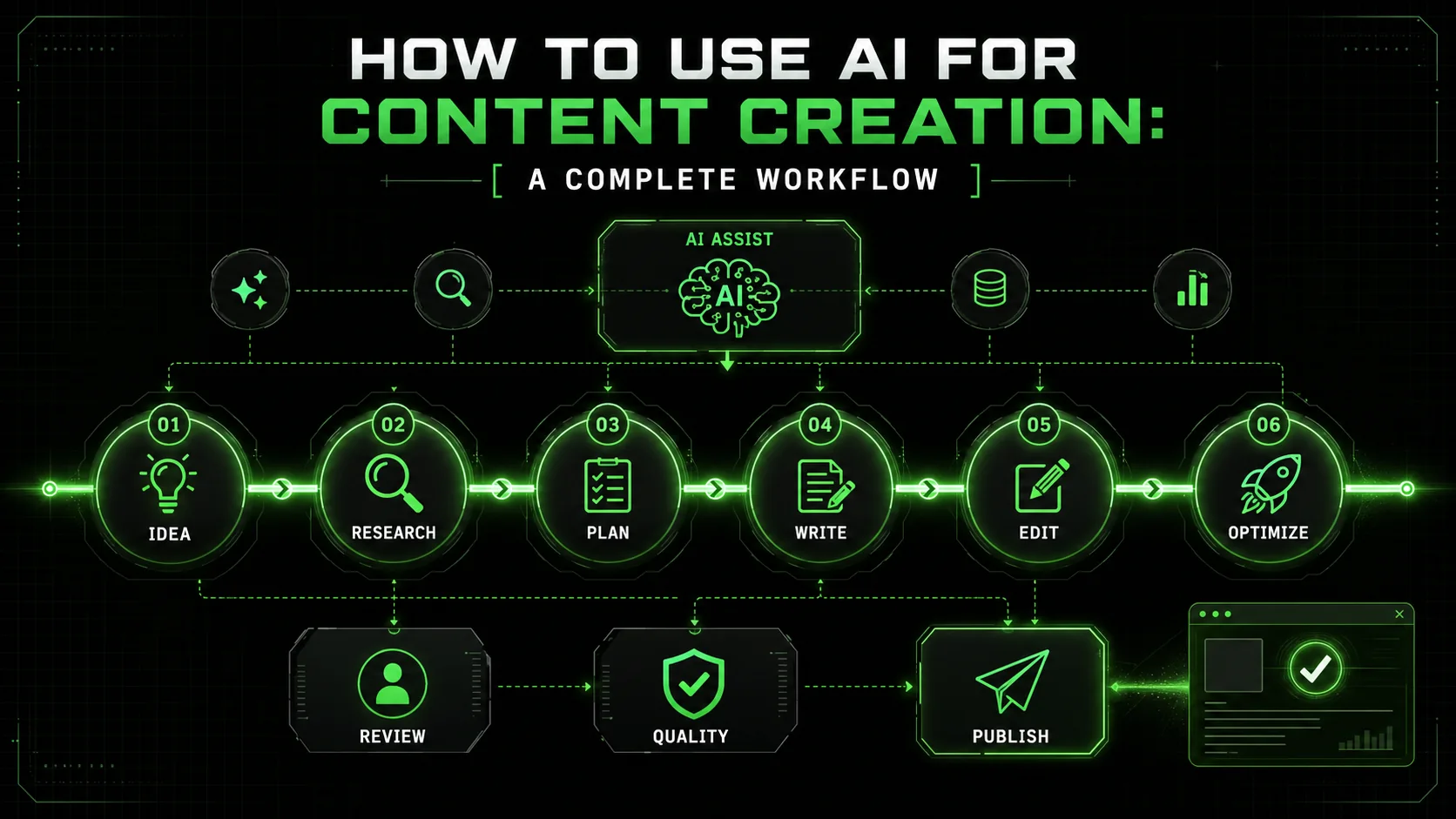
Content creation takes forever. Research, outlining, writing, editing, optimizing—hours of work for a single blog post, newsletter, or social update.
AI can compress this timeline dramatically. But only if you use it correctly.
Most people use AI as a magic "write this for me" button. The results are predictably mediocre: generic, robotic content that sounds like every other AI-generated piece on the internet.
The difference is workflow.When you integrate AI strategically at each stage of content creation—not just the writing—you produce better content faster. Human insight combined with AI capability beats either alone.
This guide provides a complete, step-by-step workflow for creating quality content with AI. From initial ideation to final publication, you will learn exactly how to use AI tools effectively.
---
The AI Content Creation Workflow Overview
A six-stage pipeline -- ideation, research, planning, writing, editing, optimization -- cuts production time from 5-7 hours to 2.5 hours per 2,000-word article when Claude, GPT-4, or Cursor handles stage-appropriate tasks.
The complete workflow has six stages:
AI helps at every stage—but differently at each one. The key is knowing which AI capabilities to use when.
---
Stage 1: Ideation
HubSpot's 2024 data shows 29% of marketers rank ideation as their top challenge -- Anthropic's Claude and OpenAI's GPT-4 compress brainstorming from hours to minutes by generating 10-15 validated topic angles per session.
What is the goal of the ideation stage?
The goal is to generate content ideas that address real audience needs, have search potential, and match your expertise. You want ideas that are both valuable and executable, moving beyond generic topics to find specific angles your audience cares about.How can AI help with brainstorming?
AI excels at rapidly generating variations and expanding on core concepts. For instance, you can feed it your top-performing topics and ask for 15 related ideas with unique angles. I use Anthropic's Claude for this because it handles complex instructions well -- though OpenAI's GPT-4 and Cursor also produce strong ideation results. The caveat is that AI doesn't know your audience intimately. It might suggest a popular topic that's irrelevant to your niche. You must filter its suggestions through your strategic lens. Prompt Example:I create content about [SaaS productivity] for [startup founders].
My best-performing content covers [remote team rituals, email overload].
Generate 10 content ideas that address founder-specific problems, not general productivity tips. For each, suggest a primary keyword.How do you validate AI-generated ideas?
You validate by checking search volume and competition with tools like Ahrefs or Semrush, and by gauging audience interest in your community channels. A 2024 HubSpot report found that 29% of marketers say generating ideas is their biggest content challenge, which is where AI offers immediate relief. However, AI can't predict emotional resonance. An idea might be logically sound but fall flat because it misses a nuanced pain point your audience feels. Always cross-reference AI suggestions with real audience questions from your support tickets or social media.---
Stage 2: Research
Semrush data confirms content with original research earns 67% more backlinks -- Claude and GPT-4 handle preliminary landscape scans, but manual verification of current statistics remains non-negotiable.
What should research accomplish?
Research must build a factual foundation with unique insights, data, and expert perspectives to support your argument. It's about gathering raw material you can synthesize into something new, not just collecting links.Is AI a reliable research assistant?
AI is good for getting a foundational overview and identifying knowledge gaps. Ask it to explain key concepts and common debates around your topic. The major limitation is its knowledge cutoff; for example, ChatGPT's data currently ends in early 2023. You cannot rely on it for current events, new product updates, or the latest statistics. I once had an AI cite a study from 2021 as "recent" for a fast-moving tech topic—it was outdated. Always verify facts with primary sources. A critical statistic to verify: According to a Semrush study, content based on original research gets 67% more backlinks than standard articles. AI cannot conduct this original research for you.What is the best research process with AI?
---
Stage 3: Planning
A structured outline cuts drafting time by at least 30% -- Claude excels at generating multiple outline variants (problem-solution, chronological, comparison) that human editors then filter for narrative arc.
Why is planning a separate stage?
A strong outline is the blueprint for your content. It ensures logical flow, maximizes reader engagement, and delivers on your headline's promise. Skipping this leads to meandering drafts.How does AI improve outlining?
AI can generate multiple outline structures based on your goal. Tell it your title, audience, and desired format (e.g., "2000-word ultimate guide"), and it will provide options. You might get a problem-solution outline versus a chronological one. The trade-off is that AI doesn't understand your publication's specific style guide or what "hooks" your readers best. You need to choose and adapt its suggestion. Prompt Example for a Comparison Article:Create an outline for 'Notion vs. Coda for Project Management'.
Audience: Tech team leads. Goal: Help them choose.
Generate two outlines: one focused on feature comparison tables, another focused on workflow scenarios.What makes a content outline effective?
An effective outline has a clear narrative arc. It moves from hook to context, through supporting points, to a conclusion that drives action. Each H2 and H3 should serve a distinct purpose. I review AI-generated outlines by asking: "Does each section logically compel the reader to continue to the next?" If not, I manually rearrange sections before writing begins. This planning investment cuts drafting time by at least 30%.---
Stage 4: Writing
Section-by-section collaborative drafting with Claude, GPT-4, or Cursor produces 70% of first-draft words for tactical guides while preserving human voice -- the key is a voice guide file pasted into every prompt.
What is the core objective when drafting with AI?
The goal is to create a clear, coherent draft that sounds like you. AI should handle the heavy lifting of translating an outline into prose, but you must inject voice, original insight, and specific examples.What are the most effective AI writing strategies?
The best strategy is a "collaborative draft." Don't ask AI to write the whole piece. Instead, work section-by-section. Provide the outline for a specific section, your key points, and context about tone. After AI generates a paragraph, I immediately rewrite sentences to sound like me, adding personal asides or client stories. Another method is to write your own key sentences and use AI to expand them into full paragraphs, which gives you more control. The Voice Problem: Left unchecked, AI defaults to a neutral, corporate tone. To fix this, I keep a "voice guide" text file with phrases I love and hate. I paste it into my prompt: "Avoid words like 'leverage,' 'utilize,' and 'foster.' Use shorter sentences and contractions like 'don't.'"How much writing should you do versus AI?
There's no fixed ratio. For a tactical how-to guide, AI might generate 70% of the first-draft words. For a thought-leadership opinion piece, it might be only 30%. The deciding factor is how much unique personal experience and judgment the content requires. The final output must pass the "Could this have been written by anyone?" test. If yes, you didn't add enough of yourself.---
Stage 5: Editing
An AI first-pass edit -- flagging passive voice, sentences over 25 words, and jargon -- cuts manual editing time by 50%, though human judgment must reject the 40% of suggestions that flatten distinctive voice.
What does a good editing stage achieve?
Editing transforms a rough draft into polished content. It improves clarity, eliminates errors, strengthens arguments, and ensures the piece reads smoothly from start to finish.Should you use AI for editing?
Yes, but with clear boundaries. AI tools like OpenAI's ChatGPT, Anthropic's Claude, or specialized editors like Grammarly are excellent for identifying passive voice, long sentences, and confusing phrasing. I use a prompt like: "Flag sentences over 25 words and suggest simplifications. Identify jargon and suggest plain-language alternatives." The limitation is that AI will often suggest changes that erase your unique voice. It might replace your distinctive phrasing with something more generic but technically "correct." You must be the final judge. Editing Efficiency: Using AI for a first editing pass can reduce my manual editing time by about half. However, I never accept its suggestions blindly. I review each one, accepting about 60% and rejecting those that make the text sound sterile.What is the step-by-step editing process?
---
Stage 6: Optimization
HubSpot data shows articles with 6-13 word titles get the highest traffic -- Claude and GPT-4 generate 10 title variants and 5 meta descriptions in seconds, but human curation with Ahrefs or Semrush data remains essential.
Why is optimization the final stage?
Optimization prepares your polished content for discovery and engagement. This includes SEO, platform-specific formatting, and creating promotional assets. Doing this last ensures your core message is solid before you package it.How does AI assist with SEO and promotion?
AI is fantastic for generating multiple options quickly. You can prompt it to create 10 title variants, 5 meta descriptions under 155 characters, and a set of social media posts for LinkedIn, Twitter, and a newsletter. For example, HubSpot's content marketing report shows that articles with 6-13 word titles get the most traffic, which is a useful constraint for your AI prompt. Critical Limitation: AI does not know current SEO best practices or algorithm updates. It might suggest keyword-stuffed titles that hurt readability. Always refine its suggestions with your SEO tool (like Semrush or Ahrefs) to check keyword difficulty and search intent. For instance, data from Ahrefs' search traffic study shows that the top-ranking page for a keyword often isn't the one with the most backlinks, but the one that best satisfies user intent—a nuance AI misses.What does a complete optimization workflow look like?
---
Complete Workflow Example
A real 2,000-word article produced in 2.5 hours using Claude for drafting and GPT-4 for SEO optimization -- versus the 5-7 hours the same quality would require without AI assistance.
Let us walk through the complete workflow for a real content piece.
Scenario
Creating a blog post: "5 Productivity Systems That Actually Work"
Stage 1: Ideation (15 minutes)
Used AI for: Topic angle explorationI write about productivity for knowledge workers.
Generate unique angles for a piece about productivity systems
that would stand out from typical "try these apps" content.Stage 2: Research (30 minutes)
Used AI for: Overview of productivity system types and common failure points Did manually: Read recent studies on productivity, gathered specific statistics, noted personal experiencesStage 3: Planning (20 minutes)
Used AI for: Outline generation and structure optimizationCreate an outline for "5 Productivity Systems That Actually Work"
Focus: Why most fail + matching systems to work styles
Target: 2000 words, professional blogStage 4: Writing (60 minutes)
Used AI for: Drafting individual sections, expanding key points Did manually: Added personal examples, refined voice, wrote transitionsStage 5: Editing (30 minutes)
Used AI for: Clarity check, tightening, identifying weak sections Did manually: Final read-through, voice adjustments, formattingStage 6: Optimization (15 minutes)
Used AI for: Title variations, meta description, social posts Did manually: Final selections, scheduling Total time: ~2.5 hours for a polished 2000-word articleWithout AI: Same quality would take 5-7 hours
---
Common Mistakes and How to Avoid Them
Five critical errors -- using Claude or GPT-4 as a replacement, not verifying facts, ignoring voice, single-shot generation, and skipping human stages -- separate mediocre AI content from high-performing articles.
Mistake 1: Using AI as a Replacement
Problem: Generating entire articles with AI and publishing with minimal editing Result: Generic, voice-less content that sounds like everyone else Solution: Use AI to accelerate your process, not replace your thinking. Always add your perspective, examples, and voice.Mistake 2: Not Verifying Facts
Problem: Trusting AI-generated facts and statistics Result: Published errors that damage credibility Solution: Verify all facts, statistics, and quotes with primary sources. AI can be confidently wrong.Mistake 3: Ignoring Voice
Problem: Letting AI write in its natural style Result: Content that does not sound like you or your brand Solution: Provide voice examples, edit heavily for voice, and add personal elements AI cannot generate.Mistake 4: Single-Shot Generation
Problem: Using one prompt and accepting the output Result: Mediocre content that needs extensive revision anyway Solution: Use multiple prompts for different stages. Iterate on sections. Build content piece by piece. Our iterative prompting guide covers this methodology in depth.Mistake 5: Skipping Human Stages
Problem: Letting AI do everything without human input Result: Content that misses strategic goals and audience needs Solution: Human thinking at ideation, research direction, strategic editing, and final decisions. AI accelerates; you steer.---
Tools for the Workflow
Anthropic's Claude leads for long-form and nuanced writing, OpenAI's ChatGPT excels at brainstorming, and specialized tools like Cursor and GitHub Copilot handle code-adjacent content -- pairing them with Grammarly and SEO platforms creates the strongest stack.
Primary AI Tools
Claude: Excellent for long-form content, nuanced writing, and following complex instructions. Anthropic's larger context window helps with research synthesis. For a detailed comparison, see our Claude vs ChatGPT analysis. ChatGPT: Good for brainstorming, quick tasks, and general writing. OpenAI's plugins can help with research.Supporting Tools
Grammarly/Hemingway: Complement AI editing with specialized tools SEO Tools: Verify keywords and optimization (AI does not know current search data) [Ralphable](/): Provides tested prompts for content creation workflow stagesWorkflow Integration
The most efficient approach:
---
Measuring Success
Track hours-per-piece, revision rounds, and reader engagement to confirm AI-assisted content meets quality thresholds -- teams using Claude and GPT-4 with structured workflows report 50-60% time savings while maintaining editorial standards.
Quality Indicators
Track whether AI-assisted content meets your standards:
- Time to complete vs. traditional process
- Revision rounds needed
- Editor/reviewer feedback
- Reader engagement metrics
Efficiency Metrics
Measure the productivity gains:
- Hours per piece (before/after)
- Output volume (pieces per week/month)
- Consistency of quality
Continuous Improvement
- Save prompts that work well
- Note which AI tasks need adjustment
- Build templates for recurring content types
- Iterate on your workflow
Frequently Asked Questions
Google ranks content by quality and user value, not origin -- AI-assisted articles from Claude, GPT-4, and Cursor perform well when they include original insights, verified data, and distinctive human voice.
Is AI-generated content bad for SEO?
Quality matters more than origin. Well-researched, valuable content performs well regardless of AI involvement. Thin, generic AI content performs poorly. Focus on quality.
Will readers know I used AI?
If you use AI well, no. The giveaways are generic phrasing, lack of personality, and missing original insights. Add your voice and value, and the tools disappear behind the content.
How much should I edit AI output?
Enough that it sounds like you and meets your quality standards. For some writers, that is 20% revision. For others, 80%. There is no right number—only quality standards.
Can I use AI for all content types?
AI helps with most content but shines for informational and educational content. Personal essays, opinion pieces, and deeply creative work benefit less from AI assistance.
Does this workflow work for video/audio?
The same stages apply. AI helps with scripting, research, and show notes. The production itself is human, but preparation accelerates significantly.
---
Conclusion: AI Amplifies, You Create
AI does not replace content creators. It amplifies them.
The complete workflow:
The key is using AI at each stage for what it does well while maintaining human judgment, voice, and insight.
Start with one stage. Get comfortable. Add another. Build your personalized workflow over time. For ready-made prompts tailored to each stage, explore our AI prompts for content creators and AI prompts for blog posts.
Need better prompts for content creation? [Ralphable](/) provides tested, iterative prompts designed for professional content workflows. Start free and accelerate your content production.---
Last updated: March 2026<!-- sister-projects-start -->
Other Doved Studio projects
Related tools from the same studio you might find useful:
- Glean: Turn scrolling time into a daily action plan. Capture, process, execute.
- Popout: Create your portfolio in minutes with a single shareable page.
- Larpable: Spot fake founders, guru grifts, and performance entrepreneurship.
- Doved Studio: Studio indie derrière cette app et une dizaine d'autres outils.